Do you want to extract attachments from Live.com account? But don't know how to do this automatically? If so,then it's time to be happy!
This article introduces the simplest way to extract attachments from Live.com email folders using an automated solution.
"How to get Live.com all attachments to a folder?" This is a query of many people. In addition to this,Live.com has no way to do this task other than extracting attachments individually. But no one has much time to extract attachments one by one. You can automatically extract all attachments from Live.com in a few simple steps.
I've noticed that many users find it helpful to organize their attachments by date before starting the extraction process - it makes managing the downloaded files much easier later.
Understand the reasons to extract Live.com account attachments
The number of heavy attachments with emails is one of the reasons for the large size of Live.com mailbox. Emails without attachments may not take much space but when email messages are attached with documents,images,etc. they take a lot of storage space. If users get multiple emails with heavy attachments,the size of Live.com mailbox becomes large in size. Therefore,users want to extract the heavy attachments to local drive.
Apart from this,the closing of Live.com account or simply saving attachments to local drive for offline accessibility is the reason behind exporting Live.com attachments.
From my experience,it's always a good idea to check your Live.com account's storage space before starting the extraction - this helps avoid any unexpected interruptions during the process.
Reliable solution to extract attachments from Live.com Email folders
Individually extracting attachments from Live.com emails is easy for users as this can be done manually but extracting all attachments of Live.com account is not possible with manual methods. Therefore,one should move to professional solutions and one such smart & reliable solution is Softaken IMAP Attachment Extractor Tool. This is one of the easiest solutions by which one can extract all email attachments from Live.com account in a single attempt. Moreover,users have the option to extract selective attachments like Word,Excel,Images,PDF,etc.
Not only this,but also attachments of a particular email folder are exported from Live.com to a folder on local system using this smart application. There are no alterations to folder & subfolder structure,email formatting and email attributes while exporting attachments. By entering the correct login details i.e. username & password of Live.com account,attachments can be smoothly exported by the software. Without using any additional program,attachments are exported in bulk by the utility.
If you're using two-factor authentication,make sure to generate an app password specifically for this tool - it's more secure than using your main password.
Complete guide to extract webmail attachments:
These are the simple steps that you need to follow to extract Live.com attachments –
Step 1.Download and start the software on your Windows device.
Step 2.Enter the username and password of Live.com account in the appropriate fields. Then,click on Authenticate Userbutton.
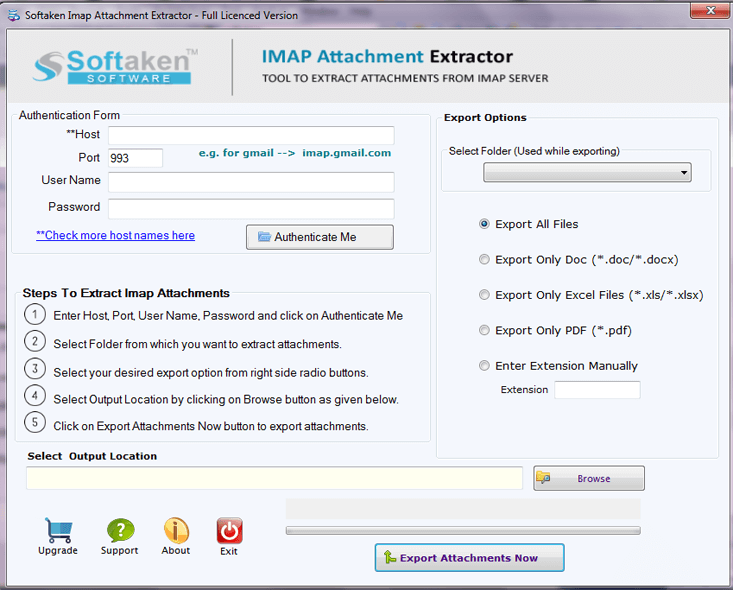
Step 3.Select the desired email folder of Live.comaccount or choose all folders to extract attachments. Moreover,users can choose export all attachments or mention Word .doc,.xlsx,.pdf,.png,etc. extensions to extract particular attachments.
Step 4.Now,use the Browse button and provide a location to save the attachments.
Step 5.In the end,click on the Export Attachmentsoption and this starts exporting attachments from Live.com account to a folder.
I've found that keeping a backup of your original Live.com data until you've verified all attachments are properly extracted gives you peace of mind.
Wrapping Up
The article throws the light on third-party solutions to extract all attachments from Live.com account. Handling the software is very easy because of its self-expressive steps. There is 100% safety assurance to email properties and other items while exporting attachments. You can try out the demo edition of the program & get familiar with the functioning and features of the software at zero cost. For any questions,contact our technical staff 24*7.
