 1
1Load files / folder & preview events
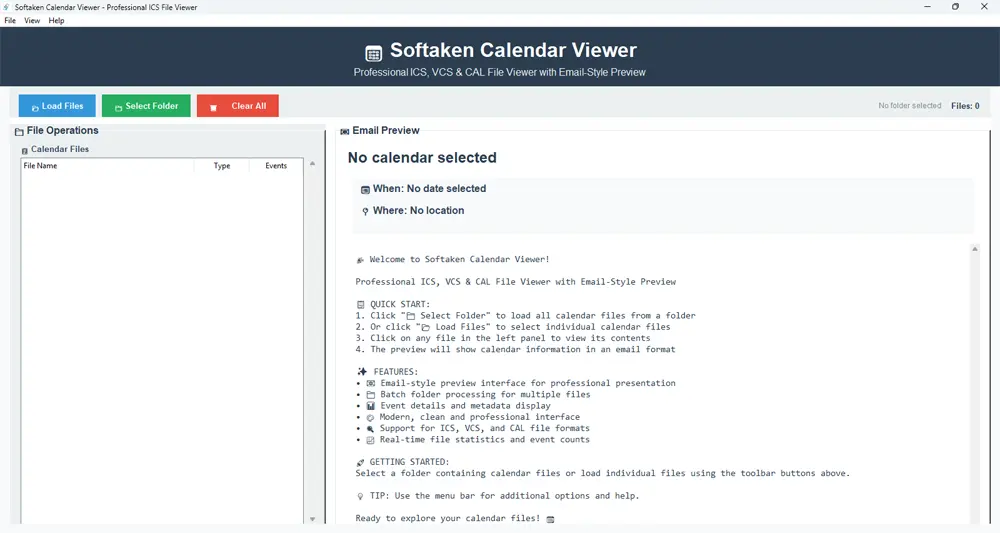
Use Load Files or Select Folder to open calendar files in batch, then click any file in the list to view its contents in the email-style preview panel.
Independently scanned with multiple antivirus engines.
Softaken Freeware Calendar Viewer is a professional desktop application to view, analyze and manage calendar files in ICS, VCS & CAL formats with an email-style preview interface. A professional tool to view and analyze calendar files in various formats.
Standalone calendar reader — instantly open and inspect .ICS (iCalendar), .VCS (vCalendar) and .CAL files on Windows with a portable executable; no installation required and no paid calendar client needed to preview the file contents.Load Files or Select Folder → pick ICS/VCS/CAL → click a file in the list → review contents in the email-style preview panel. Live progress shows total and loaded file counts.
Real Softaken UI — load files or folders, organized list, and email-style calendar preview.
1Use Load Files or Select Folder to open calendar files in batch, then click any file in the list to view its contents in the email-style preview panel.
Click the screenshot to enlarge.
When migrating between different calendar systems (Outlook to Google, Apple to Microsoft), you need to view and analyze existing calendar data. This Calendar Viewer program provides a perfect solution for all users.
When calendar files are corrupted or inaccessible, you need a reliable tool to view and analyze important meeting data. This Calendar Viewer helps analyze calendar data so you can inspect what is still readable.
IT professionals and help desk technicians need to troubleshoot calendar-related issues. This tool provides detailed analysis of calendar files to identify problems and provide solutions.

This professional program supports multiple calendar file formats including ICS (iCalendar), VCS (vCalendar), and CAL files. Users can view calendar data from various sources and applications with a unified interface. The app handles all major calendar formats seamlessly.
Apart from basic calendar viewing, the software provides a professional email-style preview interface that displays calendar data in an easy-to-read format. This makes it simple for users to understand event details, meeting information, and calendar metadata.
This calendar viewer program works on Windows (all versions listed in the specs). Using this program, users can smoothly view calendar files on supported Windows PCs for calendar data analysis.
Using this utility, you can check the live loading progress after selecting calendar files. The progress bar available in this application shows the status of the file processing. Also, you can view the total file count, loaded files, and processing status on the software panel.
After selecting calendar files or folders, users can process multiple files simultaneously. This utility provides batch processing capabilities, allowing users to load entire folders of calendar files at once and view them in an organized manner.
For users' satisfaction, this software is completely free. You can quickly download the free Calendar Viewer and use all its features without any restrictions. This freeware version provides full functionality for viewing and analyzing calendar files.
This utility offers support for multiple calendar formats in a single installation. It can handle ICS, VCS, and CAL files all from one application. You will always get perfect results with this application. Also, this tool provides speedy and precise calendar viewing for all supported formats.
This program is very simple with easy configuration and viewing steps. It has been programmed in a manner that even a non-technical user can smoothly operate it. Simply load the calendar files, select, and view. There is no special knowledge required to handle the app.
Throughout the viewing process, this utility ensures the calendar data, event details, and metadata remain intact as they were in the source calendar file. The program safely displays calendar information without any data loss or corruption.
Extension: .ics
Standard: iCalendar
Best for general use and maximum support
Extension: .vcs
Standard: vCalendar
Useful for legacy systems
Extension: .cal
Standard: Calendar
Common with Windows applications
Extension: .ics / .vcs
Standard: iCalendar / vCalendar
View exported Outlook calendar files
100% Free Forever Viewer — unlimited calendar file viewing, no file-size restrictions described on this page, no expiration, and no hidden subscriptions. View / read only (this page does not offer a convert/export Pro upsell).
Migration context: Useful when reviewing calendar files during moves such as Outlook to Google or Apple to Microsoft — open the exported ICS/VCS/CAL on Windows and inspect event details in the preview panel.
Read-only & offline: This software provides read-only access to calendar files for viewing and analysis. It runs locally on your PC with no internet required to open files.
Product Info
Version1.0
Size13.5 MB
LicenseFreeware
Supported OSWindows 11, 10, 8.1, 8, 7
Supported & Format
Calendar formatsICS, VCS, CAL
StandardsiCalendar, vCalendar
ActionsLoad Files, Select Folder, Preview
Access modeRead-only view
Viewer Capabilities
PreviewEmail-style interface
BatchMultiple files / folders
ProgressLive load status
File size limitUnlimited (as stated)
System Requirement
Processor1 GHz or faster
Operating SystemWindows 11, 10, 8.1, 8, 7
MemoryMinimum 2 GB (4 GB recommended)
Hard Disk50 MB free space
Interface Available
Language SupportedEnglish
Support OptionEmails, Chat & Skype
PlatformWindows only
InstallStandalone executable
Sarah Johnson Verified
United States
I had around 50+ ICS files that I needed to view and analyze. It could be tough for me to safely & quickly complete this task if I use manual methods. So, on my friend's recommendation, I chose this Calendar Viewer Tool. Its batch processing feature saved my time. Strong suggestions for this smart tool.
Michael Chen Verified
Canada
I found the interface straightforward. Moreover, the software completely preserved the calendar data and event details of the source calendar file. This is a must-have tool for IT teams and system admins who work with calendar data.
Emma Rodriguez Verified
United Kingdom
When I checked the freeware version, I found it great with its quick performance. The best part is that it's completely free with no limitations. I have access to all features for calendar file viewing. Thanks to the Softaken Team.
David Thompson Verified
Australia
Never imagined viewing calendar files would be too simple. I used this software to view ICS, VCS, and CAL files from different sources. It perfectly finished the viewing task without any data loss issues. Overall, this is an all-in-one tool for calendar file viewing.
No. Standalone Windows executable — open ICS, VCS, and CAL without Outlook or another email client installed.
ICS (iCalendar), VCS (vCalendar), and CAL (Calendar). Outlook .ics/.vcs exports can be viewed.
Yes for standard ICS/VCS/CAL exports in migration scenarios such as Outlook↔Google and Apple↔Microsoft.
Email-style preview shows event details, meeting information, and calendar metadata; those named fields are not listed separately on this page.
No file-size limit stated. For corrupted files, use as a read-only viewer/analyzer — not a repair tool.
No. Read-only viewing preserves source calendar data and metadata.
Keyword/date search is not listed. Use batch load, file list, and preview panel.
Yes. 100% freeware with full viewing features and no restrictions described on this page. Windows only.
| Item | Details |
|---|---|
| Product | Freeware Calendar Viewer |
| Publisher | Softaken Software |
| Version | 1.0 |
| Size | 13.5 MB |
| Platforms | Windows |
| Formats | ICS, VCS, CAL |
| License | Freeware (100% free) |
| Page | https://www.softaken.com/freeware-calendar-viewer |
