 1
1Client detection & path results
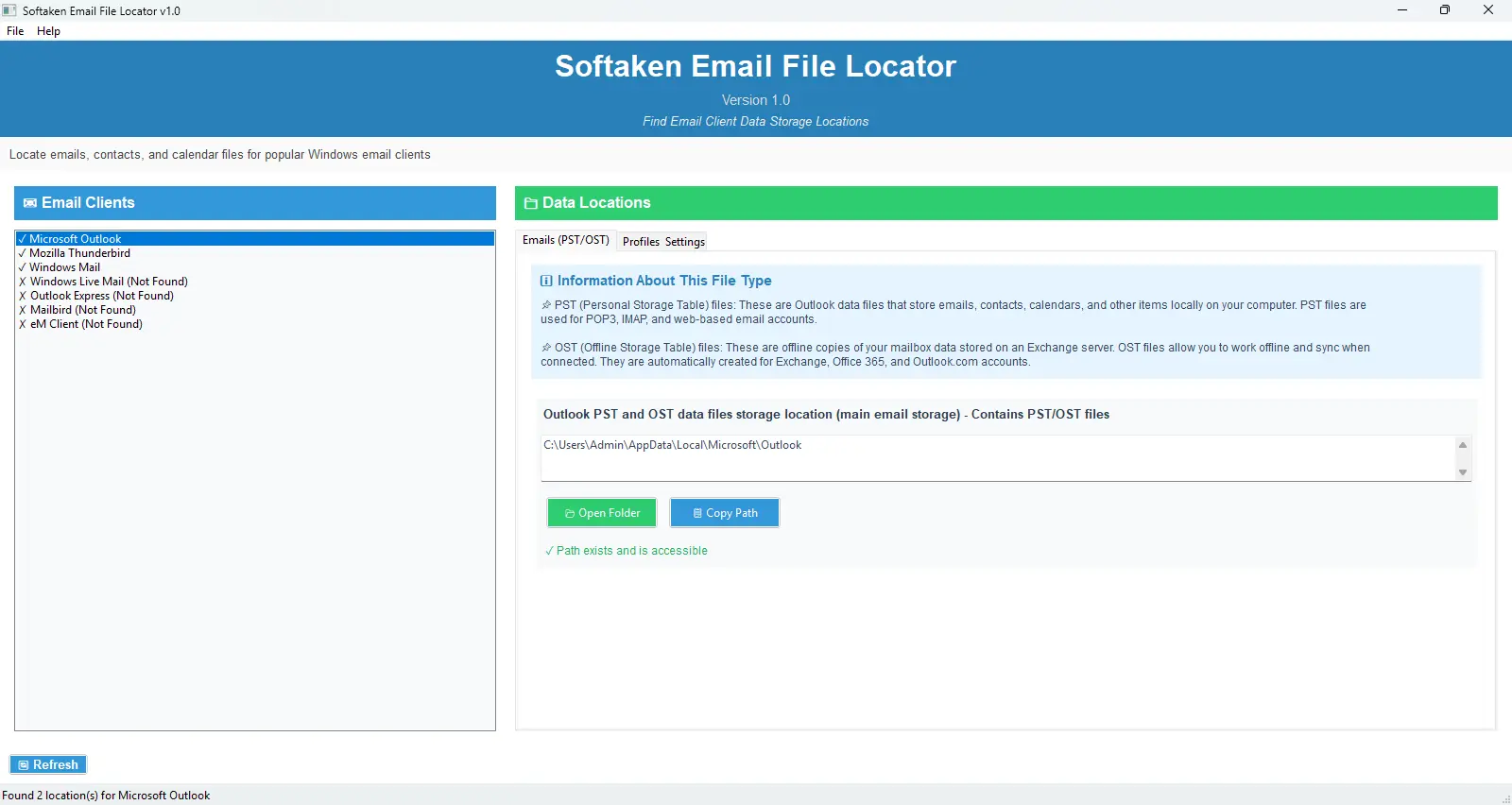
Installed clients appear with ✓ / ✗ status. Select a client to view organized data locations and use Open Folder or Copy Path.
Independently scanned with multiple antivirus engines.
Softaken Email File Locator v1.0 was created to assist you in rapidly locating and accessing email client data storage locations on your computers. When looking for PST files, OST files, contacts, calendars and other email-related data stored by well-known email clients like Microsoft Outlook, Mozilla Thunderbird, Windows Mail and more this completely free tool removes all uncertainty.
Instant email file discovery — automatically scans your Windows PC for installed email clients and locates PST/OST paths, contacts, calendars, and profiles so you no longer need to search AppData folders manually.100% Free Forever Utility — no hidden trial limits, no scan restrictions, and no feature locking. All features are offered without any charges.
Read-only safe access: the tool locates email data paths — it doesn't read, open, modify, or remove the content inside your email files.
This tool makes it simple to locate Thunderbird profiles, Outlook PST files and email backup locations. Email File Locator simplifies locating email data across Outlook 2007 and higher, Thunderbird & other major email clients.
Launch → auto-detect clients → Open Folder or Copy Path.
Softaken scans installed desktop email clients on your Windows PC, shows PST/OST and related data locations by tab, and lets you open the folder in Explorer or copy the path for backup planning.
Real Softaken UI — client list, data tabs, Open Folder and Copy Path.
1Installed clients appear with ✓ / ✗ status. Select a client to view organized data locations and use Open Folder or Copy Path.
Click the screenshot to enlarge.
When you transfer email data to a new computer, find PST or OST files, calendars, and addresses quickly so you can move data without spending hours searching folders.
Before you upgrade or reformat, instantly scan and see where email data is stored so you can copy those locations into backup scripts or back up manually.
Stop searching through AppData folders manually. The tool shows email data locations with one-click access via Open Folder and Copy Path.

Once you launch this tool, it will smartly scan your computer to check if any popular email app such as Windows Mail, Mailbird, Outlook, Thunderbird, and eM Client is installed or not. It visually represents the presence of an app if found with a check ✓, and if not found, then it show cross ✗ mark to help you save your time and enhance your workflow.
With the Open Folder button, you can access your email data file with just a click, where your email data is saved in Windows Explorer. If you use this tool, you don't need the help of AppData folders to remember long file paths. You can also copy the path of the file by clicking the Copy Path option directly to your clipboard.
It supports all the popular email clients like Thunderbird, eM Client, Outlook, and more of every versions, so that when you have more than one email client on your system it intelligently finds data for each email app and keeps each data organized separately.
Depending on the tab you select, you can view detailed information that will help you learn more about PST/OST (Personal Storage Table / Offline Storage Table), contacts, calendar formats, and the purposes of profiles. Educational information is provided so you understand the different file extensions and locations associated with those names.
✓ = The path exists which means that the folder you are looking for is there and ✗ = The path does not exist. Status icons let you quickly identify which data locations actually contain data without guessing.
Every path of data is handled by categories: Emails PST and OST, Contacts, Calendar, Profile & Settings — with clear action buttons for easy access to each data location.
When you click the refresh button, it rescans your system for mail clients. This works well if you recently installed a new mail client, moved data locations, or want to see newly added clients.
By using this software, you can simply locate your email file, as it doesn't read, open, modify, or remove the content inside your email file — locate email data without disruption or risk of changing your system.
Product Info
Version1.0
Size16.3 MB
LicenseFreeware
Supported OSWindows 11, 10, 8.1, 8, 7
What it Locates
Mailbox filesPST, OST
Other dataContacts, Calendar, Profiles
ActionsOpen Folder, Copy Path, Refresh
Access modeRead-only locate
Email Clients
Outlook2007 and higher
MozillaThunderbird
Windows mailMail, Live Mail, Outlook Express
OthersMailbird, eM Client
System Requirement
ProcessorAny Pentium Class
Operating SystemWindows 11, 10, 8.1, 8, 7 & Other
Memory2 GB Minimum (4 GB Recommended)
Hard Disk50 MB of free space for software installation
Interface Available
Language SupportedEnglish
Support OptionEmails, Chat & Skype
PlatformWindows only
WebmailNot supported (local clients only)
Sarah Johnson Verified
United States
This software is so simple to use, I understood how to use it immediately with its self-explanatory interface and found all my Thunderbird profile files in a matter of seconds. This has been a wonderful experience!
Michael Chen Verified
Canada
I spent hours trying to find my email files in the past, but I downloaded this tool on the recommendation of my colleague, and now I was able to locate all of my Outlook PST files within seconds without data corruption or any modification.
Emma Wilson Verified
United Kingdom
This tool works great; it helped me retrieve all email data locations with a very low error rate, which is amusing, has a very easy interface, and is perfect for IT Support. I strongly recommend!
David Rodriguez Verified
Australia
I was absolutely blown away by how fast it found all my PST files! Thank you, Softaken, for creating such a great product! I no longer need to search through AppData folders manually and waste my time.
Locates PST and OST mailbox files plus contacts, calendars, and profiles for supported desktop clients. MBOX, EML, NSF, and DBX are not listed as separate locate targets.
It auto-detects installed clients and shows standard data paths so you do not search AppData manually. Use Open Folder or Copy Path.
Designed to find installed desktop email clients and paths on your Windows PC for the logged-in profile. USB/network deep scan is not claimed.
Yes. Outlook, Thunderbird, Windows Mail, Outlook Express, Mailbird, Windows Live Mail, and eM Client with ✓/✗ status and Refresh rescan.
Yes. Open Folder opens Windows Explorer; Copy Path copies the path to the clipboard.
No. Read-only locate mode — does not modify, move, or delete email file contents.
CSV/TXT export is not listed. Use Copy Path for individual locations. The tool does not perform backup itself.
Yes. Completely free freeware with no trial limits described on this page. Windows only.
| Item | Details |
|---|---|
| Product | Freeware Email File Locator |
| Publisher | Softaken Software |
| Version | 1.0 |
| Size | 16.3 MB |
| Platforms | Windows |
| Locates | PST, OST, contacts, calendars, profiles |
| License | Freeware (100% free) |
| Page | https://www.softaken.com/freeware-email-file-locator |
