
Independent application
The software is completely standalone. It does not need installation of Microsoft Outlook or any external app to extract attachments from MSG files. Easy removal of attachments from MSG files is performed by the tool.
See Softaken MSG Attachment Extractor on Windows: load MSG via File or Folder mode, preview attachments, select extensions as needed, and save extracted files to a destination folder — standalone, without Outlook.
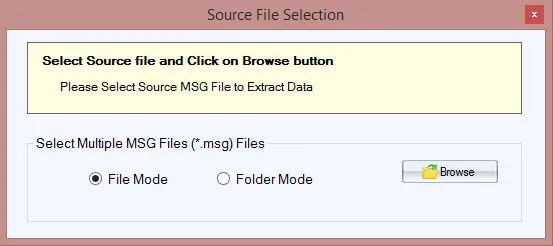
Add single MSG files or load an entire folder of MSG files at once for batch extraction.

Review attachments from loaded MSG files. Select desired extensions or extract all types supported.
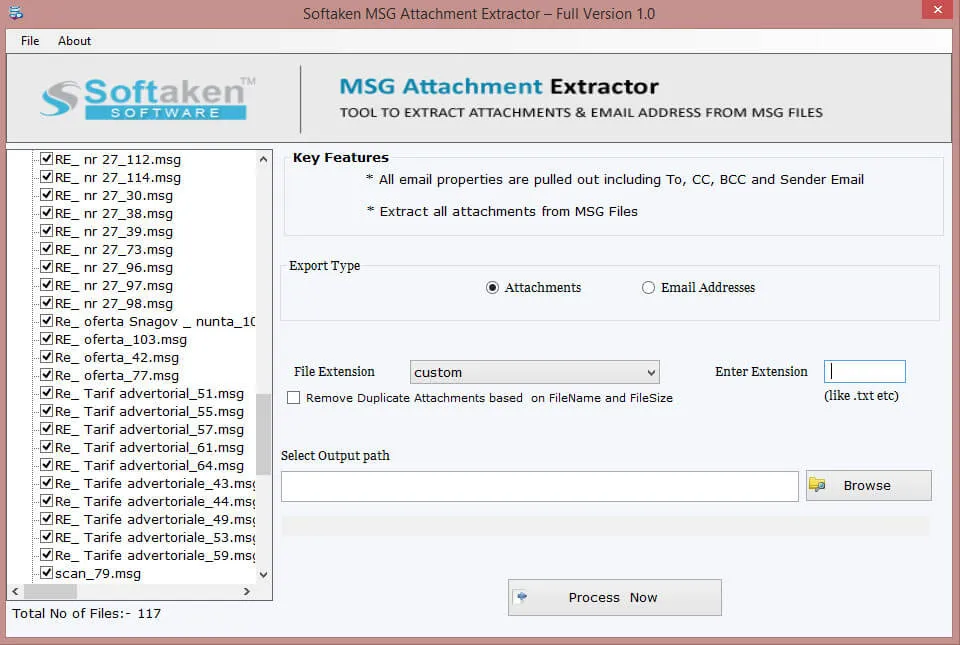
Choose an output destination folder and save extracted attachments separately from the MSG bodies.
Demo: first 10 MSG files. Full from $49. Guide: user steps · demo video.
The software is completely standalone. It does not need installation of Microsoft Outlook or any external app to extract attachments from MSG files. Easy removal of attachments from MSG files is performed by the tool.
The application is designed to suit all editions of Windows operating systems. One can comfortably install the program on the latest as well as previous versions of Windows such as Windows XP, Vista, 7, 8.1, 10, etc. without any incompatibility issues.
This Extractor Tool will process multiple MSG files at once. All attachments from the added Outlook MSG files are pulled out by the application in an effortless manner. During extracting attachments, the software does not harm any file.
MSG Attachment Extractor Tool provides complete protection to the hierarchy of folders. Moreover, while extracting attachments, there is no harm to email formatting and properties of emails. The original files remain intact during the process.
Regardless of the size and number of attachments, the application removes attachments from MSG files. With the demo version, you can extract attachments from first 10 MSG files. Once you have the paid version with you, unlimited facility is offered to users.
All types of attachments such as PNG, XLS, PDF, DOC, ZIP, HTML, TXT, etc. are swiftly extracted from MSG email files. Users can separately save these attachments to any location of their system as per their convenience.
System requirements and delivery details for Softaken MSG Attachment Extractor on Windows.
System Requirement
ProcessorAny Pentium Class
Operating SystemWindows 11, 10, 8.1, 8, 7, Vista, XP & Other
Memory512 MB Minimum
Hard Disk100 MB free for installation
Software Delivery
ElectronicVia Email
Minutes15
DemoFirst 10 MSG files
Starting Price$49
Interface Available
Language SupportedEnglish
Support OptionEmails, Chat & Skype
InputOutlook MSG files
OutputAttachments (PNG, PDF, DOC, ZIP…)
Download Guides

Jeff Heermann Verified
United States
Kudos to the development team for such a remarkable software. I also appreciate and thanks to the support team. Under their guidance, I have extracted various types of attachments from Outlook MSG files in a short time period.
Jorge Galvez Verified
Peru
I tried to manually extract attachments from Outlook MSG files but found it too lengthy. After research of two days, I got Softaken MSG Attachment Extractor. I am really happy by taking the license of this application.
Reagan Dotan Verified
United States
I got 1000 MSG files containing important attachments. To pull out attachments from them, my friend advised me to use this application and the software works smoothly without Outlook installation.
Yes. PNG, XLS, PDF, DOC, ZIP, HTML, TXT and more are supported; the guide covers selecting desired extensions.
No. Softaken MSG Attachment Extractor is standalone on Windows and does not require Outlook.
Only healthy MSG files are supported. Corrupted MSG is not supported; orphaned/password-protected are not claimed.
Original files remain intact with no harm to formatting/properties during extraction. Bit-by-bit filename checklists are not itemized.
Date and size-threshold filters are not claimed. Extension selection is supported; extraction is not bound by attachment size limits.
Subject/sender mapped folders are not claimed. Folder hierarchy is retained; save attachments to a chosen destination.
Bulk File/Folder processing and unlimited licensed extraction are claimed. Demo is first 10 MSG files.
Demo extracts from the first 10 MSG files. Full unlimited from $49. No 10–25 per-folder range stated.
| Item | Details |
|---|---|
| Product | Softaken MSG Attachment Extractor |
| Publisher | Softaken Software |
| Platforms | Windows 11, 10, 8.1, 8, 7, Vista, XP & others |
| Demo | First 10 MSG files |
| Starting Price | $49 |
| Page | https://www.softaken.com/msg-attachment-extractor |
