
Softaken OST to HTML Converter

Softaken OST to HTML Converter

Software to export Outlook OST files into HTML format

⚙ 100% Standalone Solution: Convert OST to HTML files directly without installing or configuring Microsoft Outlook.
  • Save OST emails to HTML quickly
  • Support MS Outlook 2024, 2021, 2019, 2016, 2013, 2007, and older versions
  • No requirement of Microsoft Outlook installation
  • No file size limitations to export Outlook OST messages to HTML
  • Preview complete database before exporting OST file
  • Provision to ignore empty folders
  • Unharmed and top-quality conversion
  • Export selected OST files into HTML format
  • Options to apply date filter to export OST data
  • Accurate conversion by maintaining folder structure
  • Bulk OST file conversion to HTML format
No Outlook requiredOrphaned OST supportChrome / Firefox / EdgeDemo: 10 items / folder
View converted HTML emails in
Google ChromeMozilla FirefoxMicrosoft EdgeSafariMobile browsers

Outlook .OST emails to HTML


Outlook .OSTSoftaken Converter.HTML web pages

Watch OST to HTML Demo


Export offline OST emails as browser-ready HTML pages

See Softaken OST File Exporter load an offline OST file, preview the mailbox folder tree and email body, choose HTML export with naming options, and save messages with attachments — without installing Microsoft Outlook.

  • Browse and load orphaned or offline OST files
  • Preview Inbox, Sent, Drafts, and email body / headers
  • Choose HTML export, naming convention, and output folder
  • Keep attachments, inline images, and RFC headers

See the Converter UI


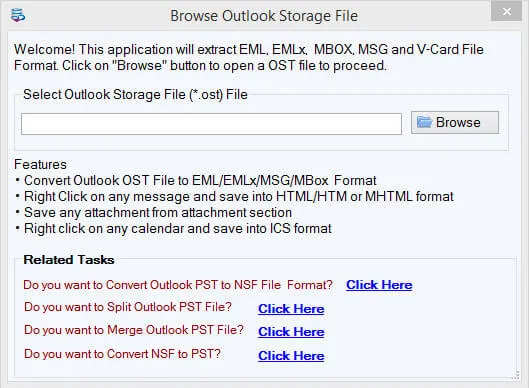
Browse and add Outlook OST files
1

Add OST file(s)

Browse a single OST or use Folder mode for bulk OST to HTML conversion.

Preview OST mailbox folder tree, email body, headers, and attachments
2

Folder tree & email preview

Review Inbox, Sent, Drafts, then preview email body, headers, and attachments.

HTML export options with file naming and output folder
3

Naming & output path

Choose HTML export, set naming filters (Subject, Date, From), and pick the save folder.

Click any screenshot to enlarge. Demo exports 10 items per folder. Full license is $49. Gallery: OST File Exporter screenshots.

Outstanding Features to Export Offline OST File to HTML


Swift export OST emails to HTML

Swift export OST emails to HTML

OST 2 HTML Converter supports export of OST emails and attachments to HTML format. The utility converts email properties such as to, cc, bcc, sent, from, subject, date, from, etc. from OST file into HTML format.

Pause and Stop Options

Pause and Stop Options

OST to HTML Converter comprises of pause and stop options. By these options, users can stop the conversion process as per their requirements. Plus, with the pause option, the conversion process can be stopped for some time and can resume later.

Support features

Support features

OST to HTML Exporter is supported with all versions of Outlook including Outlook 2019, 2016, 2013, 2010, and other versions. It also supports all editions of Windows such as Windows 11, 10, 8.1, 7, XP, Vista, etc.

Complete Preview and deep scanning

Complete Preview and deep scanning

OST 2 HTML Converter displays complete preview of OST mailbox items. Before this, OST file can be completely scanned. Any large size OST file can be converted into HTML format without loss of any information.

Dedicated attachment extraction

Dedicated attachment extraction

Automatically creates an associated folder alongside each HTML file to store all email attachments in their native file formats, so messages remain readable in any browser while files stay accessible separately.

Automated file naming

Automated file naming

Organize output HTML files using standard naming filters such as Subject, Date + Subject, From + Subject + Date, or Auto-Incrementing Numbers — ideal when hundreds of HTML pages are generated.

Feature Comparison of OST to HTML Converter – Trial and Licensed Version

Free Demo version scans, previews 100% of mailbox items, and exports up to 10 items per folder from OST to HTML format.

Features
  • Export Outlook OST Emails to HTML Web Pages
  • Orphaned / Exchange-Disconnected OST Support
  • Standalone — No Outlook / Exchange Required
  • Attachment Extraction with Associated Folder
  • Automated File Naming (Subject / Date / From)
  • Date Range Filter & Selective Export
  • Support Windows 11/10/8/7 & Others
  • Limitation
  • Price
DEMO Version
  • 10 items / folder
  • FREE
FULL Version
  • Unlimited
  • $49

The free demo exports 10 items per folder so you can test OST to HTML conversion. The full license is unlimited. Personal license is $49.

Frequently Asked Questions Regarding OST to HTML Converter


OST 2 HTML Converter supports export of OST emails and attachments to HTML format. Dedicated Attachment Extraction automatically creates an associated folder alongside each HTML file to store all email attachments in their native file formats, so you can open messages in any browser and still access attached files separately.
No. Softaken OST to HTML Converter is a 100% standalone solution. Convert OST to HTML files directly without installing or configuring Microsoft Outlook. Exchange Server Connectivity is also not required to export Outlook offline OST file to HTML.
Yes. Softaken supports Standalone Orphaned OST Migration — convert inaccessible, disconnected, Exchange-orphaned, or IMAP-cached OST files without requiring Exchange Server connection or profile access. Preview mailbox items before export, or contact Softaken support if a damaged file will not load.
Converted OST emails become individual HTML web pages viewable across Google Chrome, Mozilla Firefox, Microsoft Edge, Safari, and mobile browsers — without Microsoft Outlook. You can also publish or embed the HTML on a web portal or blog.
Yes. Automated File Naming lets you organize output HTML files using standard filters such as Subject, Date + Subject, From + Subject + Date, or Auto-Incrementing Numbers. OST File Exporter documentation lists Naming Convention on the export Options tab for mail files.
Yes. Softaken preserves complete email formatting — retaining inline images, hyperlinks, CSS/HTML styling, and standard RFC headers (To, From, CC, BCC, Sent/Received Dates). The utility converts email properties such as to, cc, bcc, sent, from, subject, and date from OST into HTML with unharmed, top-quality conversion.
Yes. With the Date Range Filter options, users can perform selective database conversion. Select a start date and end date to export Outlook offline OST file to HTML format, or export selected folders and items only.
Free Demo version scans, previews 100% of mailbox items, and exports up to 10 items per folder from OST to HTML format so you can examine the utility before purchase. The full license unlocks unlimited HTML export. Personal license is $49 through the OST File Exporter buy page.

Software Specifications


⚡ Standalone Orphaned OST Migration: Convert inaccessible, disconnected, Exchange-orphaned, or IMAP-cached OST files without requiring Exchange Server connection or profile access.
🌐 Cross-Platform Browser Accessibility: Convert offline OST emails into individual HTML web pages viewable across Google Chrome, Mozilla Firefox, Edge, Safari, and mobile browsers without Microsoft Outlook.
📎 Dedicated Attachment Extraction: Automatically creates an associated folder alongside each HTML file to store all email attachments in their native file formats.
📁 Automated File Naming: Organize output HTML files using standard filters such as Subject, Date + Subject, From + Subject + Date, or Auto-Incrementing Numbers.
Preserves complete email formatting: Retains inline images, hyperlinks, CSS/HTML styling, and standard RFC headers (To, From, CC, BCC, Sent/Received Dates).
OST → HTMLNo OutlookOrphaned OSTAttachmentsWindows$49

System Requirement

ProcessorAny Pentium Class

Operating SystemWindows 11, 10, 8.1, 8, 7 & Other

Memory512 MB Minimum

Hard Disk100 MB of free space for software installation

Software Delivery

ElectronicVia Email

Minutes15

Demo10 items / folder

Full License$49

Interface Available

Language SupportedEnglish

Support OptionEmails, Chat & Skype

PlatformWindows only

ProductOST to HTML Converter

Client Reviews
