SoftakenAOL Backup Pro

Modern Authentication Support: Safely log in using your AOL email address and 16-character AOL Generated in AOL account security settings for third-party apps. Works with 2-Factor Authentication so your main AOL password is not used. (supported with 2-Factor Authentication) over encrypted TLS/SSL protocols.

Direct Cloud-to-Local AOL Mail Backup & Exporter to PST, MBOX, Standard email message file (.eml) used by many clients., Apple Mail single-message file (.emlx)., and Outlook message file (.msg) — one email with attachments. Formats

An Advanced AOL Backup Email Software to download and Export all or desired emails from AOL Email account to different file extensions like EML, PST, MBOX, MSG and EMLX. Free trial to Check functionality and process 10 emails from AOL to desired file format.

  • Windows · Mac · Linux
  • Demo: 10 items
  • App Password / 2FA
  • Folder filter
  • No Outlook needed
  • Web page format that opens in any browser. / Portable Document Format file.
  • Migrate AOL mail to Outlook Personal Storage Table (.pst), EML, MSG and Unix mailbox archive (.mbox) in one workflow
  • Back up a single AOL account — Inbox, Sent, Trash and custom folders
  • Open archived mail in Outlook, Mozilla Thunderbird desktop email client (often MBOX-based)., Microsoft desktop mail app (WLM) that commonly uses EML message files. and other clients
  • Filter a particular folder when you do not need the whole mailbox
  • Standalone processing — no Outlook or Thunderbird required to create the backup
  • Connect over SSL/TLS with App Password login so your main AOL password stays unused
  • Supported on Windows 11, 10, 8.1, 8 and 7, with Mac and Linux builds available
PSTMBOXEMLEMLXMSGHTMLPDF

Available for Windows, Mac, and Linux. Free demo: 10 items / 10 emails. Sign in with AOL email and App Password (2FA).

100% Safe & Verified Download Windows, Mac, and Linux installers are digitally signed with a trusted certificate, ensuring authentic publisher identity and zero tampering.

Softaken AOL Backup Pro
Safe & Secure DownloadIndependently scanned with multiple antivirus engines.
100% Safe

Quick Facts

Output
PST · MBOX · EML · EMLX · MSG · HTML · PDF
Version
1.0 · 13.4 MB
Demo
10 items / 10 emails
Platform
Windows · Mac · Linux

AOL is a free web mail service. Like Gmail and Yahoo, it lets you export and receive mails. Storing your important mails on the web mail service is not safe at all. Your data can be hacked or accidently deleted. You may lose important mails because of data mismanagement. To avoid AOL related issues, AOL backup Pro is an excellent solution. Your entire important mails can be exported to different types of email platforms. Thus, you can easily access your AOL mails and manage them smartly.

AOL MailSoftaken AOL Backup ProPST · MBOX · EML · PDF

Software interface

Real software screenshots — AOL login, export format options and local save destination. Click a step or the arrows, and click a screenshot to enlarge it. More screens are in the full screenshot gallery.

Buy License Online Free demo: 10 emails
AOL account login with email and App Password — Softaken AOL Backup Pro

step 1 of 3

Watch Softaken AOL Backup Pro in action

Connect to AOL → choose export type → set destination → Process.

Download AOL mail to PST, MBOX, EML and more

See Softaken connect to AOL, select an export type, choose a local save path and back up emails — without Outlook or Thunderbird installed.

  1. Run Softaken AOL Backup Pro on your Windows, Mac or Linux system.
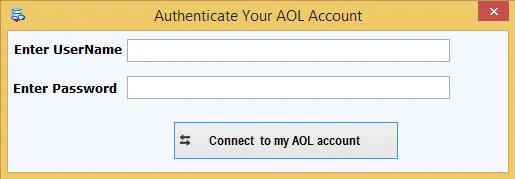
  2. Authenticate your AOL account with your email ID and App Password.
  3. Select an export type: PST, MBOX, EML, EMLX, MSG, HTML or PDF.
  4. Browse to set an output location and filter a particular folder if needed.
  5. Hit Process to finalize the backup task.

Features & Benefits of AOL Backup Tool

Back up AOL Mail to PST, MBOX, EML, EMLX, MSG, HTML and PDF on Windows, Mac and Linux — with App Password login and folder filters.

Export Data of Desirable AOL Profile

The Backup AOL asks users to enter the username and valid password of the particular AOL account from which you would like to gather data. Once the username and password are provided to the tool, it establishes connection with the particular account to perform conversion.

You stay in control of which AOL account gets connected.

AOL to EML/EMLX/MBOX

Both EML/MBOX are highly versatile email formats that save data of Thunderbird, Apple Mail, Entourage and WLM. With Conversion of AOL to EML or AOL to EMLX or AOL to MBOX, you are allowed to open and read AOL on multiple platforms.

Why it helps: the same mailbox can open in more than one email client.

Save Backup Data as Per Your Instruction

The output location of the backup data is decided by you. The tool manages to save data to user’s defined location that could be a new folder or an existed one.

Pick a new folder or an existing one — the path stays yours.

Backup of All Mail Folders

The converter allows you to create backup of entire data of your AOL profile including inbox, sent, trash, items or any other custom folder you have created or added. It allows you to create instant backup.

Inbox through custom folders can go in one run.

Filter Your Selective Folder

Users have flexibility to get backup of only useful data. You can convert entire AOL mails to PST/MSG/EML/MBOX or just choose a specific folder to migrate into desirable file format.

In short: take the whole mailbox, or only the folder that matters.

Free AOL Backup Software

Free trial of AOL Backup software is available to install in your Windows based computer. Download it today and be familiar with every feature of the tool with the evaluation copy and know the complete working. Mac and Linux demos are also offered for the same product line.

Try the evaluation copy first — you can see the working before purchase.

AOL to PST/MSG

In case users wish to create backup of AOL data to MS Outlook, they are offered with two formats including PST and MSG. Users can select either of them. The tool swiftly performs migration to the select folder.

Choose PST or MSG when Outlook is your target.

Retaining Quality

This program has been tested for quality. It is a reliable tool to export AOL data safely to PST/MSG/EML/MBOX format. During backup process no data is modified. All email properties exported safely including CC, BCC, To, From and Attachments.

Original properties stay with each message.

Comfortable with all Windows OS

You can download the application on Windows 11, 10, 8.1, 8 and 7 (32-bit and 64-bit). A smooth backup is taken without damaging your files. Mac and Linux builds are available as well.

Also available: Mac and Linux installers for the same backup workflow.

AOL Backup Pro FAQs

1. How do I generate an AOL App Password to log into the backup software?

Sign in to your AOL account and open the security settings. Turn on two-step verification if it is not already on, then choose the option to generate an app password, give it a name such as Softaken, and copy the 16-character code AOL shows you. In AOL Backup Pro, type your AOL email address and paste that code into the password field. Our article on accessing AOL Mail with third-party apps walks through the screens.

2. Which file formats (such as PST, MBOX, EML, MSG) can I choose to save my AOL emails locally?

You can save AOL emails as PST, MBOX, EML, EMLX or MSG, and also as HTML or PDF if you want something easy to read and share. Pick the format on the export screen before you start. PST suits Outlook, MBOX and EML work with Thunderbird and many other clients, and EMLX is used by Apple Mail.

3. Do I need to install Microsoft Outlook on my computer to create an AOL PST backup?

No. AOL Backup Pro is a standalone application and writes the PST file on its own, so Outlook does not have to be installed on the machine. You only need Outlook later, when you want to open or import the PST. The same goes for Thunderbird and other mail clients if you pick a different format.

4. Does the tool retain email attachments, inline images, and original folder structures?

Yes. Attachments stay with their messages, inline images and HTML formatting are kept, and your folder hierarchy is reproduced in the output. Headers such as To, From, CC, BCC, subject and dates are preserved too, so the backup looks the same as your mailbox.

5. Can I back up specific email folders or filter emails by date range instead of downloading the entire account?

You can pick specific folders instead of the whole account, for example just Inbox or Sent Items, or any custom folder you created. The filter works at folder level, so you tick the folders you need rather than setting a date range. That keeps the backup smaller and faster when you only want part of your mail.

6. Are my AOL account credentials stored or accessible to anyone during the backup process?

Your login is used only to connect to AOL. The software talks to AOL directly from your computer over an encrypted TLS/SSL connection, and your messages are not routed through any third-party server. Because you sign in with an App Password, your main AOL password is never needed, and you can revoke that App Password in AOL whenever you like.

7. Which versions of Microsoft Outlook (2024, 2021, 2019, 2016, and Microsoft 365) support the generated PST file?

The PST file is a standard Unicode PST, so you can open or import it in Outlook 2024, 2021, 2019 and 2016, as well as Microsoft 365 (Office 365). Older Outlook releases that read Unicode PST files can open it too.

8. What are the specific capabilities and email download limits of the free trial demo version?

The free demo lets you sign in, browse folders and run a real backup of the first 10 emails, so you can check the formats, folder structure and attachments for yourself. The full version removes that limit and starts from $29.

AOL Backup Pro Specifications

Direct end-to-end encryption: The software connects from your PC to AOL servers over SSL/TLS with no third-party proxy relays. Sign in with an AOL App Password — see How to Access AOL Mail with Third-Party Apps.

Cross-platform: Separate builds for Windows, macOS, and Linux. Archive AOL mailboxes to PST, MBOX, EML, EMLX, MSG, HTML or PDF with folder filtering.

Free demo: Connects to your AOL account, shows the folder hierarchy and backs up the first 10 items / 10 emails. The full version removes the limit.

Software Information

Product
AOL Backup Pro
Version
1.0 · 13.4 MB
Platforms
Windows · macOS · Linux
Sign-in
AOL email + App Password
Demo
10 items / 10 emails

Backup & Formats

Source
AOL Mail (IMAP / cloud)
Export
PST · MBOX · EML · EMLX · MSG · HTML · PDF
Outlook
Not required to run backup
Language
English

Software Delivery

Electronic
Via Email
Delivery Time
15 Minutes
Accounts
Single AOL account at a time
License
Free demo / Full

Platform specifications

System requirements and installer packages for each operating system.

Windows

Desktop installer

Operating System
Windows 11, 10, 8.1, 8, 7 & Other (32-bit & 64-bit) supported
Package
.exe installer (code-signed)
Processor
Intel, AMD, or compatible 64-bit/32-bit processor
RAM
512 MB Minimum
Disk Space
100 MB free for installation
Display
1024×768 or higher

macOS

Apple desktop build

Operating System
macOS 10.15 Catalina and later supported (Big Sur, Monterey, Ventura, Sonoma & newer)
Package
.dmg installer (code-signed)
Processor
Intel or Apple Silicon
RAM
512 MB Minimum
Disk Space
100 MB free for installation
Display
1280×800 or higher

Linux

AppImage & Debian package

Operating System
Ubuntu 18.04+, Debian 9+, CentOS 7+ and other modern distributions supported
Package
AppImage and .deb
Architecture
x86_64 (64-bit)
RAM
512 MB Minimum
Disk Space
100 MB free for installation
Desktop
GNOME, KDE, XFCE and similar environments

Demo vs Licensed Version

The free demo connects to your AOL account, displays the folder hierarchy and email preview, and exports up to 10 items / 10 emails so you can evaluate backup speed and fidelity before purchasing a license. The full version has no limit.

FeaturesDEMO VersionFULL Version
Backup in EML/EMLX FormatAvailableAvailable
Backup in MSG FormatAvailableAvailable
Backup in MBOX FormatAvailableAvailable
Backup in HTML FormatAvailableAvailable
Backup in Outlook PST FormatAvailableAvailable
Support Plain Text, RTF & HTML FormatsAvailableAvailable
Support Windows / Mac / LinuxAvailableAvailable
Limitation10 itemsUnlimited
PriceFREE$29
Softaken Reviews

What Our Users Say

Client feedback from Softaken customers who back up AOL Mail to PST, MBOX, EML, and more.

János Róbert CsetnekiCustomer feedback

Hungary · AOL to PST · Windows

I am highly thankful to Softaken AOL Backup Tool.

I am highly thankful to Softaken AOL Backup Tool. It helps me to convert AOL account data to PST format without facing any issues. There is no need of any extra application to perform the conversion. Even no technical skills are used for the whole process.

What I liked

Simple AOL to PST without extra apps

Borja PucheCustomer feedback

Spain · AOL backup · Windows

I am amazed with few working steps of the software that I never suppo…

I am amazed with few working steps of the software that I never supposed so easy but your tool proved that the backup task can be so easier that any new user handles the process. Great efforts shown by the team.

What I liked

Easy steps for new users

Steven BroadheadCustomer feedback

United States · AOL account backup · Windows

A marvelous tool as per my opinion.

A marvelous tool as per my opinion. Moreover, the price is not so high. Anyone can easily afford the application. I must say, if you are looking for AOL account backup. You should try this application once.

What I liked

Affordable AOL account backup

Review

Back up AOL Mail to PST, MBOX, EML & more

Sign in with an AOL App Password, choose your folders and export format, and save a local archive on Windows, Mac or Linux.

  • Windows · Mac · Linux
  • PST · MBOX · EML · EMLX · MSG · HTML · PDF
  • Demo: 10 items / 10 emails

Available for Windows, Mac, and Linux. Free demo: 10 items / 10 emails. Sign in with AOL email and App Password (2FA).