 1
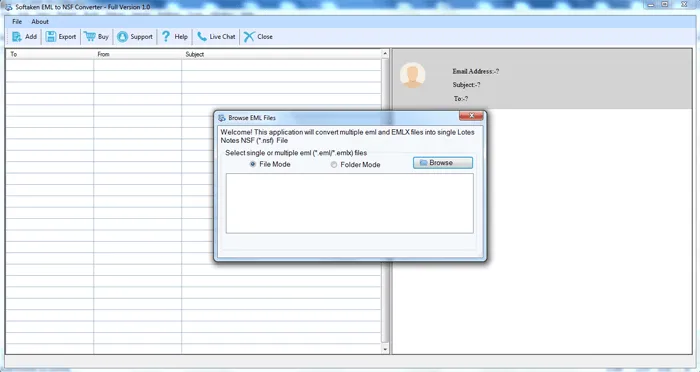
1Main interface
Clean Softaken EML to NSF Converter window after launch on Windows.
Independently scanned with multiple antivirus engines.
100% SafeA High end program for swift bulk migration of EML to NSF
Convert EML and EMLX into a single IBM Lotus Notes NSF file on Windows. Softaken states Lotus Notes installation is required (Domino Server is not needed), batch/folder conversion, access for all Lotus Notes versions, preview & export, and no file size or quantity limitation when licensed. Named HCL Notes version matrices (14/12/11/10…), merge-into-existing-NSF vs brand-new NSF dual modes, Zoho/eM Client as named sources, and “100% offline / zero telemetry” slogans are not listed on this page.An EML/EMLX file cannot be directly read or opened to Lotus Notes file format. It needs conversion of EML to NSF. Softaken EML to NSF Converter makes migration simply easy—a matter of a few clicks—with error-free conversion assurance so your data is safe. Softaken documents batch and folder conversion, Lotus Notes installation (not Domino Server), import of EML & EMLX into a single NSF file, and access across all Lotus Notes versions.
Screenshots from the Softaken EML to NSF steps guide (File/Folder mode, export, destination path).
1Clean Softaken EML to NSF Converter window after launch on Windows.
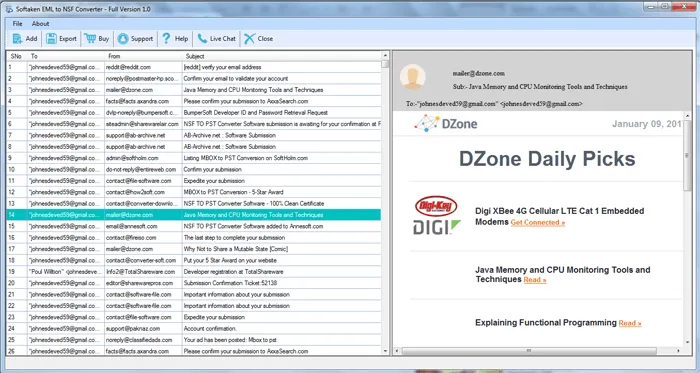 2
2Select individual EML files or an entire folder holding EML files for bulk migration.
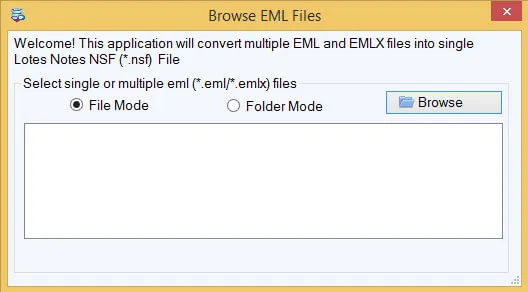 3
3Softaken shows the path and count of selected EML files so you confirm the right source.
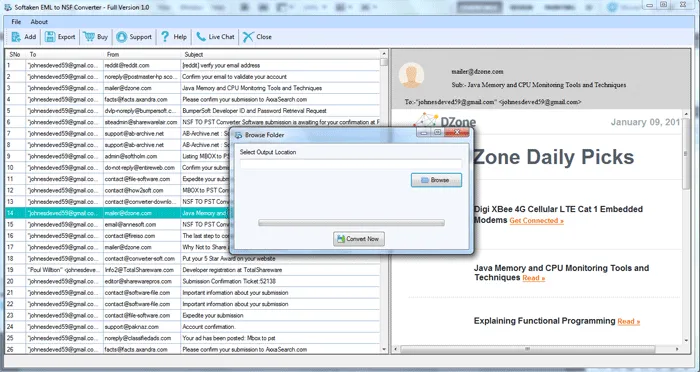 4
4Click Export, then choose a destination folder (create new or use an existing local folder) for NSF output.
Click a screenshot to enlarge. Source: docs/eml-to-nsf/steps · screenshots.
Follow Softaken’s documented workflow (Lotus Notes must be installed):
For rapid migration assistance, the EML to NSF migration app supports bulk data conversion. It is possible to select more than one EML file to convert them into NSF. Users can select a folder holding EML files for bulk migration. Thus, conversion is achieved rapidly.
The control of conversion is at the hands of users because the app asks user's to save file to any location in the local folder. They can either create a new folder or choose an existed one to save data.
There is a box in the window of the app that features the number of EML files you are exporting and the path of those selected EML files. It is to ensure you that you have select a right file.
No matter which EML files you want to export, the exporter allows you to export any EML file without any delay. It has deep file filtration feature that gives permission to locate a specific EML file for migration.
No matter what is the size of an EML file and whichever EML file you have chosen to export, the results you get are remarkable every time. The utility retains To, CC, BCC along with formatting, images, graphics, hyperlinks and other meta data.
Free trial of EML to NSF Migration is all set to install in your Windows app. Download the app today. With the free version, you can convert 10 EML files to NSF format and can become familiar with every feature of the utility.
Free demo: Softaken states you can convert 10 EML files to NSF (feature table: 10 items). A “10 to 25 emails per folder” range is not stated. Full unlimited from $29. Softaken requires Lotus Notes installed (Domino Server not needed).
Engine Note
Dedicated Softaken EML to NSF Converter (docs/eml-to-nsf, buy-eml-to-nsf-converter). Softaken documents EML/EMLX → single IBM Lotus Notes NSF, Lotus Notes required (not Domino Server), all Lotus Notes versions, File/Folder batch mode, and demo 10 EML files. Named HCL version matrices, merge-into-existing-NSF dual modes, Zoho/eM Client sources, and “100% offline / zero telemetry” slogans are not listed (see FAQs).
Product Info
Version1.0
Size5.5 MB
Starting Price$29
Full licenseUnlimited
Demo & License
Free demo: Convert 10 EML files to NSF. A “10 to 25 emails per folder” range is not stated. Full unlimited from $29.
Demo limit10 EML files
Lotus NotesRequired
Domino ServerNot required
Licensed editionUnlimited from $29
Input & Output
InputEML / EMLX (Apple Mail, Thunderbird, WLM, etc.)
OutputSingle Lotus Notes NSF
ModesFile / Folder (batch)
Notes versionsAll Lotus Notes versions
System Requirement
ProcessorAny Pentium Class
Operating SystemWindows 11, 10, 8.1, 8, 7 & Other
Memory512 MB Minimum
Hard Disk100 MB of free space for software installation
Software Delivery
Interface Available
Related Guides
There are no posts available
Yes. Softaken requires Lotus Notes. Domino Server is not needed. HCL branding beyond Lotus Notes wording is not listed.
Softaken supports all Lotus Notes versions. A numbered HCL 14/12/11 matrix is not listed.
Yes. Softaken lists Apple Mail, Thunderbird, WLM and other EML clients, plus EMLX.
Softaken retains To, CC, BCC, formatting, images, graphics, hyperlinks and other metadata; Plain Text/RTF/HTML supported. Named attachment inventories are not listed.
Yes. Softaken lists folder batch conversion with no quantity limit when licensed.
Softaken documents a single NSF output and local save folder choice. Merge-vs-new NSF dual mode is not listed.
No size or quantity limitation when licensed. Demo converts 10 EML files.
Demo converts 10 EML files to NSF. Full unlimited from $29. A 10–25 per folder range is not stated.
| Item | Details |
|---|---|
| Product | Softaken EML to NSF Converter |
| Publisher | Softaken Software |
| Platforms | Windows |
| Version | 1.0 |
| Size | 5.5 MB |
| License | Demo 10 EML files; full unlimited from $29 |
| Scope | Convert EML/EMLX to single IBM Lotus Notes NSF |
| Prerequisite | Lotus Notes required; Domino Server not required |
| Page | https://www.softaken.com/eml-to-nsf-converter |
