Softaken EML to Yahoo Importer
Safe &Secure Download

Independently scanned with multiple antivirus engines.

100% Safe

Softaken EML to Yahoo Importer

Import &upload EML &EMLX files into Yahoo (YMail) account

Simplify your EML to Yahoo conversion with this advanced app

(Average Rating 4.3Based on 46rating)
Upload EMLand EMLXfiles to Yahoo Mailusing Softaken-documented Yahoo username and password(valid login details). Softaken states the tool does not saveYahoo login details,supports existing or new Yahoo folder,and preserves properties including CC,BCC,To,Date,and attachments. Named “16-character Yahoo App Password / TLS/SSL IMAP pipeline / OAuth” hero slogans,Inbox-vs-Archive mapping beyond new/existing folder,and “zero intermediary cloud staging” claims are not listedon this page (see Softaken Yahoo third-party apps KB).
  • A fast conversion app to upload EML/EMLX files to Yahoo
  • File size doesn't interrupt conversion
  • Bulk data migration assistance
  • Import only user's specified EML files
  • Convert data to desirable Yahoo account
  • Establish connection with Yahoo immediately
  • Import data with accuracy by importing entire email databases
  • Support Apple Mail,WLM,Thunderbird &multiple other EML supportive email clients
  • A Windows tool,support Windows 10,XP,Vista,8 &7
From $99Demo:10 itemsWindows onlyEML + EMLXCredentials not savedNew / existing folder
EMLEMLXYahoo MailAttachments

How to Access Yahoo Account with Third Party Apps or Software?

Import EML to Yahoo without losing single information. With this conversion you are capable to access Apple Mail,Thunderbird and several other email clients’ databases to Yahoo. It will give you real time access by allowing you to view your important EML databases on any system and smart device. Softaken documents bulk and selected EML migration,Yahoo username and password authentication,existing or new Yahoo folder,and that the software does not save Yahoo login details.

Software interface

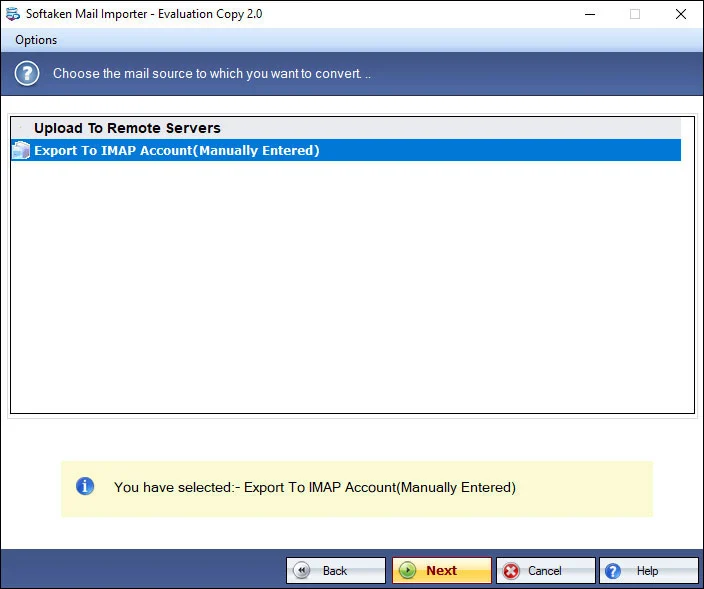
Add local files (EML/EMLX),preview,authenticate Yahoo,then choose or create a folder (Softaken Mail Importer UI).


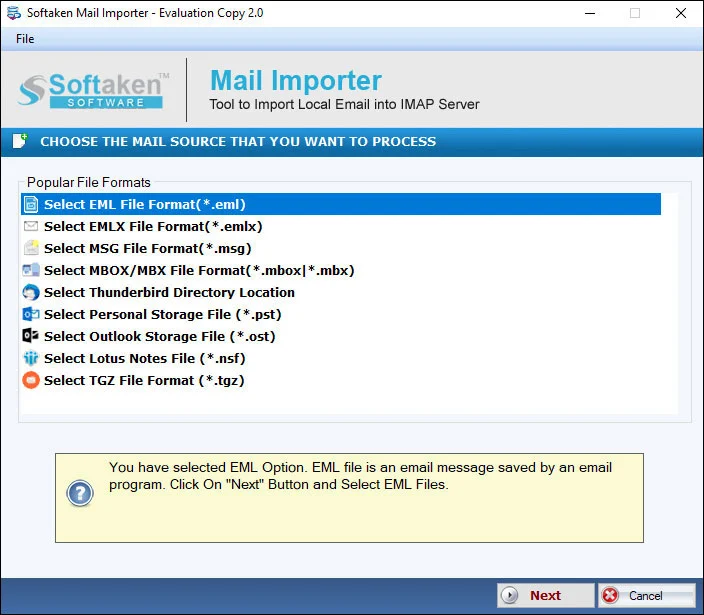
Select file type and add EML or EMLX files1

Add EML / EMLX files

Select EML (or EMLX) in File Type and add files—or browse from local folders for selected migration.

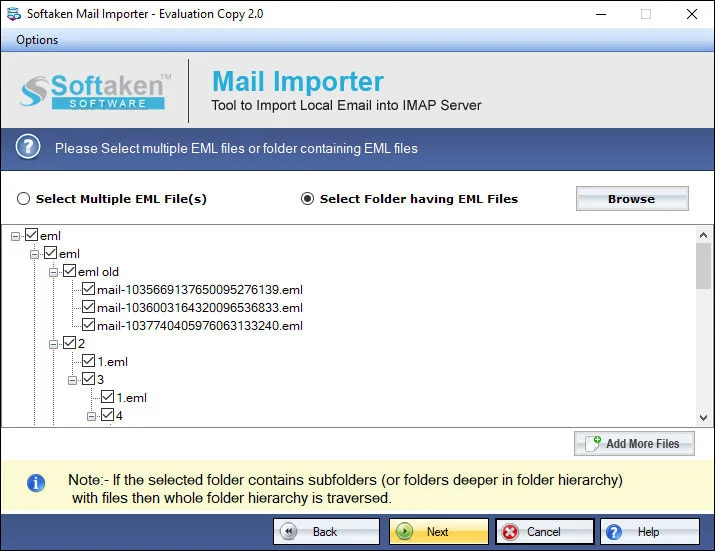
Preview selected local email files before Yahoo upload2

Scan &preview

The tool scans selected EML files to make them ready for conversion before upload.

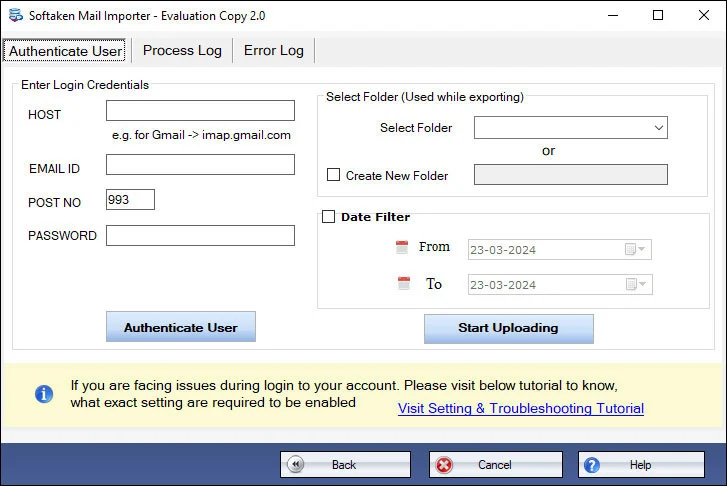
Authenticate Yahoo with username and password3

Authenticate Yahoo

Provide Yahoo username and password (valid email address and password of the target account).

Select existing Yahoo folder or create a new folder4

Folder &Process

Select an existing folder or create a new folder in Yahoo,then hit Process to start import.

Click a screenshot to enlarge. Guides:how-to steps· screenshots.

How to import EML files to Yahoo


Step-by-step import

Only a few steps are involved to import EML file to Yahoo with this application.

  1. Download and Run EML to Yahoo Importer on your Windows system.
  2. Select EML files in File Type and then add EML files.
  3. Click on Authenticate your Yahoo account and provide Yahoo username &password.
  4. Select an existing folder or create a new folder in Yahoo account.
  5. Hit the Process button to start the import task.

Key features of Import EML to Yahoo Mail Tool


Import EML files with top accuracy

This program has been examined for its accuracy. No matter how big or small an EML file,the conversion program has capacity to import the EML file with top accuracy. It inserts entire properties of EML files including CC,BCC,To,Date and Attachments.

Convert selected EML files

The conversion program enables users to filter particular EML files for migration. Browse and locate from local folders the particular EML file. The tool scans the particular EML file to make it ready for conversion.

Import EML files in bulk

Bulk conversion is offered with this advanced app. Users can select either one or multiple EML files to convert them at once. Each time,the utility provides desirable results. The converted data is retained safely. Bulk migration doesn't influence the file quality.

Migration to user’s choice Yahoo account

As you launch the program,it needs valid email address and password of the particular Yahoo account in which you want to import data. The utility imports EML files to that particular Yahoo account which username and password are valid.

Simple &easy application

If you want to know how to import email into Yahoo mailbox,it is easier with this third application. The program carries a few simple steps for migration. Its wizard is so interactive and well-expressive. Users of the app don't need additional technical help.

Free trial for all

Give the tool a free trial. This simple application is so easy to use. The free version is capable to let you know how the tool is functioning. It will also help you finalize your decision to purchase the program after analyzing its every feature free of cost. Softaken’s feature comparison on this page lists demo limitation as 10 items.

Feature Comparison of EML to Yahoo Importer – Trial and Licensed Version

This Softaken page’s feature comparison lists demo limitation as 10 items. Softaken Mail Importer docs (same download) also state the trial imports the first 25 local files. A “10 to 25 emails per folder” range is not stated. Full unlimited from $99. Softaken documents Yahoo username and password(valid login details) and that the tool does not saveYahoo login details. Named 16-character App Password / TLS IMAP / OAuth hero slogans are not listedon this page (see Softaken Yahoo third-party apps KB).

Features
  • Import EML files into Yahoo
  • Import EMLX files into Yahoo
  • Bulk / selected file migration
  • Yahoo username &password auth
  • Existing or new Yahoo folder
  • Preserve CC,BCC,To,Date,attachments
  • Does not save Yahoo login details
  • Support Windows 11/10/8/7 &others
  • Limitation
  • Price
DEMO Version
  • 10 items (page) / 25 files (docs)
  • FREE
FULL Version
  • Unlimited
  • $99

EML to Yahoo Importer FAQs


This Softaken page documents authenticating with Yahoo username and password(valid email address and password). Softaken’s KB guide for third-party Yahoo access explains generating an App Passwordwhen Yahoo blocks regular passwords:How to Access Yahoo Account with Third Party Apps. Named “16-character App Password,” “TLS/SSL IMAP channels,” or “OAuth” slogans are not listedon this EML to Yahoo page alone.
No.Softaken’s documented steps are download/run the importer,add EML files,authenticate Yahoo,choose folder,and Process—without requiring Thunderbird,Windows Live Mail,or Outlook to be installed. Softaken lists support for EML from Apple Mail,WLM,Thunderbird and other EML-supportive clients as source file types,not as a pre-installation requirement.
Yes.Softaken documents upload of EML/EMLXfiles to Yahoo,and the feature comparison lists both Import EML and Import EMLX into Yahoo. Softaken also states you can import unlimited EMLX files with the licensed edition.
Yes.Softaken states you can select an existing folder or create a new folderin the Yahoo account,and you can specify any location as per your desire. Named Inbox / Sent Items / Archive mapping slogans beyond existing-or-new folder wording are not listed.
Softaken states import with top accuracy and that it inserts entire properties including CC,BCC,To,Date and Attachments,without losing single information. Named “RFC 822,” “Message-ID,” or “inline images / rich HTML styling” slogans beyond that wording are not usedon this page.
Softaken lists bulkmigration (one or multiple EML files at once),importing entire email databases,and unlimited EMLX files when licensed. File size doesn’t interrupt conversion. Explicit “thousands from multiple nested subfolders in one run” wording beyond bulk/selected file import is not listed.
No.Softaken states the software does not save your Yahoo login details. Named “zero intermediary cloud storage,” “direct client-to-Yahoo TLS tunnels,” or “emails not cached on external servers” slogans beyond credentials-not-saved wording are not listedon this page.
This Softaken page’s feature comparison lists demo limitation as 10 items. Softaken Mail Importer docs (same download) also state the trial imports the first 25 local files. Full unlimited license from $99(lifetime use as documented). A “10 to 25 emails per folder” range and App Password connection-test slogans are not statedon this page.

Software Specifications


Engine Note

This landing page uses the Softaken Mail Importerdownload and docs (EML/EMLX among sources → Yahoo among destinations;buy-mail-importer). Primary focus here is EML &EMLX → Yahoo Mail. Softaken documents Yahoo username and password,existing or new folder,and that credentials are not saved. Named 16-character App Password / TLS IMAP / OAuth USPs,Inbox/Sent/Archive mapping beyond new/existing folder,and zero-proxy staging slogans are not listed(see FAQs and Softaken Yahoo KB).

Product Info

Version2.0

Size19.4 MB

Starting Price$99

Full licenseUnlimited

Demo &License

Free demo:This page’s feature comparison lists 10 items. Softaken Mail Importer docs (same download) also list trial first 25 local files. A “10 to 25 emails per folder” range is not stated. Full unlimited from $99.

This page demo10 items

Mail Importer docsFirst 25 local files

10–25 per folderNot stated

Licensed editionUnlimited from $99

Input &Output

InputEML &EMLX

OutputYahoo Mail account

Folder optionsExisting or new Yahoo folder

AuthYahoo username &password

System Requirement

ProcessorAny Pentium Class

Operating SystemWindows 11,10,8.1,8,7 &Other

Memory512 MB Minimum

Hard Disk100 MB of free space for software installation

Software Delivery

ElectronicVia Email

Minutes15

PlatformWindows only

Interface Available

Language SupportedEnglish

Support OptionEmails,Chat &Skype

What Our Users Say


Frequently asked questions

How do I generate and use a Yahoo App Password to connect to the importer tool?

This page documents Yahoo username and password. Softaken’s Yahoo third-party apps KB explains App Password when regular passwords are blocked.

Do I need to have Thunderbird or Windows Live Mail installed on my PC to upload EML files?

No. Softaken steps do not require installing Thunderbird,Windows Live Mail,or Outlook.

Can I upload both standard .EML and Apple Mail .EMLX files using this software?

Yes. Softaken lists importing EML and EMLX files into Yahoo.

Can I upload EML messages directly into a custom-created folder in Yahoo Mail?

Yes. Softaken lists selecting an existing folder or creating a new folder.

Does the tool preserve email attachments,inline images,and RFC headers during upload?

Softaken preserves CC,BCC,To,Date,and attachments with accurate import.

Can I import thousands of EML files from multiple subfolders in a single batch?

Softaken lists bulk migration and unlimited licensed import. Nested-subfolder slogans beyond that are not listed.

Are my Yahoo Mail login credentials stored or logged on any external server?

No. Softaken states the software does not save Yahoo login details.

What are the specific capabilities and email upload limits of the free trial demo version?

This page:10 items. Mail Importer docs:first 25 local files. Full from $99. A 10–25 per folder range is not stated.

EML to Yahoo Importer specifications
ItemDetails
ProductSoftaken EML to Yahoo Importer
PublisherSoftaken Software
PlatformsWindows
Version2.0
Size19.4 MB
LicenseDemo 10 items (page) / 25 files (docs);full unlimited from $99
ScopeImport EML and EMLX to Yahoo Mail with attachments
AuthYahoo username and password;credentials not saved
Pagehttps://www.softaken.com/eml-to-yahoo-importer