
Softaken MBOX to Office 365 Migration Tool

MBOX to Office 365 Migration Tool

Support Bulk Migration of MBOX to Office 365,Save Time &Effort

100% Standalone Migration:Import MBOX files directly to Microsoft 365 without requiring Mozilla Thunderbird or Microsoft Outlook installed on your system.
  • An easy to use program with interactive interface
  • Export MBOX files of any size
  • Support Thunderbird,Entourage,Poco Mail and several other MBOX supportive email clients
  • Allow you to export selective MBOX files
  • Perform bulk migration regardless of the file size
  • Save time &effort of users
  • Accurate conversion every time
  • A reliable app to use for both personal and commercial purposes
  • Export data to only selected Office 365 account
  • A Windows utility,support Windows 11,10,XP,Vista,8 and 7

Office 365 comes up as one of the best web based platforms to save and share emails. To provide excellent user experience,it is often updated with new features. If you are looking for a way to export MBOX to Office 365,choose our conversion app. It meets your conversion goal without any data loss. Less manual attempts are required to safely export MBOX to Office 365.

ThunderbirdApple MailEntouragePoco Mail

MBOX Files to Office 365


MBOX / MBX FilesSoftaken Mail ImporterOffice 365 / Microsoft 365

Watch MBOX to Office 365Demo


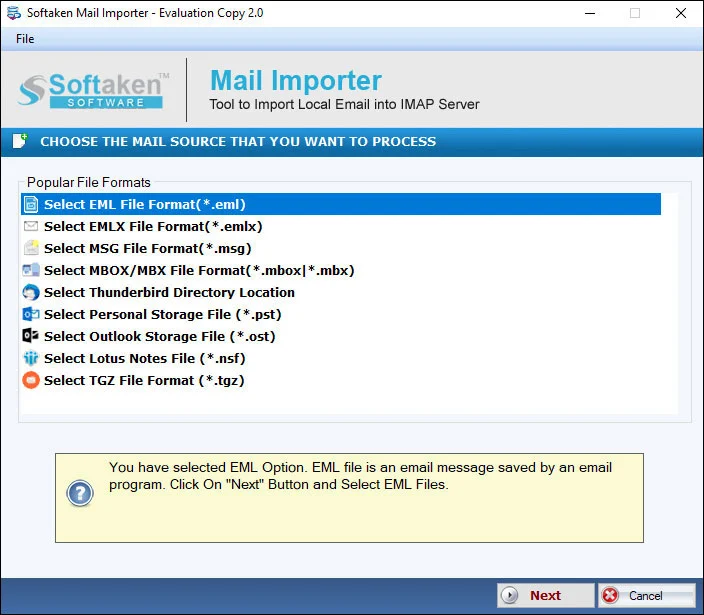
Load MBOX,preview,sign in to Office 365,import

See Softaken Mail Importer on Windows:add MBOX files,preview mailbox items,connect to Office 365 with account credentials,and migrate — without installing Thunderbird or Outlook.

  • Bulk migration of MBOX files of any size
  • Selective MBOX export with interactive interface
  • Export data to the selected Office 365 account
  • Standalone — no Thunderbird or Outlook required

See the Mail ImporterInterface


Mail Importer main interface with mailbox load
1

Load MBOX Files

Add MBOX / MBX files for bulk or selective migration to Office 365.

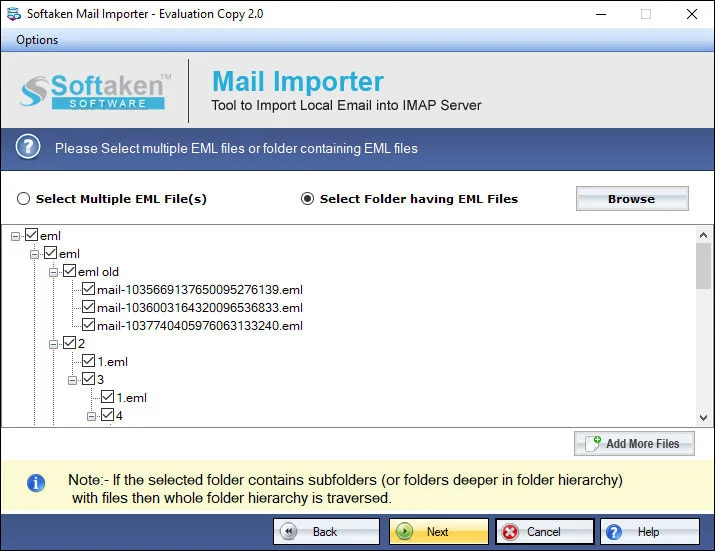
Preview emails and attachments before import
2

Preview &Select

Interactive interface to review items and export only selected MBOX files.

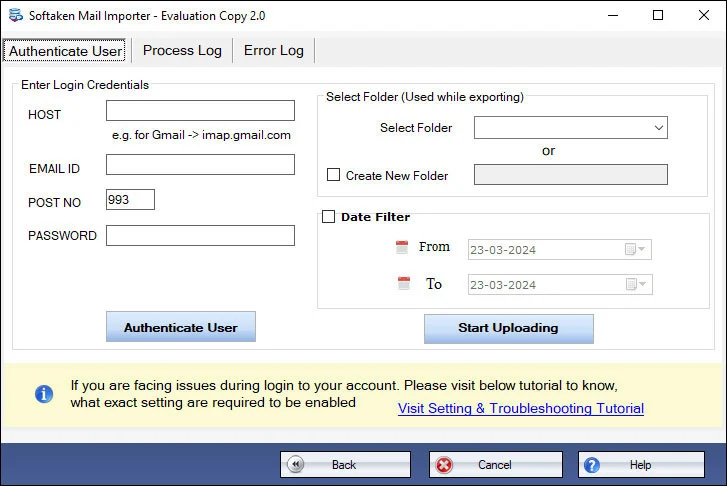
Office 365 / IMAP account login settings
3

Office 365 Login

Enter Office 365 account credentials to connect and import. Softaken does not store login details.

Demo:first 25 local files. Full from $99. Guide:user steps· demo video.

Key Features of MBOX to Office 365 Exporter


Support to Export Only Selected MBOX Files

With this conversion program,users have found constant support to export only those MBOX files that they find necessary. The advance filter feature allows you to filter a particular MBOX file to upload and convert.

Migrate with Top Accuracy

This app has been designed to provide accurate conversion results every time. You don't need to worry for the original structure of the file. It keeps data intact. No email is corrupted or damaged using this great app.

Export Data in Bulk
Export Data in Bulk

Bulk migration is supported by the app where not just 2 or 3 but you can export a number of MBOX files at once. The feature is helpful for those people who are looking to export a number of MBOX files.

Easy to Run
Easy to Run

Running the app on your Windows is not so difficult. It is a lightweight app which takes a few minutes to install and configure. The interface is highly interactive,expressing you the steps of conversion.

Convert All Sizes MBOX Databases

There is no objection in terms of the sizing of the file. Any big and small MBOX file can export at once. The converter helps you to accomplish conversion goals effortlessly. This is an added advantage of this app.

Highly Supported
Highly Supported

Don't mind to use the app whether you are using Thunderbird,Apple Mail or any other email clients to create an MBOX file. The super fast conversion program scans MBOX files easily,supporting all email clients that support MBOX. It is a highly supported app.

Feature Comparison of MBOX to Office 365 – Trial and Licensed Version

Features
  • Import MBOX to Office 365
  • Bulk / selective MBOX export
  • Standalone — no Thunderbird / Outlook
  • Retain folders,attachments &metadata
  • Office 365 account login (IMAP)
  • Support Windows 11/10/8/7 &others
  • Limitation
  • Price
DEMO Version
  • First 25 local files
  • FREE
FULL Version
  • Unlimited
  • $99

Free Demo version imports the first 25 local filesto the email server (Mail Importer). A “10 to 25 emails per folder” range is not stated. Full:unlimited from $99.

Tool Faq's


Documented workflow:connect with Office 365 account login credentials(username/password / IMAP settings). Softaken does notsave user login details in its database. OAuth 2.0,Microsoft Entra ID,and explicit MFA / Modern Auth compliance are not claimedon this page.
No.You don't need Outlook or Thunderbird installed. Softaken Mail Importer works standalone to import MBOX to Office 365 without depending on those clients.
Documented:export data to the selected Office 365 account. Separate destination modes for In-Place Archive or Shared Mailboxes are not claimedon this page.
Yes for Apple Mail(also Thunderbird,Entourage,Poco Mail,and other MBOX-supportive clients). Google Takeoutis not specifically named on this page.
Designed to retain folders,attachments,and metadataand keep data intact with accurate conversion. HTML/RTF styling,inline graphics,and nested attachment types are not separately named beyond attachments and metadata on this page.
Bulk migration of multiple MBOX files of any size is supported to the selected Office 365 account. Structured batch mapping of many MBOX mailboxes to differentMicrosoft 365 user accounts in one run is not claimed.
Metadata retention and intact data structure are claimed. Field-by-field RFC headers (To,From,CC,BCC,Sent/Received) are not listedon this page beyond folders,attachments,and metadata.
Demo (Mail Importer) imports only the first 25 local filesto the email server. Full license:unlimited from $99. A “10 to 25 emails per folder” range is not stated.

Software Specifications


System requirements and delivery details for Softaken MBOX to Office 365 Migration Tool on Windows.

Office 365 login uses account credentials for connectivity. Softaken does not save user login details in its database. Standalone — no Thunderbird or Outlook required.
Free demo imports the first 25 local files. Full license (Mail Importer) is unlimited from $99.
WindowsNo Thunderbird / OutlookBulk &selective MBOXSelected O365 accountFolders,attachments,metadataDemo:first 25 files
Not claimed on this page:OAuth 2.0 / MFA / Entra ID Modern Auth,In-Place Archive or Shared Mailbox destination modes,Google Takeout / Postbox / SeaMonkey / Opera as named sources,enterprise multi-account batch mapping,or a demo range of “10 to 25 emails per folder.”
Sources &destination (as documented)
  • Thunderbird,Apple Mail,Entourage,Poco Mail,and other MBOX-supportive clients
  • Destination:selected Office 365 / Microsoft 365 account
  • Bulk and selective export;retain folders,attachments,and metadata

System Requirement

ProcessorAny Pentium Class

Operating SystemWindows 11,10,8.1,8,7 &Other

Memory512 MB Minimum

Hard Disk100 MB of free space for software installation

Software Delivery

ElectronicVia Email

Minutes15

DemoFirst 25 local files

Starting Price$99

Interface Available

Language SupportedEnglish

Support OptionEmails,Chat &Skype

InputMBOX / MBX files

OutputOffice 365 / Microsoft 365

Frequently asked questions

How does the software authenticate with Microsoft 365 when Multi-Factor Authentication (MFA) is enabled?

Connect with Office 365 account credentials. Softaken does not store login details. OAuth / MFA / Entra ID are not claimed.

Do I need to install Mozilla Thunderbird or Microsoft Outlook to migrate MBOX files to Office 365?

No. Migration works standalone without Thunderbird or Outlook.

Can I import MBOX files directly into Office 365 In-Place Archive or Shared Mailboxes?

Export is to the selected Office 365 account. Archive and Shared Mailbox modes are not claimed.

Does the tool support MBOX files exported from Apple Mail and Google Takeout?

Apple Mail is supported. Google Takeout is not specifically named.

Will the upload process preserve all email attachments,inline graphics,and original formatting?

Folders,attachments,and metadata are retained. Inline graphics and HTML/RTF are not separately named.

Can I migrate multiple large MBOX files simultaneously across different Microsoft 365 accounts?

Bulk MBOX to the selected Office 365 account is supported. Multi-account batch mapping is not claimed.

Will the imported emails maintain complete RFC headers (To,From,CC,BCC,Sent/Received Dates)?

Metadata retention is claimed. Field-by-field RFC headers are not listed on this page.

What are the specific capabilities and mailbox migration limitations of the free trial demo version?

Demo:first 25 local files. Full:unlimited from $99. No 10–25 emails-per-folder range stated.

Specifications
ItemDetails
ProductSoftaken MBOX to Office 365 Migration Tool
PublisherSoftaken Software
PlatformsWindows 11,10,8.1,8,7 &others
DemoFirst 25 local files
Starting Price$99
Pagehttps://www.softaken.com/mbox-to-office-365