SoftakenOST to MSG Converter

Convert Your OST data to MSG format with just a few simple clicks. Purchase OST to MSG conversion application today to get safe and quality migration

⚙ Outlook-supported Outlook message file (.msg) — one email with attachments. export — save Outlook Offline Storage Table file (.ost). emails as individual MSG files you can view in Outlook and move to another system.

Key Features at One Glance

  • Convert OST files to MSG, a universally valid Outlook file format to store email messages
  • Recover OST items
  • No data loss during migration process
  • Capable to export those OST files carry non-English characters
  • Fast and smooth conversion is achieved
  • Capable to transfer big-sized files up to 2 GB without any interruption
  • Convert all version Outlook OST file without trouble — Outlook 2024, 2021, 2019, 2016 & older
  • Supported on Windows 11, 10, 8.1, 8, 7 & Other · Mac · Linux
  • Demo version is available — exports 10 items

Available for Windows, Mac, and Linux. Pick your OS, then download or buy. Free demo exports 10 items. Outlook-supported MSG files.

Softaken OST to MSG Converter
  • Individual MSG
  • Attachments
  • Date Filter
  • Demo: 10 items
✓
Safe & Secure DownloadIndependently scanned with multiple antivirus engines.
100% Safe

Quick Facts

Input
Outlook .OST
Output
Individual .MSG
Demo
10 items
Platform
Windows · Mac · Linux

Outlook .OST emails to MSG

Load offline OST mail, convert with Softaken, then open individual MSG files in Outlook and other Outlook MSG clients.

  1. Outlook .OST
  2. Softaken OST File Exporter
  3. Individual .MSG files

View converted MSG emails in

  • Microsoft Outlook
  • Outlook 2024
  • Outlook 2021
  • Outlook 2019 / 2016
  • Other Outlook MSG clients

Software interface

Follow the steps on the left. Use the arrows to switch screenshots — click a screenshot to enlarge.

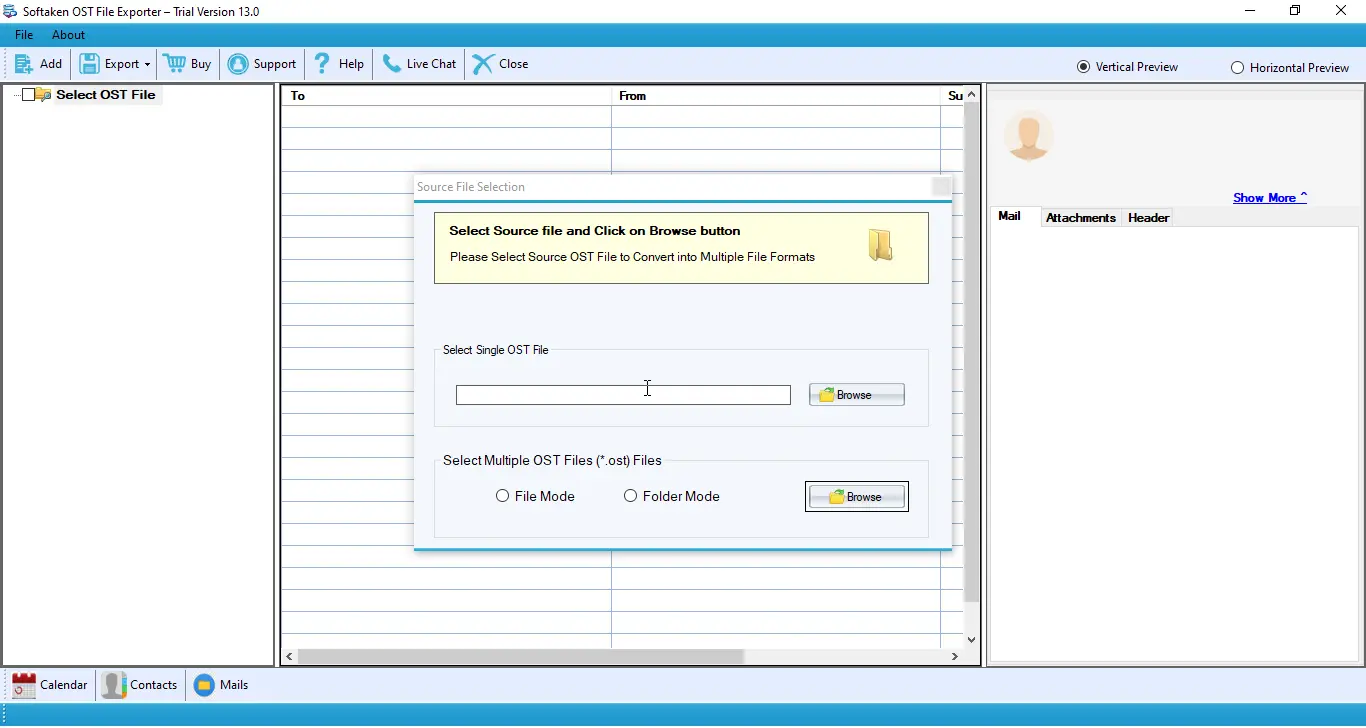
Select OST File — Softaken OST to MSG Converter

step 1 of 3 · click image to enlarge

Watch OST to MSG Demo

See Softaken OST File Exporter add OST files, preview the mailbox, choose MSG export, and save individual message files to your folder.

Convert OST emails to MSG format

  1. Run Softaken OST to MSG Converter and browse the OST file
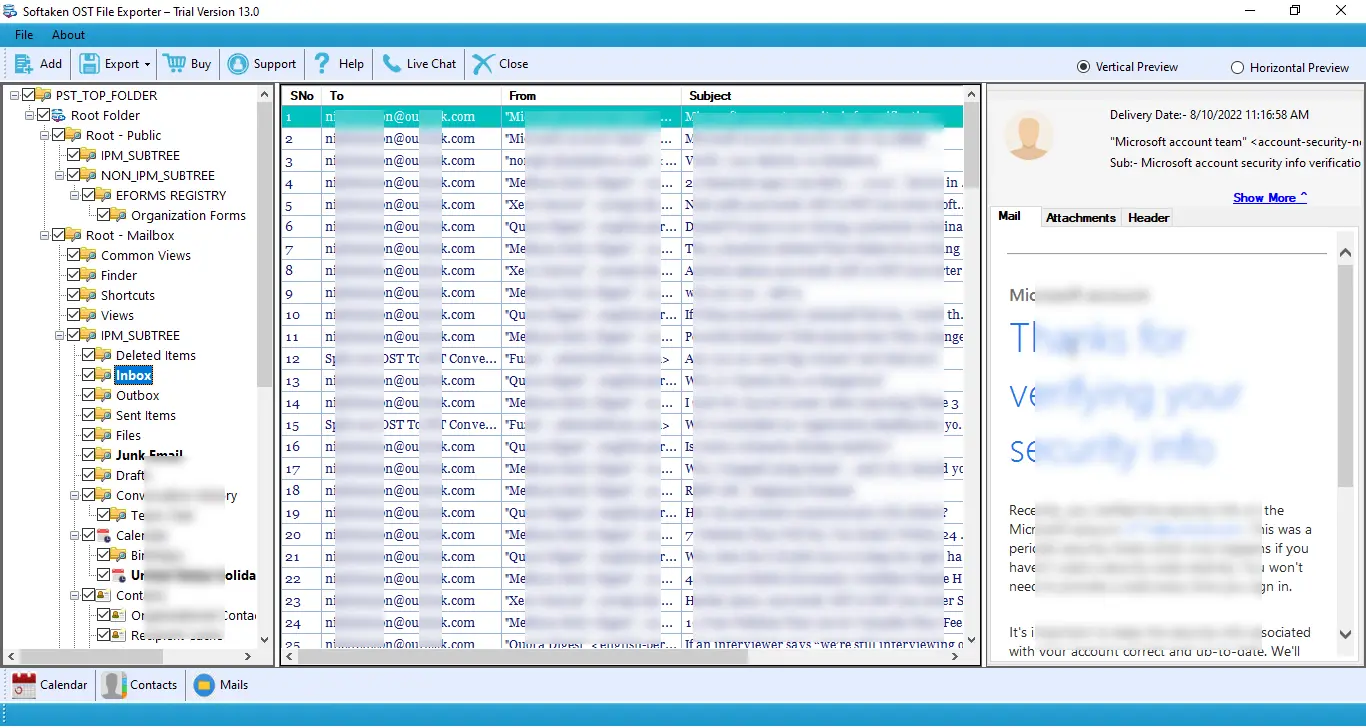
  2. Preview entire OST file with all folders in the left pane
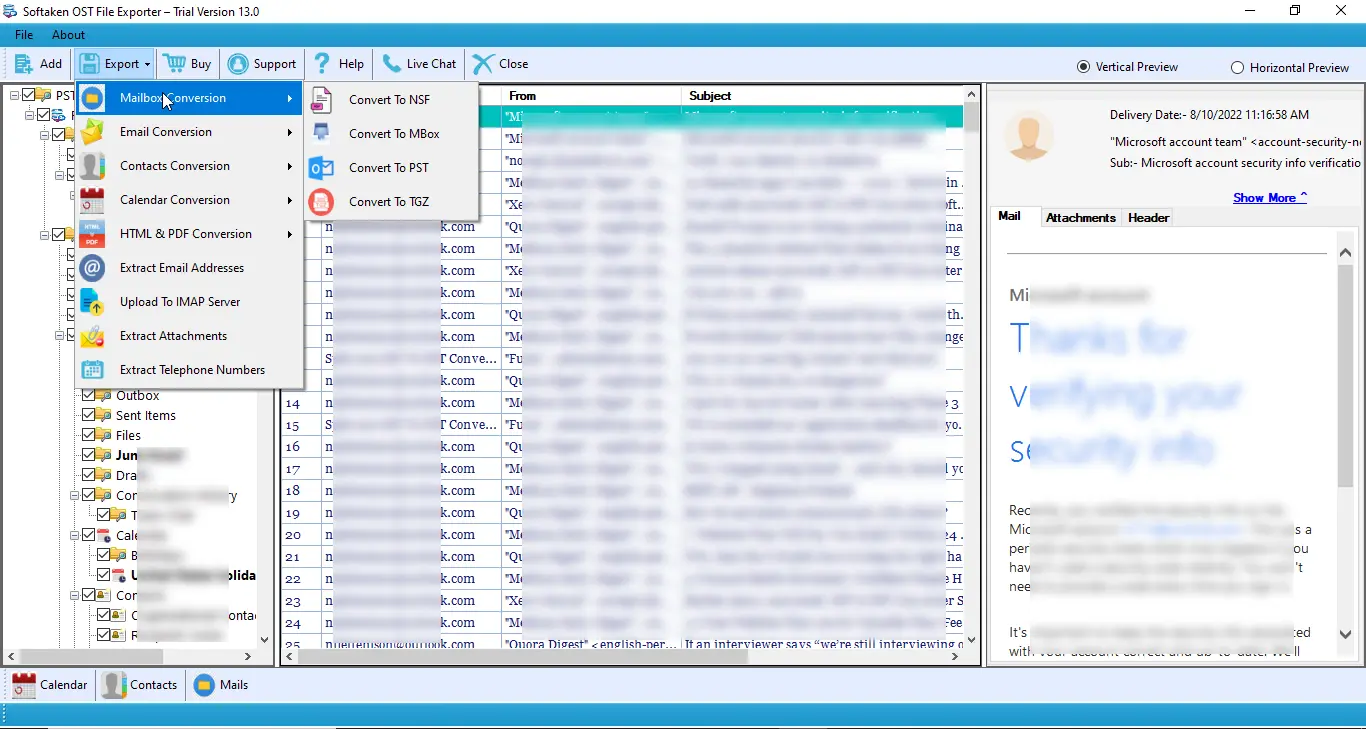
  3. Choose MSG format and select the destination path
  4. Click Convert Now — conversion is done in a few minutes

Features & Benefits of OST to MSG Converter

Convert All OST Properties to MSG

OST to MSG is an incredible application. It smoothly convert OST files including emails, attachments, contacts, journals and notes to MSG format with just a few simple clicks. Convert OST contact info to MSG or convert OST notes to MSG format along with to, cc, bcc etc.

Benefit: Convert All OST Properties to MSG.

Uncomplicated Data Conversion Achieved

Convert big sized as well as OST files that contain non-English characters. OST2MSG easily handles conversion of big sized files (up to a GB). To achieve top quality migration, OST converter tool transforms those OST files that contain double-byte characters.

Benefit: Uncomplicated Data Conversion Achieved.

Free Trial Version of OST to MSG

Try the free trial version first. It helps you to understand the smart features of OST to MSG conversion program. After satisfying with the utility, you will not hesitate to invest your money to this tool. With the license version, unlimited conversion of OST 2 MSG is performed.

Benefit: Free Trial Version of OST to MSG.

Provide Preview of Converted Data

OST to MSG Migration tool offers preview of the transformed OST files to give users assurance that quality is not avoided during conversion. In a tree structure format, users can see preview of OST files.

Benefit: Provide Preview of Converted Data.

Flexibility to Convert the Desired OST Files

The application saves the converted items at the desired location of your PC so that you will not get difficulty in locating those files. You can separately create a new folder to save MSG files for easy accessing. You can view the MSG file in Outlook.

Benefit: Flexibility to Convert the Desired OST Files.

Flexibility to Save the Migrated Items to Desired Location

Save the converted items at the desired location of your PC so that you will not get difficulty in locating those files.

Benefit: Flexibility to Save the Migrated Items to Desired.

Fast and Safe Conversion Process

This is a professional tool, gives importance to time by making conversion process fast and safe. It doesn't damage OST files. Also, it doesn't lose the content quality. No formatting and layout of the OST files be changed during the conversion process.

Benefit: Fast and Safe Conversion Process.

Rich User Interface

The tool supports rich quality user interface. It is easy to operate. Within a few times, you can become proficient to handle the application. It is designed so smartly to manage by any technical or non-technical user without facing any trouble.

Benefit: Rich User Interface.

Higher Quality Integrity

OST 2 MSG Conversion utility is supported on Windows 11, 10, 8.1, 8, 7 & Other · Mac · Linux. It runs smoothly with Outlook OST from Outlook 2024, 2021, 2019, 2016, 2013, 2010, 2007, and 2003 without interruptions. All other tasks keep going smoothly on the system.

Benefit: Higher Quality Integrity.

Frequently Asked Questions Regarding OST to MSG Converter

1. What is an MSG file and how can I open the converted files?

MSG is Outlook’s standard file format for a single email message. After export you get individual .msg files you can open in Microsoft Outlook and move to another system when you need them elsewhere.

2. Do I need to have Microsoft Outlook installed on my PC to convert OST to MSG?

Exported MSG files are meant to open in Outlook (including recent Outlook editions). Whether Outlook must be installed just to run the conversion isn’t spelled out on this page — the OST File Exportercovers reading OST files on Windows, Mac, and Linux, including a temporary copy when a file is in use.

3. Can I convert orphaned, inaccessible, or disconnected OST files into MSG format?

Yes for many offline or disconnected OST cases — a verified user converted an offline OST to MSG to move data elsewhere. For inaccessible data, Softaken also links to Recover OST. Family docs include recovery mode, auto recovery, and deep scan; severely corrupt files may need recovery before MSG export.

4. Does the tool save email attachments and embedded images inside the generated MSG files?

Yes. Conversion covers emails, attachments, notes, journals, contacts, events, and more — attachments go with the messages. A verified user reported a whole OST file including attachments converted to MSG.

5. Does the software provide automatic file naming options (e.g., Subject, Date, Sender) for MSG files?

Yes. Export forms include a Naming Convention (for mails) option — for example by subject or date — so exported MSG files are easier to find and sort. Specific Sender or Auto-Increment presets aren’t separately listed on this product page.

6. Will the conversion process preserve original email headers (To, From, CC, BCC, Date) and formatting?

Contact info and notes convert to MSG along with to, cc, bcc, and related fields. Content quality stays intact and formatting/layout of the OST data isn’t changed during conversion. Preview the mailbox in a tree structure before you save if you want to double-check.

7. Can I filter and export emails based on a specific date range rather than the entire OST file?

Yes. Export forms include No Filter / Enable Filter and Date Range (From / To) — export only items in the selected range (or other filter criteria) instead of the whole OST.

8. What are the specific capabilities and export limitations of the free trial version?

The free demo lets you convert 10 items so you can evaluate how OST to MSG export works. The full license unlocks unlimited conversion from $49. Available for Windows, Mac, and Linux.

Software Specifications

Windows · Mac · Linux OST to MSG export: Individual Outlook-supported message files from offline OST data. Part of the Softaken OST File Exporter family.

Individual MSG files: Export OST emails, attachments, contacts, notes, and journals to MSG. Date filter & naming (Subject / Date).

Preview & selective export: Tree-structure preview in the left pane before conversion; save MSG files to your chosen destination folder.

Supported

Windows 11, 10, 8.1, 8, 7 · Mac · Linux

Outlook OST

2024, 2021, 2019, 2016 · ANSI / Unicode

Demo

10 items

Pricing

Full from $49

Platform specifications

System requirements for Softaken OST to MSG Converter on each supported OS.

Windows

Desktop installer

Operating System
Windows 11, 10, 8.1, 8, 7 (32-bit & 64-bit)
Package
.exe installer (code-signed)
Processor
Intel, AMD, or compatible 64-bit/32-bit processor
RAM
512 MB Minimum
Disk Space
100 MB free for installation
Display
1024×768 or higher

macOS

Apple desktop build

Operating System
macOS 10.15 Catalina and later
Package
.dmg installer (code-signed)
Processor
Intel or Apple Silicon
RAM
512 MB Minimum
Disk Space
100 MB free for installation
Display
1280×800 or higher

Linux

AppImage & Debian package

Operating System
Ubuntu 18.04+, Debian 9+, CentOS 7+ and other modern distributions
Package
AppImage and .deb
Architecture
x86_64 (64-bit)
RAM
512 MB Minimum
Disk Space
100 MB free for installation
Desktop
GNOME, KDE, XFCE and similar

Key Specifications

SpecificationDetails
Product NameSoftaken OST to MSG Converter
Version16.0
InputOffline / orphaned Outlook OST
Output FormatIndividual MSG files
OS SupportedWindows 11, 10, 8.1, 8, 7 & Other · macOS · Linux
Outlook Supported2024, 2021, 2019, 2016, 2013, 2010, 2007, 2003
PrerequisiteMSG files open in Outlook MSG clients
ProcessorAny Pentium Class
Memory512 MB Minimum
Hard Disk100 MB of free space for software installation
Demo10 items
DeliveryElectronic · Via Email · Minutes: 15
Language / SupportEnglish · Emails, Chat & Skype
PlatformWindows · Mac · Linux

Product Details

Version
16.0
License
Free demo / Full
Support
Emails, Chat & Skype · [email protected]

Free demo vs. full version

The free demo exports up to 10 items so you can evaluate OST to MSG conversion. The full license is unlimited.

FeatureFree demoFull version
Convert OST emails to individual MSG filesAvailableAvailable
Export attachments, contacts, notes & journals to MSGAvailableAvailable
Preview OST items in tree structureAvailableAvailable
Selective folder / item conversionAvailableAvailable
Date range & filter optionsAvailableAvailable
Mail naming convention (subject, date)AvailableAvailable
Save MSG to chosen destination folderAvailableAvailable
Supported on Windows, Mac & LinuxAvailableAvailable
Limitation10 itemsUnlimited
PriceFREE$49
Softaken Reviews

What Our Users Say

Customer feedback on Softaken OST to MSG Converter.

Tammie DicksonCustomer feedback

United States

I have an offline OST file and wanted to convert it to MSG format as …

I have an offline OST file and wanted to convert it to MSG format as I want to move the OST file to another system due to some requirements. I tested many tools but finally, this tool worked like a magic for me. It easily converted entire OST data to MSG format.

Thomas SchwartzCustomer feedback

Canada

Thanks for providing such a smooth application which helped me to con…

Thanks for providing such a smooth application which helped me to convert Outlook 2013 OST file to MSG format. It nicely convert whole OST file including attachments. A great email migration utility!

Chris Du ToitCustomer feedback

Namibia

Softaken OST to MSG Converter works with 100% efficiency for conversi…

Softaken OST to MSG Converter works with 100% efficiency for conversion of all emails and attachments in a quick manner and without any data loss. I am really amazed with this application.

Review

Convert OST Emails to MSG

Load an offline OST file, preview the mailbox, and save messages as individual Outlook MSG files.

  • Windows · Mac · Linux
  • OST · MSG
  • Individual files · Attachments

Available for Windows, Mac, and Linux. Pick your OS, then download or buy. Free demo exports 10 items. Outlook-supported MSG files.