Avail the benefits of PST Duplicate Remover Application tool
One of the major concerns of Outlook users is how to stop downloading duplicate emails. In the Outlook POP3 email account,the emails get downloaded as duplicate items also. Thus,to stop doing this,users need to choose some professional tools.
If you are finding a reliable solution for removing the duplicate downloading emails. Then choose the trustworthy application for resolving the same issue.
What is the reason for duplicate emails downloaded in the email client?
There is an option on the email server. If users select the option and enabled to leave the emails on Server. Then,this will start download emails as duplicate. Some of the related reasons for duplicate email downloading on an email client. These are listed below:
- In an Outlook email account if users have selected incorrect settings. If the rules are not followed as required then it may lead to download emails duplicate.
- In some scenarios when there are different instances are running simultaneously. Then also this will cause to download emails as duplicate.
- If you have downloaded any third-party anti-virus application.
How Users Can Deal with the Outlook Duplicate emails?
Users can try some of the manual methods for controlling duplicate emails. Try to follow the steps given below. These guidelines can overcome the problem of duplicate emails.
Method 1-Try to disable the option of leaving a copy message on the Server
Users required to disable the option in the mail account. There is an option to leave a copy of the message on the Server. You need to disable this option on your email account manually. This will help not to download the copy email on your email account.
- Check out the steps for disabling this function in Outlook.
- Try to start the Outlook application on your local machine.
- Then click on the option named as File tab.
- There you will find the Info option. Under there you can click on Account settings.
- Try to click on the Email tab.
- There you will find your email account name. Then choose more settings.
- In the advanced tab. Users need to uncheck the option given as Leave a copy message on the Server.
Once you deselect the option. The downloading of duplicate emails will get resolved.
Check out another method for overcoming this problem
Method 2 - If you have selected any rules,then deselect all
There are some default rules in the email application. Sometimes users do not know what that means. So,they proceed by checking these options. Now you need to deselect these rules and proceed again. Here you will be able to know what options need to be deselected.
There are some rules which say to move the contents of the email from the inbox to a temporary folder. Users need to turn off these options for resolving issues. In Outlook 2007,users need not move their emails. While there is a simple process to change the location.
In account settings,users can change the desired location. This will be helpful in resolving problems related to duplicate emails.
Method 3- Try to disable the scanning process in Antivirus.
Sometimes the antivirus makes this problem for Outlook users. In antivirus,there is an option for scanning the emails in the background. Thus,users need to disable this option for overcoming the issue of duplicate downloading of emails.
Do you know how to delete similar emails in Outlook Server?
Outlook users can try the easy solution available online to merge different calendars. You will find the application easy to understand as well operating the same is simple. You need not have any technical background for working with this software. Follow the following steps and avail to merge the Outlook calendars.
Users will be great to know the simple steps for deleting duplicate emails from the Server.
Method 1 - Cleanup tool can help to delete the duplicate emails from Outlook Server
The MS Outlook Server comes with an inbuilt utility. This will help to clean the duplicate emails in few minutes. How you need to run the cleanup application.
Steps to follow clean up application
1) Try to launch MS Outlook. There you need to check the mailbox folder.
Then click on the Home tab and then click on the cleanup tool.
Clean up conversation option - The emails are available in the conversation folder. This option will delete the duplicate email data from there.
Clean up folder option:This option will help to delete similar emails from the folder.
Folders and subfolders clear - This option will help to delete the duplicate emails from different folders.
Another Best and Reliable Option to Delete Duplicate Emails Completely
Outlook users can try the professional application. The tools will help for deleting duplicate emails from the email client.
PST Duplicate removerapplication can help Outlook users with great benefits.
The software is simple to use and understand. Once you download the application and launch the same on your local machine. The following interface will be displayed to user.
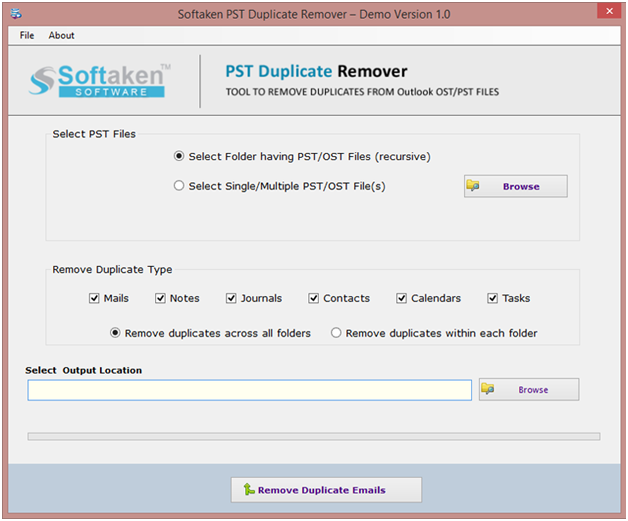
By clicking some of the simple options,users can remove duplicate emails. The software comes with a demo version as well. Users can download the freeware version for understanding the working of the application.
Users need to choose the options as per their needs.
Folder – Here,users need to add the OST/PST file folder. The software will automatically remove the duplicate folder.
Single/many files – If you need to add single OST/PST files. Then try to choose this option.
Browse – choose this option for selecting the path.
The last step is to remove the duplicate emails from the software
Remove emails across all folders – All duplicate emails from the folders will get removed from the Outlook email application.
Remove emails in the folder – From the folder the emails which are in a duplicate state. This option will help to delete those.
Thus,users recommended choosing the professional application rather than manual methods. This will make your time easy as well as work will not get hampered. The technical support team is also available for users to help them 24*7.
