SoftakenEML Duplicate Remover

Deduplicate Standard email message file (.eml) used by many clients. and macOS Mail app; exports often use EMLX or MBOX.Apple Mail single-message file (.emlx). with Softaken Compare or process items inside each folder on its own. or Compare or process items across multiple folders in one run. modes. Softaken lists no email client required, Keeps the original folder structure in the output., save a new file excluding duplicates, and a free demo that counts duplicates (save requires license).

Remove duplicate emails from EML and EMLX files

  • Demo: Count duplicates
  • Windows only
  • Within / Across folders
  • No email client
  • EML + EMLX
  • Facilitates removal of duplicate emails from EML
  • Removal facility from a single as well as multiple EML files
  • Duplicate emails are removed from EMLX files
  • Create a new EML/EMLX file excluding duplicates
  • Not necessary to install any email client to remove EML duplicates
  • Removal duplicate emails from various EML files of Microsoft desktop mail app (WLM) that commonly uses EML message files., Mozilla Thunderbird desktop email client (often MBOX-based)., Older Windows mail client that stores mail in DBX folders., etc.
  • Safe, quick and flawless removal of duplicate items
  • Desirable location path to save EML file with no duplicates
  • Operable simply on Windows 32 bit and 64 bit editions
EMLEMLXFolder / File modeWLM · Thunderbird · OEeM Client · Entourage

Available for Windows. Softaken EML Duplicate Remover removes duplicate emails from EML and EMLX—within or across folders, no email client required.

100% Safe & Verified Download Windows installer is digitally signed with a trusted certificate, ensuring authentic publisher identity and zero tampering.

Softaken EML Duplicate Remover
Safe & Secure DownloadIndependently scanned with multiple antivirus engines.
100% Safe

Quick Facts

Input
EML · EMLX
Version
1.0 · 4.1 MB
Demo
Count duplicates (no save)
Platform
Windows

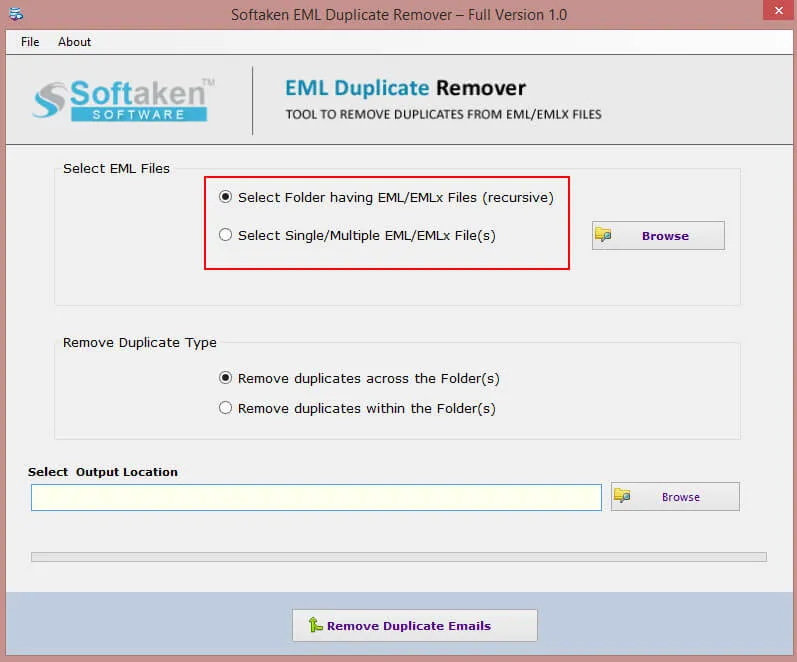
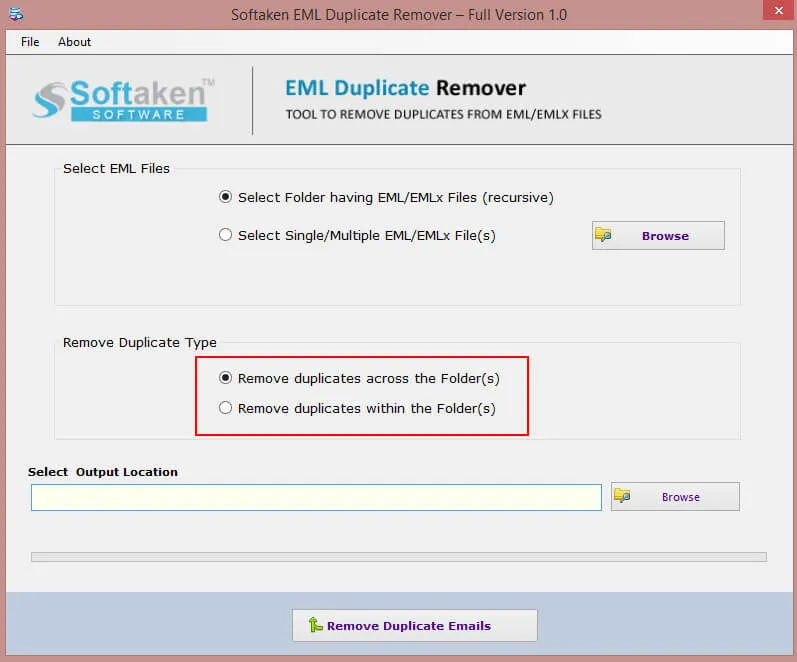
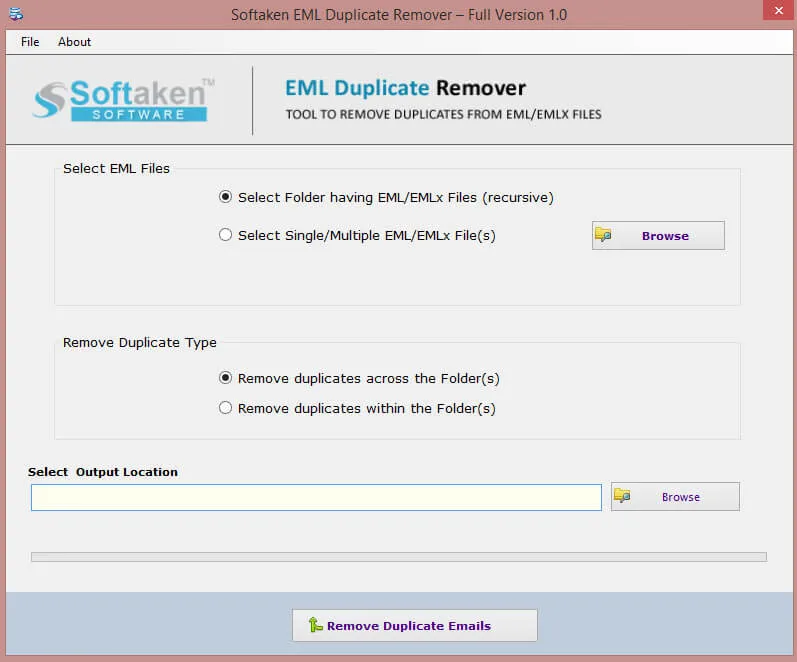
Softaken EML Duplicate Remover entirely removes duplicate emails from all folders of EML and EMLX. Instant and fast way to exclude duplicate emails from EML files without any harm to original files. The tool is used to exclude duplicate items from unlimited EML and EMLX files. Softaken docs list Folder mode or single/multiple file add, then remove duplicates within the folder or across the folder, browse a save location, and hit Remove Duplicate Emails.

Software interface

Screenshots from Softaken EML Duplicate Remover docs and product UI. Click each step to enlarge.

Buy License Online Free demo: count duplicates
EML Duplicate Remover home window - Folder or File mode

step 1 of 4

How to remove duplicate EML emails

Softaken docs list these steps to remove EML/EMLX duplicates:

Step-by-step

Softaken docs list these steps to remove EML/EMLX duplicates:

  1. Download, install, and launch — EML Duplicate Remover on Windows.
  2. Choose Folder mode — or add single/multiple EML/EMLX files.
  3. Select within or across folders — then browse a save location.
  4. Hit Remove Duplicate Emails — to start the process.

Features & Benefits of EML Duplicate Remover

Remove duplicate emails from EML and EMLX with Softaken—within or across folders, no email client required.

Easy and safe utility

Email Duplicate Remover is quick in removing the duplicate items from EML files. It successfully load EML files and remove EML file duplicates. It is very easy to use, safely scans EML messages prior excluding duplicate items.

Benefit: Keep source files unchanged during processing.

Batch removal of duplicates

The program effectively removes duplicate mail items from single as well as multiple EML files in one sitting. With this feature, users can either select single or various EML files at once for filtering items by removing duplicates.

Benefit: Remove repeated items safely.

Save data in new file

Once you have done with the process of excluding duplicate items from EML, you can save the filtered items in new EML file at desire location in the system. It is a matter of few clicks to exclude duplicate messages from EML.

Benefit: Save data in new file.

Support for all Windows

EML Duplicate Item Remover Tool works with all editions of Windows operating system from the earlier to the latest version. Freely download the program on Windows 11, 10, 8.1, 8, 7, Vista, XP, and others without any trouble.

Benefit: Support for all Windows.

Perform EMLX email removal

EMLX Duplicate Remover Tool comfortably load Apple Mail EMLX files in a few seconds and can remove duplicate items. Email Duplicate Remover Free version is also available for testing purpose by all users prior paying for it.

Benefit: Perform EMLX email removal.

Compatible with all EML-based applications

EML Duplicate Remover Program does not differentiate with the platform and email program where EML files are created. It successfully considers EML files of Windows Live Mail, Thunderbird, eM client, Outlook Express, Entourage, etc.

Benefit: Compatible with all EML-based applications.

EML Duplicate Remover FAQs

1. Which parameters (such as Message-ID, Subject, Sender, Date, Body) are used to detect duplicate EML files?

The page describes duplicate detection based on email content and metadata. It does not list separate matching checkboxes for Message-ID, Subject, Sender, Date or Body.

2. Can the software remove duplicate emails across multiple folders, or only within the same folder?

Both options are available. You can remove duplicates within a folder or compare files across folders while keeping the folder hierarchy.

3. Does the tool permanently delete duplicates, or can it move them to a separate backup folder?

It creates a new EML or EMLX file without the duplicates and saves it where you choose, leaving the originals untouched. A separate move-to-backup-folder option is not listed.

4. Does the deduplication tool support both standard .EML and Apple Mail .EMLX files?

Yes. It can find and remove duplicates from both EML and Apple Mail EMLX files, then create a clean output file.

5. Do I need to install Thunderbird, Windows Live Mail, or MS Outlook to run the duplicate remover?

No. An email client is not required to remove duplicates from EML files. Thunderbird, Windows Live Mail and Outlook are listed as source types, not required installations.

6. Will original unique emails, email attachments, and RFC headers remain completely unaltered?

Yes. The original files are scanned before duplicates are excluded, and the page says they are not harmed. Attachment preservation and a full RFC header inventory are not listed separately.

7. Can I process large archives containing tens of thousands of EML files in a single batch?

Yes. You can add multiple EML or EMLX files and process them in one batch. The page lists unlimited files and Folder Mode, although it does not promise a specific tens-of-thousands count.

8. What are the specific capabilities and removal limits of the free trial demo version?

The demo lets you count and find duplicate items for evaluation. It cannot save the filtered data; a full license is needed to remove duplicates and save the cleaned output.

Software Specifications

Softaken EML Duplicate Remover. Softaken documents EML/EMLX dedupe with within-folder and across-folder modes, Folder/File load, and save a new file excluding duplicates. Named Message-ID/Subject/From criteria matrices, permanent-delete vs move-to-folder actions, Zoho as a source, RFC 822 inventories, and “100% offline / zero telemetry” slogans are not listed (see FAQs). Demo: Count Duplicate Emails (no save).

Free demo evaluation: Softaken lists Count Duplicate Emails; docs say trial finds duplicates so you can test before buying, but cannot save filtered data. A “10 to 25 per folder” range is not stated.

Product Info

Version
1.0
Size
4.1 MB
Starting Price
$49
Full license
Remove & save

Input & Output

Input
EML / EMLX (WLM, Thunderbird, OE, eM Client, Entourage, etc.)
Output
New EML/EMLX excluding duplicates
Modes
Folder / File; within / across folders
Platform
Windows only (not Mac)

System Requirement

Processor
Any Pentium Class
Operating System
Windows 11, 10, 8.1, 8, 7 & Other
Memory
512 MB Minimum
Hard Disk
100 MB of free space for software installation

Software Delivery

Electronic
Via Email
Minutes
15
Prerequisite
No email client required
Demo
Count duplicates (no save)

Platform specifications

System requirements for the Softaken Windows desktop installer.

Windows

Desktop installer

Operating System
Windows 11, 10, 8.1, 8, 7 & Other (32-bit & 64-bit) supported
Package
.exe installer (code-signed)
Processor
Any Pentium Class
RAM
512 MB Minimum
Disk Space
100 MB free for installation
Display
1024×768 or higher
Publisher
Softaken Software
Platforms
Windows
Demo
Count duplicates (no save)

Demo Version & Comparison

Softaken’s feature comparison lists the demo limitation as Count Duplicate Emails. Softaken docs also state the trial can find duplicate items so you can test before buying, but cannot save the filtered data. Softaken lists within-folder and across-folder modes, folder hierarchy, and create/save a new EML/EMLX file excluding duplicates. A “10 to 25 duplicate items per folder” range is not stated.

FeaturesDemo VersionFull Version
Remove duplicates from multiple EML/EMLX filesAvailableAvailable
Support and maintain Folder Structure hierarchyAvailableAvailable
Remove duplicate EML/EMLX files within folder(s)AvailableAvailable
Remove duplicate EML/EMLX files across the folder(s)AvailableAvailable
Support Windows 11/10/8/7/othersAvailableAvailable
LimitationCount Duplicate Emails (no save)Remove Duplicates & save
PriceFREE$49
Softaken Reviews

What Our Users Say

Client feedback from Softaken customers who remove duplicate EML and EMLX emails on Windows.

Jeff HeermannCustomer feedback

United States

5/5

I was using Windows Live Mail from a long time and as now I switched …

I was using Windows Live Mail from a long time and as now I switched to Outlook so I kept EML files as a backup. Now, I want to use these files but before this, I want to filter duplicate items from them. Manually, it was not possible for me. Then, I came to know about EML Duplicate Remover Program and it perform the desired task in a few minutes.

What I liked

Fast EML duplicate filter

Jorge GalvezCustomer feedback

Peru

5/5

Excluding duplicate items from 1500+ EMLX files manually was impossible.

Excluding duplicate items from 1500+ EMLX files manually was impossible. My friend recommended me EMLX Duplicate Remover and the task becomes a child's play for me with this program.

What I liked

Bulk EMLX dedupe

Reagan DotanCustomer feedback

United States

5/5

Fantastic and easy to handle application.

Fantastic and easy to handle application. The credit goes to Softaken developers. Brilliant work is done by the team!

What I liked

Easy to use

Show more reviews
Pat McenroeCustomer feedback

Ireland

5/5

It is the best utility for me to fix duplicate emails from Thunderbird EML files.

It is the best utility for me to fix duplicate emails from Thunderbird EML files. I love the processing speed of this utility and want to suggest it to the needy users.

What I liked

Thunderbird EML speed

Review

Remove duplicate EML and EMLX emails on Windows

Try the free demo to count duplicates, then unlock remove & save with a full license.

  • Windows only
  • EML · EMLX
  • Within / Across folders

Available for Windows. Softaken EML Duplicate Remover removes duplicate emails from EML and EMLX—within or across folders, no email client required.