 1
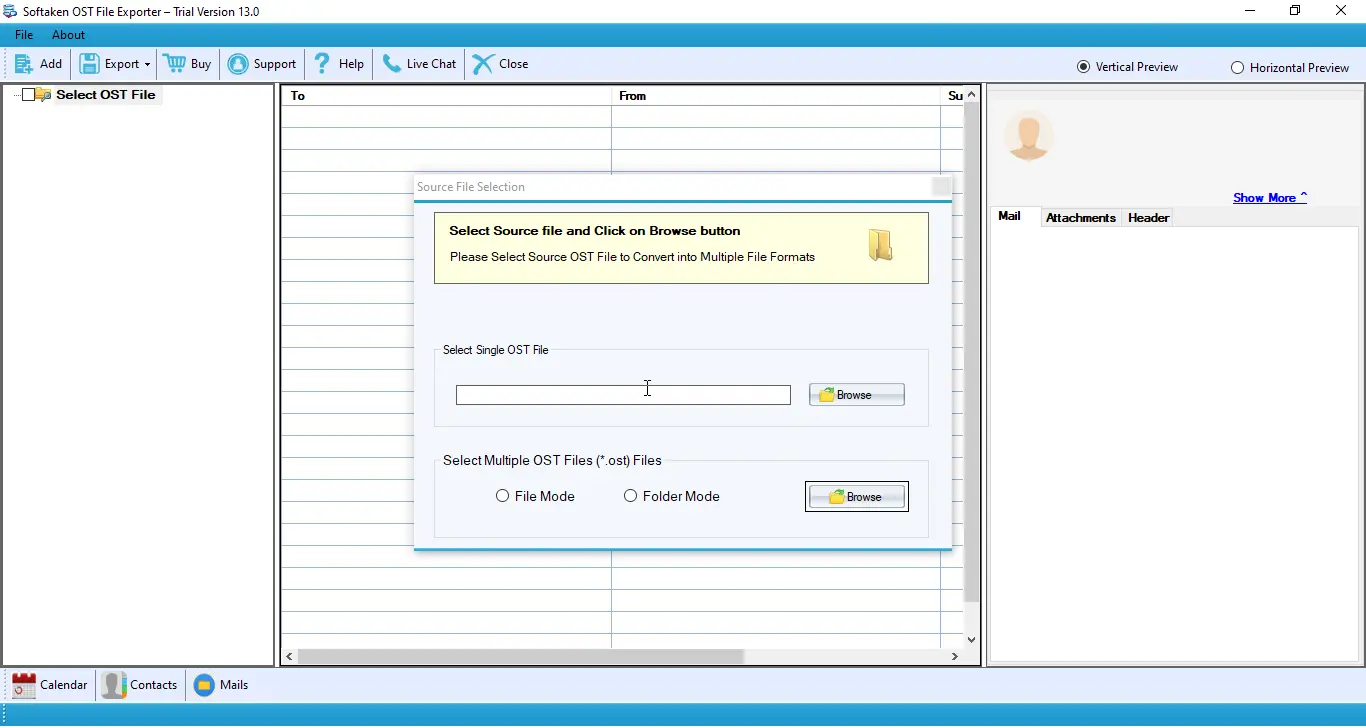
1Browse OST file
Use Browse to locate and open the OST file you want to view with the file filter facility.

Independently scanned with multiple antivirus engines.
OST stands for Offline Storage Tablethat stores all MS Outlook items including notes,journals,calendars,tasks etc. An OST file can be accessed in the MS Outlook environment. What will happen if you try to open an OST file without MS Outlook? It cannot be opened. If you still need to open it,install the OST file Viewer. It is a sophisticated program which is free to download. You are not going to pay a penny to install the tool. Use it at free of cost.
100% standalone OST reader — open,read,and examine Outlook OST files without requiring Microsoft Outlook or Exchange Server installation.Browse your system to open the specific OST you want. Folder list appears on the left pane so you can pick folders and view them one by one. Email properties such as To,From,CC,and BCC are supported.
Browse OST,folder tree,item list,and preview panes.
1Use Browse to locate and open the OST file you want to view with the file filter facility.
2Left-side folder list,mailbox items,and preview — emails with To,From,CC,BCC and other Outlook items such as contacts,calendars,notes,tasks and journals.
Click a screenshot to enlarge. Interface shots show Softaken OST mailbox UI used with this freeware family.
View and read OST files without an MS Outlook environment — including during weak or no connectivity with Exchange Server.
Access emails,contacts,calendars,notes,journals and tasks. Email properties such as CC,BCC,To and From are supported.
Error-free view — no file is damaged or corrupted when you open the selected OST. Original content is not changed by the safe OST reader.

OST Viewer is a standalone tool that allows users to view emails that exist in the OST file without an MS Outlook environment. Users can view and read OST files without any support of MS Outlook. Easily view OST files during weak or no connectivity with Exchange Server.
The OST file created by MS Exchange Servercontains important information like notes,tasks,contacts,messages etc. With OST Viewer,users are able to view whole items of OST files with just a few simple clicks. It supports whole email properties like CC,BCC,To and From.
OST Viewer supports viewing those OST files that you have selected to view. Browse the system to search the specific OST file you want to open.
OST Viewer offers error-free view. No file is damaged or corrupted when users want to open the selected OST file. It is a sophisticated tool that takes care of your important OST files.
Freeware OST Viewer application provides a complete list of OST folders on the left side of the software panel. You can pick the folders of your choice from the left pane and view them completely one by one.
The application doesn’t create trouble opening any size OST file. You can view any large size OST file using the freeware. Users don’t have to fear about file corruption. Quality and systematic view is provided by the software.
Clear freeware vs convert/export product boundary.
| Capability | Free OST Viewer | OST File Exporter |
|---|---|---|
| License | 100% freeware ($0) to install and view | Paid convert/export product (demo available) |
| Open / view OST | Yes — view mailbox items without Outlook | Yes — plus export workflows |
| Folder list &item view | Yes — left folder pane;view folders one by one | Yes — preview before export |
| Convert / export (PST,EML,MBOX,MSG,etc.) | Not on this freeware page | Yes — see OST File Exporter |
Is this OST Viewer completely free forever,and how does it differ from the Pro OST Exporter version?
100% Free OST Viewer— freeware to install and view as described on this page. View-only freeware;conversion/export is handled by Softaken’s separate OST File Exporterproduct.
What you get:no Outlook required · weak/no Exchange connectivity viewing · left folder list · emails,contacts,calendars,notes,journals,tasks · To/From/CC/BCC · any size OST · file filter to open the desired file.
Safe viewing:Error-free view — the tool does not damage or change the OST file and its content.
Product Info
Formats &Items
InputOutlook OST
Outlook itemsEmails,contacts,calendars,notes,journals
Also viewTasks;To,From,CC,BCC
File sizeAny / large size OST
Viewer Capabilities
Outlook requiredNo
Exchange installNot required to view
FoldersLeft-pane folder list
FilterOpen desired OST file
System Requirement
ProcessorAny Pentium Class
Operating SystemWindows 11,10,8.1,8,7 &Other
Memory512 MB Minimum
Hard Disk100 MB free space
Interface Available
Bichler Verified
Austria
I have a huge pile of OST files and I want to view them. After a lot of struggle,I found OST Viewer and with the help of it,I was able to view these files quickly within few simple steps.
Raman Verified
Indonesia
The software has only three steps to view all size OST files and it worked quickly with the easily rememberable steps. The whole task got completed in few moments.
Rahlf Verified
United States
I have some OST files but could not access these files because now I don’t have MS Outlook installed on my system. I was looking for a reliable tool for a long time and finally,I got OST reader tool from one of my friend.
Holland Verified
Netherlands
It is a highly supportive tool to view OST files completely. I used this tool to view my thousands of OST files and got detailed viewing of these files. Really a big thank to Softaken team for this freeware.
No. Standalone freeware — no MS Outlook installation required;works with weak or no Exchange connectivity.
Standalone viewing without Outlook/Exchange install is described;explicit orphaned/deleted-user recovery is not listed separately.
PAD lists Outlook 2016–2003 and lower. 2024/2021/2019/Microsoft 365 are not named on this page.
Views emails,contacts,calendars,notes,journals,tasks and To/From/CC/BCC. Attachment preview not listed separately.
Any/large size OST supported. Encrypted or corrupted OST open is not listed.
Safe OST reader — does not change OST content. Forensic/RFC bit-level wording is not listed.
Mailbox sender/keyword/date search is not listed. Browse folders from the left pane after opening an OST.
Yes,freeware for viewing. Conversion/export is Softaken OST File Exporter,a separate product.
| Item | Details |
|---|---|
| Product | Free OST Viewer |
| Publisher | Softaken Software |
| Platforms | Windows |
| Input | Outlook OST |
| License | Freeware ($0) |
| Related convert | OST File Exporter |
| Page | https://www.softaken.com/free-ost-viewer |
