Outlook Archive — PST / MSG
In case you would like to access or save Live.com to MS Outlook for Windows, do it with live.com to PST or Live.com to MSG. The utility supports 2 file formats to export data to Outlook 2003, 2007, 2010 and 2013.
@live.com is somewhat like Gmail and Hotmail. The cloud based mail service is easy to operate. It allows its users to send and receive emails and chat. Like Gmail and other server based mail service, you cannot entirely depend on live.com for data storage because it has various risks:
Looking at these problems, live.com Backup program has been introduced by us. It allows you to export data so swiftly and fast.
See Softaken Live.com Backup (Hotmail Backup Tool) connect your account, select folders, pick a format, and save emails locally — without needing Outlook desktop to run the backup.
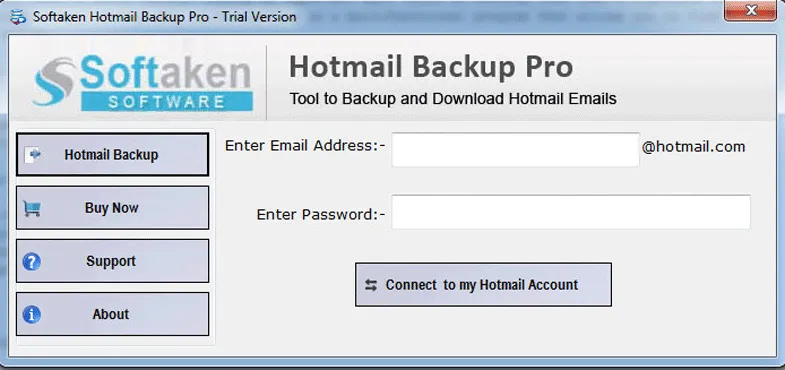
Enter your Live.com / Hotmail email and password (or app password), then authenticate.
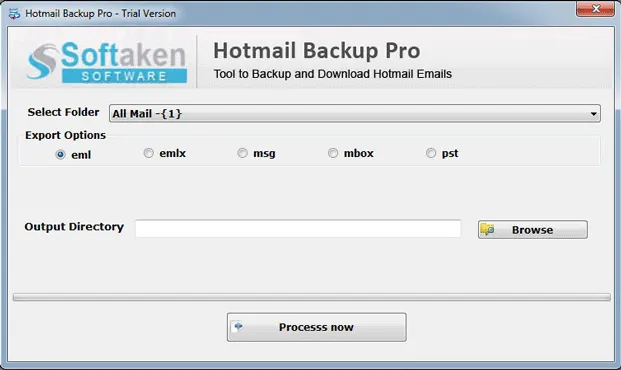
Choose a specific folder or all mail — Inbox, Sent, Draft, Deleted, and more.
Pick PST, MSG, EML, EMLX, or MBOX and set the output folder on your PC.
Demo downloads 10 items from each folder. Full license is $29. Walkthrough: demo video · user guide.
In case you would like to access or save Live.com to MS Outlook for Windows, do it with live.com to PST or Live.com to MSG. The utility supports 2 file formats to export data to Outlook 2003, 2007, 2010 and 2013.
If you are looking for fast and accurate conversion solution to Thunderbird, WLM, Mac Mail, Entourage and several other email clients, choose Live.com to EML/EMLX or Live.com to MBOX.

In case you would like to access or save Live.com to MS Outlook for Windows, do it with live.com to PST or Live.com to MSG. The utility supports 2 file formats to export data to Outlook 2003, 2007, 2010 and 2013.
All the resultant data is exported to the user's directed file format and in any local folder which is decided by the user. Direct the tool about the folder or sub-folder you would like to store Live Mail data. The utility saves it in no time.
If you are looking for fast and accurate conversion solution to Thunderbird, WLM, Mac Mail, Entourage and several other email clients, choose Live.com to EML/EMLX or Live.com to MBOX. You are free to choose any of these backup options.
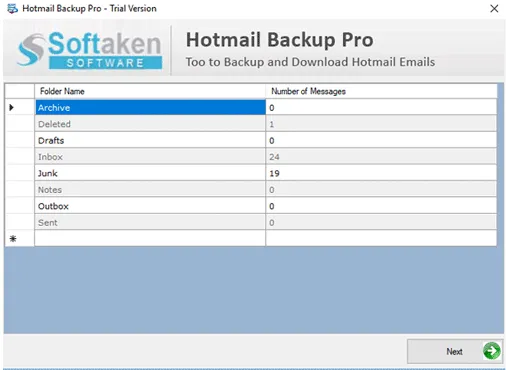
Every account folders are exported safely. The tool backups Live Mail effortlessly by scanning the emails along with their key components such as CC, BCC, To, Subject, Date and Attachments. All folders are scanned including Inbox, Sent, Draft, Deleted etc…
Connect with the desirable Live Mail account. To connect with a particular account, the tool needs the right username and password. Once you provide the tool with the particular information, it automatically establishes connection with the account.
This is a remarkable utility. By examining the tool demo version you can come to know about the key features it holds. The app carries a few simple tabs that describe their role in backup. There is hardly any technical support required.
Free Demo connects to your account, previews mailbox folders, and downloads up to 10 items from each folder into the selected output format.
The free demo downloads 10 items from each folder. The full version is unlimited. Personal license is $29.
System Requirement
ProcessorAny Pentium Class
Operating SystemWindows 11, 10, 8.1, 8, 7 & Other
Memory512 MB Minimum
Hard Disk100 MB of free space for software installation
Software Delivery
ElectronicVia Email
Minutes15
Demo10 items from each folder
Full License$29
Interface Available
Language SupportedEnglish
Support OptionEmails, Chat & Skype
PlatformWindows only
ProductLive.com Backup
Download Guides

William Cook Verified
Brazil
I have examined the tool. Its performance is exactly the same as it describes. I have exported Live Mail to MSG without any worry. At first I was worried but all my doubts were cleared after seeing the conversion accuracy.
Tony Lapa Verified
United States
I was assigned with the task of converting Live Mail to Outlook for over 10 systems. I was nervous but feeling so lucky after trying your app. It did this so well. I didn't believe that in such a nominal price I found a valuable tool.
Benoit Lacasse Verified
Canada
I don't know about others but it is excellent for me. My mails are now saved and well organized too.
Patrick Mckee Verified
United States
A worthy software for individuals like me who want valuable goods in small prices.
Use your Live.com email and password, or a Microsoft app password when MFA is enabled. Softaken does not claim OAuth browser login on this landing. See the Hotmail third-party apps guide.
This page focuses on @live.com. Softaken Live.com Backup is the Hotmail Backup Tool for Microsoft personal webmail; Outlook.com Backup covers Hotmail / Outlook.com for the same family.
No. Softaken downloads Live.com mail to PST/MSG/EML/EMLX/MBOX on Windows without Outlook desktop to run the export.
This landing documents PST, MSG, EML, EMLX, and MBOX with attachments. PDF is not listed here; the Outlook.com Backup page for the same tool family also lists PDF.
Yes. Choose all mail or a particular folder, including Inbox, Sent, Draft, and Deleted.
CC, BCC, To, Subject, Date, and Attachments are retained. Broader RFC/HTML styling USPs are not detailed separately on this landing.
A date-range filter is not claimed on this page. Select folders or all mail instead.
Demo: 10 items from each folder. Full: unlimited from $29. No 10–25 matrix stated.
| Item | Details |
|---|---|
| Product | Live.com Backup |
| Publisher | Softaken Software |
| Platforms | Windows |
| Demo | 10 items from each folder |
| Price | From $29 |
| Page | https://www.softaken.com/live-com-backup |