SoftakenMerge vCard Pro

Independent program: Smart and interactive interface to operate independently — no third app required to perform the merge operation.

Your search for a reliable Contact card format commonly saved as .vcf. merge program is over now. Softaken vCard merger provides merge of multiple vCard files to create one strong vCard file. It helps to avoid data clutter and encourages smart data management.

  • VCF
  • vCard
  • Multiple Files
  • Folder + Subfolder
  • Preview
  • Merge multiple small vCard contact file (.vcf). files into single vCard
  • Capable of merging selective VCF contacts
  • Option of merging selective VCF contacts
  • Keep all contact information intact after merging
  • Support VCF files in various platforms
  • Provide preview VCF contacts before merge
  • Sort the contacts with respect to the attributes
  • Smart and interactive interface to operate independently

Note: Free demo merges 10 items. Softaken Merge vCard Pro is a Windows tool — no Outlook required.

Available for Windows. Softaken Merge vCard Pro runs standalone — no Outlook or third-party app required.

Softaken Merge vCard Pro box
Safe & Secure DownloadWindows desktop tool to merge VCF files. No Outlook required.
Demo Available

Quick Facts

Input
Multiple VCF / vCard
Output
Single merged VCF
License
Trial + Full
Platform
Windows

Are you tired of unnecessary data clutter? Do you want to manage VCF contact files? The best solution is to merge VCF files to create one single VCF. The tool helps to arrange VCF files without losing quality.

Software interface

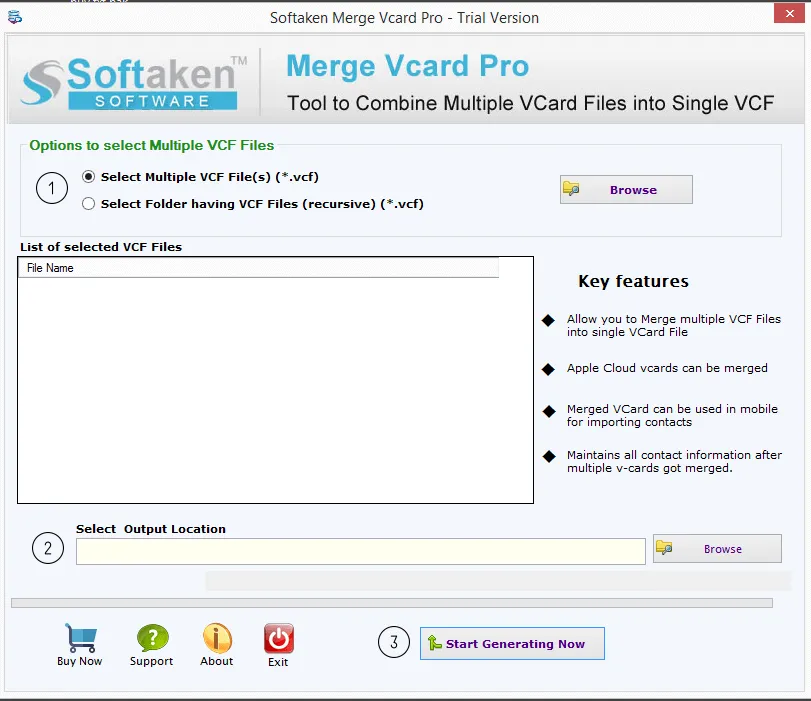
Real Softaken Merge vCard Pro screens: add VCF files or a folder, preview contacts, then save one merged VCF. Click each step to enlarge.

Buy License Online Full license available
Add VCF Files / Folder — Softaken Merge vCard Pro

step 1 of 3

Watch Merge vCard Demo

Add VCF files or a folder, preview contacts, then merge into one strong vCard — Softaken runs as a standalone Windows utility.

Merge multiple VCF files into one

See Softaken Merge vCard Pro on Windows: load files or folders, preview contact fields, then save one merged VCF — without Outlook.

  1. Add multiple VCF files or a folder (and subfolder).
  2. Preview name, company, and phone fields.
  3. Choose an output location and merge into one vCard.

Features & Benefits of Merge vCard Pro

Merge Multiple VCF Files into One

The incredible tool has been designed to merge more than one VCF file into single vCard file. Users can merge two, three, five or more VCF files together to create one strong VCF file. Thus, file management becomes an easy goal to achieve.

Benefit: Merge Multiple VCF Files into One.

Merge Required VCF Files Only

The utility doesn't select VCF files automatically. It allows users to select required VCF files manually to merge them together. Users have freedom to select VCF files of any size. It merges data intact.

Benefit: Merge Required VCF Files Only.

Show Preview of Uploaded Data

The utility provides clean preview of uploaded VCF files. It shows complete preview of the uploaded VCF file including full name, company, business phone, business fax, home phone and mobile phone.

Benefit: Show Preview of Uploaded Data.

Keep File Quality Intact

Merge VCF is an advanced program which has been designed to keep the data quality intact. It retains original structure of all contacts. All meta properties of contacts are retained including text, number and symbol.

Benefit: Keep File Quality Intact.

Simple Interface

The interface of VCF merger is simple. It has single window which is well descriptive. It shows the number of VCF files selected by users and what should be the next step to merge data. No deep technical help is required by the app.

Benefit: Simple Interface.

Free Demo Trial

Softaken has offered free demo trial of VCF merger. The free version will let you know whether the app fits to your needs. Don't forget to download the light tool because it doesn't consume more data and keep file quality intact.

Benefit: Free Demo Trial.

Merge vCard Pro FAQs

1. Which vCard versions (2.1, 3.0, 4.0) does the software support for merging?

Exact labels like 2.1, 3.0, or 4.0 aren’t broken out on this page. It’s built to merge standard VCF / vCard files from various platforms — if your contacts are normal .vcf files, you can add and merge them here.

2. Can I import the single merged VCF file directly into an iPhone (iCloud) or Android device?

iPhone, iCloud, and Android aren’t named as import targets here. You get one merged VCF on Windows that you can move wherever you need. This tool itself runs on Windows only.

3. Will the tool preserve contact profile photos, company details, and custom notes after merging?

Contact details stay intact — original structure and meta properties (text, numbers, symbols). Preview shows full name, company, business phone, business fax, home phone, and mobile. Profile photos and custom notes aren’t called out separately on this page.

4. Does the software automatically detect and remove duplicate contacts during the merge operation?

No automatic duplicate cleanup is claimed here. You pick the VCF files to merge; if you want to check for duplicates, do that in preview or with a separate duplicate remover before or after.

5. Can I merge thousands of separate VCF files simultaneously using the batch folder option?

You can merge two, three, five or more VCF files, and add a folder (and subfolder) of VCF files. There’s no stated file-size limit. A hard “thousands” number isn’t listed. The free demo merges 10 items.

6. Do I need any third-party software (such as Microsoft Outlook) installed to merge VCF files?

No. It’s an independent Windows program — you don’t need Outlook or another third-party app just to merge. The interface walks you through the steps on its own.

7. Can I merge VCF files exported from different platforms (e.g., mixing iCloud and Android contacts)?

The page says VCF files from various platforms are supported. It doesn’t name iCloud, Android, Google Contacts, or Outlook as specific sources — if the exports are standard .vcf files, you can add them together and merge.

8. What are the specific capabilities and file merging limitations of the free trial demo version?

The free demo lets you test the merge with up to 10 items. The full license unlocks unlimited merging from $29. A “10 to 25 VCF files” demo range isn’t stated.

Merge vCard Pro Specifications

Selective merge: Add multiple VCF files or a folder + subfolder, preview contacts, then save one merged vCard. Contact information stays intact.

Standalone Windows tool: No Outlook or third-party app required. Supported on Windows 11, 10, 8.1, 8, and 7.

Free demo evaluation: Try the merge workflow with Softaken-documented limit: 10 items. Full license unlocks unlimited merging.

Software Information

Product
Merge vCard Pro
Version
1.0
Operating System
Windows 11, 10, 8.1, 8, 7
Outlook / install
Standalone — no Outlook required

Supported & Format

Input
Multiple VCF / vCard files
Output
Single merged VCF
License
Trial + Full
Language
English

System Requirements

Processor
Any Pentium Class
RAM
512 MB Minimum
Hard Disk
100 MB free space for installation
Display
1024x768 resolution

Software Delivery

Electronic
Via Email
Delivery Time
15 Minutes
Full License
From $29
Demo
10 items

Product Details

License
Free demo / Full
Platform
Windows
Support
Emails, Chat & Skype

Demo Version & Comparison

Free demo merges 10 items so you can test the workflow. Full license unlocks unlimited VCF merging on Windows.

FeaturesDemo VersionFull Version
Merge Multiple VCF files into Single VcardAvailableAvailable
Add Folder and Subfolder having Multiple VCFAvailableAvailable
Support Windows 11/10/8/7 & OthersAvailableAvailable
Limitation10 itemsUnlimited
PriceFREE$29
Softaken Reviews

What Our Users Say

Customer feedback on Softaken Merge vCard Pro.

Peter JunkerCustomer feedback

Denmark

Your team is cooperative.

Your team is cooperative. We have found no trouble in installing and running the app. It works the way you have described. Quite satisfied with its performance.

Norbert NieleckCustomer feedback

Germany

Hi team! It is my second app from you guys.

Hi team! It is my second app from you guys. The performance of the previous one is all good. You have maintained the trust. I hope the second app will meet my expectations.

Marques CatelCustomer feedback

Brazil

My decision to purchase VCF merge from you is nevertheless correct.

My decision to purchase VCF merge from you is nevertheless correct. I have merged over 100 VCF files. It has retained the quality and above my expectations.

Review

Merge VCF files on Windows

Try the free demo (10 items), then unlock unlimited merging with a full Softaken Merge vCard Pro license.

  • Windows
  • Folder + Subfolder
  • No Outlook required

Available for Windows. Softaken Merge vCard Pro runs standalone — no Outlook or third-party app required.