

Softaken Outlook to Apple Mail Converter — PST to MBOX / EMLX

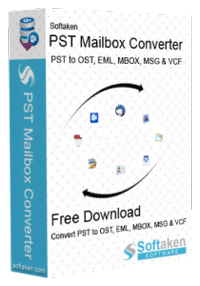
Softaken Outlook to Apple Mail Converter

Swift and Reliable Way to Convert Outlook Emails to Apple Mail

Dual Apple Mail Export (MBOX & EMLX) Seamlessly convert Microsoft Outlook .PST files into universal standard .MBOX archives or native Apple Mail .EMLX message files for import into Mac Mail — with folder hierarchy, attachments, and email meta properties retained.

(Average Rating 4.5 Based on 209 rating)
  • Complete conversion of Outlook data file to Apple Mail
  • With Outlook emails to Mac Mail, attachments are also exported
  • Comfortably export Outlook 2021, 2019, 2016, 2013, 2010, etc. file to Apple Mail
  • Smartly convert encrypted Outlook file to Apple Mail
  • Freeware Outlook to Mac Mail Converter to monitor the software performance
  • Quick and simple solution to convert Outlook file data to Apple Mail
  • Easily locate and convert Outlook mailbox data to Mac Mail
  • Maintain original folder hierarchy and email meta properties
  • No additional program configuration required for the migration
  • Give you informative preview of Outlook data items
  • Use filters for selective Outlook items export to Apple Mail
  • Applicable to use on all new versions of Windows OS
  • 100% offline & confidential processing on your Windows PC — no cloud upload of mailbox data

Awesome Features of Outlook to Apple Mail Converter utility


pst converter

Trouble-free & Simplified conversion

This smart application offers easy and trouble-free export of Outlook mailbox data to Apple Mail file format. With the friendly environment and easy working steps, no technical assistance is required to operate the program. Furthermore, in few simple clicks, Outlook email folders to Apple Mail are seamlessly exported.

pst to vcf

Convert any heavy Outlook data file

No matter how much heavy Outlook data file you have, this program is capable of exporting its data items into Apple Mail. The software harmlessly exports data of Outlook heavy file to Apple Mail email account. Moreover, the size of file will not slow down the export process of Outlook Mail to Apple Mail.

support other language

Quick Scan & Preview

Prior the export, the loaded Outlook file is well scanned and then users can check data of the file in preview screen. Every detail is well checked inside Outlook file prior export into Apple Mail file. This will not only help users to view the data items but also help in checking their accuracy prior moving data into Apple Mail.

password protected pst convert

Save Apple Mail files at desired location

Users have choice to pick location for Apple Mail files as their requirements. This software allows users to set any path of their system for exporting Apple Mail files. Also, this program has option for exclude empty folders of Outlook database so that only folders having data in them can be exported to Apple Mail email client.

simple user interface

Fully Standalone to use

Without prior installation of any supportive tool like MS Outlook or Apple Mail in the system, Outlook data files are seamlessly converted into Apple Mail supported file format. This program requires users to fulfil basic needs only. Moreover, it can smartly run on all the newer and older versions of Windows operating systems.

win based tool

Complete or filtered data export

Users can easily export complete Outlook data to Mac Mail or users have options to apply filters or manually pick desired folder/item to export into Apple Mail file. Users have their choice for whole database export or picked items. To clear every single doubt, users can get free copy of this Outlook file to Apple Mail conversion tool.

Software Interface

Softaken Outlook to Apple Mail Converter screens — add PST files or folders, preview mailbox hierarchy, choose MBOX or EMLX, and set the save path.


Softaken Outlook to Apple Mail Converter home window

1. Home interface

Launch the tool and start from the main window to begin Outlook PST to Apple Mail migration.
Add PST file or folder mode for Apple Mail export

2. Add PST file / folder

Use File or Folder mode to browse and load single or multiple Outlook PST files for batch conversion.
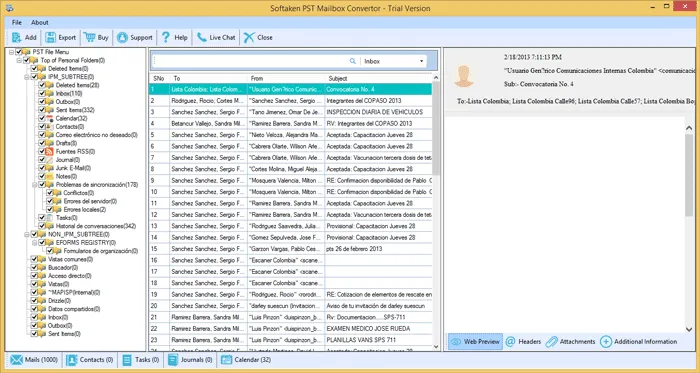
Preview Outlook PST emails headers body attachments

3. Mailbox preview

Review folder hierarchy, headers, message body, and companion attachments before export to Apple Mail formats.

Choose MBOX or EMLX format for Apple Mail

4. Choose MBOX or EMLX

Pick MBOX or EMLX format as both are supported into Apple Mail / Mac Mail.

Filters and output location for PST to Apple Mail

5. Filters & save path

Apply filters if required and set any path on your system for exporting Apple Mail files.

Convert Outlook PST to Apple Mail progress

6. Convert

Start conversion and track progress while Outlook PST items export to Apple Mail-ready files.

How to Convert Outlook PST to Apple Mail


Step-by-step conversion

With our software, only few simple steps you have to follow for the conversion:

  1. Successfully install this program on Windows PC/Laptop.
  2. Add your desired Outlook PST file.
  3. Next, view all Outlook data items and press Export button.
  4. Pick MBOX or EMLX format as both are supported into Apple Mail.
  5. Next, apply filters if required.
  6. Set path to save the converted Apple Mail files.
  7. Go for Convert Now button to export the data.

Tools Faq's


With our software, only few simple steps you have to follow for the conversion:

  1. Successfully install this program on Windows PC/Laptop
  2. Add your desired Outlook PST file.
  3. Next, view all Outlook data items and press Export button.
  4. Pick MBOX or EMLX format as both are supported into Apple Mail.
  5. Next, apply filters if required.
  6. Set path to save the converted Apple Mail files.
  7. Go for Convert Now button to export the data
No, not at all. If you have damaged Outlook file, first repair it and then you can export its data into Apple Mail file.
Yes, this PST to Apple Mail Converter permits conversion of particular date-range data export using Apply Filter option.
No, the software is self-reliant and won't need Outlook configuration in the system for the conversion task.
Yes, PST to Mac Mail Converter permits users to convert bulk PST files at once without any restrictions.
Convert on Windows using this tool, then copy the saved MBOX or EMLX files to your Mac. In Apple Mail, use File → Import Mailboxes (for MBOX) or place/import EMLX messages as supported by your Mac Mail workflow. Pick MBOX or EMLX during export as both are supported into Apple Mail.
No, the software is self-reliant and won't need Outlook configuration in the system for the conversion task. Without prior installation of MS Outlook or Apple Mail, Outlook data files are converted into Apple Mail supported file formats on Windows.
Yes. This toolkit allows conversion of Unicode and ANSI Outlook PST file to Apple Mail. Archived, password-protected, and orphaned Outlook files can also be conveniently converted into Apple Mail file formats when the PST is healthy (not damaged).
Yes. Password-protected, archived, and orphaned Outlook files can be conveniently converted into Apple Mail file formats. The original page also notes support to convert encrypted Outlook file to Apple Mail. Damaged or corrupt PST files should be repaired first.
Yes. All attachments along with Outlook emails are well preserved and exported safely into Apple Mail. Formatting and email attributes such as to, cc, bcc, subject, date, time, hyperlinks, signatures, and font style are well maintained, and folder hierarchy remains intact.
Yes. Using Folder mode, multiple Outlook data files can be browsed together to export directly into Apple Mail file format. Heavy Outlook files are supported, and the size of the file will not slow down the export process.
The software exports standard MBOX and EMLX formats that Apple Mail / Mac Mail can import. Conversion runs on Windows (Windows 11, 10, 8.1, 8, 7 & Other). After export, copy the files to your Mac and import them into Apple Mail on your installed macOS version.
Free Demo version scans unlimited ANSI/UNICODE PST files, displays a full email preview with companion attachments, and converts the first 10 items from each Outlook folder into Apple Mail MBOX/EMLX format so you can evaluate migration fidelity before purchasing a license.

Software Specifications


System Requirement

ProcessorAny Pentium Class
Operating SystemWindows 11, 10, 8.1, 8, 7 & Other
Memory512 MB Minimum
Hard Disk100 MB free space for installation

Migration Capabilities

100% Standalone Processing Deep-scans and parses healthy, password-protected, or orphaned ANSI and UNICODE .PST files directly on your Windows PC without requiring Microsoft Outlook installed, MAPI configuration, or an active Mac OS environment for the conversion step.

Advanced PST Handling Seamlessly processes password-protected, archived, and large UNICODE PST files during export to Apple Mail-ready MBOX or EMLX without truncating mailbox data.

Preserves Complete Metadata & Attachments Retains original mailbox folder hierarchies, companion attachments, and email meta properties such as To, From, CC, BCC, Subject, date, and time.

100% Offline & Private Processing Operates locally on your Windows workstation — no cloud upload of mailbox data for complete confidentiality of your private Outlook mailboxes.

Software Delivery

ElectronicVia Email
Delivery TimeWithin 15 minutes
Demo LimitFirst 10 items / folder
Full LicenseFrom $29

Interface Available

Language SupportedEnglish
Support OptionEmails, Chat & Skype
PlatformWindows only
ProductSoftaken PST Mailbox Converter

Demo vs Licensed Version

Free Demo version scans unlimited ANSI/UNICODE PST files, displays a 100% full email preview with companion attachments, and converts the first 10 items per folder into Apple Mail MBOX/EMLX format to evaluate migration fidelity before purchasing a license.


CapabilityFree DemoLicensed Version
Scan ANSI / UNICODE PST filesUnlimitedUnlimited
Full preview (emails, attachments)YesYes
Export to MBOX / EMLX for Apple MailYes (limited)Yes (unlimited)
Items converted per folderFirst 10 itemsUnlimited
Password-protected / orphaned PSTEvaluateFull
Batch multiple PST filesLimited by demoFull
Offline local processingYesYes
PriceFreeFrom $29

Outlook to Apple Mail Client Reviews


Nathan Leeper

Nathan Leeper

★★★★★
Canada
I have my important emails saved in Outlook PST file that I need to convert into Apple Mail. This effortless tool allows instant and secure export of Outlook data items into Mac Mail by preserving the folder structure intact as of source data file.
Claude Guérette

Claude Guérette

★★★★★
France
When I switched from Outlook 2016 to Apple Mail, the main concern for me was how to export emails to Apple Mail from Outlook. For this, I met with this amazing solution and I can proudly say it helped me a lot. With its interface and easy working steps, I am really happy.
Silke Weisz

Silke Weisz

★★★★★
Germany
From last 6 days, I was not getting an appropriate solution to convert Outlook 2019 file to Mac Mail. However, with this powerful program, I could easily migrate Outlook complete emails into Mac Mail with attachments.
Richard A. Scott

Richard A. Scott

★★★★★
United Kingdom
This tool is completely worthy! I am truly blessed to have this software with me.