SoftakenOutlook Converter

An Expert Solution to Convert Outlook data files to multiple formats

Universal Outlook Migration Engine Batch convert Microsoft Outlook .Outlook Personal Storage Table (.pst) — the mailbox file that stores emails, contacts, calendars, and folders. files into Mailbox archive format (.mbox) used by Thunderbird, Apple Mail, and many other clients., EML, MSG, Apple Mail single-message format (.emlx)., PDF, HTML, Lotus Notes / Domino database file (.nsf)., Compressed tar archive often used with Zimbra and similar mail systems., CSV, vCard (vCard contact file (.vcf) for phones and email apps.), and iCal (iCalendar schedule file (.ics) for calendar apps.) formats with folder tree and attachment preservation.

  • Equipped with batch mode for converting multiple Outlook Personal Storage Table (.pst) mailbox file. files at a time
  • Quickly scans Outlook PST file with all data items
  • Give free preview of Outlook mailbox items in details
  • Convert Outlook data files of latest versions & older versions
  • Advanced Export only items within a chosen From–To date range instead of the whole mailbox. for particular data conversion
  • Exports Outlook emails into popular formats: MBOX, EML, PDF, MSG, EMLX, HTML, NSF, TGZ, CSV, VCF, etc.
  • Supportive to convert PST files locked with an Outlook password — enter the password when loading the file. Outlook data file
  • Consider Outlook archive and A PST file no longer linked to an active Outlook profile, but still readable as a data file. files
  • No MS Outlook compulsion in the system to convert Outlook PST files
  • Direct option to upload Outlook file to Microsoft 365 / Exchange Online cloud mailbox — needs your account login details. cloud
  • Feature to preserve Outlook folder & subfolder hierarchy as original
  • Easily handled and self-instructive interface to convert Outlook mailbox data
  • Dedicated Contacts & Calendars export to standard Standard contact card format for importing people into phones and mail apps. and Standard calendar event format for Outlook, Google Calendar, Apple Calendar, and more.
  • Supports legacy Older Outlook PST format (Outlook 97–2002 / XP era). and modern Current Outlook PST format used from Outlook 2003 onward, including large mailboxes., including large Outlook mailboxes
  • 100% offline & confidential processing on your Windows, Mac, or Linux machine — no cloud upload of mailbox data
MBOXEMLMSGEMLXPDFHTMLNSFTGZCSVVCFICS
ANSIUNICODEPassword PSTOffice 365Standalone

100% Safe & Verified Download Windows, Mac, and Linux installers are digitally signed with a trusted certificate, ensuring authentic publisher identity and zero tampering.

Softaken Outlook Converter — PST Mailbox Converter
Safe & Secure DownloadIndependently scanned with multiple antivirus engines.
100% Safe

Quick Facts

Source
Outlook · PST
Output
MBOX & 9+ formats
Demo
10 items / folder
Platform
Windows · Mac · Linux

Software interface

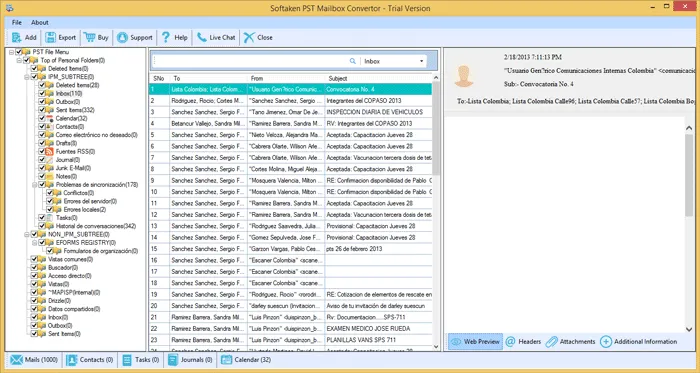
Real Softaken screens for Outlook Converter—add PST files, preview mailbox data, choose export format, then set the save path. Click a step or the arrows; click a screenshot to enlarge. User guide: Outlook Converter user guide.

Buy License Online Free demo: 10 items per folder
Softaken Outlook Converter home window

step 1 of 5

How to convert Outlook PST mailbox data

Add PST files, preview mailbox items with attachments, pick MBOX, EML, MSG, PDF, VCF, ICS, or another export target, and save locally—without Microsoft Outlook installed on the conversion PC.

Softaken Outlook Converter main window

Step-by-step conversion

  1. Install this Outlook Mailbox Data Converter Tool.
  2. Choose Folder mode (or File mode) and add Outlook PST files.
  3. Find data of Outlook PST files and hit Export button.
  4. Pick required format to convert the data. Use Filters, if required.
  5. Set output data file path.
  6. Point to Convert Now button to commence the process.

Features & Benefits of Softaken Outlook File Converter

Core Outlook PST migration capabilities—with a short benefit under each feature.

Convert Outlook file to 9+ formats

Once you get this program, you will be able to convert Outlook PST data file to multiple known formats to access in various email clients. This program exports Outlook emails to these given formats like PDF, MBOX, HTML, NSF, TGZ, EML, MSG, Office 365 cloud and IMAP Servers. In few clicks, you can convert Outlook email items to desired format.

Benefit: One PST scan can feed Thunderbird, Apple Mail, PDF archives, and cloud targets.

Offer Advanced Filter Option

You are given 'Filter' option so that you can export Outlook data items selectively. You can pick Date Range filter and export data of specific date-range from Outlook file. Apart from it, you can set filters based on subject, to, cc, etc. to move desired data from Outlook file instead of complete Outlook mailbox export to required format.

Benefit: Export a date range or subject slice instead of the whole PST.

Comes with inbuilt Scan & Preview

Two inbuilt features are instilled with this Outlook Mailbox Converter. It quickly performs scan of every item of added Outlook file and then users can view all the content on the screen. On left pane, data items in a structured manner are displayed. Users can simply point to desired item or folder to view it in detail before conversion into desired format.

Benefit: Verify headers, bodies, and attachments before you commit to an export.

Convert every type Outlook data file

Except corrupt & damaged Outlook file, this program accepts every Outlook data file to convert. It can smoothly consider password-protected, archived, ANSI, Unicode, orphan, network based, and even every big size Outlook file. Moreover, to convert data inside these Outlook files, users will surely face no trouble at all.

Benefit: Handles typical production PSTs including protected and oversized stores.

Batch Mode For Instant Export

This Outlook Email Converter Program comes with batch mode feature. With this advanced feature, users have opportunity to add multiple Outlook PST files in a single attempt to export into picked file format. This makes the conversion process smoother and help in saving a lot of time and efforts of users for exporting PST files one by one.

Benefit: Queue many PST files and export in one session.

Export Outlook entire database

Outlook Mailbox complete data items such as email messages, notes, tasks, calendars, contacts, journals, attachments, etc. are comfortably converted with this application. However, users have choice to export selective item or folder from Outlook data file. Both options are open for users to convert Outlook file data items.

Benefit: Move the full mailbox or only the folders you select.

Convert Contacts & Calendars to Standard formats

If users wish to convert only contacts and calendars from Outlook file to a standard format i.e. VCF and ICS. Then, they have option to convert Outlook contacts to VCF and Outlook calendars to ICS format respectively. Also, Outlook email addresses can be separately saved using this application into PST file.

Benefit: Pull address books and schedules into VCF and ICS without exporting all mail.

Hold Structure of Folder Intact

This Outlook Data File Converter program take care of Outlook folders and subfolders hierarchy. You will get data in output file format in exact manner. You will notice there is no change in database structure. This professional program is completely secure and trustworthy to use by individuals and business users.

Benefit: Output mirrors your original Outlook folder tree.

Freely judge before pay facility

Nothing can be better than getting something free. This software comes with free conversion of first 10 items from each Outlook folder to desired format. You can monitor overall performance and features of this amazing utility by downloading Free Outlook Export Tool before getting the license version.

Benefit: Test real PST data with the first 10 items per folder before you buy.

Free demo: Unlimited scan and full preview; convert the first 10 items per folder before upgrading to a full license.

Outlook Converter FAQs

1. What is the process to convert multiple Outlook files at once?

The discussed steps will help you to understand the working process:

  1. Install this Outlook Mailbox Data Converter Tool.
  2. Then, choose Folder mode and add multiple Outlook PST files.
  3. Find data of Outlook PST files and hit Export button.
  4. Pick required format to convert the data. Use Filters, if required.
  5. Set output data file path
  6. Point to Convert Now button to commence the process.
2. I have attachments with Outlook emails. Will this software convert them too?

Yes, using this amazing solution to export Outlook data file, you can convert emails and associated attachments from Outlook PST file to desired format.

3. My Outlook data file too large. Can this utility consider it?

Yes, the software has no barrier for Outlook PST file. Hence, any heavy Outlook file can be smartly exported into required format.

4. Which details are needed to move Outlook data file to Office 365 cloud?

The software only asks Office 365 account login credentials to import Outlook PST to Office 365 cloud.

5. Does this software support Windows 10 64-bit OS?

Yes, this software is updated one which greatly runs on all the latest Windows versions including 10 and others, both 64-bit and 32-bit.

6. Can I export only emails of Outlook Inbox folder?

Yes, why not. You can mark only Outlook Inbox folder and this will convert data of Outlook Inbox to selected file format.

7. Which export file formats (such as MBOX, EML, MSG, PDF, VCF, and ICS) are supported by the software?

The software exports Outlook emails and related items into popular formats including MBOX, EML, PDF, MSG, EMLX, HTML, NSF, TGZ, CSV, and VCF. Contacts can be saved as vCard (.vcf) and calendars as iCalendar (.ics). Office 365 cloud and IMAP upload options are also available.

8. Do I need to have Microsoft Outlook installed or configured on my PC to convert PST files?

No. There is no MS Outlook compulsion in the system to convert Outlook PST files. The converter parses PST files locally on Windows without requiring Outlook or MAPI configuration.

9. Can this tool convert password-protected or heavily encrypted Outlook PST files?

Yes. The software is supportive to convert password-protected Outlook data files, and it can also consider archived and orphaned PST files.

10. Does the software support both legacy ANSI PST (Outlook 2002/XP) and modern UNICODE PST formats?

Yes. Except corrupt and damaged Outlook files, the program accepts ANSI and UNICODE Outlook data files, along with archived, orphaned, network-based, and large PST files.

11. Does the converter retain companion email attachments, inline graphics, and original folder structures?

Yes. You can convert emails and associated attachments from Outlook PST files, and the program preserves Outlook folder and subfolder hierarchy in the output.

12. Can I selectively export Outlook Contacts to vCard (.vcf) and Calendar schedules to iCal (.ics)?

Yes. You can convert Outlook contacts to VCF and Outlook calendars to ICS format respectively when you wish to export only contacts and calendars.

13. Can I convert multiple large PST files simultaneously in batch mode?

Yes. Use Folder mode to add multiple Outlook PST files in a single attempt and export them into the selected file format. There is no barrier for heavy Outlook PST files.

14. What are the specific capabilities and item conversion limits of the free trial demo version?

Free Demo version scans unlimited ANSI/UNICODE PST files, displays full email, contacts, and calendar preview with attachments, and converts the first 10 items from each Outlook folder into the selected format so you can evaluate data fidelity before purchasing a license.

Software Specifications

Outlook PST → MBOX & more — Load PST files, preview mailbox data, then export to MBOX, EML, MSG, PDF, VCF, ICS, and related formats. Microsoft Outlook is not required on the conversion PC. See the Outlook Converter user guide.

Free demo evaluation: Unlimited scan and full preview; convert the first 10 items per folder so you can test export before buying. Full license unlocks unlimited conversion from $29 on Windows, Mac, and Linux.

Supported

Windows · Mac · Linux

Source

Outlook · PST

Demo

10 items / folder

Output

MBOX & 9+ formats

Platform specifications

System requirements and installer packages for Softaken Outlook Converter / Softaken PST Mailbox Converter on each supported OS.

Windows

Desktop installer

Operating System
Windows 11, 10, 8.1, 8, 7 & Other (32-bit & 64-bit) supported
Package
.exe installer (code-signed)
Processor
Intel, AMD, or compatible 64-bit/32-bit processor
RAM
512 MB Minimum
Disk Space
100 MB free for installation
Display
1024×768 or higher

macOS

Apple desktop build

Operating System
macOS 10.15 Catalina and later supported (Big Sur, Monterey, Ventura, Sonoma & newer)
Package
.dmg installer (code-signed)
Processor
Intel or Apple Silicon
RAM
512 MB Minimum
Disk Space
100 MB free for installation
Display
1280×800 or higher

Linux

AppImage & Debian package

Operating System
Ubuntu 18.04+, Debian 9+, CentOS 7+ and other modern distributions supported
Package
AppImage and .deb
Architecture
x86_64 (64-bit)
RAM
512 MB Minimum
Disk Space
100 MB free for installation
Desktop
GNOME, KDE, XFCE and similar environments

Demo vs Licensed Version

Try PST browse, preview, and export on real mailbox data. The licensed version removes the per-folder item cap for complete Outlook migrations.

FeaturesDEMO VersionFULL Version
Add PST files (File & Folder Mode)AvailableAvailable
ANSI & UNICODE PST; password-protected & archive PSTAvailableAvailable
Full live preview (mail, contacts, calendars, attachments)AvailableAvailable
Export MBOX, EML, MSG, EMLX, PDF, HTML, NSF, TGZ, CSV, VCF, ICSAvailableAvailable
Office 365 cloud uploadAvailableAvailable
Advanced filters (date range, subject, To, Cc, etc.)AvailableAvailable
Preserve folder structure & attachmentsAvailableAvailable
Batch multiple PST filesAvailableAvailable
Microsoft Outlook not required on conversion PCAvailableAvailable
Windows, Mac & LinuxAvailableAvailable
LimitationFirst 10 items / folderUnlimited
LicenseFree demoFull license
Softaken Reviews

What Our Users Say

Notes from people who converted Outlook PST mailboxes with Softaken.

Premjith BalakrishnanCustomer feedback

United States

Conversion of Outlook data file turns too simple with your tool.

Conversion of Outlook data file turns too simple with your tool. It allowed me to export thousands of emails from Outlook file without any hassles. I genuinely appreciate advanced features like preview & filter of this application.

Jim VenturiCustomer feedback

Germany

This MS Outlook Converter Program is too simple and safe to use.

This MS Outlook Converter Program is too simple and safe to use. It smartly converts all mailbox items of Outlook file without any hassles. I can only say a perfect match to fulfil your needs.

Marc HoornCustomer feedback

Australia

Not faced a single trouble in exporting Outlook file items.

Not faced a single trouble in exporting Outlook file items. It has functionality to convert Outlook data items into other email clients by saving into multiple file formats.

Show more reviews
Boonleang TchangCustomer feedback

United States

I am very pleased with this Outlook data file migration tool.

I am very pleased with this Outlook data file migration tool. I am very thankful that I got this excellent solution.

Reiner BauerCustomer feedback

New Caledonia

This program has completed conversion of Outlook data items in exact the way I want.

This program has completed conversion of Outlook data items in exact the way I want. All data items with maintained hierarchy are exported from Outlook PST file. I can proudly say this is the best tool that I want to recommend others.

Review

Ready to convert Outlook PST mailboxes?

Batch-convert Outlook PST files to MBOX, EML, MSG, PDF, VCF, ICS, and more on Windows, Mac, or Linux—standalone, Outlook not required.

  • Windows · Mac · Linux
  • Outlook not required
  • Demo: 10 items / folder