



1. Home interface
Launch the tool and start from the main window to begin Outlook PST to Thunderbird migration.
PST to Thunderbird via MBOX Convert Microsoft Outlook .PST files into standard .MBOX files you can import into Mozilla Thunderbird — with folder hierarchy, attachments, and email meta properties retained for cross-client archiving.

You can go with this program and smoothly import Outlook emails to Thunderbird with all details. The software smoothly considers attachments, email, contacts, notes, tasks, etc. to export into Thunderbird account. You will not face any issue with simple steps and easy interface of this effortless program.

Prior changing from Outlook Program to Mozilla Thunderbird, the software offers quick preview of Outlook mailbox items on the screen. On the software screen, users can check every item prior exporting Outlook email messages into Thunderbird profile. By this, users can easily check accuracy of Outlook data items with this preview option.

Using this software which is designed with advanced technology, there will be no alteration to Outlook data items. The content, folder hierarchy and other data items are exactly exported from Outlook email folders to Mozilla Thunderbird. There will be no change in database structure after it is exported into Thunderbird from Outlook.

This software has been well examined by experts for accuracy and speed. On many parameters, this program has been tested well. You will not face any data loss & corruption issues with this application. Also, this program is fully functionable on all newer versions of Windows operating system such as 10, 8.1, 8, 7, etc.

You have freedom to add & convert any Outlook file to Mozilla Thunderbird. The software well accepts locked PST with password, archived PST, ANSI (2002 or older versions), UNICODE (2003-2021), orphaned Outlook PST to migrate into Thunderbird. If you have damaged or corrupt PST file, then repair it first PST Recovery Software.

Bulk conversion is available with this utility. This means multiple Outlook data files are allowed to convert into Thunderbird profile in a single attempt. This feature is very useful for organizations and individuals having multiple Outlook files. Now, without repeating the entire process every time, users can migrate data at once.
Softaken Outlook to Thunderbird Converter screens — add PST files or folders, preview mailbox hierarchy, choose MBOX export, and set the save path.
Launch the tool and start from the main window to begin Outlook PST to Thunderbird migration.

Use File or Folder mode to browse and load single or multiple Outlook PST files for batch conversion.
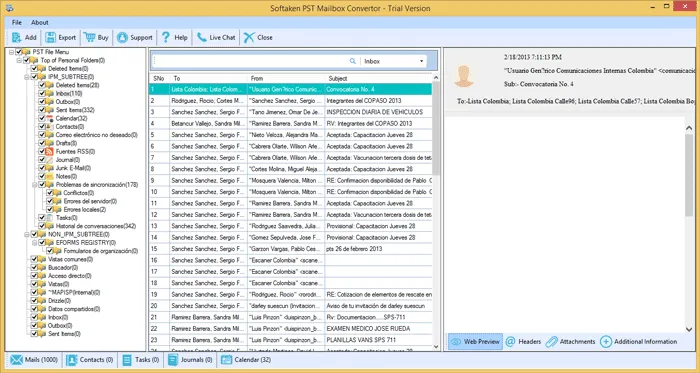
Review folder hierarchy, headers, message body, and companion attachments before export to MBOX.

Select MBOX as the export format so converted Outlook data is ready for Mozilla Thunderbird.

Apply date-range or other filters if needed and set the destination folder for MBOX files.

Start conversion and track progress while Outlook PST items export to Thunderbird-ready MBOX.
Get detailed process to convert Outlook mailbox data to Thunderbird:
Get detailed process to convert Outlook mailbox data to Thunderbird.
100% Standalone Processing Deep-scans and parses healthy, password-protected, or orphaned ANSI and UNICODE .PST files directly on your Windows PC without requiring Microsoft Outlook to be pre-installed.
Advanced PST Handling Seamlessly processes password-protected, archived, and large UNICODE PST files without freezing or truncating mailbox data during export to Thunderbird-ready MBOX.
Preserves Complete Data Integrity Retains original mailbox folder hierarchies, companion attachments, and email meta properties such as To, From, CC, BCC, Subject, date, and time.
100% Offline & Private Processing Operates locally on your Windows workstation — no cloud upload of mailbox data for complete confidentiality of your private Outlook mailboxes.
Free Demo version scans unlimited ANSI/UNICODE PST files, displays a 100% full email preview with companion attachments, and converts the first 10 items per folder into Thunderbird-ready MBOX format to evaluate migration fidelity before purchasing a license.
| Capability | Free Demo | Licensed Version |
|---|---|---|
| Scan ANSI / UNICODE PST files | Unlimited | Unlimited |
| Full preview (emails, attachments) | Yes | Yes |
| Export to MBOX for Thunderbird | Yes (limited) | Yes (unlimited) |
| Items converted per folder | First 10 items | Unlimited |
| Password-protected / orphaned PST | Evaluate | Full |
| Batch multiple PST files | Limited by demo | Full |
| Offline local processing | Yes | Yes |
| Price | Free | From $29 |

Kenneth M. Roth
I really liked all features of this brilliant software. It helped me to switch from Outlook 2019 to Thunderbird email client with all data items in few minutes. With all attachments Outlook 2019 emails to Thunderbird are safely exported with it.
Nick K. Armentrout
When I tried to open PST file in Mozilla Thunderbird, my friend recommended this software for the conversion. I used it and smartly export PST file emails into Thunderbird file format. I love its easy working.
Russell J. Wotring
With the free trial of this software, I have cleared all my doubts about this software. Thereafter, all Outlook data items are flawlessly converted into Thunderbird file format with the license of this tool.
Judy J. Ohalloran
For me this is the powerful and ultimate solution to switch to Thunderbird from Microsoft Outlook. Before this, I give try to manual method but it was not sufficient to export heavy Outlook PST file data into Mozilla Thunderbird.
