Softaken MBOX to Hotmail Importer

MBOX to Hotmail

Import emails from Thunderbird to Outlook.com with attachments

100% Standalone Migration:Import MBOX files directly into Hotmail / Outlook.com without needing Thunderbird,Outlook,or any source email client installed. Connect with Hotmail account login details (IMAP). Softaken does not store login credentials.
  • Completely transfer emails from Thunderbird to Hotmail
  • Consider attachments while migrating MBOX emails to Hotmail
  • Export nominated MBOX files
  • Swift conversion without possessing technical skills
  • Bulk export MBOX data to Hotmail
  • Import multiple emails clients file like Thunderbird,Mac Mail,Entourage,Postbox,etc.
  • Free MBOX to Outlook.com Exporter to evaluate the utility
  • Consider every size MBOX file to import into Hotmail account
  • Workable on the latest versions of Windows – 11,10,8,7,etc.
  • Full scan and preview of MBOX files earlier to migration
  • Maintain the actual structure of MBOX folders
  • Export MBOX file attributes like to,cc,bcc,from,subject,etc.
  • Export data to targeted Hotmail account
  • 100% safe and easy to use with a graphical interface
HotmailOutlook.com
Mozilla ThunderbirdMac Mail / Apple MailPostboxEntourageEudora

How to Access Hotmail Account with Third Party Apps or Software?(App Password guidance for 2SV accounts)

MBOX Files to Hotmail / Outlook.com


MBOX / MBX FilesSoftaken Mail ImporterHotmail / Outlook.com

Watch MBOX to HotmailDemo


Load MBOX,preview,sign in to Hotmail,import

See Softaken Mail Importer on Windows:add MBOX files,preview mailbox items,connect with Hotmail / Outlook.com account credentials,and migrate — without installing Thunderbird or Outlook.

  • Bulk import of MBOX files to Hotmail / Outlook.com
  • Selective export of nominated MBOX files
  • Attachments and folder structure retained
  • Standalone — no source email client required

See the Mail ImporterInterface


Mail Importer main interface with mailbox load
1

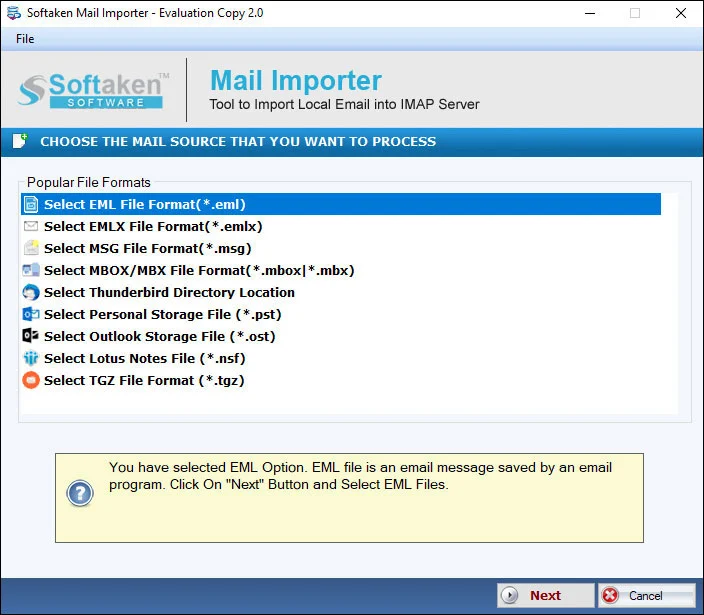
Load MBOX Files

Add MBOX / MBX files for bulk or selective import to Hotmail / Outlook.com.

Preview emails and attachments before import
2

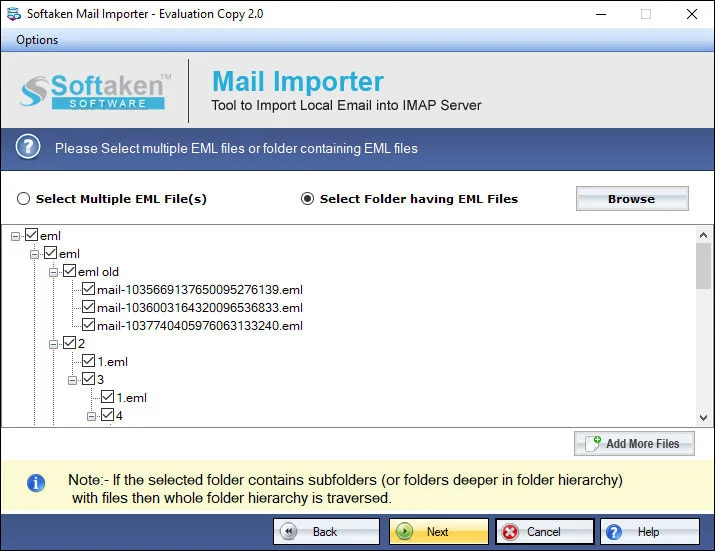
Preview &Select

Full scan and preview of MBOX files;export nominated items before migration.

Hotmail / Outlook.com IMAP account login settings
3

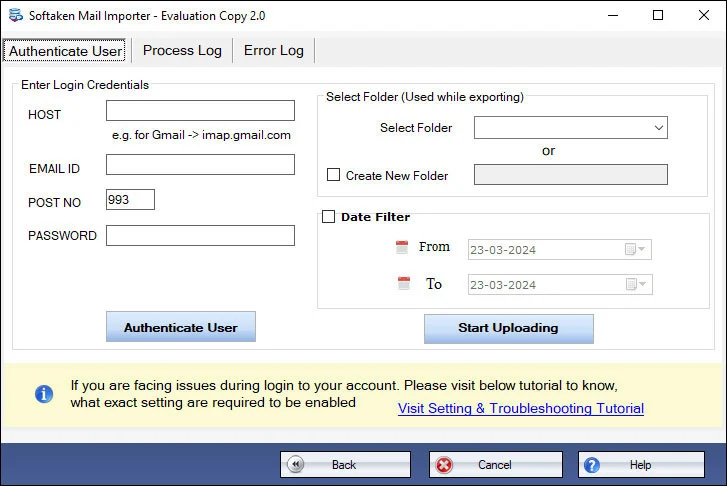
Hotmail Login

Enter Hotmail / Outlook.com login details to connect and import. Softaken does not store credentials.

Demo:first 25 local files(Mail Importer docs;older FAQ:10 MBOX files). Full from $99. Guide:user steps· demo video.

Quality features of MBOX to Outlook.com Importer


Import MBOX file with complete information

The utility offers a descriptive interface and provides the facility to import MBOX file with full details. All emails,email components,and attachments associated with every MBOX email are safely imported to Hotmail account.

Retain original structure

The complete structure of MBOX folders remains intact meanwhile and after the import task. Along with this,complete formatting like hyperlinks,font styles,graphics,images,etc. are also preserved in the same manner after completing the import task.

Import all MBOX files

All type MBOX files are well considered by the tool to import into Hotmail account. MBOX file of Thunderbird,Apple Mail,Postbox,Entourage,Eudora,etc. are well imported by the application. The only condition is these files should be healthy.

Desired file import to desired account

No need to convert all Thunderbird emails to Hotmail account. Pick desired MBOX files and import them to your chosen Hotmail account. Only MBOX files and correct login details of Hotmail account are required to complete the migration.

Import in bulk
Import in bulk

MBOX to Hotmail grants import of various MBOX files to Outlook.com account in bulk. Now,users don't need to load MBOX file one by one. This feature is helpful in saving a lot of time and effort. Without any hassle,the import task gets completed.

Fully Windows-based utility

One can easily transfer emails from Thunderbird to Outlook.com on every Windows edition. It includes the latest and older version of Windows such as Windows 11,10,8.1,8,7,Vista,XP,and others without interrupting the already running tasks.

Feature Comparison of MBOX to Hotmail Importer – Trial and Licensed Version

Free Demo version scans/previews MBOX items and imports a limited set to Hotmail. This page’s older FAQ said 10 MBOX files;Softaken Mail Importer docs (same download) state the first 25 local files. A “10 to 25 emails per folder” range is not stated.

Features
  • Import MBOX to Hotmail / Outlook.com
  • Bulk / selective MBOX export
  • Attachments + To/CC/BCC/From/Subject
  • Retain folder structure &formatting
  • Hotmail account login credentials
  • Support Windows 11/10/8/7 &others
  • Limitation
  • Price
DEMO Version
  • First 25 local files*
  • FREE
FULL Version
  • Unlimited
  • $99

*Mail Importer documentation. Older page FAQ:10 MBOX files.

Free Demo:Mail Importer docs — first 25 local files;older page FAQ — 10 MBOX files. A “10 to 25 emails per folder” range is not stated. Full:unlimited from $99.

Tool Faq's


This product page documents connecting with correct login detailsof the Hotmail account (Mail Importer IMAP:host,port,email ID,password). Softaken does notclaim OAuth 2.0,Modern Auth,or MFA compliance on this page. For accounts with two-step verification,Softaken’s KB explains generating an App Passwordfor third-party apps:Access Hotmail via third-party apps.
No.Softaken Mail Importer (same download as this page) works standalone to import MBOX to Hotmail / Outlook.com without requiring Thunderbird or Outlook installed. You need MBOX files and Hotmail login details.
Hotmailand Outlook.comare named destinations on this page. Domains @live.comand @msn.comare not listedon this landing page.
Yes for Apple Mail / Mac Mail(also Thunderbird,Postbox,Entourage,Eudora,etc.—healthy files). Google Takeoutis not specifically named on this page.
Documented:import to a targeted / chosen Hotmail accountand maintain the actual structure of MBOX folders. Explicit “create a new dedicated folder inside Hotmail” or Inbox vs custom folder mapping UI is not claimedon this page.
Yes for attachments and formattingas documented:attachments are imported;formatting like hyperlinks,font styles,graphics,and images is preserved;attributes To,CC,BCC,From,Subject are exported. Nested attachment type inventories and Sent/Received as separate fields beyond those attributes are not listed further.
Yes for bulk importof various MBOX files to Outlook.com without loading one by one;any size and any number of MBOX files are allowed in the full version (page FAQ). Demo remains limited (first 25 local files / older FAQ:10 MBOX files). Explicit “batch folder selection” / “Add Folder” mode wording is not claimedbeyond bulk multi-file import.
Mail Importer documentation:demo imports the first 25 local filesto the email server. This page’s older FAQ:only 10 MBOX files. Full license:unlimited from $99. A “10 to 25 emails per folder” range is not stated.

Software Specifications


System requirements and delivery details for Softaken MBOX to Hotmail Importer on Windows (via Softaken Mail Importer).

Standalone:import MBOX to Hotmail / Outlook.com without Thunderbird or Outlook. Connect with Hotmail login details. Softaken does not store credentials. See KB for App Passwordwhen 2SV is enabled.
Free demo:first 25 local files(Mail Importer docs) / older FAQ 10 MBOX files. Full license from $99.
WindowsHotmail / Outlook.comNo Thunderbird / Outlook neededAttachments retainedTo / CC / BCC / From / SubjectBulk + selectiveDemo:first 25 files
Not claimed on this page:Softaken “100% OAuth 2.0 / Modern Auth compliant” product USP,@live.com / @msn.com as named domains,Google Takeout / Netscape / SeaMonkey as named sources,create-new-folder mapping inside Hotmail,or a demo range of “10 to 25 emails per folder.”
Sources &destination (as documented)
  • Thunderbird,Mac Mail / Apple Mail,Postbox,Entourage,Eudora,etc. (healthy MBOX files)
  • Destination:targeted Hotmail / Outlook.com account via login credentials (IMAP)
  • Attachments;To,CC,BCC,From,Subject;folder structure;hyperlinks,fonts,graphics,images

System Requirement

ProcessorAny Pentium Class

Operating SystemWindows 11,10,8.1,8,7 &Other

Memory512 MB Minimum

Hard Disk100 MB of free space for software installation

Software Delivery

ElectronicVia Email

Minutes15

DemoFirst 25 local files

Starting Price$99

Interface Available

Language SupportedEnglish

Support OptionEmails,Chat &Skype

InputMBOX / MBX files

OutputHotmail / Outlook.com

Client Reviews


Frequently asked questions

How do I authenticate my Hotmail or Outlook.com account if two-step verification is enabled?

Connect with Hotmail login details (IMAP). OAuth/Modern Auth are not claimed. Use Softaken’s KB App Password guide for 2SV accounts.

Do I need to install Mozilla Thunderbird or Microsoft Outlook to import MBOX files to Hotmail?

No. Softaken Mail Importer works standalone without Thunderbird or Outlook.

Does the tool support accounts with @outlook.com,@live.com,and @msn.com email addresses?

Hotmail and Outlook.com are documented. @live.com and @msn.com are not named on this page.

Does the software support MBOX files exported from Apple Mail and Google Takeout?

Apple Mail is supported. Google Takeout is not specifically named.

Can I choose a specific target folder or create a new folder inside my Hotmail account?

Import to a chosen Hotmail account and retain MBOX folder structure. Create-new-folder mapping is not claimed.

Will the upload process preserve original email attachments,inline images,and formatting?

Attachments and formatting (hyperlinks,fonts,graphics,images) are preserved,plus To/CC/BCC/From/Subject.

Can I import multiple large MBOX files simultaneously using the batch folder selection mode?

Yes. Bulk import of multiple MBOX files of any size is supported in the full version. Explicit batch-folder mode wording is not claimed.

What are the specific capabilities and upload limitations of the free trial demo version?

Demo:first 25 local files (docs) / older FAQ 10 MBOX files. Full from $99. No 10–25 emails-per-folder range stated.

Specifications
ItemDetails
ProductSoftaken MBOX to Hotmail Importer
PublisherSoftaken Software
PlatformsWindows 11,10,8.1,8,7 &others
DemoFirst 25 local files
Starting Price$99
Pagehttps://www.softaken.com/mbox-to-hotmail-importer