
Softaken NSF to MBOX Converter

Softaken NSF to MBOX Converter

A smart conversion app to customize NSF to MBOX conversion

Export Lotus Notes NSF to MBOX — move data to Thunderbird and other MBOX clients such as Apple Mail,Entourage,PocoMail,SpiceBird,etc.
Lotus Notes is required to operate the app (you don’t need any other tool except Lotus Notes). Pure Windows-based app — not macOS. NSF cannot be opened in Thunderbird without conversion.

NSF to MBOX Converter is an advanced and highly interactive utility that can be installed and operated with less technical assistance. The tool makes Lotus Notes data flexible for sharing to multiple email platforms. It has multiple advantages.

Key Attentive Features of NSF to MBOX Conversion

  • Export NSF to MBOX at fast speed
  • Preserve data quality by exporting all email properties and attachments
  • Convert entire folders of NSF files
  • Allow to convert only required folders of NSF files
  • File filter feature to browse particular NSF files for conversion
  • Allow users to ignore empty folders
  • Save the converted data locally to any suitable drive
  • Display preview of the selected NSF file
  • Perform flawlessly
  • A Windows based app,work with Windows 11,10,XP,Vista,8 and all the latest versions of the OS
NSFMBOXThunderbirdApple Mail
With MBOX format,you can easily move NSF data to Thunderbird,Apple Mail,Entourage,PocoMail,SpiceBird,etc. Risk-free export for commercial as well as personal use. Exports archived NSF files.
WindowsLotus Notes RequiredNSF PreviewRequired FoldersProperties &Attachments

Lotus Notes NSF to MBOX


NSF (Lotus Notes / IBM Notes)Softaken (Windows)MBOX (Thunderbird &others)

Watch NSF to MBOX ConverterDemo


Preview NSF and export to MBOX

See Softaken NSF Suite (engine for NSF export) add an NSF file,preview mailbox data,choose the export path,and convert — on Windows.

  • Display preview of the selected NSF file
  • Convert entire folders or only required folders
  • File filter to browse particular NSF files
  • Save converted data locally to any suitable drive

See the NSF to MBOX ConverterInterface


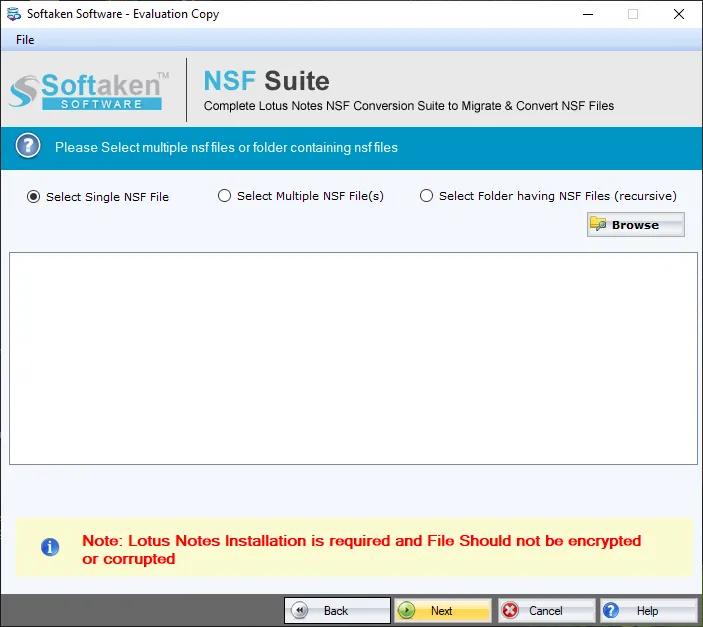
Softaken NSF Suite main interface
1

Launch &Add NSF

Launch the converter and add the NSF file you wish to export to MBOX format.

Preview of selected NSF mailbox data
2

Preview NSF

Display preview of the selected NSF file,then convert entire folders or only required folders as needed.

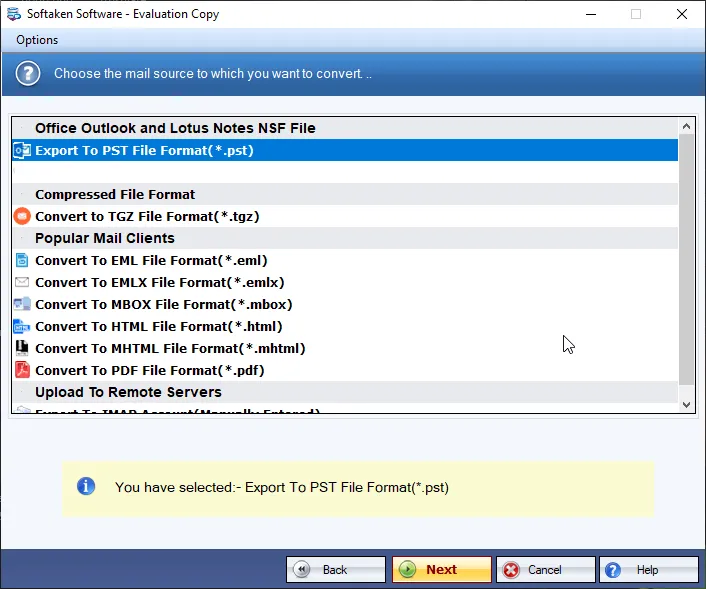
Choose MBOX export and destination path
3

Export MBOX Locally

Export NSF to MBOX at fast speed and save the converted data locally to any suitable drive.

Free Demo is available for evaluation with NSF preview. Full license unlocks conversion via NSF Suite (from $99). Guide:user steps· demo video.

Challenges Faced &Solutions Offered


Issues in opening NSF file on Thunderbird

When NSF file is moved out of Lotus Notes,it becomes inaccessible as it can’t be opened without Lotus Notes application. When you try opening NSF file on Thunderbird,there are possibilities that you may lose the data contained in it.


Problem in using additional client with Lotus Notes

Using Lotus Notes and Thunderbird together have no meaning because both use different file formats. You cannot view each other file formats — NSF is not supported in Thunderbird and MBOX is supported in Thunderbird.

How to export NSF to MBOX quickly

There are multiple users who are unable to find a quick solution to export NSF to MBOX and have faced many solutions who are unable to work out to convert Lotus Notes to Thunderbird.

NSF to MBOX Converter quick solution

NSF to MBOX Converter is a quick solution to export Lotus Notes data to Thunderbird client in an easy manner without any trouble and without thinking of NSF file size. The process is completed in a few minutes.

Allow access Lotus Notes to Thunderbird and others

With NSF 2 MBOX Converter,you can easily access Lotus Notes data to Thunderbird. With MBOX format,you can easily move NSF data to Apple Mail,Entourage,PocoMail,SpiceBird etc.

Risk free export – commercial or personal use

A risk-free export is achieved with NSF 2 MBOX Converter. You can utilize this utility for commercial as well as personal use. The tool is available for both commercial and individual needs.

Feature Comparison of NSF to MBOX Converter – Trial and Licensed Version

A free demo is available so you can preview the selected NSF file and evaluate conversion before purchasing. Numeric per-folder demo export limits (for example 10 or 25 items) are not listed on this product page. Full license unlocks unrestricted conversion via NSF Suite (from $99).

Features
  • Export NSF to MBOX at fast speed
  • Preserve email properties &attachments
  • Entire folders or only required folders
  • File filter;ignore empty folders
  • Preview of selected NSF file
  • Save converted data to any local drive
  • Windows only;Lotus Notes required
  • Limitation
  • Price
DEMO Version
  • Free evaluation / preview
  • FREE
FULL Version
  • Unlimited conversion
  • $99

Tools Faq's


Converted MBOX is for Thunderbird and other MBOX clients. This page lists Thunderbird,Apple Mail,Entourage,PocoMail,SpiceBird,etc. Postbox,SeaMonkey,Eudora,Netscape,and Opera Mail are not named separately beyond that “etc.” Windows converter only — Thunderbird OS matrix (macOS/Linux) is not claimed for the Softaken app itself.
Yes. You don’t need any other tool except Lotus Notes to operate the app. Standalone conversion without Lotus Notes is not claimed. The Softaken app is Windows-based only.
Single vs separate MBOX file-creation modes (for example Inbox.mbox / Sent.mbox) are not claimed on this product page. You can convert entire folders of NSF files or only required folders,ignore empty folders,and save converted data locally to any suitable drive.
The tool preserves data quality by exporting all email properties and attachments. Domino doclinks,inline images,and nested attachments are not itemized separately on this page beyond those claims.
Orphaned,disconnected,or password-protected NSF handling is not separately claimed. The page documents NSF to MBOX conversion with preview,archived NSF export,required/entire folders,and preserved email properties and attachments. Lotus Notes is required to operate the app.
The software preserves data quality by exporting all email properties and attachments. Field-by-field RFC header lists (To,From,CC,BCC,Sent/Received Dates) are not itemized separately on this page beyond “all email properties.”
Date-range filters are not claimed on this product page. You can use the file filter feature to browse particular NSF files for conversion,convert entire folders or only required folders,ignore empty folders,and preview the selected NSF file.
A free demo / evaluation is available so you can preview the selected NSF file and test conversion before purchasing. Numeric per-folder export limits (for example 10 or 25 items) are not listed on this product page. Full license unlocks conversion via NSF Suite from $99. Windows only.

Software Specifications


Windows onlyLotus Notes requiredNSF previewThunderbird / Apple Mail / etc.From $99

System Requirement

ProcessorAny Pentium Class

Operating SystemWindows 11,10,8.1,8,7 &Other

Memory512 MB Minimum

Hard Disk100 MB of free space for software installation

Software Delivery

ElectronicVia Email

Minutes15

DemoFree evaluation / preview

Full LicenseFrom $99 (NSF Suite)

Interface Available

Language SupportedEnglish

Support OptionEmails,Chat &Skype

PlatformWindows only

ProductNSF to MBOX Converter

Conversion Notes

OutputMBOX files

PreservesEmail properties &attachments

PrerequisiteLotus Notes required

PreviewSelected NSF file

Target Clients

PrimaryMozilla Thunderbird

Also listedApple Mail,Entourage

Also listedPocoMail,SpiceBird

FoldersEntire or required only

NSF to MBOX Converter Reviews