SoftakenOST to MBOX Converter

Now recover OST files and export them to the universally popular MBOX format with just a few simple clicks of OST to MBOX Conversion program

⚙ 100% Standalone Solution: Convert Outlook Offline Storage Table file (.ost). to Unix-style mailbox archive (.mbox / .mbx). directly without installing Microsoft’s desktop email app. Standalone Softaken tools can run without Outlook installed. or any MBOX-supported email client.

Key Features at One Glance

  • High Quality conversion of OST to MBOX without interruptions
  • OST to MBOX is suitable for both personal and industrial usage
  • Complete conversion is provided by converting OST email properties, contacts, events, calendars notes etc…
  • Support fast Recovery of OST items
  • Export those OST files carrying non-English characters or double byte characters
  • Saves time by providing “Search” option to locate the files required for conversion
  • Freedom to save the converted items to the desired location
  • Supported with the latest Windows versions including Windows 11, 10, 8.1, 8, 7, Vista, XP [32bit & 64bit] and Outlook 2003, 2007, 2010, 2013, 2016, 2019, 2021, and 2024 · Mac · Linux
  • Conversion of big sized OST files and those OST data protected with password
  • Free demo version is available to try before purchasing the application

Available for Windows, Mac, and Linux. Pick your OS, then download or buy. Free demo exports 10 items per folder. No Outlook required.

Softaken OST to MBOX Converter
  • No Outlook
  • Orphaned OST
  • Mozilla Thunderbird desktop email client (often MBOX-based). / macOS Mail app; exports often use EMLX or MBOX.
  • Demo: 10 items / folder
✓
Safe & Secure DownloadIndependently scanned with multiple antivirus engines.
100% Safe

Quick Facts

Input
Outlook .OST
Output
MBOX
Demo
10 items / folder
Platform
Windows · Mac · Linux

Outlook .OST to MBOX

Load offline OST mail, convert with Softaken, then import MBOX into Thunderbird, Apple Mail, and other MBOX clients.

  1. Outlook .OST
  2. Softaken OST File Exporter
  3. .MBOX mailbox

Seamless import into

  • Mozilla Thunderbird (Windows & macOS)
  • Apple Mail / Mac Mail
  • Postbox
  • SeaMonkey
  • Eudora
  • Opera Mail
  • Entourage
  • Pocomail

Software interface

Follow the steps on the left. Use the arrows to switch screenshots — click a screenshot to enlarge.

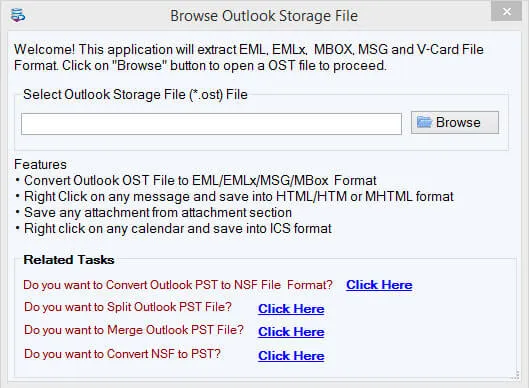
Add OST file(s) — Softaken OST to MBOX Converter

step 1 of 3 · click image to enlarge

Watch OST to MBOX Demo

See Softaken OST File Exporter load offline OST files, preview the mailbox folder tree, and export MBOX for Thunderbird, Apple Mail, and other MBOX clients — without Microsoft Outlook or Exchange Server connectivity.

Move Outlook OST to Thunderbird-ready MBOX

  1. Browse and load orphaned or offline OST files
  2. Preview Inbox, Sent, Drafts, and custom folders
  3. Choose MBOX export and set the destination path
  4. Keep attachments, formatting, and RFC headers

Features & Benefits of OST to MBOX Converter

Conversion of Any Type of OST Data

OST 2 MBOX is a smart converter that easily migrates OST files including emails, contacts, notes, journals, events etc. It converts emails and its properties including CC, BCC and attachments.

Benefit: Conversion of Any Type of OST Data.

Conversion of Password Protected Files

OST to MBOX supports transfers of those OST files, protected with password. Within a few minutes, the password protected data of OST is transferred to MBOX.

Benefit: Conversion of Password Protected Files.

Well suited to Windows and Outlook versions

Supported on Windows 11, 10, 8.1, 8, 7 & Other · Mac · Linux. It also supports Outlook versions including Outlook 2024, 2021, 2019, 2016, 2013, 2010, 2007, and 2003.

Benefit: Well suited to Windows and Outlook versions.

Safe Data Transfer

No file damage occurs during conversion process. It converts large sized OST files and those OST data that has non-English characters such as Japanese and Chinese.

Benefit: Safe Data Transfer.

Convert Desired OST Files to MBOX

The unique feature makes conversion speed super-fast and makes OST to MBOX as a professional tool. OST Complete Converter has "Search" option that allows conversion of specific OST files.

Benefit: Convert Desired OST Files to MBOX.

Save Migrated Data to the Desired Location

It is amazing to know that OST to MBOX allows to save the converted OST data to desired location of your system. Moreover, you can save the results to any new folder.

Benefit: Save Migrated Data to the Desired Location.

Get Preview of Migrated Items

Before saving of the converted OST items you can see preview of these items to ensure about its accuracy. The facility gives users an assurance of safe data conversion.

Benefit: Get Preview of Migrated Items.

Designed for Individual and Official Purposes

It is convenient to use and full technical assistance is provided to each consumer. User-friendly and reliability is the correct merge of the software, offer you to swiftly transfer all your OST file data.

Benefit: Designed for Individual and Official Purposes.

Free trial of OST to MBOX is available

A free demo of OST to MBOX Converter lets you scan and preview the full mailbox, then export up to 10 items per folder so you can check MBOX output before unlocking unlimited conversion.

Benefit: Free trial of OST to MBOX is available.

Frequently Asked Questions Regarding OST to MBOX Converter

1. Which email clients (Thunderbird, Apple Mail, Postbox, SeaMonkey) can open the converted MBOX file?

The .mbox files open in Mozilla Thunderbird (Windows & macOS), Apple Mail / Mac Mail, Postbox, SeaMonkey, Eudora, Opera Mail, Entourage, and Pocomail. After conversion, import the file into whichever client you use.

2. Do I need to install Microsoft Outlook on my computer to convert OST to MBOX?

No. It runs on its own — you don’t need Outlook installed, and you don’t need a Thunderbird or other MBOX client installed just to convert. It works as a desktop utility from the Softaken OST File Exporter family on Windows, Mac, and Linux.

3. Can I convert orphaned, disconnected, or corrupted OST files to MBOX format?

Yes. Orphaned, inaccessible, Exchange-disconnected, or IMAP-cached OST files work without reconnecting Exchange or rebuilding an Outlook profile. Password-protected OST is supported too. Preview the mailbox first; if a damaged file won’t load, Softaken OST Recovery can help before you export.

4. Does the software allow creating separate MBOX files for individual mailbox folders?

Yes. You can save one combined MBOX or separate files per Outlook folder (Inbox.mbox, Sent.mbox, and so on) — handy when you import folder-by-folder into Thunderbird or Apple Mail.

5. Will my email attachments, formatting, and RFC headers be preserved during conversion?

Yes. HTML/RTF formatting, inline graphics, attachments, and standard headers (To, From, CC, BCC, Sent/Received dates) stay with the message so the mailbox still reads like the original.

6. How do I import the resulting MBOX file into Mozilla Thunderbird or Apple Mail?

After conversion: Thunderbird — import the .mbox into Local Folders with ImportExportTools NG or your Thunderbird version’s built-in import. Apple Mail — on macOS use File → Import Mailboxes and choose the MBOX files. The same output also works in Postbox, SeaMonkey, Eudora, Opera Mail, Entourage, or Pocomail. See the Softakenfor conversion steps before import.

7. Is there any file size limit when converting large (20 GB or 50 GB+) OST mailboxes to MBOX?

There’s no practical size cap for big OST files — including 20 GB or 50 GB+ mailboxes — as long as you have disk space for the MBOX output. Try the free demo on your mailbox size first if you want to check performance.

8. What are the specific capabilities and export limitations of the free demo version?

The free demo scans and previews 100% of mailbox items, and exports up to 10 items per folder from OST to MBOX so you can verify quality first. Full license unlocks unlimited export from $49. Available for Windows, Mac, and Linux.

Software Specifications

Direct Orphaned OST Migration: Convert inaccessible, orphaned, Exchange-disconnected, or IMAP-cached OST files without requiring Exchange Server connectivity or Outlook profile reactivation.

Preserves 100% Data Integrity: Retains rich text formatting (HTML/RTF), inline graphics, email attachments, and all standard RFC headers (To, From, CC, BCC, Sent/Received Dates).

Flexible File Organization: Choose between creating a single combined MBOX file or separate MBOX files for each Outlook folder (Inbox.mbox, Sent.mbox, etc.).

Supported

Windows 11, 10, 8.1, 8, 7 · Mac · Linux

Outlook OST

2024, 2021, 2019, 2016 · ANSI / Unicode

Demo

10 items / folder

Pricing

Full from $49

Platform specifications

System requirements for Softaken OST to MBOX Converter on each supported OS.

Windows

Desktop installer

Operating System
Windows 11, 10, 8.1, 8, 7 (32-bit & 64-bit)
Package
.exe installer (code-signed)
Processor
Intel, AMD, or compatible 64-bit/32-bit processor
RAM
512 MB Minimum
Disk Space
100 MB free for installation
Display
1024×768 or higher

macOS

Apple desktop build

Operating System
macOS 10.15 Catalina and later
Package
.dmg installer (code-signed)
Processor
Intel or Apple Silicon
RAM
512 MB Minimum
Disk Space
100 MB free for installation
Display
1280×800 or higher

Linux

AppImage & Debian package

Operating System
Ubuntu 18.04+, Debian 9+, CentOS 7+ and other modern distributions
Package
AppImage and .deb
Architecture
x86_64 (64-bit)
RAM
512 MB Minimum
Disk Space
100 MB free for installation
Desktop
GNOME, KDE, XFCE and similar

Key Specifications

SpecificationDetails
Product NameSoftaken OST to MBOX Converter
Version16.0
InputOffline / orphaned Outlook OST
Output FormatMBOX mailbox
OS SupportedWindows 11, 10, 8.1, 8, 7 & Other · macOS · Linux
Outlook Supported2024, 2021, 2019, 2016, 2013, 2010, 2007, 2003
PrerequisiteNo Outlook / Exchange Server required
ProcessorAny Pentium Class
Memory512 MB Minimum
Hard Disk100 MB of free space for software installation
Demo10 items / folder
DeliveryElectronic · Via Email · Minutes: 15
Language / SupportEnglish · Emails, Chat & Skype
PlatformWindows · Mac · Linux

Product Details

Version
16.0
License
Free demo / Full
Support
Emails, Chat & Skype · [email protected]

Free demo vs. full version

Free Demo version scans, previews 100% of mailbox items, and exports up to 10 items per folder from OST to MBOX format.

FeatureFree demoFull version
Convert Outlook OST to MBOX FormatAvailableAvailable
Orphaned / Exchange-Disconnected OST SupportAvailableAvailable
Standalone — No Outlook / Thunderbird RequiredAvailableAvailable
Preview Mailbox Folder Tree & EmailsAvailableAvailable
Preserve Attachments, Formatting & RFC HeadersAvailableAvailable
Flexible MBOX Saving (Single or Per Folder)AvailableAvailable
Supported on Windows, Mac & LinuxAvailableAvailable
Limitation10 items / folderUnlimited
PriceFREE$49
Softaken Reviews

What Our Users Say

Customer feedback on Softaken OST to MBOX Converter.

Robin StengerCustomer feedback

Germany

I never utilized any paid solution for conversion before this.

I never utilized any paid solution for conversion before this. For conversion of OST data to MBOX format, I used your software and it worked comfortably and I didn't face single trouble in this conversion.

Polun TseCustomer feedback

United States

Great tool, instant working with multiple features.

Great tool, instant working with multiple features. I like this tool and comfortably handled it. I must say the team proved that their efforts are going in the right directions.

Sadaaki KameiCustomer feedback

Japan

The support team is active and helpful.

The support team is active and helpful. They guided me to go through the user manual and demo version before I perform actual conversion of OST to MBOX. I realized their guidance worked for me.

ROLANDO SANCHEZ SELASCustomer feedback

Spain

I already tried various software of Softaken and all I find trusted ones.

I already tried various software of Softaken and all I find trusted ones. So, for OST to MBOX Conversion, I pick your OST to MBOX Converter tool and it is as good as I imagined. Thank you to the team for their efforts.

Review

Convert OST to MBOX

Load an offline or orphaned OST file, preview the mailbox, and export MBOX for Thunderbird, Apple Mail, and more.

  • Windows · Mac · Linux
  • OST · MBOX
  • No Outlook · Orphaned OST

Available for Windows, Mac, and Linux. Pick your OS, then download or buy. Free demo exports 10 items per folder. No Outlook required.