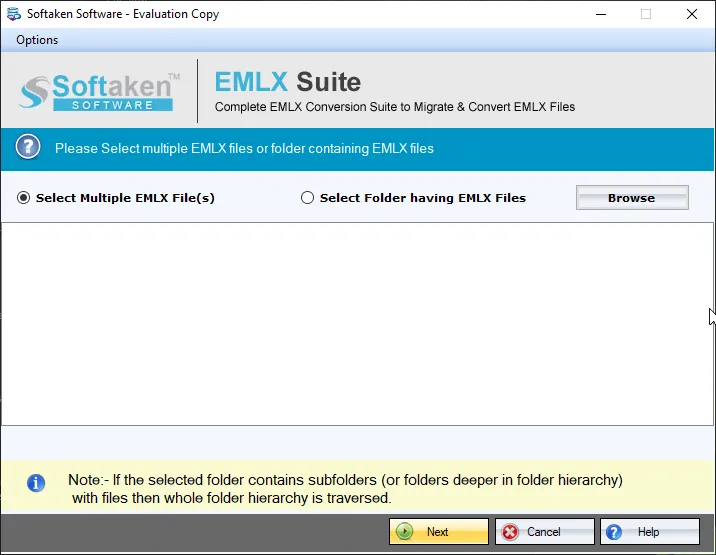
1Browse EMLX files
Load EMLX files;Folder mode adds an EMLX folder at once.

Independently scanned with multiple antivirus engines.
100% SafeLibrary/Mailpaths,and “100% offline / zero telemetry” claims are not listedon this page.Softaken EMLX to MHTML Converterhelps bulk convert Apple Mail EMLX files to MHTML web pages on Windows. Scan and preview EMLX data,embed attachments,hold formatting,and save MHTML at a location of your choice—without installing any email program for the conversion.
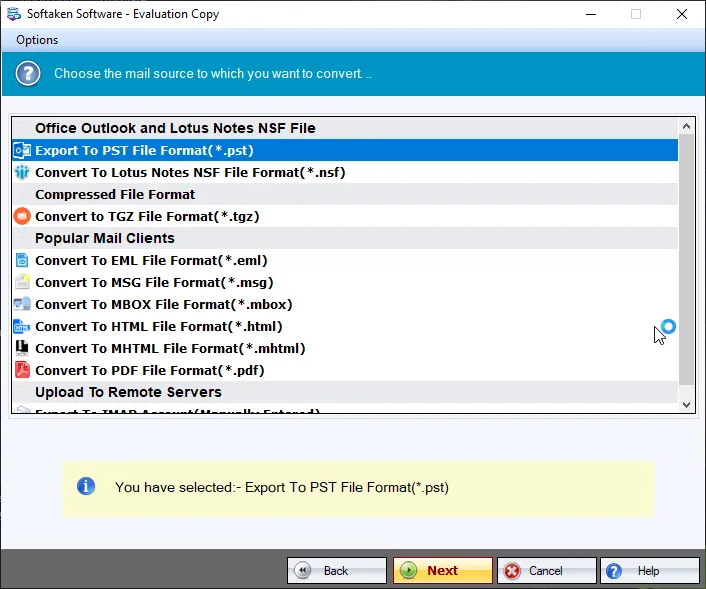
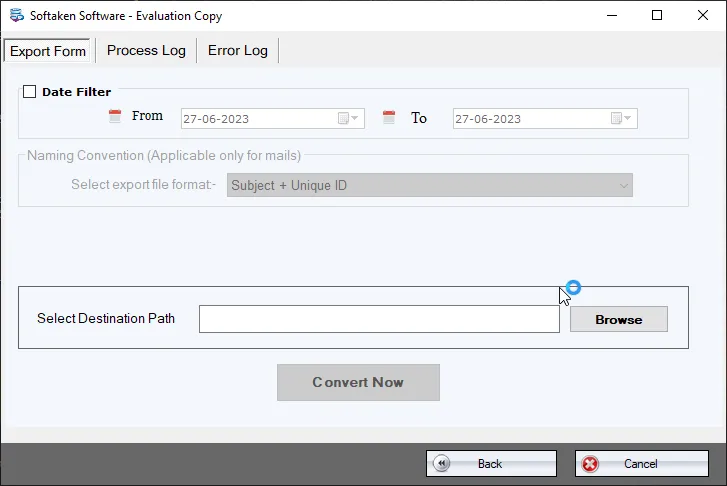
Screenshots from the Softaken EMLX Suite steps guide(choose MHTML under Export options).
1Load EMLX files;Folder mode adds an EMLX folder at once.
2Loaded EMLX files are scanned with live data preview before export.
3Under Export options,select MHTML format (Softaken EMLX Suite).
4Specify the location to save the MHTML file and hit Convert Now.
Click a screenshot to enlarge. Source:docs/emlx-suite/steps· screenshots.
Given below are the steps to create MHTML web pages from EMLX files–
The program is designed to smoothly export Apple Mail emails to MHTML file format. Along with EMLX files,all attachments and email attributes are well maintained by the application without losing a single bit of information.
All the loaded EMLX files are scanned and then live data preview is provided by the application before the migration. Users can easily add desired EMLX files and export them to MHTML file format in a few minutes and only in 4 easy steps.
The conversion is completed without any risk of data loss and the resultant MHTML file format can be exported to any location of user choice. The software completely works as per user needs and does not need any technical training to operate it.
You can easily convert a single EMLX file or a folder of EMLX smoothly to MHTML file format. There is no effect on the quality of data and performance of the application due to the size and number of EMLX files. It is capable enough to load thousands of files at once.
The best part of this EMLX 2 MHTML Converter is it does not depend on any additional program to complete the conversion. It works standalone and provides accurate results all the time without modifying the original data items.
To practically examine the software before investing in it,download the free demo of the software and assess the performance by converting 10 EMLX files to MHTML file format. Once you find the tool perfect for it,upgrade it to the licensed edition.
Free Demo converts 10 EMLX filesto MHTML (same as pro,limited export). A “10 to 25 emails per folder” range is not stated. Full unlimited license from $29(Softaken EMLX Suite engine used on this page). No email client required.
~/Library/Mail/V*) is not listed. Softaken documents a Windows-onlyprogram (cannot be operated on Mac OS):browse and load EMLX after files are available on the PC. Named .emlxpartsupport is also not listed.Engine Note
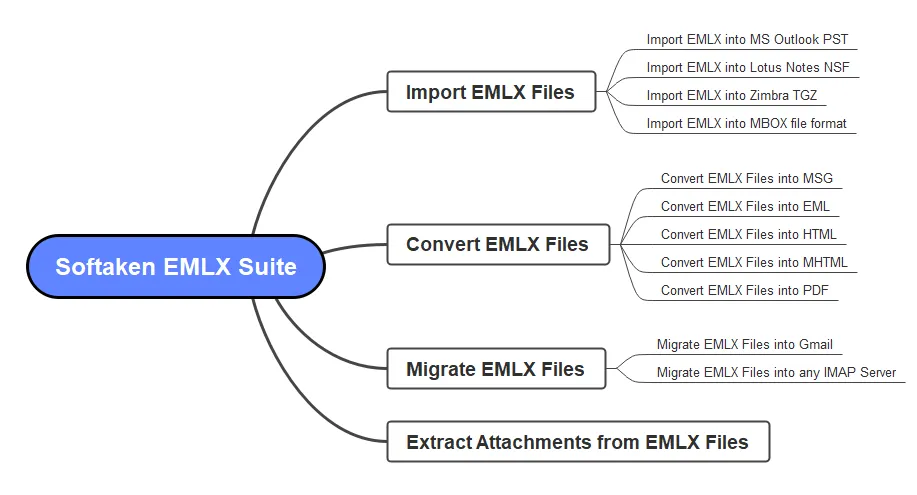
This landing page uses the Softaken EMLX Suitedownload and docs (MHTML / HTML among export options;buy-emlx-suite). Primary focus here is Apple Mail EMLX → MHTML. Softaken states conversion works without any email programinstalled. Exact Mac Library/Mailpaths,.emlxpart,named Chrome/Edge/Firefox/Safari matrices,Bates / Subject+Date naming lists,“RFC 822 / CSS / inline images” beyond listed integrity wording,and “100% offline / zero telemetry” slogans are not listedon this EMLX to MHTML page (see FAQs).
Product Info
Version1.0
Size19.5 MB
Starting Price$29
Full licenseUnlimited
Demo &License
Free demo:Converts 10 EMLX filesto MHTML. A “10 to 25 emails per folder” range is not stated. Full unlimited license from $29(Softaken EMLX Suite).
Demo limit10 EMLX files
EngineEMLX Suite
10–25 per folderNot stated
Licensed editionUnlimited from $29
Input &Output
InputApple Mail / Mac Mail EMLX
OutputMHTML / MHT web page
ModesFile / Folder / bulk
PrerequisiteNo email client required
System Requirement
ProcessorAny Pentium Class
Operating SystemWindows 11,10,8.1,8,7 &Other
Memory512 MB Minimum
Hard Disk100 MB of free space for software installation
Software Delivery
Interface Available
Softaken documents MHTML web pages. Named Chrome/Edge/Firefox/Safari matrices are not listed.
Exact Library/Mail paths are not listed. Softaken documents a Windows-only tool.
No. Softaken states no email program installation is required;the tool works standalone.
Softaken preserves attachments,email attributes,and formatting. RFC 822/CSS/inline slogans beyond that are not listed.
Yes. Bulk folder convert of thousands of EMLX files is listed for licensed use.
Softaken documents choosing a save location. Subject/Date/Bates naming patterns are not listed.
Softaken states conversion of any large and any number of EMLX files;licensed edition is unlimited.
Demo converts 10 EMLX files to MHTML. Full from $29. A 10–25 per folder range and offline/telemetry slogans are not stated.
| Item | Details |
|---|---|
| Product | Softaken EMLX to MHTML Converter |
| Publisher | Softaken Software |
| Platforms | Windows |
| Version | 1.0 |
| Size | 19.5 MB |
| License | Demo 10 EMLX files;full unlimited from $29 |
| Prerequisite | No email client required to convert |
| Scope | Convert Apple Mail EMLX to MHTML web pages with attachments |
| Page | https://www.softaken.com/emlx-to-mhtml-converter |