
Softaken MSG to Hotmail Importer

MSG to Hotmail Importer

Find fast and accurate conversion with MSG to Hotmail solution

Import selective or bulk Outlook MSG files into the particular Hotmail account using the correct user ID and password — independent Windows app (no Microsoft Outlook install),with originality preserved and unlimited conversion for license holders.
Windows tool only (Wins 10/XP/Vista/8/7). Not a macOS app. Login is documented as Hotmail user ID and password— Microsoft OAuth 2.0,App Passwords,2SV/2FA workflows,custom Inbox vs new-folder mapping,and zero credential caching are not claimedon this page. KB:Access Hotmail via third-party apps.

Instead of using any manual conversion process to export MSG to Hotmail,use our third solution. It is a simple and fast app,offers accurate conversion each time. With MSG to Hotmail exporter you can access your important mails from anywhere and using any device. You will find real time access of your important mails.

  • Export only user's specified MSG files
  • Convert MSG files without consider its size
  • Convert data in bulk to save your time
  • Unlimited conversion support to it license holders
  • Allow you to convert the particular Hotmail account
  • Export without any data conversion issue
  • A simple app,with advance conversion solution
  • Support Ms Outlook 2003,2007,2010,2013 and 2016
  • A Windows tool,integrate with Wins 10/XP/Vista/8/7
MSGHotmailLive MailOutlook.comUser ID &Password
Free demo available for evaluation (limited export). A numeric demo limit such as 10or 10–25 MSGis not statedon this product page. Unlimited conversion for license holders from $99via Softaken Mail Importer.
WindowsSelective MSGBulk MSGHotmail LoginIndependent AppOutlook 2003–2016

Outlook MSG to Hotmail


MSG FilesSoftaken (Windows)Hotmail / Live / Outlook.com

Watch Mail ImporterDemo


Select MSG files,sign in to Hotmail,import

See Softaken Mail Importer workflow used for MSG to Hotmail on Windows:browse specified MSG files,connect with the correct Hotmail user ID and password,and upload — an independent app without Microsoft Outlook installed.

  • Browse / select specific MSG files for export
  • Bulk migration of more than 1 MSG file altogether
  • Connect with the correct Hotmail user ID and password
  • Independent app — Outlook installation not required

See the MSG to Hotmail ImporterInterface


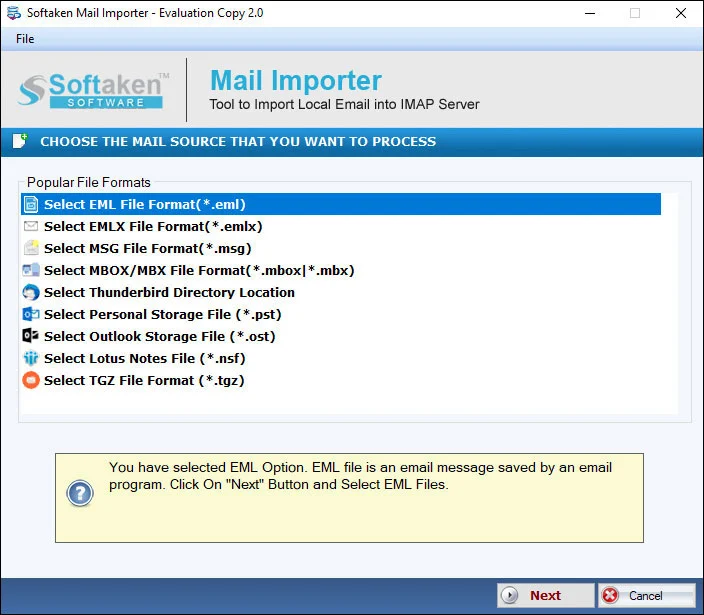
Add MSG files for Hotmail import
1

Browse Specified MSG

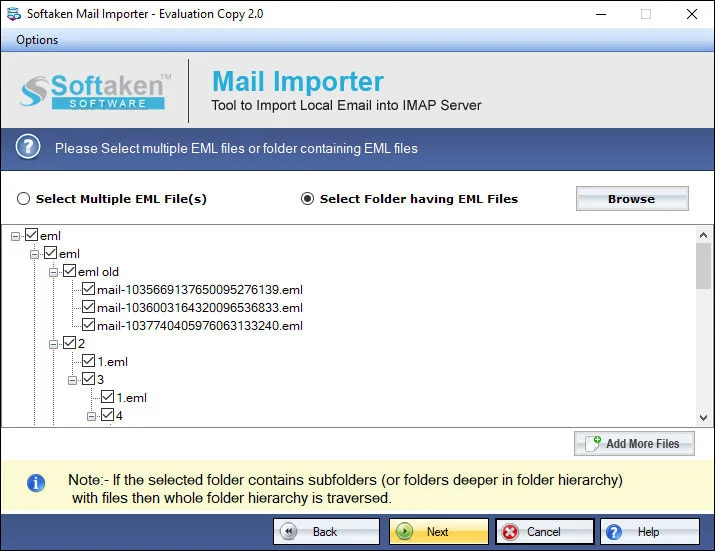
Browse feature assists you to select specific MSG files. Export only user's specified MSG files;bulk of more than 1 MSG altogether.

Preview local email files before Hotmail upload
2

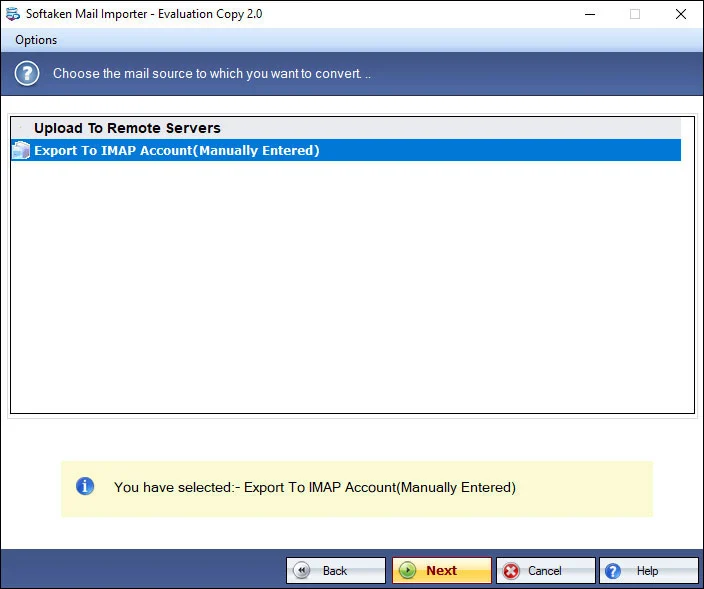
Simple GUI Steps

Simple to operate — 3–4 simple steps to successfully export Outlook MSG to Hotmail. No special technical skill required.

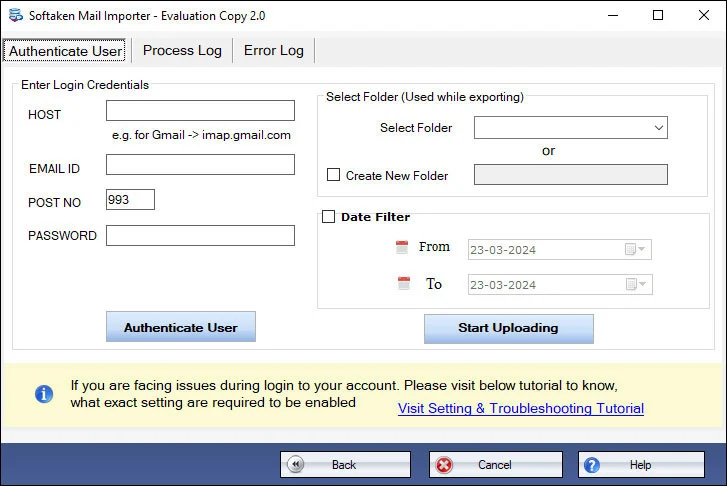
Hotmail account login with user ID and password
3

Hotmail User ID &Password

Specify the particular Hotmail account. Correct user ID and password automatically connect the tool with the Hotmail account.

Demo available for evaluation. Full license from $99. Guide:user steps· demo video.

Key Features of MSG to Hotmail


Convert User's Specified Databases

With this converter program,users find complete flexibility of data conversion. The tool has been designed to export those MSG files that they actually want to export. The browse feature assists them to select specific MSG files.

Simple to Operate
Simple to Operate

No specific technical competency is required to operate the app. The GUI of the app is simple. It just needs 3-4 simple steps to successfully export Outlook to Hotmail. No special technical skill you need to operate it.

Export in Batch
Export in Batch

Users find bulk data transfer assistance where they can import more than 1 MSG file altogether. The utility saves conversion time by allowing bulk migration. No data is spoilt during migration process.

Accurate Conversion Assurance

Export MSG to Hotmail without losing quality. The exporter is capable in scanning all sizes MSG files. It scans both new and archived MSG files. It allows you to export data in bulk with top accuracy. Originality of mails is preserved.

Convert to Selected Hotmail Account

Users need to specify the Hotmail account in which they want to access the Outlook databases. For which it needs correct User ID and Password. The given User ID and correct password automatically connect the tool with the Hotmail account.

Added Advantages
Added Advantages

The tool fits to your personal and commercial needs. It exports data in bulk. Moreover,the license of the app works for the time period you want. It doesn't expire in any case.

Feature Comparison of MSG to Hotmail Importer – Trial and Licensed Version

A free demo is available to evaluate Softaken Mail Importer for MSG to Hotmail. This product page does notstate a numeric demo limit (such as 10 or 10–25 MSG). Unlimited conversion is for license holders from $99.

Features
  • Selective / bulk MSG to Hotmail
  • Hotmail user ID &password login
  • Independent app (no Outlook install)
  • Archive &new MSG;any size
  • Accurate conversion;originality preserved
  • Outlook 2003–2016 MSG support
  • Windows only (11/10/XP/Vista/8/7)
  • Limitation
  • Price
DEMO Version
  • Limited export (count not stated)
  • FREE
FULL Version
  • Unlimited (license holders)
  • $99

Tools Faq's


This page documents Hotmail login with the correct user ID and passwordonly. Microsoft OAuth 2.0,App Passwords,and two-step verification (2SV/2FA) workflows are not claimedhere. The app cannot help retrieve a Hotmail password. For third-party app access guidance see:How to Access Hotmail Account with Third Party Apps.
No.This is an independent app. MSG from MS Outlook 2003,2007,2010,2013 and 2016 is supported for conversion without requiring Outlook installation to run the tool.
Product positioning covers import to Hotmail,Live Mail,and Outlook.com(particular Hotmail account via user ID and password). A separate @msn.comdomain checklist is not claimedon this page beyond those named targets.
Documented assurance:export without losing quality;originality of mails is preserved;no data is spoilt during migration;export without any data conversion issue. Named attachment types (PDF,DOCX,ZIP),inline graphics checklists,and HTML/RTF styling lists are not itemizedon this page. Only healthy MSG files are scanned and exported.
Custom target folder mapping (primary Inbox vs create a dedicated new folder) is not claimed. Documented flow converts to the particular / selected Hotmail account after user ID and password connect.
Yes for bulk work:convert data in bulk;import more than 1 MSG file altogether;convert MSG files without considering size;unlimited conversion for license holders. Selective export of user's specified MSG files is also supported. A numeric “thousands” label and a dedicated batch folder-selection option name are not separately stated beyond bulk / browse for specified files.
Complete RFC header checklists (To,From,CC,BCC,Sent/Received) are not itemizedon this page. Documented claims are accurate conversion,originality preserved,and no data spoilt / no data conversion issue during migration.
A free demo is available for evaluation (limited export). Numeric limits such as 10or 10 to 25 MSG filesare not statedon this product page. Unlimited conversion support is for license holders. Full license from $99. Windows only. The tool does not retrieve Hotmail passwords;only healthy MSG files are exported.

Software Specifications


System requirements and delivery details for Softaken MSG to Hotmail Importer on Windows.

System Requirement

ProcessorAny Pentium Class

Operating SystemWindows 11,10,8.1,8,7,XP,Vista &Other

Memory512 MB Minimum

Hard Disk100 MB free for installation

Software Delivery

ElectronicVia Email

Minutes15

DemoLimited export (count not stated)

Starting Price$99

Interface Available

Language SupportedEnglish

Support OptionEmails,Chat &Skype

LoginUser ID &Password

MSG SupportOutlook 2003–2016

Client Reviews