Softaken Email Duplicate Analyzer
Safe & Secure Download

Independently scanned with multiple antivirus engines.

100% Safe

Email Duplicate Analyzer

Identify and Analyze Duplicate Emails from your Mailbox

Scan and remove duplicate emails from PST, OST, EML, EMLX, MSG, and MBOX in one Softaken tool. Softaken lists within each folder or across all folders, Filter Option for mails, password-protected PST, preserve originals, save output at a chosen path, and standalone use (no Outlook required). Demo: Count Duplicate Emails (save needs license); from $69. Windows only.
  • Quickly scan your mailbox and delete duplicate emails from PST, OST, EML, EMLX, MSG, MBOX
  • Easily remove duplicate emails from Password-protected Outlook file
  • Remove duplicate emails in Apple Mail without any issues
  • Find and remove duplicate Outlook email messages in 3 steps
  • Remove duplicate EML & EMLX files in bulk
  • Preserve original emails when searching & delete duplicate emails
  • Remove duplicate emails from OST & MSG files without Outlook
  • Free to utilize on different editions of Windows i.e. 11, 10, 8.1, 8, 7, etc.
  • Support maintaining folder hierarchy when finding duplicate emails
  • Freely find duplicate emails in Thunderbird
  • Free Duplicate Email Remover for all for quick examination
From $69Demo: Count duplicatesWindows onlyWithin / Across foldersNo Outlook requiredPassword-protected PST
PSTOSTEMLEMLXMSGMBOX

Softaken Email Duplicate Analyzer helps you analyze, search, and remove duplicate emails from PST, OST, MSG, EML, EMLX, and MBOX. Softaken lists within-folder or across-folder modes, Filter Option for mails, password-protected PST, maintain folder hierarchy, save the resultant file at any path, make a new PST without duplicates, bulk load with no mailbox size/number restrictions, and standalone use without additional applications. Softaken FAQ: free trial can detect & remove for evaluation but cannot save the resultant file without a license.

Related: Softaken EML Duplicate Remover entirely removes duplicate emails from all folders of EML and EMLX without harm to original files.

Software interface

Only Softaken Email Duplicate Analyzer screenshots from the official steps guide.


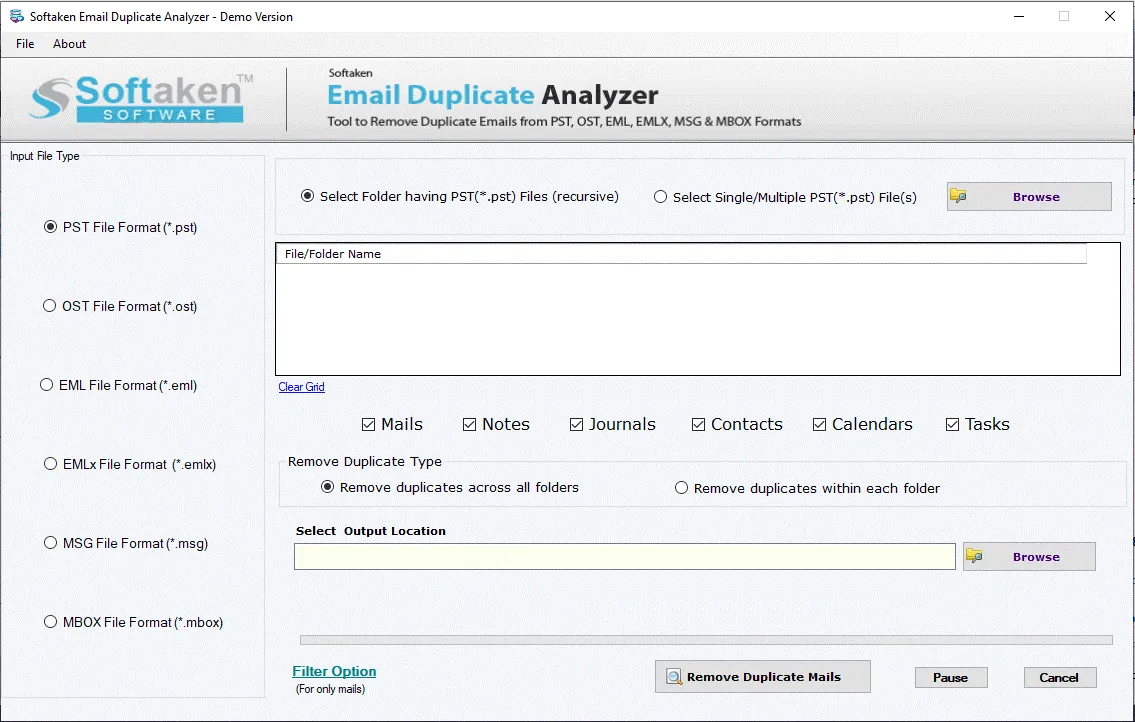
Softaken Email Duplicate Analyzer - launch and select source format1

Launch & select source

Open Softaken Email Duplicate Analyzer. In the left panel choose PST, OST, EML, EMLX, MSG, or MBOX, then load file(s) or folder. Softaken docs: preview selected files, within/across folders, and choose output location.
Softaken Email Duplicate Analyzer - Duplicate Field Form filter option2

Filter & remove duplicates

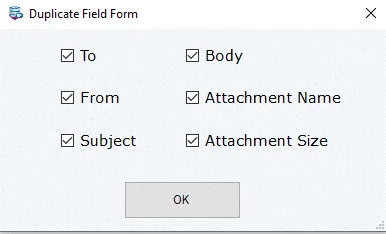
Softaken docs: use Filter Option as required (To, From, Subject, Body, Attachment Name, Attachment Size), then click Remove Duplicate Emails to analyze and remove.

Click a screenshot to enlarge. Softaken steps: how-to guide · screenshots.

How to remove duplicate emails


Step-by-step

Softaken Email Duplicate Analyzer docs:

  1. Launch the Software — open Softaken Email Duplicate Analyzer and activate with the provided key.
  2. Select Source Files — choose the format in the left panel, load your file/folder, set within or across folders, choose output location, and optionally use Filter Option.
  3. Analyze and Remove Duplicates — click Remove Duplicate Emails to start the process.

Essential Features of Email Duplicate Analyzer Software


Remove Duplicate Emails

Remove Duplicate Emails

With this program, users can analyze, search and remove duplicate emails from PST, OST, MSG, EML, EMLX, and MBOX files. The software smoothly identifies all duplicate emails & removes them within a few clicks.

Find Duplicate Emails and Delete

Find Duplicate Emails & Delete

This Duplicate Emails Remover Tool is designed with a friendly UI that easily fixes all duplicate emails from multiple email clients such as Outlook, Thunderbird, Apple Mail, Windows Live Mail, and more.

Delete Same Messages from EML and EMLX

Delete Same Messages from EML & EMLX

All the same messages from EML and EMLX files are deleted by the software. It will delete duplicate copies of emails by maintaining data integrity. It always performs safe operation & won’t change the content & attachments of emails.

Perform Bulk Operation

Perform Bulk Operation

In bulk mode, users can load data files. The Outlook Duplicate Email Finder easily adds multiple files and deletes all duplicate copies from them. It has no restrictions on mailbox size and number. It will detect & delete duplicate emails, contacts, notes, etc.

Password-Protected PST Supported

Password-Protected PST Supported

Not only unlocked but also password-protected PST files can be added to the software panel for fixing duplicate emails. The software can comfortably delete duplicate emails in Outlook without getting any inconvenience.

Support all MS Outlook Editions

Support all MS Outlook Editions

This Mailbox Duplicate Analyzer Tool is workable with all versions of MS Outlook, Exchange, and Windows. It comes with wide compatibility so freely use it on any Windows OS like Win 11, 10, 8.1, 8, 7, and others.

Save Output file at Desired Path

Save Output file at Desired Path

After finding & fixing duplicates, users can save the resultant file at any path of their system. This Email Duplicate Finder Tool seeks users to set any preferred location for the output file having no duplicates in it.

Make New PST File without Duplicates

Make New PST File without Duplicates

The software can detect all duplicate Outlook emails across all folders or within each folder, as per the selection of desired options by users. After removing duplicate Outlook email messages, users can save the other emails in a new PST file.

No Additional Tool Needed

No Additional Tool Needed

To remove duplicates from MSG, OST, PST, and other files, the software won’t ask for additional application installation. It can comfortably work standalone to find & fix duplicate emails. Also, the program allows to show de-duplication status.

Feature Comparison of Email Duplicate Analyzer – Trial and Licensed Version

Features
  • Remove Duplicate Emails
  • Add Files & Folder
  • Remove duplicates within the Folder(s)
  • Remove duplicates across the Folder(s)
  • Remove Duplicates from MBOX/PST/OST/EML/EMLX/MSG Files
  • Support All Versions File
  • Support Windows 11/10/8/7/others
  • Limitation
  • Price
DEMO Version
  • Count Duplicate Emails
  • FREE
FULL Version
  • Remove Duplicates
  • $69

Softaken’s free demo counts / shows duplicate values and Softaken FAQ states you can detect & remove duplicates for evaluation but cannot save the resultant file without a license. A “10 to 25 duplicate items per folder” range is not stated. Full remove and save from $69.

Email Duplicate Analyzer FAQs


Yes — Softaken lists all of those: PST, OST, EML, EMLX, MSG, and MBOX. Softaken also lists Thunderbird (MBOX), Apple Mail, Outlook, Windows Live Mail, and password-protected Outlook PST files.
Softaken docs include a Filter Option (for only mails) and Softaken’s Duplicate Field Form shows checkboxes for To, From, Subject, Body, Attachment Name, and Attachment Size. Named Message-ID or Date & Time fields are not shown on that Softaken dialog.
Yes. Softaken lists remove duplicates within the Folder(s) and across the Folder(s), maintain folder hierarchy, and Softaken docs: remove duplicates from across all folders or within each folder. Softaken UI also offers recursive folder selection for supported formats.
Softaken describes remove / delete duplicate emails and then save the resultant file (for example a new PST without duplicates) at a preferred path. Softaken also lists preserve original emails when searching & delete duplicates, and won’t change content & attachments of kept emails. A named “move duplicates to a separate backup folder” action is not listed on Softaken.
No. Softaken FAQ: the software does not need Outlook for fixing duplicate emails from a PST file. Softaken also lists remove duplicates from OST & MSG without Outlook, and no additional tool needed for MSG, OST, PST, and other files. Softaken does not list a Mac edition for this product.
Softaken lists preserve original emails when searching & delete duplicate emails, maintain data integrity, safe operation that won’t change the content & attachments of emails, and Softaken FAQ: you won’t face data corruption & data loss issues. Named full RFC 822 header inventories beyond Softaken’s wording are not listed.
Yes for bulk / large mailboxes: Softaken lists no restrictions on mailbox size and number, bulk load of multiple files, and Softaken FAQ: designed to handle mailboxes of various sizes and large volumes of emails. Softaken demo report UI shows example totals such as thousands of messages scanned. A fixed “tens of thousands” guarantee slogan beyond Softaken’s wording is not listed.
Softaken’s feature comparison lists demo limitation as Count Duplicate Emails. Softaken FAQ: free edition permits you to detect & remove all duplicates but you can’t save the resultant file—license required. Softaken docs: demo helps show duplicate values. A “10 to 25 duplicate items per folder” range is not stated. Full remove and save from $69.

Software Specifications


Engine Note

Softaken Email Duplicate Analyzer (buy-email-duplicate-analyzer). Softaken documents multi-format dedupe for PST/OST/EML/EMLX/MSG/MBOX with within/across folders, Filter Option fields (To/From/Subject/Body/Attachment Name/Size), password-protected PST, and save output without duplicates. Named Message-ID/Date criteria, move-to-folder vs permanent-delete modes, and “100% offline / zero telemetry” slogans are not listed (see FAQs). Demo: Count Duplicate Emails / cannot save.

Product Info

Version1.0

Size3.3 MB

Starting Price$69

Full licenseRemove & save

Demo & License

Free demo: Softaken lists Count Duplicate Emails; FAQ says detect & remove for evaluation but cannot save the resultant file. A “10 to 25 items per folder” range is not stated. Full from $69.

Demo limitCount Duplicate Emails / no save

Scope modesWithin folder / Across folders

10–25 per folderNot stated

Licensed editionRemove & save from $69

Input & Output

InputPST / OST / EML / EMLX / MSG / MBOX

OutputResultant file without duplicates (e.g. new PST)

Filter fieldsTo · From · Subject · Body · Attachment Name/Size

PlatformWindows only (not Mac)

System Requirement

ProcessorAny Pentium Class

Operating SystemWindows 11, 10, 8.1, 8, 7 & Other

Memory512 MB Minimum

Hard Disk100 MB of free space for software installation

Software Delivery

ElectronicVia Email

Minutes15

PrerequisiteNo email client required

Interface Available

Language SupportedEnglish

Support OptionEmails, Chat & Skype

What Our Users Say