Softaken NSF to Gmail Importer

Softaken NSF to Gmail Importer

Open your Lotus Notes files to Gmail account with attachments

Direct import using correct login details of Gmail — introduce Gmail account username &password,select the folder,then click Upload Now.
A compulsion for installation of Lotus Notes email client (11.0,10.0,9.0,8.5,7.0,6.0 &others) — not standalone. Windows operable utility — not macOS.
  • Offer direct import NSF files to Gmail account
  • Capable to bulk import Lotus Notes files to Gmail
  • Import IBM Notes to Gmail with attachments
  • Assures 100% safe and smooth migration
  • Avail preview and NSF files count
  • Import NSF mailboxes without any size restrictions
  • A compulsion for installation of Lotus Notes email client
  • Import to a new folder in Gmail account
  • Accurate and fast migration process
  • Windows operable utility,smoothly run on Windows 10 &others
NSFGmailAttachments
File &Folder modes:single NSF or multiple NSF files at once. Demo allows 25 items import from each folder of NSF. See also:How to Access Gmail Account with Third Party Apps or Software?
WindowsLotus Notes RequiredUsername &PasswordFile &Folder ModesDemo 25/Folder

Lotus Notes NSF to Gmail


NSF (Lotus Notes / IBM Notes)Softaken (Windows + Notes)Gmail Account

Watch NSF to Gmail ImporterDemo


Load NSF,sign in to Gmail,and upload

See Softaken Mail Importer (engine for NSF cloud import) load NSF files,introduce Gmail username &password,select a destination folder,and upload — with Lotus Notes installed.

  • Download &Run the software
  • Select and Browse NSF files
  • Introduce Gmail account username &password
  • Select the folder to import NSF files,then Upload Now

See the NSF to Gmail ImporterInterface


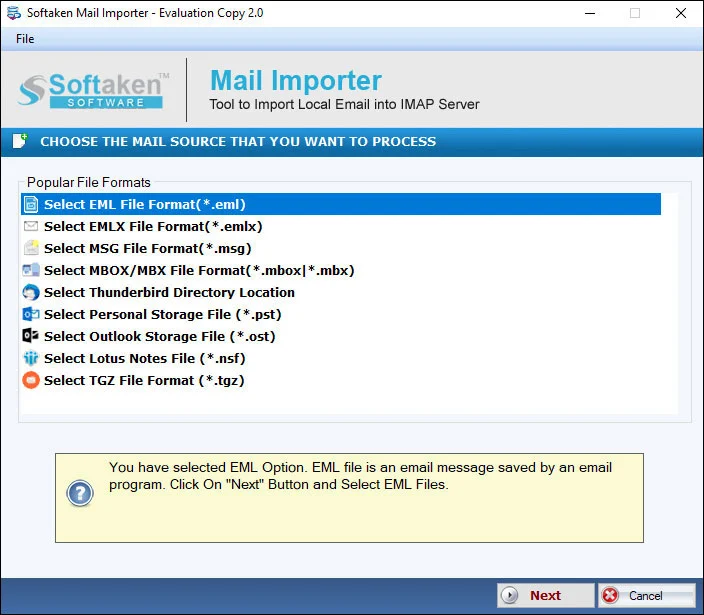
Softaken Mail Importer home for NSF import
1

Launch &Load NSF

File mode for a single NSF file,or Folder mode to load multiple NSF files at once for Gmail import.

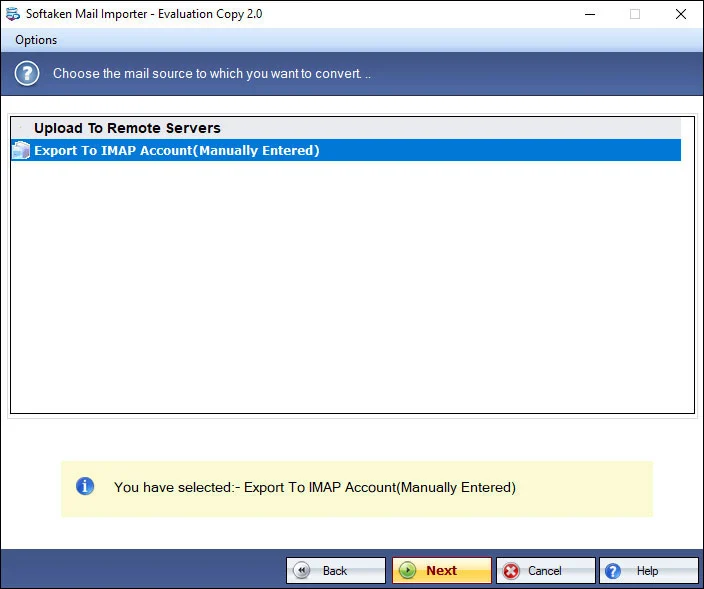
Import options for NSF to Gmail
2

Import Options

Review options before importing Lotus Notes emails with corresponding attachments to any folder of the Gmail account.

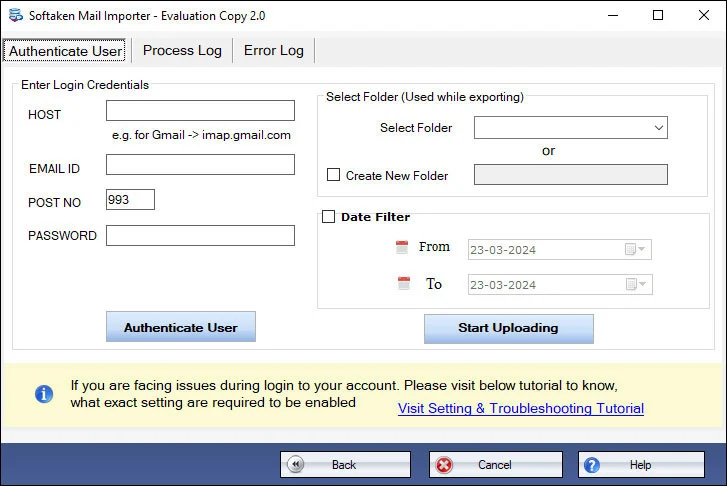
Gmail account username and password login screen
3

Login &Upload

Introduce Gmail username &password,select or import to a new folder,then click Upload Now.

Free Demo allows 25 items import from each folder of NSF. Full license unlocks unlimited migration (from $49). Guide:user steps· demo video.

Key Features of NSF to Gmail Importer


Import Lotus Notes to Gmail account

The program is designed to successfully import Lotus Notes emails to Gmail account with corresponding attachments. Without restricting the size of NSF file,users can easily import them to any folder of Gmail account. Users require correct login details of Gmail for this migration.

Provide Dual options to choose NSF data

The software offers two options to load NSF data – File &Folder. If users have a single NSF file then they can go with File mode but Folder mode is helpful when users have multiple NSF files. These NSF files can be loaded at once and are imported to Gmail account with this utility.

Great Support with Windows OS

Softaken NSF to Gmail Importer is Windows-based program and comes with a great feature of support. Using this program,users can import any number of IBM Notes files to Gmail account on all versions of Windows OS i.e. 11,10,8.1,8,7,XP,Vista,and others.

Maintain Data Integrity

All the meta properties like layout,fonts,texts,hyperlinks,cc,bcc,subject,from,etc. are retained without data loss issues. The software maintains data integrity and email elements throughout the migration. There is no loss of a single bit of information.

Support every edition of IBM Notes

Before you initiate this migration process,it is necessary to install Lotus Notes email client on your system. Any version of Lotus Notes should be installed and configured to use this software. It includes Lotus Notes 11.0,10.0,9.0,8.5,7.0,6.0,&others.

Free IBM Notes to Gmail Importer

There is a free trial of NSF to Google Mail Importer that every user can directly download on their system and check the complete functionality of the software before applying for the pro version. Moreover,for any kind of issue,customers can contact our support executives 24x7.

Feature Comparison of NSF to Gmail Importer – Trial and Licensed Version

Free trial is available for evaluation. Demo allows 25 items import from each folder of NSF. Full / pro version unlocks unlimited migration.

Features
  • Import NSF to Gmail with attachments
  • Gmail username &password login
  • Lotus Notes client installation required
  • File &Folder modes (bulk NSF)
  • Import to new / any Gmail folder
  • No NSF size restrictions;preview &count
  • Windows only;Notes 11.0–6.0 &others
  • Limitation
  • Price
DEMO Version
  • 25 items per NSF folder
  • FREE
FULL Version
  • Unlimited migration
  • $49

Tools Faq's


This product page documents import with correct login details of Gmail— introduce Gmail account username &password,select the folder,then click Upload Now. Google App Passwords,2-Step Verification workflows,Modern Auth / OAuth,and zero credential caching are not separately claimed. See Softaken’s guide:How to Access Gmail Account with Third Party Apps or Software?
Yes. To import NSF files to Gmail account,Lotus Notes installation is must. It is necessary to install Lotus Notes email client (11.0,10.0,9.0,8.5,7.0,6.0 &others) and configure it before migration. Softaken importer is Windows only.
Orphaned,disconnected,or password-protected NSF handling is not separately claimed on this product page. Documented scope is NSF import with Lotus Notes installed,without size restrictions on NSF mailboxes,with preview and NSF files count.
Gmail “labels” preservation is not separately claimed. The page documents import to a new folder/ any folder of the Gmail account after you select the destination folder. Folder mode loads multiple NSF files at once for import into Gmail.
Yes for attachments and meta properties:import Lotus Notes emails to Gmail with corresponding attachments;layout,fonts,texts,hyperlinks,cc,bcc,subject,from,etc. are retained without data loss. Inline images and Domino doclinks are not itemized separately beyond those claims.
Date-range filters are not claimed on this product page. You can use File &Folder modes to load NSF data,select the folder to import into Gmail,and import to a new folder in the Gmail account.
The page states import NSF mailboxes without any size restrictionsand without restricting the size of NSF file when importing to any folder of Gmail. Specific 20 GB / 50 GB+ figures are not listed as caps on Softaken’s side;Gmail account limits still apply on Google’s side.
The free version is available for evaluation and allows 25 items import from each folder of NSFso you can check the complete functionality before the pro version. Full license unlocks unlimited migration from $49. Windows only;Lotus Notes required.

Software Specifications


Windows onlyLotus Notes mandatoryUsername &passwordDemo 25/folderFrom $49

System Requirement

ProcessorAny Pentium Class

Operating SystemWindows 11,10,8.1,8,7 &Other

Memory512 MB Minimum

Hard Disk100 MB of free space for software installation

Software Delivery

ElectronicVia Email

Minutes15

Demo25 items per NSF folder

Full LicenseFrom $49

Interface Available

Language SupportedEnglish

Support OptionEmails,Chat &Skype

PlatformWindows (10,8.1,8,7,XP,Vista &others)

ProductNSF to Gmail Importer

Migration Notes

TargetGmail account

AuthGmail username &password

PrerequisiteLotus Notes compulsory

ModesFile &Folder (bulk NSF)

Data Integrity

PreservesLayout,fonts,texts,hyperlinks,cc,bcc,subject,from

AttachmentsWith corresponding attachments

FoldersNew / any Gmail folder

NSF sizeWithout size restrictions

NSF to Gmail Importer Reviews