Softaken NSF to Office 365 Importer

Softaken NSF to Office 365 Importer

Import Lotus Notes mailboxes to Office 365 account

Office 365 login credentials are required to directly import NSF to O365. Enter the username &password of the Office 365 account,then select or create a folder and hit Upload Now.
Lotus Notes installation is must for Lotus Domino to Office 365 migration (not standalone). Supports Lotus Notes 11.0,10.0,9.0,8.5,8.0,7.5,7.0,6.5,etc. Domino Server connectivity is not required. Windows only — not for Mac OS.
  • Support migration of multiple Lotus Notes files to Office 365
  • Office 365 login credentials are required to directly import NSF to O365
  • Facilitate import NSF files to a newly created folder in Office 365 account
  • Lotus Notes installation is must for Lotus Domino to Office 365 migration
  • Upload any large Lotus Notes file effortlessly
  • Comes with a friendly user interface
  • Create migration progress report
  • All Lotus Notes and Windows versions are supported
  • No chance of data loss and file corruption
  • Keep NSF file structure and attachments intact
NSFOffice 365 / Microsoft 365
Bulk migrate multiple NSF files at once via Add Folder. No Domino Server connection required. Demo imports 25 items from each folder.
WindowsLotus Notes RequiredNo Domino Server NeededMultiple NSF / Add FolderDemo:25/folder

Lotus Notes NSF to Microsoft Office 365


NSF (Lotus Notes)Softaken (Windows + Notes)Office 365 Mailbox Folder

Watch NSF to Office 365 ImporterDemo


Add NSF,sign in to Office 365,and upload

See Softaken Mail Importer (engine for NSF cloud import) add NSF files,authenticate with Office 365 credentials,choose a destination folder,and upload — with Lotus Notes installed.

  • Download and launch NSF to Office 365 Importer
  • Select NSF and add NSF files
  • Enter the username &password of Office 365 account
  • Select or create a folder,then hit Upload Now

See the NSF to Office 365 ImporterInterface


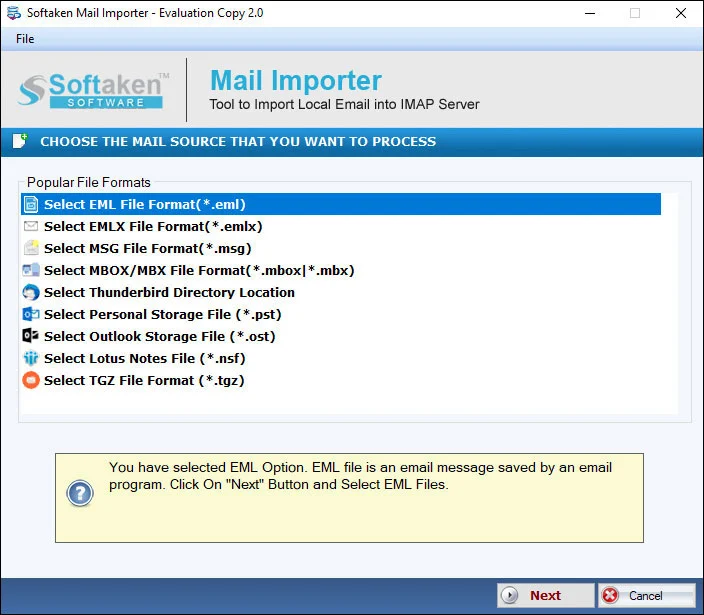
Softaken Mail Importer home for NSF import
1

Launch &Add NSF

Launch the importer and add NSF files — or use Add Folder to import a folder with multiple NSF files at once.

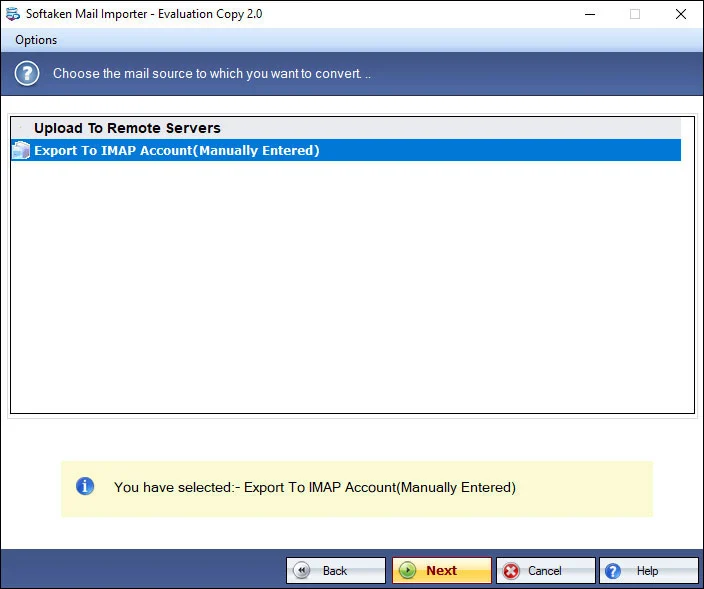
Import options for NSF to Office 365
2

Choose Import Options

Review import options before uploading NSF data items to the Microsoft Office 365 account.

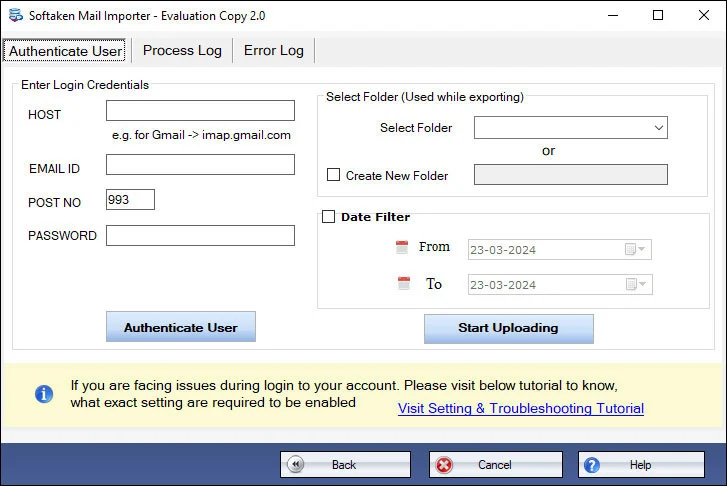
Office 365 login credentials screen
3

Sign In &Upload

Enter Office 365 username &password,select or create a folder in the account,and hit Upload Now. Progress report is available.

Free Demo imports 25 items from each folderof NSF. Full license unlocks unlimited migration (from $99). Guide:user steps· demo video.

Salient Features of NSF to Office 365 Importer


Import Lotus Notes NSF to MS Office 365

The software permits users to upload NSF files to Office 365 account. It directly migrates NSF data items to Microsoft Office 365 account by providing correct login details of the desired Office 365 account. Without any file size constraints,smooth migration is performed by the tool.

Bulk migrate Domino NSF to Office 365
Bulk migrate Domino Server to Office 365

The software easily imports Domino NSF files to Office 365 with this utility. However,it is not required to connect with Domino Server for the migration. Multiple NSF files instant import to Office 365 is performed at once by the software without any problems.

NSF emails migration with attachments
Conduct NSF emails migration with attachments

While you migrate NSF emails to Office 365 account,all the associated attachments are smoothly moved with emails. There is no loss of any attachments and its format throughout the migration process. The entire process is easy and safe.

Maintain folder structure
Maintain Folder structure completely

You will find the same structure of NSF files after they are imported to Office 365 account. There is no change in the actual structure of NSF files. Also,there is no effect on Lotus Notes email attributes and attachments throughout the migration.

All Lotus Notes versions supported
All Lotus Notes versions are supported

Before you start the conversion process,make sure you have Lotus Notes installed on your system. However,you can install any version of IBM Notes like Lotus Notes 11.0,10.0,9.0,8.5,7.0,etc. and migrate all versions NSF file to Office 365 account.

Free NSF to Office 365 migration demo
Free NSF to Office 365 Migration

To check the features and working performance of the software,users will get a trial version of the software by which they can import 25 items from each folder of NSF. Both demo and pro editions have the same features apart from the limited migration facility with the demo version.

Feature Comparison of NSF to Office 365 Importer – Trial and Licensed Version

Free demo connects with Office 365 login credentials and migrates up to 25 items from each folderof NSF. Demo and pro share the same features apart from the limited migration facility. Full license unlocks unlimited migration.

Features
  • Import Lotus Notes NSF to Microsoft Office 365
  • Migrate NSF emails with attachments intact
  • Requires Lotus Notes / IBM Notes client
  • Multiple NSF files / Add Folder batch import
  • No Domino Server connection required
  • Keep NSF folder structure &attributes
  • Migration progress report;Windows only
  • Limitation
  • Price
DEMO Version
  • 25 items per folder
  • FREE
FULL Version
  • Unlimited migration
  • $99

Free Demo imports 25 items from each folderof NSF. Full license unlocks unlimited migration (from $99). Softaken NSF to Office 365 Importer supports only Windows OS and requires Lotus Notes / IBM Notes.

Frequently Asked Questions Regarding NSF to Office 365 Importer


This product page documents authentication with Office 365 login credentials — enter the username &password of the Office 365 account,then select or create a folder and hit Upload Now. Modern Authentication (OAuth 2.0),Entra ID,MFA/2FA workflows,and zero credential caching are not separately claimed on this page.
Yes. Lotus Notes installation is must for Lotus Domino to Office 365 migration. Make sure you have Lotus Notes installed before you start. Domino Server connectivity is not required — only Lotus Notes installation is required. The tool is not 100% standalone. Windows only (not Mac OS).
There is no need to connect Domino Server for the migration;Domino NSF files can be imported with Lotus Notes installed. Orphaned,disconnected,or password-protected NSF handling is not separately claimed beyond “no Domino Server connection required,” large NSF upload support,and Notes version support (11.0–6.5,etc.).
CSV user-mapping templates are not claimed on this product page. You can import NSF to Office 365 in batch by selecting the Add Folder option to import a folder having multiple NSF files. Multiple NSF files can be imported at once to the Office 365 account you sign into with login credentials.
Associated email attachments are smoothly moved with emails with no loss of attachment format. NSF folder structure and Lotus Notes email attributes stay intact. Recurring calendar events,address books (names.nsf),distribution lists,and tasks are not separately claimed on this page beyond NSF emails,attachments,structure,and attributes.
The documented workflow migrates NSF data items into the signed-in Office 365 account — including import to a newly created folder,or select/create a folder,then Upload Now. Primary vs In-Place Archive vs Shared Mailbox targets are not separately claimed on this product page.
Date-range filters and exclusion filters are not claimed on this product page. Documented controls include adding NSF files (or a folder of NSF files),signing in with Office 365 credentials,selecting or creating a destination folder,uploading,and generating a migration progress report.
The trial version lets you import 25 items from each folder of NSF so you can check features and working performance. Both demo and pro editions have the same features apart from the limited migration facility with the demo. Full unlimited migration from $99. Windows only;Lotus Notes required.

Software Specifications


Windows onlyLotus Notes requiredNo Domino Server neededDemo:25 items/folderFrom $99

System Requirement

ProcessorAny Pentium Class

Operating SystemWindows 11,10,8.1,8,7 &Other

Memory512 MB Minimum

Hard Disk100 MB of free space for software installation

Software Delivery

ElectronicVia Email

Minutes15

Demo25 items per folder

Full LicenseFrom $99

Interface Available

Language SupportedEnglish

Support OptionEmails,Chat &Skype

PlatformWindows only

ProductNSF to Office 365 Importer

Migration Notes

PrerequisiteLotus Notes client required

Domino ServerNot required for migration

O365 Sign-inUsername &password

Batch NSFAdd Folder (multiple NSF)

NSF to Office 365 Importer Reviews