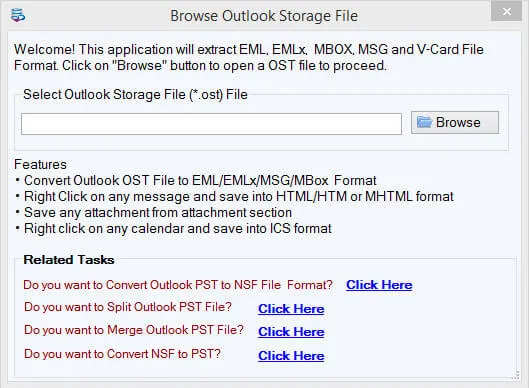
OST to CSV Converter is an amazing application that does not need any extra application like Outlook,Exchange Server,and another app to perform the conversion. It easily converts OST contact details to CSV without any technical skills.

See Softaken OST File Exporter load an offline OST file,preview contact folders and contact details,choose CSV export,and save the address book — without installing Microsoft Outlook. Import the generated CSV into Microsoft Excel,Google Sheets,Google Contacts,Salesforce,or HubSpot CRM.

Browse a single OST or use Folder Mode for bulk OST to CSV conversion.

Review contact folders,distribution lists,and preview complete contact details.

Choose CSV export and pick the save folder for your address book file.
Click any screenshot to enlarge. Demo exports 10 contacts per folder. Full license is $49. Gallery:OST File Exporter screenshots.
OST to CSV Converter is an amazing application that does not need any extra application like Outlook,Exchange Server,and another app to perform the conversion. It easily converts OST contact details to CSV without any technical skills.
One can simply convert multiple OST files at a single attempt using this application. The tool single-handedly manages the conversion of multiple OST files without having any effect on the working performance.
During the complete OST 2 CSV Conversion,the application preserves all meta elements,formatting,images,and other details of Address Book. The associated attachments are safely converted without any data loss issues.
All Microsoft Outlook versions are well-supported by the program. Users can pick any Outlook edition OST file such as Outlook 2019,2016,2013,2010,2007,2003,etc. Both 32-bit and 64-bit Outlook versions are supported.
To transfer Offline OST contacts to CSV,the utility can be set up in all Windows OS versions like Windows 11,10,8.1,8,7,XP,Vista,and others. The installation process of the application is simple and takes only a few seconds in it.
OST 2 CSV Converter utility displays complete contact details once OST file is loaded on the software screen. Users can select only contacts folders from the left pane and view all details before exporting OST Address Book to CSV.
Free Demo version previews all contact entries and exports up to 10 contacts per folder from OST to CSV format.
The free demo scans,previews all contact entries,and exports up to 10 contacts per folderfrom OST to CSV format. The full license is unlimited. Personal license is $49.
System Requirement
ProcessorAny Pentium Class
Operating SystemWindows 11,10,8.1,8,7 &Other
Memory512 MB Minimum
Hard Disk100 MB of free space for software installation
Software Delivery
ElectronicVia Email
Minutes15
Demo10 contacts / folder
Full License$49
Interface Available
Language SupportedEnglish
Support OptionEmails,Chat &Skype
PlatformWindows only (conversion tool)
ProductOST to CSV Converter
Download Guides
Recent Blogs