SoftakenOST to NSF Converter

Utility that Converts Outlook OST Files to Lotus Notes NSF Format

⚙ No Outlook Configuration Required — convert offline Outlook Offline Storage Table file (.ost). files to IBM / HCL Notes desktop client that uses NSF databases.Notes Storage Facility — Lotus Notes / HCL Notes database file. without setting up Microsoft’s desktop email app. Standalone Softaken tools can run without Outlook installed..

Key Features at One Glance

  • Convert OST files to NSF safely and swiftly
  • Perform complete scanning of the selected offline folder of OST
  • Display all mailbox items in the left pane
  • Support Legacy ANSI PST format used by older Outlook versions. and Unicode PST/MSG encoding used by modern Outlook versions. file types
  • Batch migration of OST files is supported
  • Complete migration of emails, contacts, notes, calendars, tasks, attachments, etc. of OST file
  • No requirement of Outlook configuration
  • Holds Keeps the original folder structure in the output. and email attributes
  • Filtered items conversion from OST to NSF format
  • Provision to ignore empty folders
  • Evaluation edition for testing the application — demo exports 10 emails
  • Supported on Windows 11, 10, 8.1, 8, 7 & Other

Windows only. Free demo exports 10 emails to NSF so you can test the conversion. No Outlook configuration required.

Softaken OST to NSF Converter
  • OST → NSF
  • Lotus Notes
  • Date Range
  • Demo: 10 emails
✓
Safe & Secure DownloadIndependently scanned with multiple antivirus engines.
100% Safe

Quick Facts

Input
Outlook .OST
Output
Lotus Notes .NSF
Demo
10 emails
Platform
Windows only

Outlook .OST mailboxes to NSF

Load offline OST mail, convert with Softaken, then open the NSF on every edition of Lotus Notes / HCL Notes / IBM Notes.

  1. Outlook .OST
  2. Softaken OST File Exporter
  3. Lotus Notes .NSF

Open converted NSF mailboxes in

  • HCL Notes 14 / 12 / 11 / 10
  • IBM Notes 9
  • Lotus Notes editions
  • Domino Server environments

Software interface

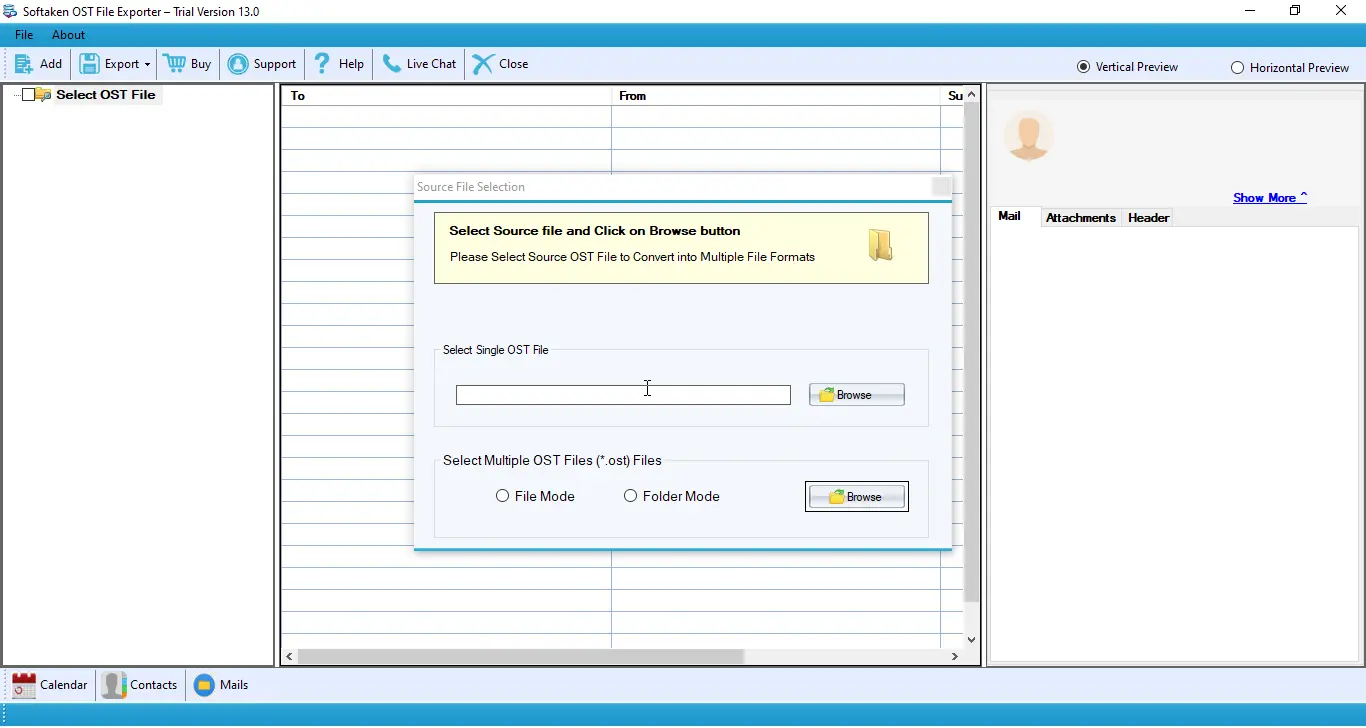
Follow the steps on the left. Use the arrows to switch screenshots — click a screenshot to enlarge.

Add OST Files — Softaken OST to NSF Converter

step 1 of 3 · click image to enlarge

Watch OST to NSF Demo

See Softaken OST File Exporter add OST files, preview the mailbox, and export to NSF — part of the same OST File Exporter family used across Softaken OST conversion tools.

Convert OST mailbox items to Lotus Notes NSF

  1. Browse and load offline OST files (ANSI & UNICODE)
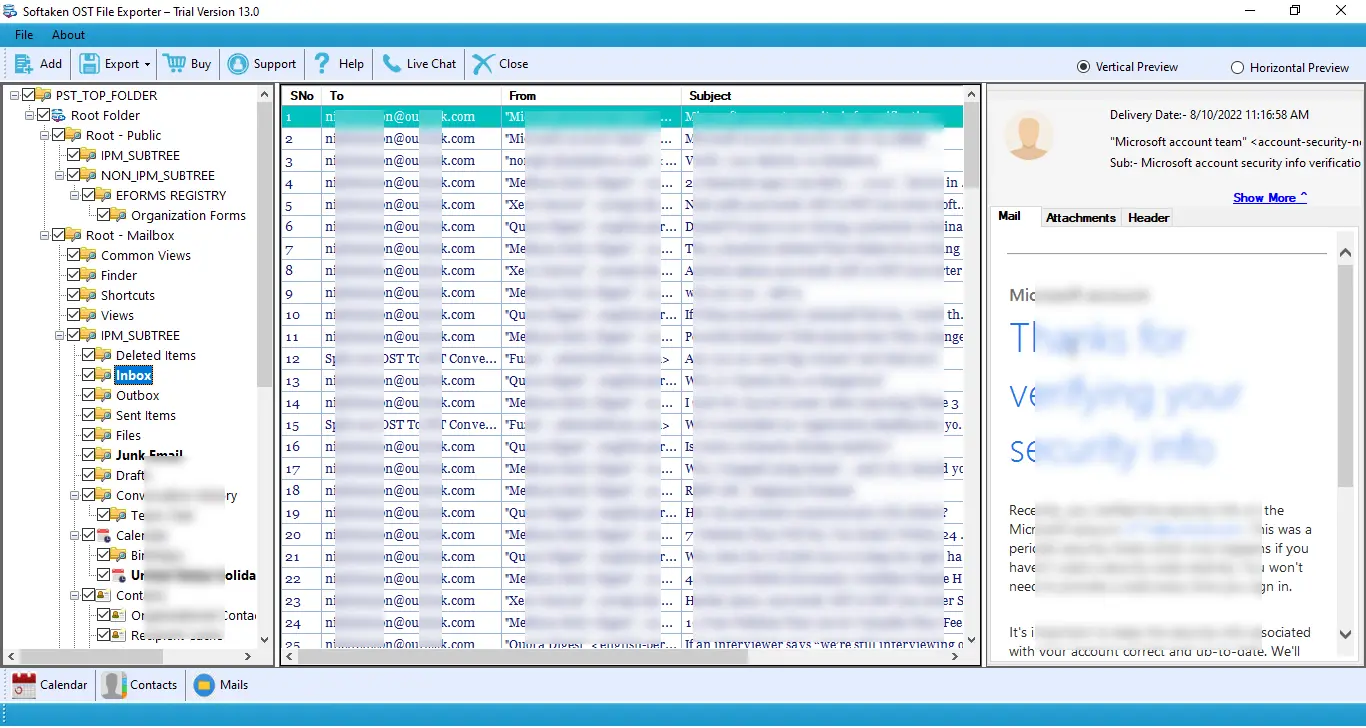
  2. Preview all mailbox items in the left pane
  3. Apply Date Range and selective folder filters
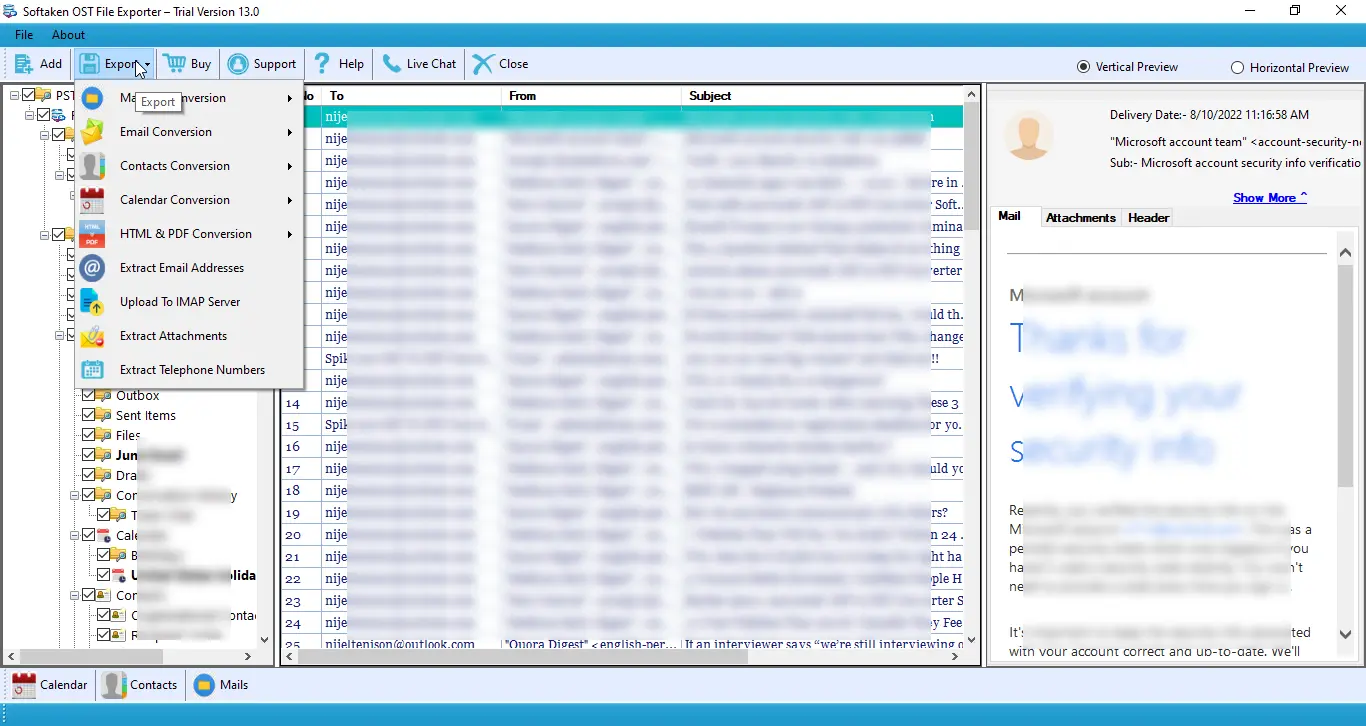
  4. Export to NSF and save to your chosen location

Features & Benefits of OST to NSF Converter

Bulk Outlook to Lotus Notes migration

Softaken OST to Lotus Notes NSF Converter is designed with a quick conversion algorithm that offers conversion speed and scanning of OST file. The utility exports multiple OST files at a time irrespective of Outlook versions where it is created.

Benefit: Bulk Outlook to Lotus Notes migration.

Export entire Outlook database

OST to NSF Converter export all mailbox items like emails, address book, calendars, attachments, etc. The application can be effortlessly handled by all technical or non-technical users without prior technical knowledge.

Benefit: Export entire Outlook database.

Upholds folder hierarchy and email components

The application upholds all originality of OST mailbox folders and preserves email properties (to, cc, time, bcc, subject, date, from) while performing the task of exporting OST files into Lotus Notes NSF format. Export OST to Lotus Notes NSF as per user choice.

Benefit: Upholds folder hierarchy and email components.

Export names.nsf contacts to VCF/CSV

With this program, users can export names.nsf file contacts to VCF and CSV formats. In the same manner, Outlook OST calendars are saved into ICS format. After export, users can save the complete NSF file to any location of their choice.

Benefit: Export names.nsf contacts to VCF/CSV.

Offer Preview and Filter options

OST files to IBM Notes NSF Conversion Tool offer a complete preview of OST mailboxes in the left pane. Apart from it, users have advanced filtration options by which they can filter the database according to date range and export only required items.

Benefit: Offer Preview and Filter options.

Wide Support

The software converts offline Outlook OST files to Lotus Notes NSF format without any issues. All Outlook version OST files are supported by the utility whom you can read on every edition of Lotus Notes. Moreover, freely download the application on all Windows OS.

Benefit: Wide Support.

Frequently Asked Questions Regarding OST to NSF Converter

1. Do I need to install Lotus Notes / HCL Notes on my computer to convert OST to NSF?

No Notes install is required just to run the export. Softaken’s Windows system requirements do not list Lotus Notes or HCL Notes as a prerequisite — the tool builds NSF mailbox files you can save anywhere. To open or work with that NSF later, you will need a supported HCL / IBM / Lotus Notes client on a machine that can open it.

2. Which versions of Lotus Notes and Domino Server (HCL Notes 12, 11, 10, IBM Notes 9) are supported?

Softaken states that all Outlook-version OST files are supported and that exported NSF data can be read on every edition of Lotus Notes (including IBM Notes and newer HCL Notes builds such as 14 / 12 / 11 / 10). The product docs do not publish a fixed Domino Server build matrix — use the free demo against your Notes environment to confirm.

3. Can I convert orphaned, disconnected, or corrupt OST files to NSF format?

Yes for offline, disconnected, or orphaned OST files — no Outlook configuration or Exchange reconnect is required. Corrupt OST recovery is not specifically documented on this product page; if a damaged file will not load, check the preview pane first or try Softaken OST Recovery before you export.

4. Does the software maintain the original folder structure, email formatting, and attachments in the NSF file?

Yes. Folder hierarchy and email attributes stay intact, including properties such as To, CC, BCC, subject, date, and from. Attachments and the rest of the mailbox items move with the complete OST-to-NSF migration described on this page.

5. Will my contacts and calendar schedules also be converted and accessible in Lotus Notes?

Yes. Softaken documents complete migration of emails, contacts, notes, calendars, tasks, attachments, and related mailbox items to NSF — including address book and calendar data. The exporter can also save Outlook calendars as ICS alongside NSF output. Preview items in the left pane before you convert so you can confirm what you need.

6. Can I batch convert multiple OST files into NSF files simultaneously?

Yes. Batch migration of OST files is supported. You can export multiple OST files in one run regardless of which Outlook version created each file. OST File Exporter also lets you add several OST sources via the Folder option in the shared export workflow.

7. Is there any file size limit when converting large (20 GB or 50 GB+) OST mailboxes to NSF?

Softaken does not publish a maximum OST size for NSF conversion. Verified users on this page report converting large OST files without a file-size cap. For big mailboxes, leave enough free disk space and system resources on your Windows PC.

8. What are the specific capabilities and export limitations of the free trial version?

The free demo includes the same features as the licensed build so you can try the full workflow. Through the demo edition you can export 10 emails from the OST file to NSF. When you are ready, unlock unlimited conversion with the full license from $49. Windows only.

Software Specifications

Windows desktop OST to NSF export: No Outlook configuration required. Part of the Softaken OST File Exporter family.

Lotus Notes NSF output: Convert offline OST to NSF. Date Range filter. Batch OST migration. Demo: 10 emails.

Preview & selective export: Mailbox items in the left pane before conversion; save the complete NSF file to any location of your choice.

Supported

Windows 11, 10, 8.1, 8, 7 & Other

Outlook OST

All Outlook versions · ANSI / UNICODE

Demo

10 emails

Pricing

Full from $49

Key Specifications

SpecificationDetails
Product NameSoftaken OST to NSF Converter
Version16.0
InputOffline / orphaned Outlook OST
Output FormatLotus Notes NSF
OS SupportedWindows 11, 10, 8.1, 8, 7 & Other
Notes SupportedEvery edition of Lotus Notes / IBM Notes / HCL Notes
PrerequisiteNo Outlook configuration · NSF opens in Notes clients
ProcessorAny Pentium Class
Memory512 MB Minimum
Hard Disk100 MB of free space for software installation
Demo10 emails
DeliveryElectronic · Via Email · Minutes: 15
Language / SupportEnglish · Emails, Chat & Skype
PlatformWindows only

Product Details

Version
16.0
License
Free demo / Full
Support
Emails, Chat & Skype · [email protected]

Free demo vs. full version

The free demo contains the same features as the licensed version and exports 10 emails to NSF so you can test the application. The full license is unlimited.

FeatureFree demoFull version
Convert OST mailbox to Lotus Notes NSFAvailableAvailable
Emails, address book, calendars, attachments & moreAvailableAvailable
Date Range filter & selective exportAvailableAvailable
Batch migration of multiple OST filesAvailableAvailable
ANSI & UNICODE OST supportAvailableAvailable
No Outlook configuration requiredAvailableAvailable
Support Windows 11/10/8/7 & othersAvailableAvailable
Limitation10 emailsUnlimited
PriceFREE$49
Softaken Reviews

What Our Users Say

Customer feedback on Softaken OST to NSF Converter.

Patrik SchererCustomer feedback

United States

I have recently bought your software and it is really cool to convert…

I have recently bought your software and it is really cool to convert offline Outlook OST files to Lotus Notes NSF format with this. Thanks to the developers of Outlook OST to NSF Converter for this commendable utility.

Amir NahviCustomer feedback

Germany

Without any file size limitations, I have converted a large size OST …

Without any file size limitations, I have converted a large size OST file into IBM Notes NSF format. I haven't faced a single trouble during this export. I recommend all the needful users to try this utility once.

Sharon GillingsCustomer feedback

Australia

I checked various applications to convert OST files to IBM Notes NSF.

I checked various applications to convert OST files to IBM Notes NSF. But when I tested the demo version of OST to NSF Converter, I decided at that moment to purchase it with its rapid working speed and simplified GUI. Now, I can say that I have taken the right decision.

Review

Convert OST to Lotus Notes NSF

Load an offline OST file, preview the mailbox, and export to NSF without Outlook configuration.

  • Windows only
  • OST · NSF
  • Lotus / IBM / HCL Notes

Windows only. Free demo exports 10 emails to NSF so you can test the conversion. No Outlook configuration required.