SoftakenPST Password Removal

Standalone Tool to Remove Outlook PST Passwords, Quick function to access Password Protected PST files with provided PST Password Remover Tool.

100% Standalone Engine — unlock and remove passwords from Outlook Personal Storage Table file (.pst). files without installing or configuring Microsoft’s desktop email app. Standalone Softaken tools can run without Outlook installed..

Quick unlock: Remove old passwords or reset with a password of your choice, including lengthy and multilingual passwords — without needing Outlook.

Key Features at One Glance

  • Give you flexibility to unlock PST files protected with a password
  • Reset Outlook password protected PST files to unlocked PST
  • The standalone tool needs no other software to run and no Microsoft Outlook desktop client. Standalone Softaken tools do not need it installed.
  • Capable to delete old password
  • Support password removable to both Legacy ANSI PST format used by older Outlook versions. & Unicode
  • Supported with Outlook 2024, 2021, 2019, 2016, 2013, 2010, 2007 & 2003
  • Supported on Windows 11, 10, 8.1, 8, and 7
  • Remove Password
  • Reset Password
  • ANSI · Unicode
  • Batch Unlock
  • No Outlook required

Batch unlock: Select one or multiple locked PST files and process them together. Free demo tests remove/reset; full license saves unlocked files.

Free demo lets you test remove/reset workflows but cannot save unlocked files. Full license unlocks saving. Windows only. No Outlook required.

Softaken PST Password Removal Software
✓
Safe & Secure DownloadIndependently scanned with multiple antivirus engines.
100% Safe

Quick Facts

Input
Password-protected PST
Actions
Remove · Reset
Demo
Cannot save unlocked files
Platform
Windows

What this tool does

Unlock password-protected Outlook PST files — remove or reset passwords in batch without installing Microsoft Outlook.

Outlook 2024Outlook 2021Outlook 2019Outlook 2016ANSI & UnicodeBatch Unlock

Software interface

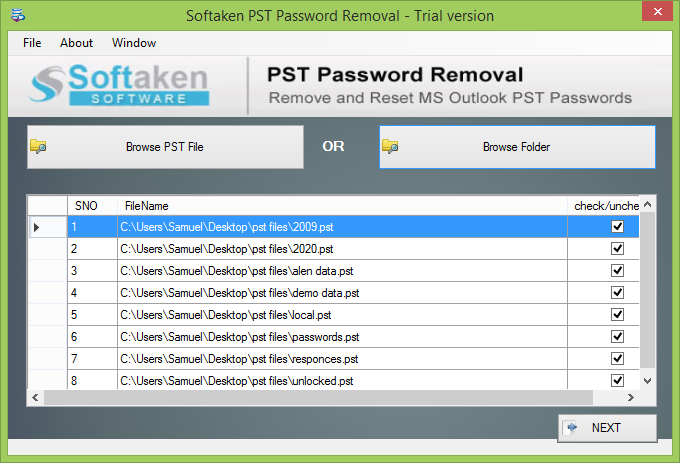
Follow the steps on the left. Use the arrows to switch screenshots — click a screenshot to enlarge.

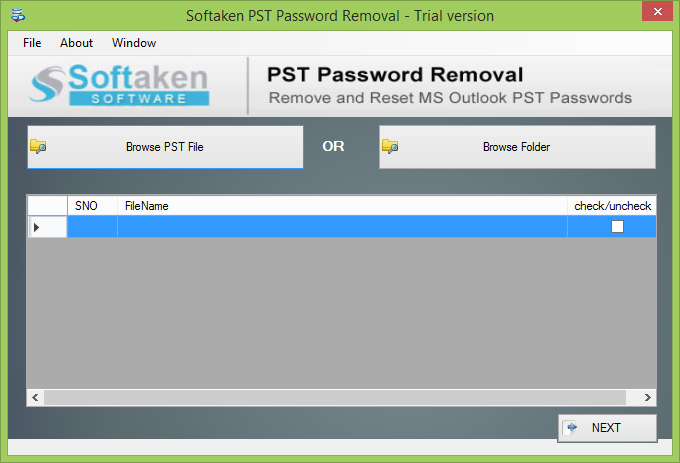
Open Password Remover — Softaken PST Password Removal

step 1 of 3 · click image to enlarge

Watch PST Password Removal Demo

See Softaken PST Password Remover add locked PST files, remove or reset passwords, and unlock mailbox access — without installing Microsoft Outlook.

Unlock password-protected Outlook PST files

  1. Add one or multiple password-protected PST files
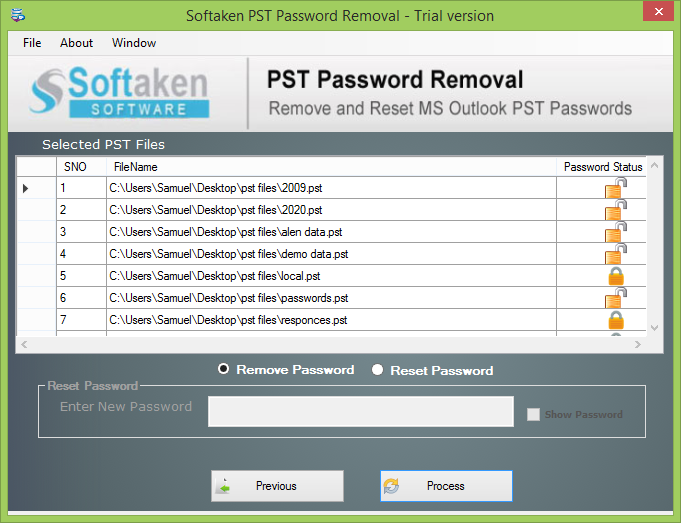
  2. Choose Remove password or Reset password
  3. Process and unlock your PST files quickly
  4. Save unlocked files with the full license

Features & Benefits of PST Password Removal

Standalone Software

Outlook PST Password Remover doesn't require you to install MS Outlook for removing password of PST and recovery of such password protected files. Without having MS Outlook you will achieve safe password removable of your emails.

Benefit: Standalone Software.

Fast Recovery

The sophisticated program is designed to recover password protected Outlook files in bulk. It means you can able to select more than one PST files and apply the password remove button. The feature saves time and gives bulk recovery opportunity.

Benefit: Fast Recovery.

Recovery of Complex PST Passwords

Outlook PST Password Recovery performs recovery of those PST files whose passwords are lengthy or multilingual. It doesn't consider how long the password is. It successfully breaks PST password of any character length and gives access to locked emails.

Benefit: Recovery of Complex PST Passwords.

Remove Old Passwords

It is hard to remember old passwords. But the tool gives you facility to remove old passwords. Select PST files having old passwords and let the application performs its task. The app easily removes old passwords and makes the PST files unprotected.

Benefit: Remove Old Passwords.

Higher Level Support

Whether you are using Outlook 2024, 2021, 2019, 2016, 2013, 2010, 2007 & 2003, the application supports all the Outlook versions. Windows 32 and 64 bit are well supported by the program. Uninterrupted working is done by tool on all Windows OS.

Benefit: Higher Level Support.

Free Download

Download the tool today. The free version is for every people who wish to buy the tool and want to test the software before investing money to this. This will help the user to evaluate every feature of the utility.

Benefit: Free Download.

Frequently Asked Questions Regarding PST Password Removal Software

1. Does this software instantly remove the PST password or recover the original password?

It unlocks locked PSTs by removing the old password or letting you reset with one you choose — so you can open the mailbox again. It does not show or return the forgotten original password text.

2. Do I need to install Microsoft Outlook on my computer to remove the PST password?

No. It is a standalone Windows tool — no Outlook install and no other mail client needed to remove or reset the PST password.

3. Does the tool support both older ANSI and modern UNICODE PST file formats?

Yes. Both ANSI and Unicode PST files are supported, along with major Outlook versions including Outlook 2024, 2021, 2019, 2016, 2013, 2010, 2007 & 2003.

4. Can this utility unlock PST files with long, complex, and multilingual passwords?

Yes. Lengthy or multilingual passwords are fine — character length is not a blocker. Once the password is removed or reset, you can access the locked emails again.

5. Will removing the password damage or alter the emails, attachments, and folder hierarchy inside the PST?

It is built for safe password removal without Outlook. Keep a backup of your original PST first, then remove or reset the password so you can open the mailbox contents again.

6. Can I process oversized (20 GB or 50 GB+) password-protected PST files?

Yes. Large locked PSTs are supported, including bulk processing of multiple files. There is no fixed size cap stated for the full license — use a Windows PC with enough memory for bigger archives.

7. Can I reset or assign a new password to the unlocked PST file using this tool?

Yes. You can remove the password or reset it. Choose Reset password and assign a new password of your own choice.

8. What are the specific limitations of the free demo version of PST Password Removal software?

The free demo lets you test remove and reset workflows so you can verify the process. It cannot save unlocked files. Full license from $29 saves unlocked PSTs to your system. Windows only.

Software Specifications

100% Standalone: Microsoft Outlook is not required. Windows desktop password unlock tool.

Free demo: Test remove and reset workflows. Full license saves unlocked PST files to your system.

Batch unlock: Select one or multiple locked ANSI & Unicode PST files and process them together.

Supported

Windows 11, 10, 8.1, 8, 7

Outlook

2024–2003 · ANSI / Unicode

Demo

Cannot save unlocked files

Pricing

Full from $29

Key Specifications

SpecificationDetails
Product NameSoftaken PST Password Removal
Version3.0
InputPassword-protected Outlook PST (ANSI · Unicode)
ActionsRemove password · Reset password · Batch unlock
Outlook Supported2024, 2021, 2019, 2016, 2013, 2010, 2007 & 2003
PrerequisiteNo Microsoft Outlook required
OS SupportedWindows 11, 10, 8.1, 8, 7 & Other
PlatformWindows only
DemoCannot save unlocked files
Processor1 GHz or faster
Memory2 GB minimum
Hard Disk500 MB free space
DeliveryElectronic · Via Email · Minutes: 15
Language / SupportEnglish · Emails, Chat & Skype

Product Details

Version
3.0
License
Free demo / Full
Support
Emails, Chat & Skype · [email protected]

Free demo vs. full version

Free demo lets you test remove and reset workflows. Full license saves unlocked PST files to your system.

FeatureFree demoFull version
Batch Outlook Password RemoverAvailableAvailable
Remove Outlook PST PasswordsAvailableAvailable
Reset Forget Outlook PST PasswordsAvailableAvailable
Support Plain Text, RTF & HTML FormatsAvailableAvailable
ANSI & Unicode · No Outlook RequiredAvailableAvailable
Supported on Windows 11 / 10 / 8 / 7AvailableAvailable
LimitationCannot save unlocked filesSave unlocked files
PriceFREE$29
Softaken Reviews

What Our Users Say

Customer feedback from Softaken users who remove or reset Outlook PST passwords on Windows.

Donald GlennCustomer feedback

United States · Windows

My office was in trouble because of poor data management.

My office was in trouble because of poor data management. There were around 10 PST files to recover their password. We were all planned to hire technicians. Luckily your PST password recovery came as a boon. All files have been recovered.

Kris KaiserCustomer feedback

Australia · Windows

After trying multiple recovery programs I selected your tool because …

After trying multiple recovery programs I selected your tool because the software support multiple files in single time and speed is excellent and it is quite easy to handle. Two thumbs up for this smart recovery utility.

Mario GarciaCustomer feedback

Italy · Windows

Smooth and fast process with batch option, great!

Smooth and fast process with batch option, great!

Show more reviews
David GrantCustomer feedback

France · Windows

Wow, this app has been designed for bulk recovery.

Wow, this app has been designed for bulk recovery. I have saved my time. All locked PST file were reset. I have no problem using this app. A ton of thanks to the team of Softaken.

Lin DongCustomer feedback

Slovenia · Windows

It was afraid when I forgot password of one of my important PST files.

It was afraid when I forgot password of one of my important PST files. There was no way to contact technician. One of my friends recommended me this software. I was lucky that password recovery took place fast with no data loss.

Julien MALEVAUTCustomer feedback

Netherlands · Windows

I am really impressed with this product and your customer service.

I am really impressed with this product and your customer service. I must recommend the app to every Outlook users who has forgotten their passwords.

Review

Remove or reset Outlook PST passwords on Windows

Add locked PST files, choose remove or reset, and unlock mailbox access without installing Microsoft Outlook.

  • Windows
  • ANSI · Unicode · Batch
  • Demo: test remove/reset

Free demo lets you test remove/reset workflows but cannot save unlocked files. Full license unlocks saving. Windows only. No Outlook required.