Softaken PST to Yahoo Importer

PST to Yahoo Importer

A reliable method to import PST file to Yahoo Mail

No Microsoft Outlook installation required ·Standalone tool ·Direct PST →Yahoo Mail
  • Transfer PST file to Yahoo directly
  • Consider Outlook emails and attachments
  • 100% clean and secure application
  • Support ANSI &UNICODE PST files import
  • Single panel interface for easy handling by all users
  • Keep email folder structure original
  • Upload PST emails to Yahoo without size limitations
  • Live Chat facility for handling user queries
  • Supported with all Outlook &Windows versions
  • Installation in several languages
  • Free Outlook to Yahoo Importer to check the efficiency of the application
  • No data leakage and data loss complaints
🔒Safe &Direct IMAP Upload via Yahoo App Password — Your credentials are never stored or logged.
No Outlook install neededANSI &UNICODE PSTDemo:first 10 emailsFolders &attachments kept

Outlook PST to Yahoo Mail


Outlook .PST fileSoftaken ImporterYahoo Mail

Watch PST to YahooDemo


Import Outlook PST emails to Yahoo Mail

See Softaken Mail Importer load PST data,preview folders,and connect to Yahoo Mail over IMAP — without installing Microsoft Outlook.

  • Browse PST and preview the folder tree
  • Select folders / import options
  • Sign in with Yahoo credentials / App Password
  • Keep folder hierarchy and attachments

See the Importer UI


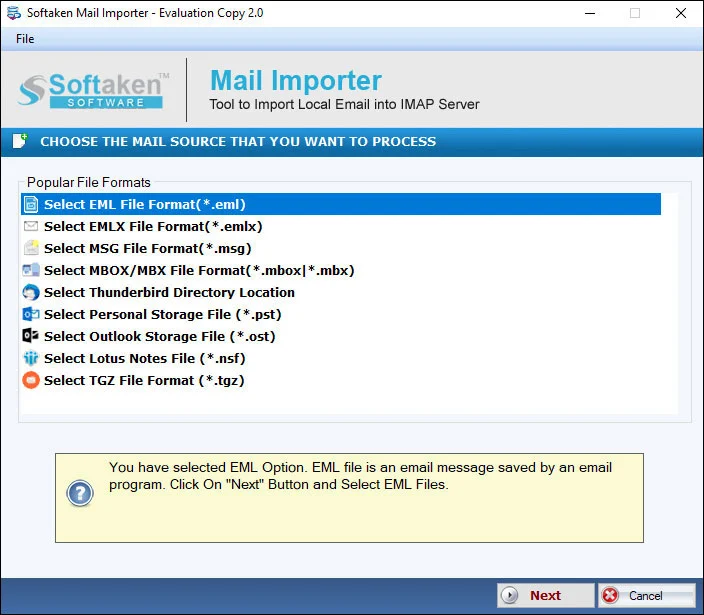
Mail Importer main interface with folder preview
1

Load &preview PST

Open the PST file and review the folder tree (Inbox,Sent,custom folders) before import.

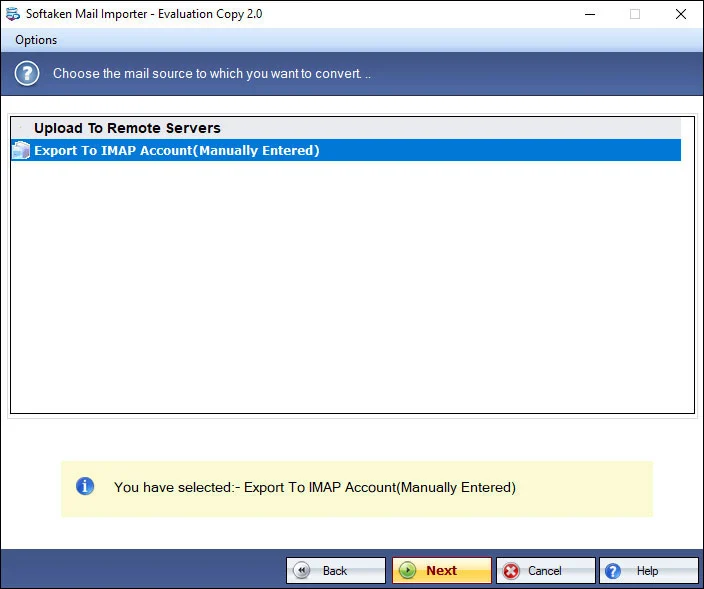
Import options for PST to cloud
2

Choose import options

Select folders and options for migrating Outlook data to the cloud destination.

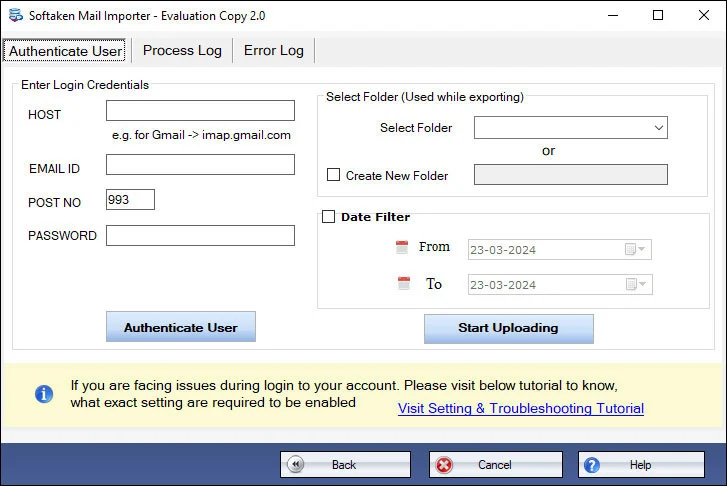
Yahoo IMAP credentials and target folder
3

Yahoo / IMAP login

Enter Yahoo credentials (App Password recommended) and choose the target folder — not stored by the tool.

Click any screenshot to enlarge. Full gallery:Mail Importer screenshots.

Key features of Outlook to Yahoo Converter


Data Security

Maintain folder structure

The software fully maintains all details while importing Outlook files to Yahoo account. All the technical properties of emails like subject,sender and receiver address,bcc,date,time,etc. are completely maintained with formatting during the conversion.

Direct Conversion

Import Outlook file to Yahoo

The tool offers a direct platform to access Outlook PST file directly to Yahoo account. Without involving any email client,one can directly access PST file on Yahoo cloud in just a few steps. Only correct Yahoo login details and PST file is required to import them.

Data Original

No alterations

The application does not alter any file and its elements during the migration. Without facing any issues and affecting the original files,the import task gets completed in a short time period. Moreover,no limit is there on the number of Outlook PST files to import.

Preview Option

Scan and Preview feature

The program first scans PST file and then shows a preview of Outlook files before starting the conversion task. Selected PST files conversion is performed by the application without disturbing the folder and subfolders structure.

Feature Comparison of PST to Yahoo Importer – Trial and Licensed Version

Features
  • Import Outlook PST emails to Yahoo Mail (IMAP)
  • Support ANSI &UNICODE PST files
  • Preserve folders,attachments &formatting
  • Standalone — no Microsoft Outlook required
  • Yahoo App Password / IMAP login
  • Support Windows 11/10/8/7 &others
  • Limitation
  • Price
DEMO Version
  • First 10 emails
  • FREE
FULL Version
  • Unlimited
  • $99

Demo version migrates first 10 emails to Yahoo Mail. Full license unlocks unlimited import.

Tool Faq's


Yes. Yahoo Mail typically requires an App Password (or third-party access setup) for IMAP login with desktop tools instead of your regular account password. Enter your Yahoo credentials / App Password in the app — Softaken does not store or log them. See our guide:How to Access Yahoo Account with Third Party Apps.
No. Softaken PST to Yahoo Importer is a standalone tool. You can import PST files to Yahoo Mail without installing Microsoft Outlook or involving any email client on your PC.
For password-protected or encrypted PST files,remove or unlock the password first so the file can be read normally,then import with this tool. Softaken also offers Outlook PST Password Removalif you need to clear a PST password. Use a healthy,accessible PST for best results.
Yes. Both ANSI and UNICODE PST files are supported. PST files from Outlook editions such as 2019,2016,2013,2010,2007,2003,and related versions can be imported to Yahoo Mail.
Yes. The software maintains email properties such as subject,sender/receiver,bcc,date,time,and formatting,keeps attachments with the messages,and preserves the original folder and subfolder structure during migration to Yahoo Mail.
There is no stated limit on the number of Outlook PST files you can import. You can process multiple PST files and,when needed,import them one by one to various Yahoo accounts.
The tool does not impose PST size limitations. You can transfer large PST files to Yahoo Mail. For multi-gigabyte archives,ensure enough free disk space and a stable internet connection.
With the free demo edition,only the first 10 emails are imported to Yahoo Mail. The full license unlocks unlimited import (from $99).

Software Specifications


System Requirement

ProcessorAny Pentium Class

Operating SystemWindows 11,10,8.1,8,7 &Other

Memory512 MB Minimum

Hard Disk100 MB of free space for software installation

Software Delivery

ElectronicVia Email

Minutes15

Interface Available

Language SupportedEnglish

Support OptionEmails,Chat &Skype

Client Reviews


Frequently asked questions

Does this tool require a Yahoo App Password to connect to my Yahoo Mail account?

Yes. Yahoo Mail typically requires an App Password for IMAP login with desktop tools. Softaken does not store or log your credentials. See the Softaken KB guide for third-party Yahoo access.

Do I need to install Microsoft Outlook on my computer to import PST files into Yahoo?

No. Softaken PST to Yahoo Importer is a standalone tool and does not require Microsoft Outlook to be installed.

Can this software import password-protected or encrypted PST files?

Unlock or remove the PST password first so the file can be read,then import. Softaken Outlook PST Password Removal can help clear a PST password when needed.

Does the tool support both ANSI and UNICODE PST file formats?

Yes. Both ANSI and UNICODE PST files are supported for import into Yahoo Mail.

Will it preserve email attachments,inline images,and original folder hierarchy in Yahoo Mail?

Yes. The software keeps email properties,attachments,and the original folder hierarchy during migration to Yahoo Mail.

Can I upload multiple PST files to Yahoo Mail simultaneously in batch mode?

There is no stated limit on the number of PST files. You can process multiple files and import to various Yahoo accounts one by one when needed.

Is there any file size limit when importing large multi-gigabyte PST files?

The tool does not impose PST size limitations. Ensure enough free disk space and a stable connection for very large files.

What are the limitations of the free trial version of PST to Yahoo Importer?

The free demo imports only the first 10 emails to Yahoo Mail. The full license unlocks unlimited import (from $99).

Specifications
ItemDetails
ProductPST to Yahoo Importer
PublisherSoftaken Software
PlatformsWindows 11,10,8.1,8,7 &others
DemoFirst 10 emails to Yahoo Mail
Pagehttps://www.softaken.com/pst-to-yahoo-importer