Softaken EMLX to Yahoo Importer
Safe &Secure Download

Independently scanned with multiple antivirus engines.

100% Safe

EMLX to Yahoo Importer

Upload Apple Mail EMLX files to Yahoo Mail account

Mac-to-cloud upload on Windows:add Apple Mail / Mac Mail EMLXfiles,authenticate your Yahoo account,then choose an existing Yahoo folder or create a new one—without configuring Thunderbird,Outlook,or another email client.
  • Import EMLX files in bulk
  • Move Apple Mail emails with all attachments
  • Maintain all email components and folder series
  • User-friendly wizard for easy understanding
  • Virus-free and secure import of EMLX files to Yahoo account
  • Complete the conversion without email client dependency
  • Connect to user-nominated Yahoo account in a few seconds
  • Multiple Yahoo account uploading facility
  • Accurate import without modifications
  • Fully Windows supported utility
From $99Demo:10 emailsWindows onlyNo email client neededChoose or create Yahoo folderCredentials not saved
Apple Mail EMLXYahoo MailAttachmentsBatch upload

Free demo:Import 10 Mac Mail emailsto Yahoo to evaluate the tool. Softaken Mail Importer docs (same download) also state the trial imports the first 25 local files. Full unlimited license from $99.

How to Access Yahoo Account with Third Party Apps or Software?

Softaken EMLX to Yahoo Importerexports Mac Mail emails to a Yahoo account directly and in a reliable manner. The application migrates the data in just 3 simple steps. Provide valid Yahoo credentials and import desired EMLX files with attachments.

Software interface

Add EMLX files,preview items,authenticate Yahoo,then choose or create a target folder (Softaken Mail Importer UI).


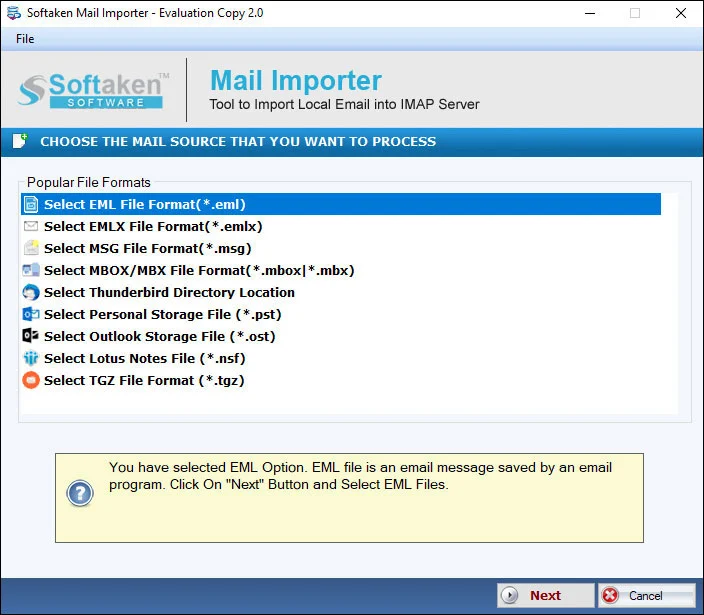
Mail Importer main interface – select EMLX file type1

Select EMLX &add files

Select EMLX in File Type and add Apple Mail EMLX files on your Windows PC.

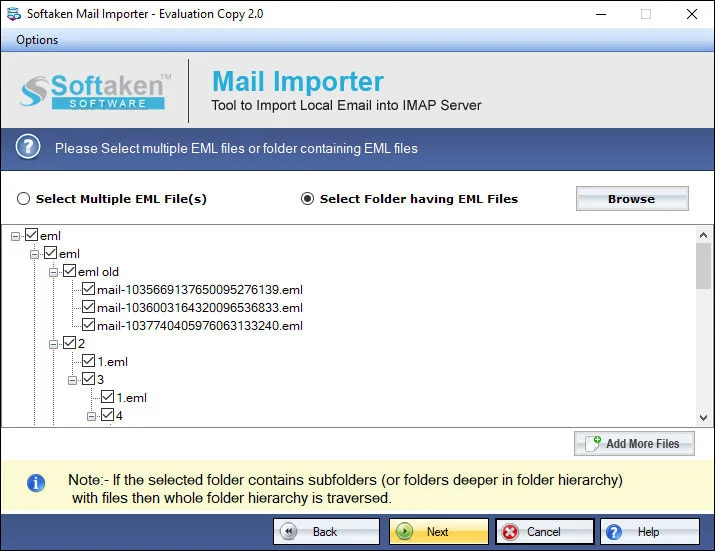
Preview EMLX messages before Yahoo upload2

Preview messages

Review loaded messages in the wizard before you authenticate Yahoo.

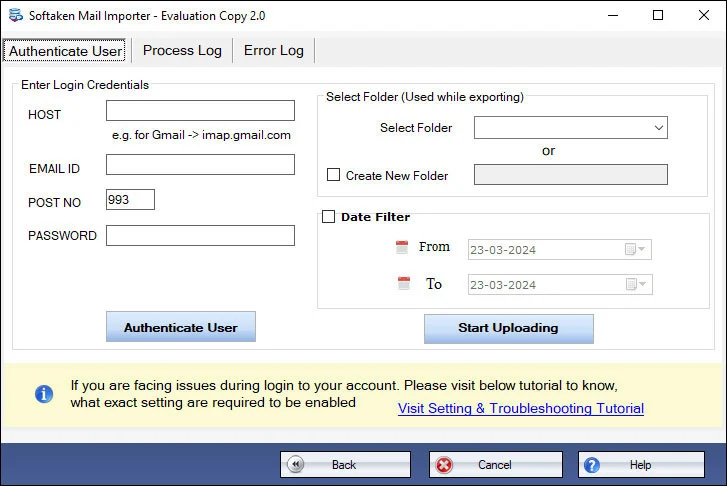
Yahoo Mail authentication and target folder3

Authenticate Yahoo

Enter Yahoo login details (username and password). Softaken does not save credentials in its database.

Import options – choose or create Yahoo folder4

Folder &Process

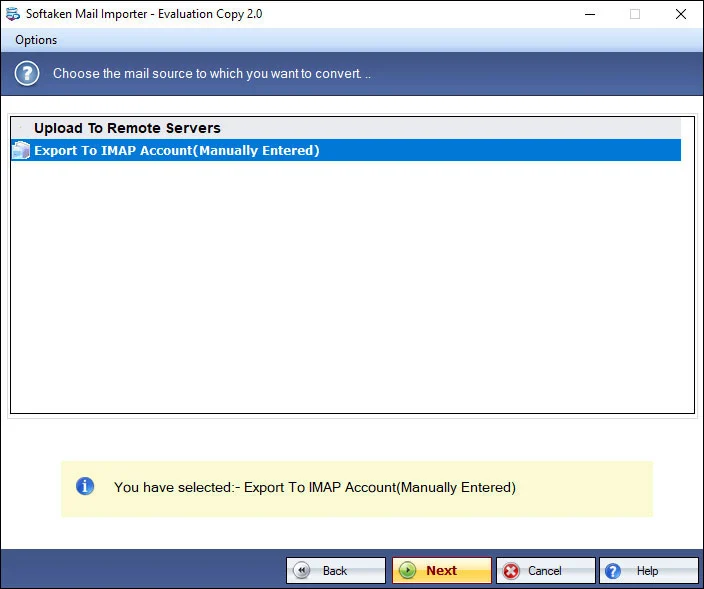
Choose a folder or create a new folder in Yahoo,then click Process to begin the import.

Click a screenshot to enlarge. Guides:how-to steps· screenshots.

Explain the process to upload EMLX files to Yahoo account


Step-by-step import

With EMLX to Yahoo Importer,you need to follow the simple steps

  1. Download and Start EMLX to Yahoo Importer on your Windows device.
  2. Select EMLX in File Type and add EMLX files.
  3. Hit the Authenticate Yahoo account option and enter Yahoo login details i.e. username and password.
  4. Choose a folder or create a new folder in Yahoo account to save EMLX files.
  5. Click Process button to begin the import process.

Key highlights of EMLX to Yahoo Importer


Reliable transfer

Export Mac Mail emails to Yahoo account directly and in a reliable manner with this software. The application completely migrates the data in just 3 simple steps and without showing any failure message throughout the conversion.

Export emails &attached files

Transfer Apple Mail emails and the attached files with them. Every type of attachment is supported by the application to migrate into Yahoo Mail account. Provide the valid credentials of Yahoo account &import desired EMLX files.

Import EMLX in batches

Batch import of Apple Mail EMLX files to Yahoo Mail account is performed by this application. It means no need to transfer EMLX file one by one. Export various EMLX files at once and hence save the precious time and efforts.

Maintains Integrity of data

No effect on the originality of the files. The complete email attributes – to,cc,bcc,subject,from,and email formatting like hyperlinks,font styles,etc. keep intact throughout the conversion. Plus,the tool does not limit the size of EMLX files to import to Yahoo.

Windows based EMLX to Yahoo Tool

As the tool is designed to import Apple Mail emails to Yahoo on Windows platforms. Therefore,feel free to download and install the application on Windows latest and older versions such as Windows 11,10,8,7,XP,Vista,and others.

Unlimited EMLX files import

No limit is there on the number &size of EMLX files to import into Yahoo cloud. Download free EMLX to Yahoo Importer which allows importing 10 Mac Mail emails to yahoo. Once you apply for the license keys,import unlimited files.

Feature Comparison of EMLX to Yahoo Importer – Trial and Licensed Version

This page’s free demo imports 10 Mac Mail emailsto Yahoo. Softaken Mail Importer docs (same download) also state the trial imports the first 25 local files. A “10 to 25 emails per folder” range is not stated. Full license:unlimited from $99.

Features
  • Select EMLX file type &add files
  • Batch / bulk EMLX to Yahoo
  • Authenticate Yahoo (username &password)
  • Choose existing or create new Yahoo folder
  • Preserve attachments &email attributes
  • No email client dependency
  • Multiple Yahoo account uploading
  • Does not save Yahoo credentials
  • Support Windows 11/10/8/7 &others
  • Limitation
  • Price
DEMO Version
  • 10 emails (page) / 25 files (docs)
  • FREE
FULL Version
  • Unlimited
  • $99

EMLX to Yahoo Importer FAQs


This page documents Authenticate Yahoo with username and password(login details). Softaken’s KB guide for third-party Yahoo access explains generating an App Passwordwhen Yahoo blocks regular passwords:How to Access Yahoo Account with Third Party Apps. Named “16-character App Password,” “TLS/SSL IMAP pipelines,” or “OAuth” slogans are not listedon this EMLX to Yahoo page alone.
An exact macOS path (for example ~/Library/Mail/) is not listedon this Softaken page. Softaken documents selecting EMLXin File Type and adding EMLX files after they are available on a Windowsdevice. Named .emlxpartsupport is also not listedhere.
No. Softaken lists completing the conversion without email client dependency. Apple Mail itself is a Mac app;this utility is a fully Windowssupported program.
Yes. Softaken steps say:Choose a folder or create a new folderin the Yahoo account to save EMLX files. Named “Inbox / Sent Items only” default mapping labels beyond that wording are not listed.
Yes for what Softaken lists here:Apple Mail emails and attachmentsare safely imported;email attributes to,cc,bcc,subject,fromand formatting (hyperlinks,font styles,etc.) keep intact;“maintain all email components and folder series.” Named “RFC 822” or “inline graphics” slogans beyond that wording are not listed.
Yes. Softaken lists bulkand batchimport of various EMLX files at once. With the licensed edition there is no such limit—freely import unlimited EMLX files. The tool also does not limit the size of EMLX files. Multiple Yahoo account uploading is listed.
No. Yahoo login credentials are just used to upload Apple Mail emails to Yahoo. The utility does not save any details in its database.
This page’s free demo imports 10 Mac Mail emailsto Yahoo. Softaken Mail Importer docs (same download) also state the trial imports the first 25 local files. Full license is unlimited from $99. A “10 to 25 emails per folder” range and named “zero intermediary cloud staging / zero telemetry” slogans are not listedon this Softaken EMLX to Yahoo page.

Software Specifications


Engine Note

This landing page uses the Softaken Mail Importerdownload and docs (EMLX among sources → Yahoo among destinations). Primary focus here is Apple Mail EMLX → Yahoo Mail. Exact Mac Library/Mailpaths,.emlxpart,named “16-character App Password / TLS IMAP / OAuth” hero slogans,“RFC 822 / inline graphics” beyond Softaken’s listed attributes,and “100% offline / zero telemetry / zero intermediary cloud staging” claims are not listedon this EMLX to Yahoo page (see FAQs).

Product Info

Version2.0

Size19.4 MB

Starting Price$99

Demo limit10 emails (page) / 25 files (docs)

Input &Output

InputApple Mail / Mac Mail EMLX

OutputYahoo Mail account

Folder optionsExisting or new Yahoo folder

AuthYahoo username &password

System Requirement

ProcessorAny Pentium Class

Operating SystemWindows 11,10,8.1,8,7 &Other

Memory512 MB Minimum

Hard Disk100 MB of free space for software installation

Software Delivery

ElectronicVia Email

Minutes15

PlatformWindows only

Interface Available

Language SupportedEnglish

Support OptionEmails,Chat &Skype

What Our Users Say


Frequently asked questions

How do I connect with a Yahoo App Password?

This page uses Yahoo username and password authentication. Softaken’s KB guide covers generating an App Password for third-party apps.

Where are Apple Mail EMLX files on Mac?

Exact Library/Mail paths are not listed. Add EMLX files on Windows after you copy them from Mac.

Do I need Apple Mail or another email client on Windows?

No. Softaken lists conversion without email client dependency. The tool is Windows-only.

Can I choose or create a Yahoo folder?

Yes. Choose a folder or create a new folder in the Yahoo account.

Are attachments and email attributes preserved?

Yes. Attachments and attributes (to,cc,bcc,subject,from) plus formatting stay intact per this page.

Can I batch import many EMLX files?

Yes. Bulk/batch import is listed;licensed edition is unlimited.

Does the software store Yahoo credentials?

No. Credentials are used for upload only and are not saved in the database.

What are the demo limits?

Page:10 Mac Mail emails. Mail Importer docs:first 25 local files. Full from $99.

EMLX to Yahoo Importer specifications
ItemDetails
ProductSoftaken EMLX to Yahoo Importer
PublisherSoftaken Software
PlatformsWindows
Version2.0
Size19.4 MB
LicenseDemo 10 emails (page) / 25 files (docs);full from $99
ScopeImport Apple Mail EMLX to Yahoo Mail
Pagehttps://www.softaken.com/emlx-to-yahoo-importer