 1
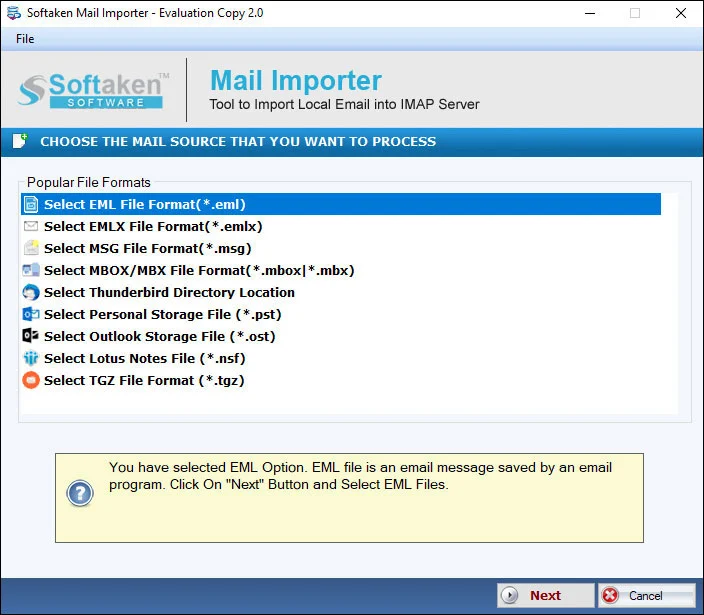
1Add EMLX file or folder
Add an EMLX file or an EMLX folder with multiple files at once for Hotmail / Outlook.com import.
Independently scanned with multiple antivirus engines.
100% SafeLibrary/Mailpaths,Inbox/Sent/Archive auto-mapping slogans,and “zero proxy / TLS staging” privacy USPs are not listedon this page (see Softaken Hotmail app-password KBfor related Outlook.com access tips).Softaken EMLX to Hotmail Importerimports Apple Mail EMLX emails and attachments to a Hotmail / Outlook.com account on Windows. Softaken lists group / mass import,valid Hotmail login details,no additional email client,managed folder structure and original formatting,held email attributes,and a free demo that transfers 10 EMLX files. Internet connectivity is compulsory for Hotmail cloud transfer.
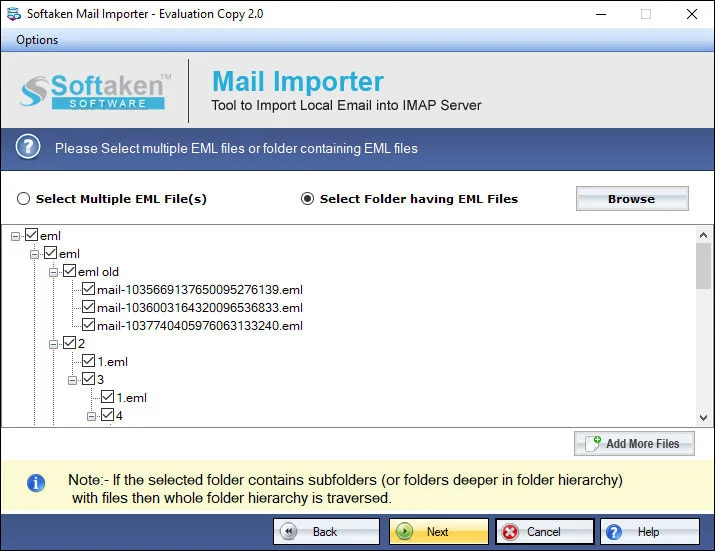
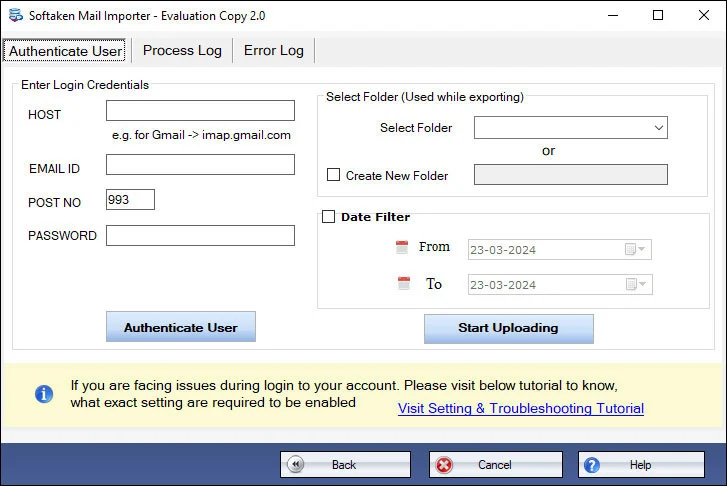
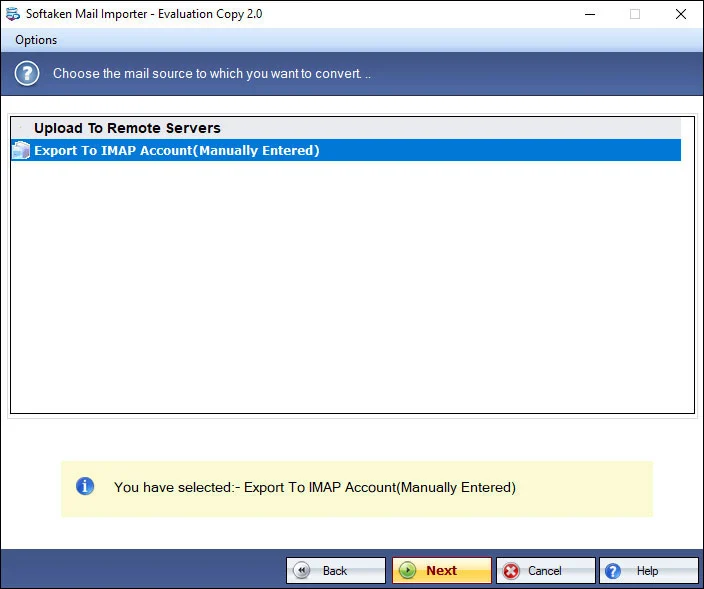
Add local files (including EMLX),preview,sign in to the cloud destination,then choose or create a folder (Softaken Mail Importer UI).
1Add an EMLX file or an EMLX folder with multiple files at once for Hotmail / Outlook.com import.
 2
2Import selected EMLX files to the Hotmail account after reviewing them in the interface.
 3
3Provide Hotmail account username &password (as documented on this Softaken page).
 4
4Specify the Hotmail / Outlook.com folder where imported EMLX files should be saved,then complete the upload.
Click a screenshot to enlarge. Guides:how-to steps· screenshots.
Find out the complete steps to open EMLX files in Hotmail account.
The software offers direct migration of Apple Mail emails and attachments to Hotmail account in just three steps. Only valid login details of Hotmail account are required to complete the task of migration. No additional email client installation is needed.
The complete formatting and email properties like to,cc,bcc,from,subject,date,hyperlinks,inline images,graphics,font styles,etc. remain the same during and after the migration. Not a single change is noticed to actual files.
Without facing any errors and mistakes,one can complete the import task. Any number of EMLX files are simply imported to Outlook.com account without facing any kind of trouble by any professional &non-professional users.
The original folder hierarchy is completely retained throughout the import task. The migration task can be simply completed without altering the original database. 100% secure transfer of Apple Mail emails to Hotmail account.
A free version of the application is offered so that users can evaluate the performance before taking the license keys. It offers to import only first 10 files from Apple Mail to Outlook.com account. Getting the license enables to transfer unlimited files.
The program offers you to import multiple EMLX files at a time. By this,one can save a lot of time and efforts. No need to import EMLX files one by one. Users can simply add EMLX files and import them to their desired Hotmail account.
Free Demo on this Softaken page imports the first 10 EMLX filesto Hotmail / Outlook.com. Softaken Mail Importer docs (same download) also mention a trial of the first 25 local files. A “10 to 25 emails per folder” range is not stated. Full unlimited license from $99. Valid Hotmail login details required;internet compulsory. Named OAuth 2.0 slogans are not listedon this page.
~/Library/Mail/V*) is not listed. Softaken documents a Windows-only/ fully Windows-based workflow:add EMLX files after they are available on the PC. Named .emlxpartsupport is also not listedon this page.Engine Note
This landing page uses the Softaken Mail Importerdownload and docs (EMLX among sources → Hotmail / Outlook.com among destinations;buy-mail-importer). Primary focus here is Apple Mail EMLX → Hotmail / Outlook.com. Softaken documents valid Hotmail login details—named OAuth 2.0 / Modern Auth USPs are not listed. Exact Mac Library/Mailpaths,.emlxpart,Inbox/Sent/Archive auto-mapping,and zero-proxy / TLS staging slogans are not listedon this page (see FAQs). Related:Softaken Hotmail app-password KB.
Product Info
Version2.0
Size19.4 MB
Starting Price$99
Full licenseUnlimited
Demo &License
Free demo:This page — import only the first 10 EMLX filesto Outlook.com. Softaken Mail Importer docs (same download) also list trial first 25 local files. A “10 to 25 emails per folder” range is not stated. Full unlimited license from $99.
This page demoFirst 10 EMLX files
Mail Importer docsFirst 25 local files
10–25 per folderNot stated
Licensed editionUnlimited from $99
Input &Output
InputApple Mail / Mac Mail EMLX
OutputHotmail / Outlook.com mailbox
ModesFile / Folder (batch)
AuthValid Hotmail login details
System Requirement
ProcessorAny Pentium Class
Operating SystemWindows 11,10,8.1,8,7 &Other
Memory512 MB Minimum
Hard Disk100 MB of free space for software installation
Software Delivery
Interface Available
This page documents valid Hotmail login details. Named OAuth 2.0 / Modern Auth slogans are not listed. See Softaken Hotmail app-password KB for related tips.
Exact Library/Mail paths are not listed. Softaken documents a Windows-based tool.
No. Softaken states no additional email client installation is needed.
Softaken lists saving to the Hotmail folder you specify and managing folder structure. Inbox/Sent/Archive auto-mapping slogans are not listed.
Softaken preserves attachments and properties such as to,cc,bcc,from,subject,date,hyperlinks,inline images,graphics,and font styles.
Yes for mass/group import of any number of EMLX files (licensed). Nested-subfolder slogans beyond that are not listed.
Softaken states 100% secure transfer. Mail Importer docs:Softaken does not save login details. Proxy/TLS staging slogans are not listed.
This page:first 10 EMLX files. Mail Importer docs also list first 25 local files. Full from $99. A 10–25 per folder range is not stated.
| Item | Details |
|---|---|
| Product | Softaken EMLX to Hotmail Importer |
| Publisher | Softaken Software |
| Platforms | Windows |
| Version | 2.0 |
| Size | 19.4 MB |
| License | Demo first 10 EMLX files (this page);Mail Importer docs also list first 25 local files;full unlimited from $99 |
| Scope | Import Apple Mail EMLX to Hotmail with attachments |
| Auth | Hotmail / Outlook.com username and password (as documented) |
| Page | https://www.softaken.com/emlx-to-hotmail-importer |
