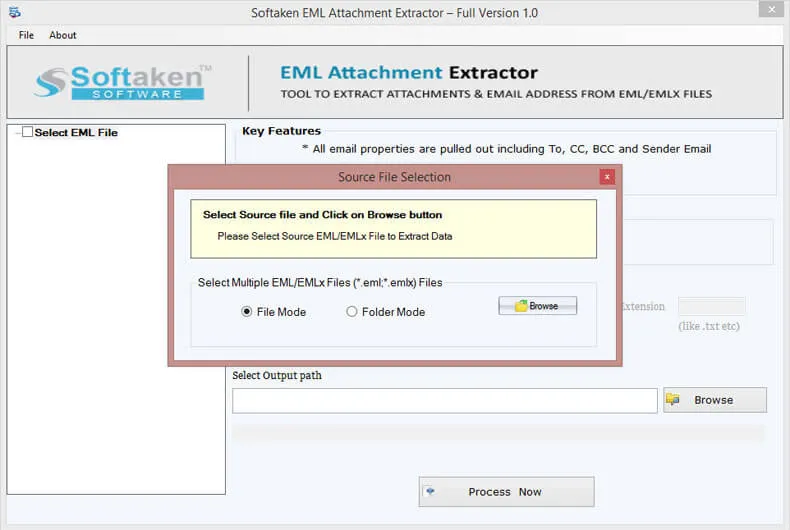
 1
1File or Folder mode
Softaken docs:File mode for single/one-by-one EML,or Folder mode for an EML folder.
Independently scanned with multiple antivirus engines.
100% SafeSoftaken EML Attachment Extractorextracts attachments from EML and EMLX files without any email client installation. Softaken lists File or Folder mode,preview and item count,selected file extension filtering,remove duplicate attachments,save extracted files to any location,maintain formatting and folder structure,and no limitation for EML file size. Softaken docs state the demo extracts only 10 attachments.
1Softaken docs:File mode for single/one-by-one EML,or Folder mode for an EML folder.
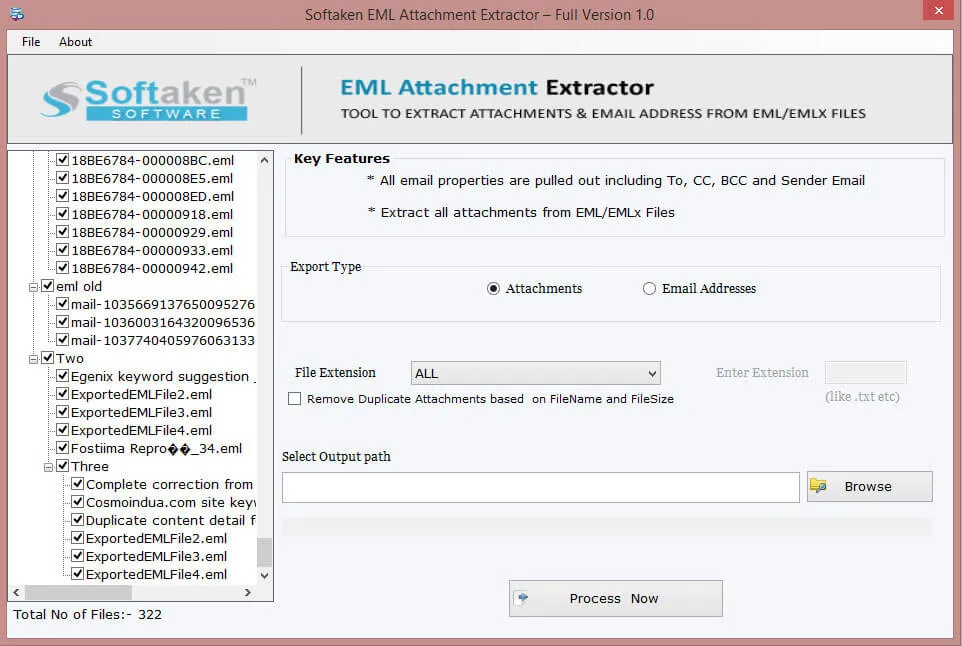 2
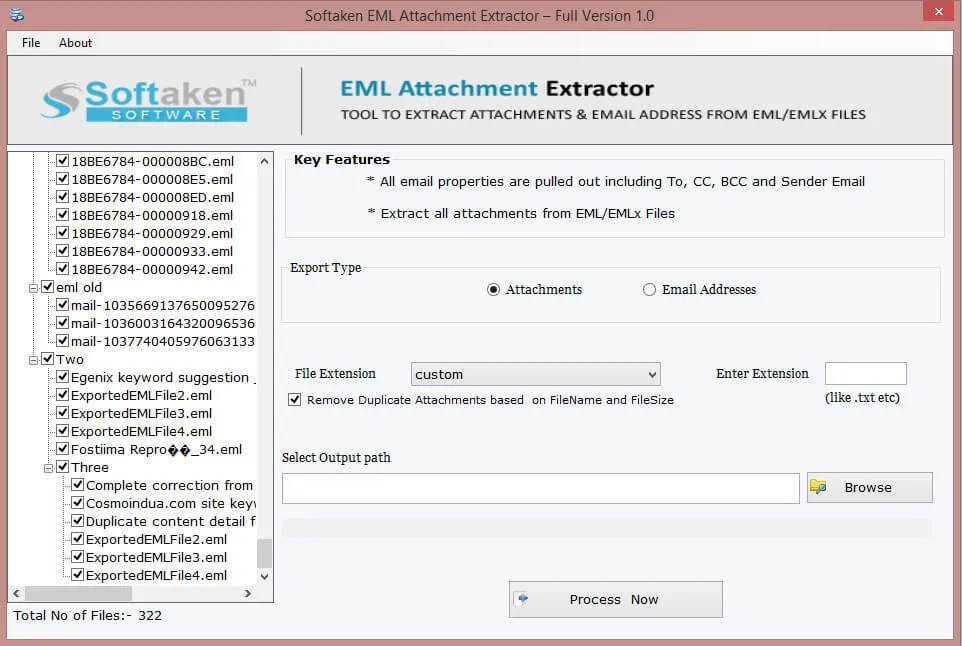
2Browse to load files;Softaken lists preview and item count of added EML files.
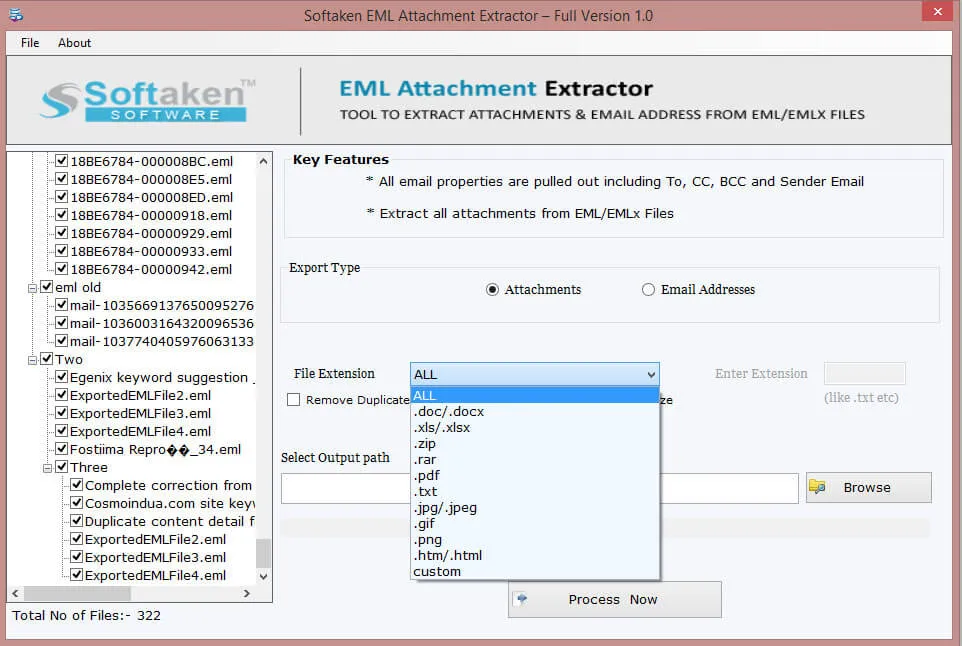 3
3Select a desired file extension,and optionally mark Remove duplicate attachments.
 4
4Choose where to save extracted attachments (or email addresses to text).
Click a screenshot to enlarge. Guides:how-to steps· screenshots.
Softaken docs list these steps to extract attachments from EML/EMLX:

The software easily removes all types of attachments such as PDF,DOC,ZIP,GIF,PNG,HTML,and others. Users can easily save the extracted attached files to any location of their choice without facing any kind of trouble.
The software does not impose any file size restrictions. You can easily add any large EML file and extract its attachments safely. One can comfortably remove duplicate attachments and save others by extracting from EML files.

You can easily add any number of EML files and smartly remove attachments from it. The software easily works with EML supported email clients like Windows Live Mail,Mozilla Thunderbird,Outlook Express,Apple Mail,eM Client and others.

The entire email formatting,email technical properties are well preserved by the application during attachment extraction. Moreover,the entire hierarchy of EML files is completely organized while extracting attachments.
The interface of the software is friendly so it can be comfortably handled without any technical expertise. With its self-expressive interface,no difficulty is faced by users in extracting attachments of EML files. You can choose desired EML files for extracting attachments.

Remove attachments from emails in EML format on all Windows operating systems like Windows 11,10,8.1,8,7,Vista,XP,and others. Along with this,both 64bit and 32bit editions of Windows are well supported by the program.
Softaken’s feature comparison lists the demo limitation as 10 items. Softaken docs also state the demo can extract only 10 attachmentsfrom EML files. Softaken lists File/Folder load,extract selected or all attachments,selected attachment extensions,remove duplicate attachments (filename &filesize),and email-address export to text. A “10 to 25 emails per folder” range is not stated. Full unlimited from $49.
Engine Note
Softaken EML Attachment Extractor(buy-eml-attachment-extractor). Softaken documents EML/EMLX attachment extract with File/Folder mode,extension selection,remove duplicate attachments by filename/filesize,and preserve formatting/hierarchy. Named EMLXPART,date-range filters,file-size filter rules,Zoho as a source,and “100% offline / zero telemetry” slogans are not listed(see FAQs). Demo:10 attachments(docs) / 10 items(comparison).
Product Info
Version1.0
Size3.3 MB
Starting Price$49
Full licenseUnlimited
Demo &License
Free demo:Softaken lists 10 items(comparison) / 10 attachments(docs). A “10 to 25 emails per folder” range is not stated. Full unlimited from $49.
Demo limit10 attachments / 10 items
Extension filterSelected attachment extensions
10–25 per folderNot stated
Licensed editionUnlimited from $49
Input &Output
InputEML / EMLX (WLM,Thunderbird,OE,Apple Mail,eM Client,The Bat,etc.)
OutputExtracted attachments;optional email addresses to text
ModesFile / Folder;selected or all;extension filter
PlatformWindows only (not Mac)
System Requirement
ProcessorAny Pentium Class
Operating SystemWindows 11,10,8.1,8,7 &Other
Memory512 MB Minimum
Hard Disk100 MB of free space for software installation
Software Delivery
Interface Available
Yes. Softaken lists Extract Selected Attachment Extensions. File-size or date-range filters are not listed.
Softaken preserves formatting,technical properties,and folder hierarchy. Stronger “untouched body” slogans are not listed.
Softaken lists EML and EMLX. EMLXPART is not listed.
No. Softaken states no email client / no extra app is required.
Yes. Softaken lists Folder mode,any number of EML files,and no limit on number/size. Nested-subfolder slogans beyond that are not listed.
Softaken removes duplicate attachments by filename and filesize. Auto-rename schemes are not listed.
Softaken lists no EML file size limitation. Per-attachment video size caps are not listed.
Demo:10 attachments (docs) / 10 items (comparison). Full from $49. A 10–25 emails per folder range is not stated.
| Item | Details |
|---|---|
| Product | Softaken EML Attachment Extractor |
| Publisher | Softaken Software |
| Platforms | Windows |
| Version | 1.0 |
| Size | 3.3 MB |
| License | Demo 10 attachments / 10 items;full unlimited from $49 |
| Scope | Extract attachments from EML/EMLX;extension filter;duplicate attachment removal |
| Prerequisite | No email client required |
| Page | https://www.softaken.com/eml-attachment-extractor |
