SoftakenMBOX to Yahoo Importer

Upload bulk MBOX files to Yahoo cloud for easy access to everywhere

Standalone migration: import Unix-style mailbox archive (.mbox / .mbx). to Yahoo’s webmail service. without depending on Mozilla Thunderbird desktop email client (often MBOX-based). or any other email client.

Key Features at One Glance

  • Completely import MBOX files to Yahoo Mail
  • Get facility to access MBOX files to anywhere
  • Bulk export MBOX emails to Yahoo cloud
  • Upload Unlimited MBOX messages to Yahoo Mail
  • Keep same folder structure after the import
  • Support MBOX file extracted from various email clients
  • Supported on Windows 11, 10, 8.1, 8, and 7 — also Mac and Linux
  • Self-introductory wizard for easy handling
  • No modification to original mailbox items
  • 24*7 customer handling team
  • Free MBOX to Yahoo Migration Tool for testing the utility
  • Fast and secure migration of MBOX messages to Yahoo
  • Full user control on conversion
  • Include attachments when exporting MBOX emails to YMail account

Available for Windows, Mac, and Linux. Pick your OS, then download or buy. Free demo: first 10 MBOX emails.

How to Access Yahoo Account with Third Party Apps or Software? (App Password guidance)

Softaken MBOX to Yahoo Importer
✓
Safe & Secure DownloadIndependently scanned with multiple antivirus engines.
100% Safe
ThunderbirdApple MailPostboxEudoraEntourageKMailPocoMail

Quick Facts

Action
MBOX → Yahoo
Source
MBOX / MBX
Demo
First 10 MBOX emails
Platform
Windows · Mac · Linux
MBOX / MBX FilesSoftaken Mail ImporterYahoo Mail

Software Interface

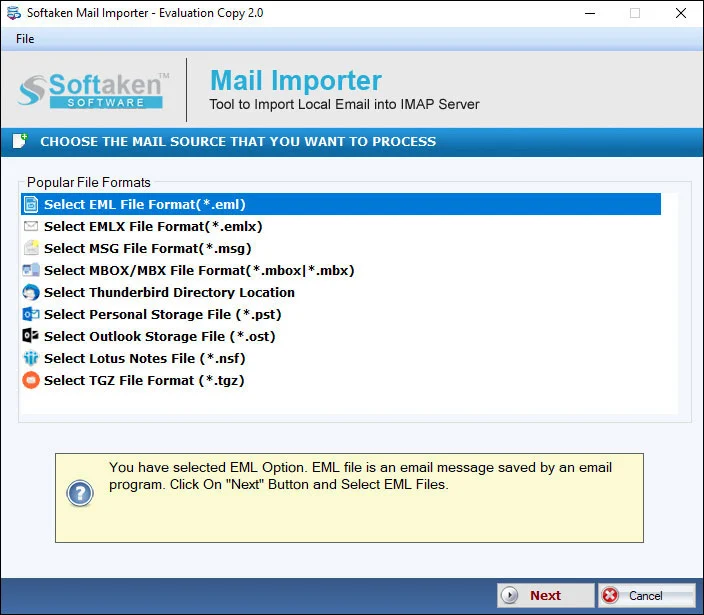
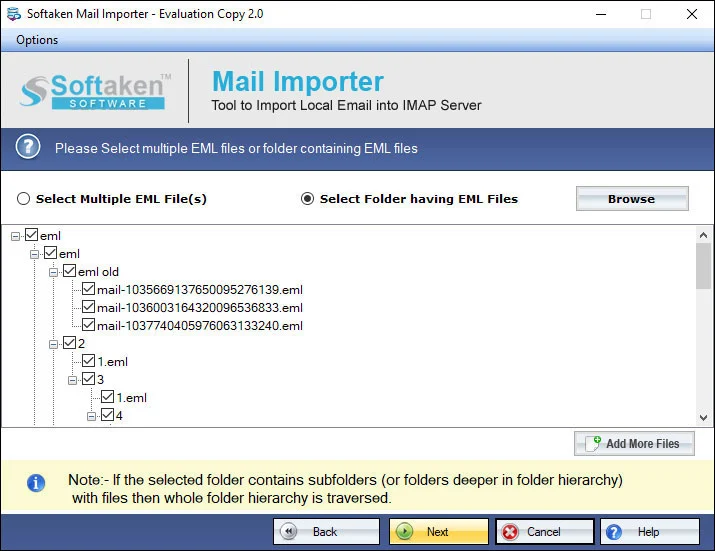
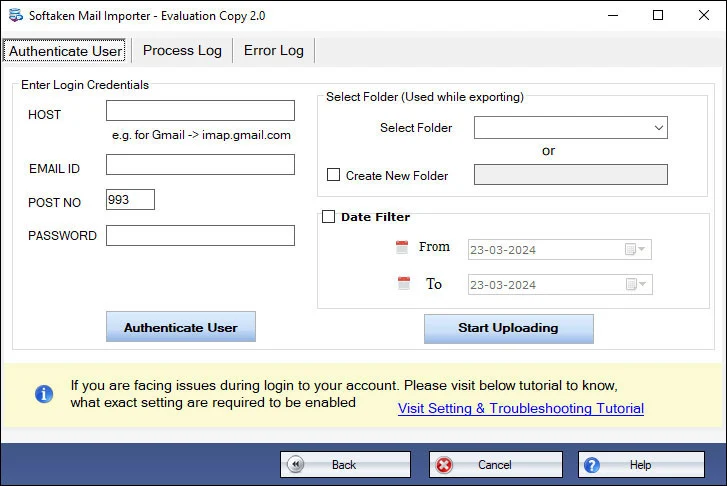
Real Softaken Mail Importer UI — load MBOX, preview messages, then sign in to Yahoo. Click each step or use the arrows to view the interface.

Load & Preview MBOX — Softaken MBOX to Yahoo Importer

step 1 of 3

Watch MBOX Emails Import to Yahoo

Load MBOX, preview, sign in to Yahoo, upload — without installing Thunderbird.

Load MBOX, Preview, Sign In to Yahoo, Upload

See Softaken Mail Importer add MBOX files, preview mailbox items, connect with Yahoo credentials or App Password, and migrate — without depending on Thunderbird.

  1. Bulk export MBOX emails to Yahoo cloud
  2. Folder mode for multiple MBOX files
  3. Attachments and folder structure retained
  4. Standalone — no source email client required

Features & Benefits of MBOX to Yahoo Importer

Bulk Export MBOX Files

The software offers Folder mode by which multiple MBOX files are imported to Yahoo Mail account at the same time. The tool does not create any hurdle in exporting any size and any number of MBOX files to Yahoo Mail account without any complications.

Benefit: Bulk Export MBOX Files.

Export MBOX to Yahoo Independently

The utility carries just a few steps and with the simplified interface, no technical expertise is required to operate the application. There is no need to depend on any email client like Thunderbird or any other to complete the migration task.

Benefit: Export MBOX to Yahoo Independently.

Windows Supported Program

One can run this software on every Windows edition. This utility works comfortably on the latest and older versions of Windows including Windows 11, Windows 10, Windows 8.1, Windows 8, Windows 7, Windows XP, Windows Vista, and others.

Benefit: Windows Supported Program.

Test the Utility Free of Cost

Download the free version of this application and test the complete utility before you take the license edition. It is similar to the license edition but offers to import only first 10 MBOX emails to YMail account. For unlimited migration, upgrade to the licensed edition.

Benefit: Test the Utility Free of Cost.

Deal with Every MBOX File

MBOX files of multiple email clients of Windows and Mac are well supported by the application. You can flawlessly import MBOX file of Thunderbird, Postbox, PocoMail, Entourage, Eudora, KMail, Apple Mail, and others. Regardless of size, every MBOX file can be simply imported.

Benefit: Deal with Every MBOX File.

Maintain Metadata Information

The complete details of MBOX file are well preserved by the application when these files are imported to Yahoo account. The meta properties like to, cc, bcc, from, sent, subject, rich-text formatting of MBOX emails, attachments, etc. are kept intact.

Benefit: Maintain Metadata Information.

FAQs About Importing MBOX to Yahoo

1. How do I generate and use a Yahoo App Password to sign into the software?

Yahoo Mail typically needs an App Password (or third-party access) for IMAP login with desktop tools instead of your regular password. Enter those Yahoo credentials / App Password in the app — Softaken doesn’t store them. Full steps: How to Access Yahoo Account with Third Party Apps or Software?

2. Do I need to install Mozilla Thunderbird or any other email client to import MBOX files?

No. You don’t need Thunderbird or any other email client for the migration. The importer works standalone to upload MBOX to Yahoo.

3. Can I choose a specific target folder or create a new folder inside Yahoo Mail for imported emails?

Documented: the tool keeps the same folder structure after import, with full user control on conversion. Creating a brand-new dedicated Yahoo folder (or mapping only to primary Inbox) isn’t separately named beyond that.

4. Does the tool support MBOX files exported from Apple Mail and Google Takeout?

Yes for Apple Mail — also Thunderbird, Postbox, PocoMail, Entourage, Eudora, KMail, and others. Google Takeout isn’t specifically named on this page.

5. Will the upload process preserve all email attachments, inline graphics, and original formatting?

Yes for what’s documented: attachments are included; meta properties like to, cc, bcc, from, sent, subject, and rich-text formatting stay intact. “Inline graphics” aren’t named separately beyond rich-text formatting and attachments.

6. Can I upload multiple large MBOX files simultaneously using the batch folder selection mode?

Yes. Folder mode imports multiple MBOX files to Yahoo at once. The full license can transfer unlimited MBOX files of any size. The demo imports only the first 10 MBOX emails.

7. Will the imported emails retain complete RFC headers (To, From, CC, BCC, Sent/Received Dates)?

Documented fields kept intact include to, cc, bcc, from, sent, and subject, plus rich-text formatting and attachments. “Received” and a formal “RFC headers” label aren’t listed beyond those fields.

8. What are the specific capabilities and upload limitations of the free trial demo version?

The free demo imports only the first 10 MBOX emails to Yahoo Mail so you can test the workflow. The full license unlocks unlimited migration from $99. A “10 to 25 emails per folder” range isn’t stated.

Software Specifications

Standalone: Import MBOX to Yahoo Mail without Thunderbird or another email client. Use Yahoo App Password / IMAP login when required. Softaken does not store credentials. See KB for App Password setup.

Free demo: Imports the first 10 MBOX emails so you can test the workflow. Full license unlocks unlimited MBOX → Yahoo migration.

Supported

Windows 11, 10, 8.1, 8, 7 · Mac · Linux

Formats

MBOX / MBX → Yahoo Mail

Demo

First 10 MBOX emails

Pricing

Full from $99

Platform specifications

System requirements for Softaken MBOX to Yahoo Importer on each supported OS.

Windows

Desktop installer

Operating System
Windows 11, 10, 8.1, 8, 7 (32-bit & 64-bit)
Package
.exe installer (code-signed)
Processor
Intel, AMD, or compatible 64-bit/32-bit processor
RAM
512 MB Minimum
Disk Space
100 MB free for installation
Display
1024×768 or higher

macOS

Apple desktop build

Operating System
macOS 10.15 Catalina and later
Package
.dmg installer (code-signed)
Processor
Intel or Apple Silicon
RAM
512 MB Minimum
Disk Space
100 MB free for installation
Display
1280×800 or higher

Linux

AppImage & Debian package

Operating System
Ubuntu 18.04+, Debian 9+, CentOS 7+ and other modern distributions
Package
AppImage and .deb
Architecture
x86_64 (64-bit)
RAM
512 MB Minimum
Disk Space
100 MB free for installation
Desktop
GNOME, KDE, XFCE and similar

Sources & Destination (as Documented)

  • Thunderbird, Apple Mail, Postbox, PocoMail, Entourage, Eudora, KMail, and others
  • Destination: Yahoo Mail via account login / App Password (IMAP)
  • Folder mode bulk import; keep folder structure, attachments, and metadata

Key Specifications

SpecificationDetails
Product NameSoftaken MBOX to Yahoo Importer (Mail Importer)
InputMBOX / MBX files
OutputYahoo Mail
OS SupportedWindows 11, 10, 8.1, 8, 7 · Mac · Linux
ProcessorAny Pentium Class
Memory512 MB Minimum
Hard Disk100 MB free space for installation
DemoFirst 10 MBOX emails
DeliveryElectronic · Via Email (~15 minutes)
Language / SupportEnglish · Emails, Chat & Skype

Product Details

License
Free demo / Full
Platform
Windows · Mac · Linux
Support
Emails, Chat & Skype

Demo Version & Comparison

Free demo imports the first 10 MBOX emails so you can test the workflow. Full license unlocks unlimited MBOX → Yahoo migration.

FeaturesDEMO VersionFULL Version
Import MBOX emails to Yahoo MailAvailableAvailable
Folder mode — bulk MBOX filesAvailableAvailable
Standalone — no Thunderbird / email clientAvailableAvailable
Preserve folders, attachments & metadataAvailableAvailable
Yahoo App Password / IMAP loginAvailableAvailable
Supported on Windows / Mac / LinuxAvailableAvailable
LimitationFirst 10 MBOX emailsUnlimited
PriceFREE$99
Softaken Reviews

What Our Users Say

Customer feedback on Softaken MBOX to Yahoo Importer.

Miguel CarvalhoCustomer feedback

Brazil

The performance of the tool is unbeatable.

The performance of the tool is unbeatable. It does not leave any failure messages and corruption. I have exported 100+ MBOX emails to Yahoo in a single cycle of conversion. Thumbs up for introducing this amazing utility!

Tom GottliebCustomer feedback

Belgium

I tried several manual solutions earlier to it.

I tried several manual solutions earlier to it. When this application is recommended to me by my friend, I took a sigh of relief. Really a helpful solution that has exported Thunderbird files to Yahoo account in just 3 simple steps.

Anssi SöderströmCustomer feedback

Finland

I am feeling myself lucky to have this software with me.

I am feeling myself lucky to have this software with me. I read various queries of users who are also looking to import MBOX emails to Yahoo account. I want to suggest this MBOX 2 Yahoo Converter to these users. Good work by the team. Keep it up guys!

Review

Import MBOX Mailboxes into Yahoo Mail

Standalone Mail Importer — bulk folder mode with attachments and metadata, without Thunderbird. Try the free demo, then unlock the full license when you’re ready.

  • Windows · Mac · Linux
  • MBOX / MBX → Yahoo Mail
  • Demo: first 10 MBOX emails

Available for Windows, Mac, and Linux. Pick your OS, then download or buy. Free demo: first 10 MBOX emails.