SoftakenMSG to Yahoo Importer

Import selective or bulk Outlook Outlook message file (.msg) — one email with attachments. files to the Yahoo account you select using the right username and password — mail body (To, From, Date) and attachments export safely.

Get simple, accurate & fast conversion with MSG to Yahoo third solution

  • MSG · Yahoo’s webmail service.
  • Username & Password
  • Selective & Bulk
  • Windows · Mac · Linux

With MSG to Yahoo converter, users are able to access useful and necessary databases of MS Outlook to Yahoo. With this conversion, real time access of data can be possible from anywhere and anytime. You can access important MSG mails to your mobile and multiple smart devices. There are several other advantages too. Get ready to install the app.

  • Accurate conversion results assurance each time you run the app
  • Export only selective MSG files only
  • Convert MSG files in bulk to make conversion error free
  • Enable you to export healthy MSG files
  • Export data completely regardless of their size
  • Support all Microsoft Outlook desktop client. Standalone Softaken tools do not need it installed. versions including 2024, 2021, 2019, 2016, 2013, 2010, 2007 and 2003
  • Work consistently till the conversion goal complete
  • Export data to only user's selected Yahoo account
  • A remarkable app to use both personally and professionally
  • Supported on Windows 11, 10, XP, Vista, 8, 7, Mac & Linux

Note: Supported on Windows 11 / 10 / XP / Vista / 8 / 7 & others, plus Mac and Linux. For third-party Yahoo login setup see: How to Access Yahoo Account with Third Party Apps or Software? Free demo uploads the first 10 emails.

Available for Windows, Mac, and Linux. Pick your OS, then download or buy. Softaken MSG to Yahoo Importer connects with Yahoo username and password. Free demo: first 10 emails.

Softaken MSG to Yahoo Importer box
Safe & Secure DownloadWindows, Mac & Linux tool to import MSG to Yahoo Mail. Username & password login.
Demo Available

Quick Facts

Input
Outlook MSG
Output
Yahoo Mail
Demo
First 10 emails
Platform
Windows · Mac · Linux

Outlook MSG to Yahoo Mail

Selective or bulk MSG import to the Yahoo account you choose with username and password — To, From, Date, and attachments kept intact.

MSG Files
Softaken Mail Importer
Selected Yahoo Account

Software interface

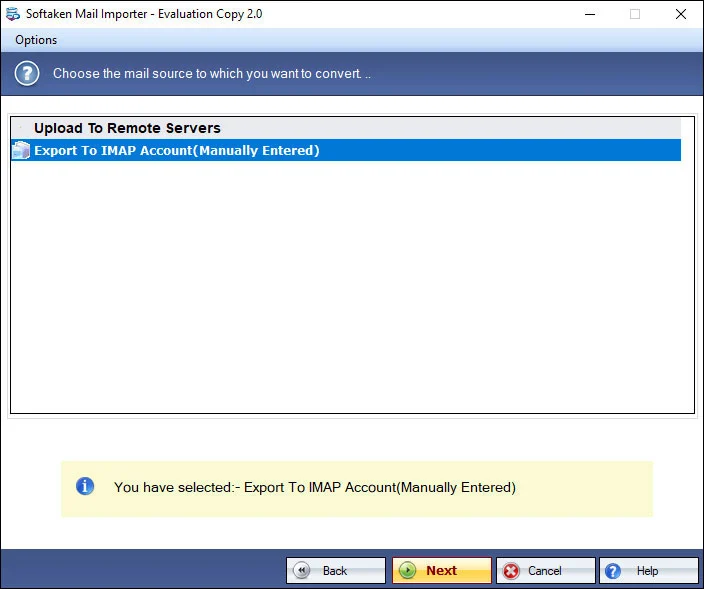
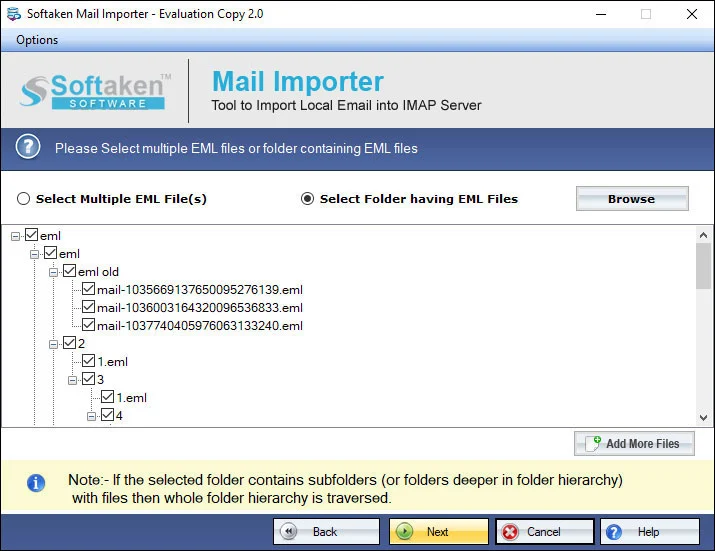
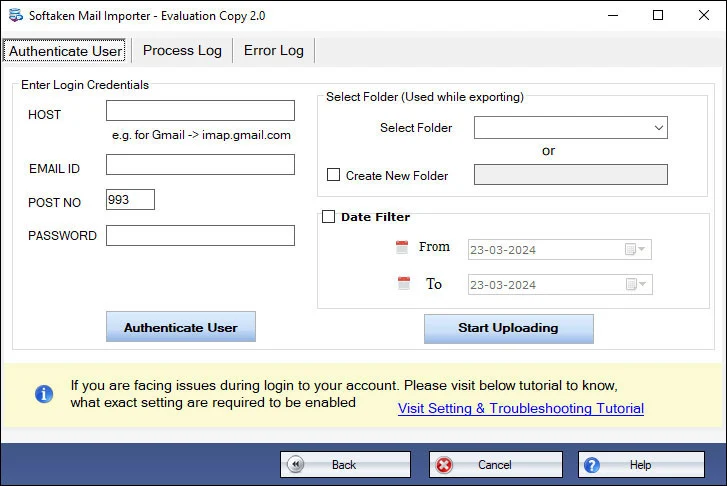
Real Softaken Mail Importer screens used for MSG to Yahoo: select MSG files, review mail content, then sign in with Yahoo username and password. Click each step to enlarge.

Buy License Online Free demo: first 10 emails
Select MSG Files — Softaken MSG to Yahoo Importer

step 1 of 3

Watch MSG to Yahoo Importer Demo

See Softaken Mail Importer workflow used for MSG to Yahoo: filter selective MSG files, connect with Yahoo username and password, and upload to the selected account.

Select MSG files, sign in to Yahoo, import

Selective or bulk MSG to Yahoo with To, From, Date, and attachments — username and password login.

  1. Scan and export MSG files selected by users (advance filtration)
  2. Bulk migration of multiple MSG files at once
  3. Connect with the right Yahoo username and password
  4. Export To, From, Date fields and attachments safely

Features & Benefits of MSG to Yahoo Importer

Export Selected MSG file

The software has capacity to scan and export those MSG files that have been selected by users. For this, the software supports advance conversion with advance filtration feature. Each time users get desired results.

Benefit: Export Selected MSG file.

Swift Migration Assistance

Import MSG to Yahoo without losing quality. No single data is exploited or damaged using the export tool. It keeps data intact. All mail body including To, From, Date and even attachments are exported safely to Yahoo.

Benefit: Swift Migration Assistance.

Convert Data in Bulk

This converter app makes conversion process not only easy but also faster by offering bulk migration assistance. Here you can export not just 2 or 3 but also multiple MSG files at once. This feature saves user's time for conversion.

Benefit: Convert Data in Bulk.

Remarkable Support

In terms of support, you will find the tool a winner. All MS Outlook versions are supported by it. You can export Outlook 2024, 2021, 2019, 2016, 2013, 2010, 2007, and 2003 databases without any hitch. The utility scans any Outlook version database.

Benefit: Remarkable Support.

Export to Specific Yahoo Account

With this exporter, users have found conversion of MSG files to the Yahoo account that they select. Users have to select the right username and password for this. The tool automatically establishes connection with the particular account.

Benefit: Export to Specific Yahoo Account.

Simple to Use

No matter how much expert you are technically, you can use the app to export data confidently. It works smoothly. The simple app carries just 2 or 3 simple tabs for conversion. The GUI is smarter and simpler.

Benefit: Simple to Use.

MSG to Yahoo Importer FAQs

1. How do I generate and use a Yahoo App Password to log into the software?

You sign in with the right username and password for the Yahoo account you select. App Password / Two-Step Verification isn’t covered as a separate product feature here. Yahoo often needs third-party access enabled for desktop tools — follow Softaken’s guide: How to Access Yahoo Account with Third Party Apps or Software? The tool only handles conversion; it can’t retrieve or reset your Yahoo password.

2. Do I need to install Microsoft Outlook on my computer to import MSG files to Yahoo Mail?

You work with MSG files from Outlook (including 2024, 2021, 2019, 2016, 2013, 2010, 2007, and 2003) and import them to Yahoo with username and password. Outlook isn’t listed as a required install step for this workflow — just your MSG files and Yahoo login.

3. Does the tool support other Yahoo domains like @rocketmail.com and @ymail.com?

@ymail.com and @rocketmail.com aren’t called out separately. Export goes to the Yahoo account you select — use the username and password for that account.

4. Will the migration process preserve original email attachments, inline images, and formatting?

Yes for what’s documented: mail body including To, From, Date, and attachments export safely to Yahoo without losing quality.

5. Can I choose a specific target folder or create a new folder inside my Yahoo Mail account?

Picking a custom Yahoo folder or creating a new one isn’t offered on this page. What’s documented is export to your selected Yahoo account after you connect with username and password.

6. Can I upload thousands of MSG files simultaneously using the batch import folder option?

Yes for bulk work — export not just 2 or 3 but multiple MSG files at once, and use advance filtration for selective picks. How many you run at a time is up to you; MSG of any size is allowed. The free demo covers the first 10 emails.

7. Will the uploaded emails maintain complete RFC headers (To, From, CC, BCC, Sent/Received Dates)?

Documented fields include To, From, Date and attachments. A full RFC checklist (CC, BCC, Sent/Received as separate named fields) isn’t spelled out beyond accurate conversion and intact data.

8. What are the specific capabilities and upload limitations of the free trial demo version?

The free demo uploads the first 10 emails to Yahoo Mail so you can try selective or bulk import with username and password. Unlock unlimited import from $99 (Softaken Mail Importer). Available on Windows, Mac, and Linux.

MSG to Yahoo Importer Specifications

MSG → Yahoo Mail: Selective or bulk import with Yahoo username and password. To, From, Date, and attachments preserved. Third-party Yahoo access guide available in Softaken KB.

Windows, Mac & Linux: Supported on Windows 11, 10, 8.1, 8, 7, XP, Vista & others, plus Mac and Linux. MSG from Outlook 2024–2003.

Free demo evaluation: Uploads the first 10 emails to Yahoo Mail so you can test the workflow. Full license unlocks unlimited import.

Software Information

Product
MSG to Yahoo Importer
Version
1.0
Operating System
Windows 11, 10, 8.1, 8, 7, Mac & Linux
Login
Yahoo username & password

Supported & Format

Input
Outlook MSG
Output
Yahoo Mail
MSG Support
Outlook 2024–2003
Language
English

System Requirements

Processor
Any Pentium Class
RAM
512 MB Minimum
Hard Disk
100 MB free space for installation
Internet
Required for Yahoo login

Software Delivery

Electronic
Via Email
Delivery Time
15 Minutes
Full License
From $99
Demo
First 10 emails

Platform specifications

System requirements for Softaken MSG to Yahoo Importer on each supported OS.

Windows

Desktop installer

Operating System
Windows 11, 10, 8.1, 8, 7 (32-bit & 64-bit)
Package
.exe installer (code-signed)
Processor
Intel, AMD, or compatible 64-bit/32-bit processor
RAM
512 MB Minimum
Disk Space
100 MB free space for installation
Display
1024×768 or higher

macOS

Apple desktop build

Operating System
macOS 10.15 Catalina and later
Package
.dmg installer (code-signed)
Processor
Intel or Apple Silicon
RAM
512 MB Minimum
Disk Space
100 MB free space for installation
Display
1280×800 or higher

Linux

AppImage & Debian package

Operating System
Ubuntu 18.04+, Debian 9+, CentOS 7+ and other modern distributions
Package
AppImage and .deb
Architecture
x86_64 (64-bit)
RAM
512 MB Minimum
Disk Space
100 MB free space for installation
Desktop
GNOME, KDE, XFCE and similar

Product Details

License
Free demo / Full
Platform
Windows, Mac & Linux
Support
Emails, Chat & Skype

Demo Version & Comparison

Free demo uploads the first 10 emails to Yahoo Mail so you can test the workflow. Full license unlocks unlimited import.

FeaturesDemo VersionFull Version
Import MSG to Yahoo MailAvailableAvailable
Selective & bulk MSG importAvailableAvailable
Yahoo username & password loginAvailableAvailable
Preserve To, From, Date & attachmentsAvailableAvailable
Advance filtration for selected MSGAvailableAvailable
Outlook 2024–2003; Windows, Mac & LinuxAvailableAvailable
LimitationFirst 10 emailsUnlimited
PriceFREE$99
Softaken Reviews

What Our Users Say

User experiences with Softaken MSG to Yahoo Importer.

LamCustomer feedback

Singapore

I have found this MSG to Yahoo importer technically so simple and easy.

I have found this MSG to Yahoo importer technically so simple and easy. Just one trial was enough for me to understand its key functions. Thank you for your technical team for providing this simple and fast conversion support.

PolverinoCustomer feedback

Italy

I am keen to share that working with MS Outlook is now so easy and interesting for me.

I am keen to share that working with MS Outlook is now so easy and interesting for me. I can now easily access my important Outlook mails from my phone. I have found a proper work balance.

Review

Import MSG to Yahoo Mail on Windows, Mac & Linux

Try the free demo (first 10 emails), then unlock unlimited import with a full Softaken license. Yahoo username and password required.

  • Windows · Mac · Linux
  • Yahoo login
  • Selective & bulk MSG

Available for Windows, Mac, and Linux. Pick your OS, then download or buy. Softaken MSG to Yahoo Importer connects with Yahoo username and password. Free demo: first 10 emails.