Softaken OST to Hotmail Importer

Softaken OST to Hotmail Importer

Powerful solution to directly import OST file to Hotmail (Outlook.com)

100% Standalone Utility:Migrate OST mailboxes to Hotmail without installing or configuring Microsoft Outlook.
  • Straight-forward uploading of OST file to Outlook.com account
  • Simple working procedure with 4 simple steps
  • Easily upload every size OST file
  • Convert OST file to Outlook.com without Outlook &Exchange Server
  • Preserve folders and subfolder structure
  • Comfortably run on all Windows editions
  • Easily export OST file of Outlook 2024,2021,2019,2016,2013,2010,etc.
  • Export to desired Outlook.com account
  • Transfer OST to Hotmail with attachments
  • Familiar with the application through demo version
  • Connect with Hotmail account in just a few seconds
HotmailOutlook.comlive.commsn.com
No OutlookOAuth / App PasswordOrphaned OSTDemo:10 emails/folder
Import to Microsoft webmail accounts
@hotmail.com@outlook.com@live.com@msn.com

Outlook OST to Hotmail / Outlook.com


Outlook .OST fileSoftaken Mail ImporterHotmail / Outlook.com

Watch OST to HotmailDemo


Import OST files directly to Hotmail / Outlook.com

See Softaken Mail Importer add OST files,preview folders,sign in to Hotmail with OAuth / App Password credentials,and upload emails — without Outlook or Exchange.

  • Add OST files and preview the mailbox folder tree
  • Optional date filter when you need a selective range
  • Sign in with Hotmail / Outlook.com credentials / App Password
  • Import with folder hierarchy and attachments preserved

See the OST to HotmailInterface


Softaken Mail Importer home for OST import
1

Open Mail Importer

Launch Softaken Mail Importer and choose OST as the source for Hotmail / Outlook.com upload.

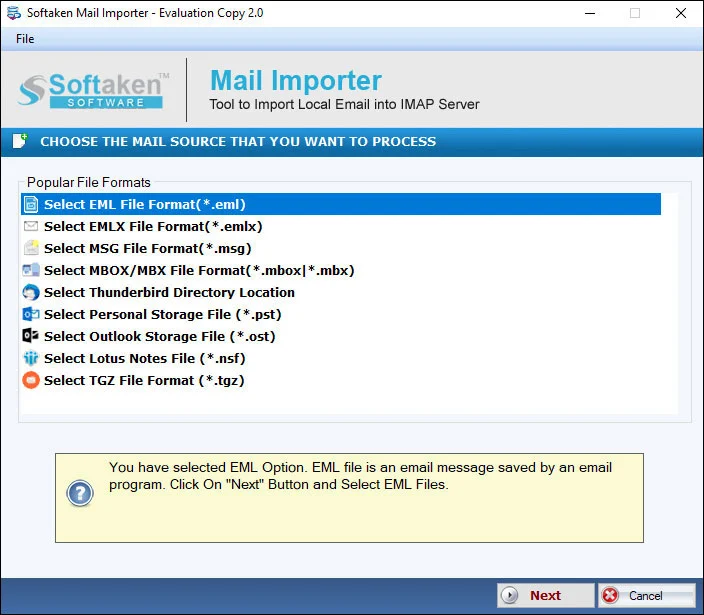
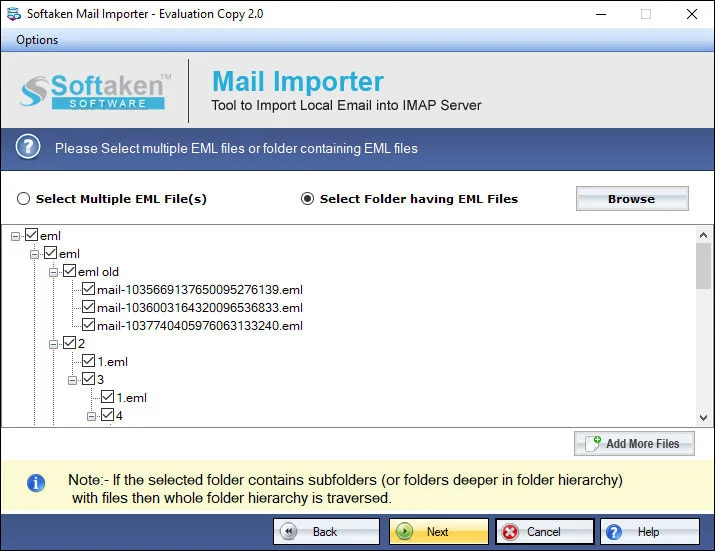
Preview OST mailbox folders before Hotmail import
2

Preview OST Folder Tree

Load the OST file and review the mailbox folder tree before migration.

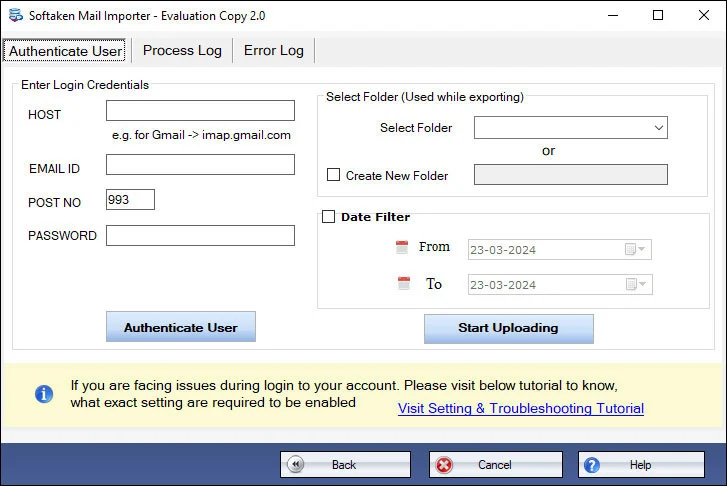
Hotmail Outlook.com login with OAuth or App Password
3

Hotmail / Outlook.com Login

Enter Hotmail credentials (OAuth / App Password recommended). Softaken never saves login details.

Demo migrates 10 emails per folderfrom OST to Hotmail. Full license $99. Guide:user steps· demo video.

Powerful features of OST to Outlook.com Importer


Automatic utility
Automatic utility

OST to Hotmail Converter offers an automatic solution by which one can directly import OST file to Hotmail account. One can directly transfer any size OST file without any trouble. 100% safety assurance is provided by the utility.

Transfer with attachments

The application offers conversion of OST emails to Outlook.com account along with attachments. All the OST email properties like to,cc,bcc,subject,from,etc. are transferred to Outlook.com account in an easy manner.

Keep data originality intact

The program maintains the original structure of emails and the formatting applied to emails. These details include hyperlinks,font styles,graphics,etc. All this information will be imported along with OST emails with full accuracy.

Supportable to all Windows

The software can be effortlessly installed on all Windows operating systems including Windows XP,Vista,7,8,10,and others. Without affecting the other running tasks on the system,one can import OST file to Outlook.com account.

Self-reliant utility

Installation of Outlook is not mandatory to perform the import task. Without Outlook and Exchange Server connectivity,the software is capable to import OST files to Hotmail account. No support of any additional program is needed.

Easy handling application

With the self-descriptive wizard,one can easily carry out the migration task in just 3-4 simple steps. Without being technically sound,the import task can be effortlessly completed without facing any kind of difficulties.

Feature Comparison of OST to Hotmail Importer – Trial and Licensed Version

Demo version previews all mailbox items and migrates up to 10 emails per folder directly from OST to Hotmail.

Features
  • Import OST to Hotmail / Outlook.com
  • Orphaned OST direct cloud migration
  • Standalone — no Outlook / Exchange required
  • OAuth 2.0 / App Password (2FA)
  • Preserve folders,formatting &attachments
  • Date range filter &batch OST
  • Support Windows 11/10/8/7 &others
  • Limitation
  • Price
DEMO Version
  • 10 emails / folder
  • FREE
FULL Version
  • Unlimited
  • $99

With the free demo,you can preview all mailbox items and migrate 10 emails per folderfrom OST to Hotmail. The full license unlocks unlimited import ($99).

Frequently Asked Questions Regarding OST to Hotmail Importer


Microsoft has disabled basic password login for Hotmail / Outlook.com IMAP. With 2FA/MFA enabled,use Microsoft OAuth 2.0 or an App Password:enable 2-step verification on your Microsoft account,create an App Password,then enter your Hotmail / Outlook.com email and that App Password in Softaken OST to Hotmail Importer. Softaken never saves login details. See our guide:How to Access Hotmail Account with Third Party Apps.
Yes. Softaken OST to Hotmail Importer uploads OST data directly to Hotmail without Outlook or Exchange Server presence. That means you can migrate OST files when the original profile or server is no longer available — select the OST file and import to your Hotmail / Outlook.com account.
No. Convert OST file to Outlook.com without Outlook &Exchange Server. Softaken OST to Hotmail Importer is a standalone Windows tool that uploads OST data directly to Hotmail account. Installation of Outlook is not mandatory.
Yes. Softaken OST to Hotmail Importer supports Microsoft webmail accounts including @hotmail.com,@outlook.com,@live.com,and @msn.com. Export to the desired Outlook.com / Hotmail account you sign in with.
Yes. Preserve folders and subfolder structure during migration. The program maintains the original structure of emails and the formatting applied to emails — including hyperlinks,font styles,and graphics — and transfers OST to Hotmail with attachments. Email properties like to,cc,bcc,subject,and from are transferred intact.
Yes. Softaken Mail Importer (the engine behind OST to Hotmail Importer) includes a date filter so you can set a date range when needed,instead of migrating every message in the OST file. You can also import multiple OST files in a session.
Easily upload every size OST file — there is no size barrier on the tool side. Softaken welcomes large OST files to Hotmail / Outlook.com. Internet connectivity is required as data transfers from local to cloud;use a stable connection and enough space in your Hotmail mailbox.
With the demo version,one can preview all mailbox items and import 10 OST emails per folder to Hotmail account. Familiar with the application through the demo version before purchasing. The full license unlocks unlimited import ($99).

OST to Hotmail Importer Specifications


🔒100% Modern Auth Compliant:Fully supported with Microsoft OAuth 2.0 and App Passwords for 2FA/MFA-enabled Hotmail &Outlook.com accounts. Zero credential storage.
Direct Cloud Migration:Upload inaccessible,Exchange-disconnected,IMAP-cached,or orphaned OST files directly to Hotmail without requiring Exchange Server connectivity or Outlook profile reactivation.
Preserves complete email formatting:Retains inline images,hyperlinks,nested attachments,folder hierarchy,and all standard RFC headers (To,From,CC,BCC,Sent/Received Dates).
OST →HotmailNo OutlookOAuth / App PasswordOrphaned OSTWindows$99

System Requirement

ProcessorAny Pentium Class

Operating SystemWindows 11,10,8.1,8,7 &Other

Memory512 MB Minimum

Hard Disk100 MB free space for installation

Software Delivery

ElectronicVia Email

Minutes15

Demo10 emails / folder

Full License$99

Interface Available

Language SupportedEnglish

Support OptionEmails,Chat &Skype

PlatformWindows only

ProductOST to Hotmail Importer

OST to Hotmail Importer Reviews