Softaken Releases Upgraded OST File Exporter 16.0 and PST Mailbox Converter 11.0 for Faster Outlook Data Conversion
Big Update coming from the Softaken Company, which is a trusted name in email migration and data management software. The company proudly announces the launch of Softaken OST to PST Converter 16.0 and Softaken PST Converter 11.0. The latest versions have a powerful solution to manage complex mailbox conversion tasks. The new versions introduce various advanced features that make the conversion faster, flexible, and more efficient for the Outlook users who manage large amounts of data.
These updated versions introduce several types of advanced functions that make the conversion process faster, flexible and highly reliable for those users who manage the large volumes of Microsoft Outlook Data. With improved export controls, enhanced stability, detailed logging, and a streamlined installer experience, the new releases ensure the conversion becomes safer and more efficient for worldwide users.
Distinctive Features
Enhanced Conversion Capabilities
Softaken OST File Exporter 16.0 offers improved conversion capabilities that facilitate the seamless and efficient export of OST files into PST. The revised version ensures that the structure, formatting and folder hierarchy of emails are preserved, while also ensuring that data migration is precise.
Users can effortlessly manage large OST files and perform dependable conversions without the risk of data loss. The software meticulously protects mailbox components, such as emails, attachments, contacts, calendars and folder structures, during the export process.
New Split PST Option
The Split PST function enables users to more effectively manage large Outlook data files. This function allows the software to partition a large PST file into smaller segments autonomously during the conversion process.
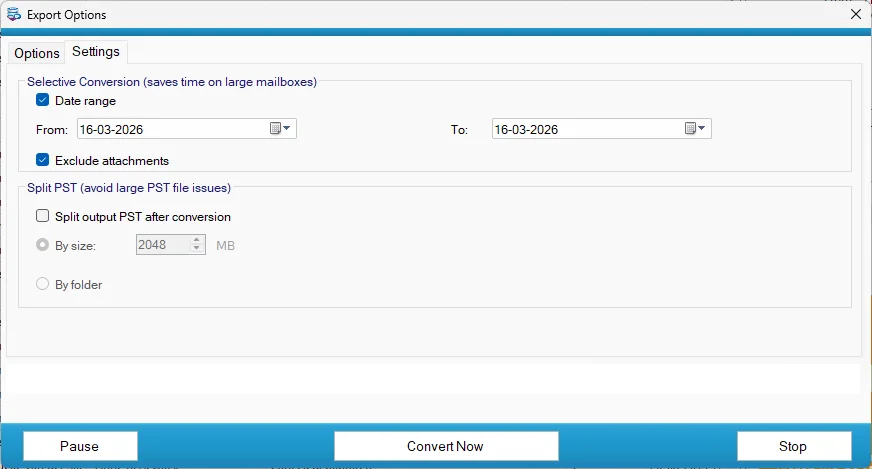
There are two mechanisms by which users can divide PST files:
- Organize PST files by their size (MB) to guarantee that they remain within the permitted storage capacity.
- Organize PST files by folder for the Inbox, Sent Items, Calendar, Contacts and other folders.
This feature simplifies the storage and administration of mailbox data, while also increasing Outlook’s efficiency and reducing the probability of PST corruption.
Advanced Date Range Filter
The Advanced Date Range Filter allows users to export communications that are within a specific time frame. Users may convert only the documents that are essential from their OST file by specifying a date for the start and end.
User assistance is provided by this selective conversion feature:
- Decrease the size of exported PST files
- Decrease the processing time
- Only the most critical mailbox data should be archived or migrated.
For organizations that manage considerable email databases, this precise conversion control is especially advantageous.
Option to Exclude Attachments
Furthermore, the software has an Exclude Attachments option that is implemented during the conversion process. Skipping attachments for users who require only email messages can significantly reduce the size of the resulting PST file.
This feature is especially advantageous for the optimization of storage space, the acceleration of the conversion process and the creation of lightweight email archives, all while maintaining the primary email content.
Improved Conversion Stability
In order to ensure consistent performance, even when administering sophisticated or large mailboxes, numerous backend improvements have been implemented in the most recent versions.

The principal stability enhancements are as follows:
- Enhanced subdirectory administration during the export of PST files
- Mechanisms for automatic fallback in the event that filters encounter processing errors
- Automatic cleansing of partially created PST files in the event of an unsuccessful split operation
- Enhanced exception protection and null-handling in all export modules
These improvements ensure a more dependable and efficient export process by minimizing interruptions during the conversion process.
Conversion Logging in Detail
A recently implemented timestamp-based monitoring system provides users with exhaustive insights into each conversion session.
Data such as: are present in the archives.
- Conversion start parameters and selected options
- The primary file paths and designated folders
- The number of objects and folders that have been processed
- Distinguish between PST operations and their results
- Summary of errors and suggestions for troubleshooting
By automatically storing all log files in the output directory with timestamped filenames, users and administrators can easily review or troubleshoot the conversion process.
Enhanced Installer Experience
Softaken has also improved the software installation process to ensure compatibility with a diverse array of Windows environments.
The installer has been significantly improved in the following ways:
- Installers that are distinctive for the OST Full, OST Demo, PST Full and PST Demo versions
- The automatic detection and execution of requisite actions. The components of the NET Framework
- The installer supports multiple languages.
- Each version of the product has its own installation folder.
- Distinct product identifiers to ensure that the uninstallation and upgrade processes are executed correctly
These enhancements ensure a more dependable installation process and alleviate compatibility concerns during the setup process.
Improved User Interface
Furthermore, the most recent versions incorporate a variety of interface improvements that simplify the process of utilizing the software.
Notable modifications to the user interface include:
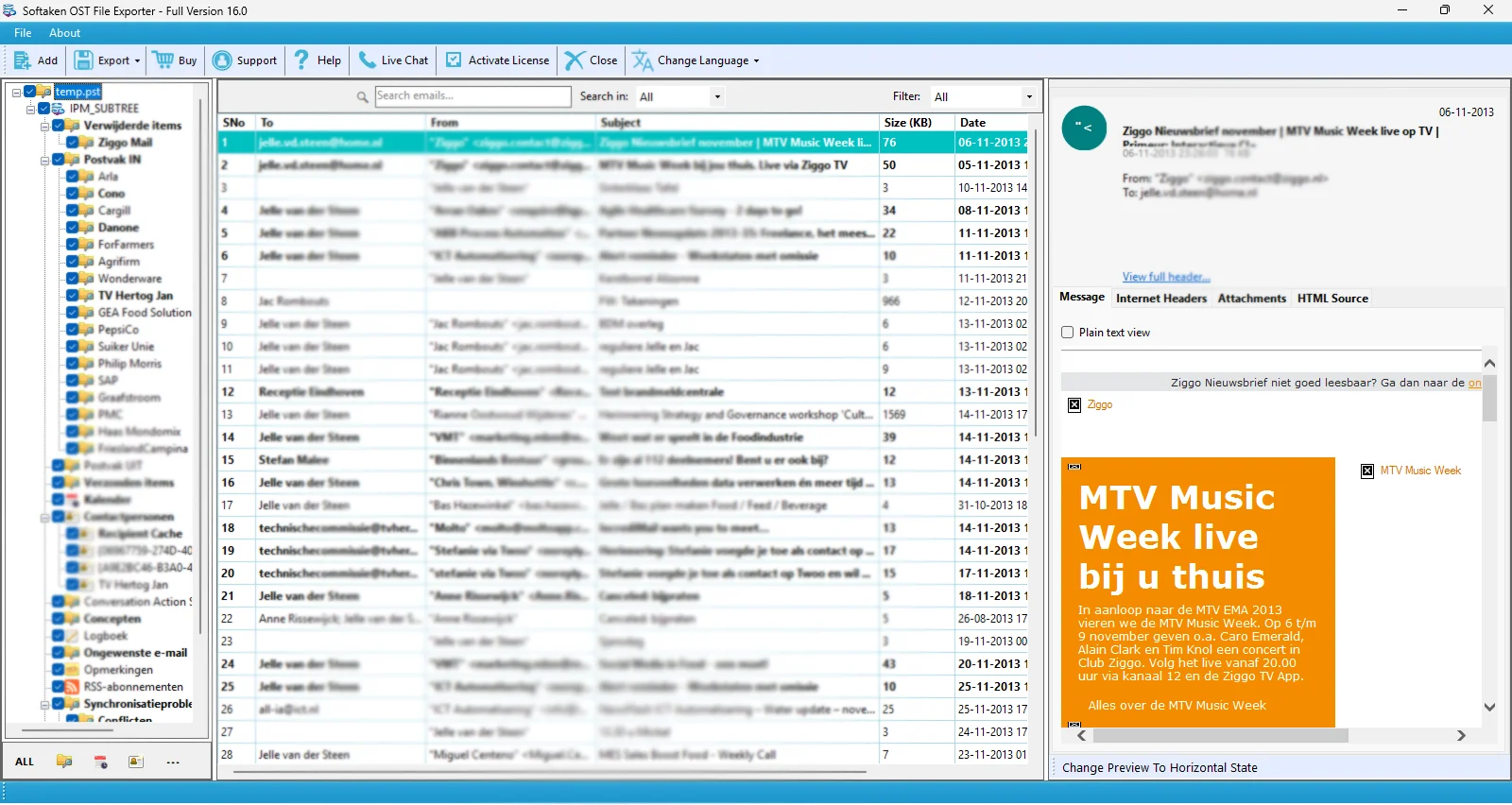
- A Segoe UI font that is consistent throughout the entire application
- Enhanced email preview by displaying the header and providing attachment links
- Improved preview panels for calendars and contacts
- A more streamlined and organized layout for export modules and settings
These modifications create a more user-friendly environment for the review and export of mailbox data.
Expanded OST Converter Reliability
The OST File Exporter 16.0 has been further optimized to handle Outlook data more effectively. While using the Outlook software, it accurately detects the mailbox folders and accesses them in read-only mode without modifying the data.
This prevents file access conflicts and ensures that users can export mailbox data without interrupting their ongoing Outlook activities.