Are you looking for ways to simplify the process to export Google Workspace emails to MS Outlook for Windows? If your answer is yes, your wait is over now. The article shares standard manual and automated solutions to achieve this goal.
Google Workspace or G Suite is an independent and reliable email platform, trusted by millions of users around the world. This power-packed tool offers various advantages, including Google Photos, Google Docs, Google Meet, Slides, Sheets, and various other outstanding features. It’s a platform you can trust. On the other hand, Outlook for Windows is a robust email client that allows users to manage their contacts, emails, notes, and various other details.
Reasons to Export Google Workspace Emails
There could be several reasons why users like to move G Suite data to PST.
Real-Time or Offline Access – Google Workspace is a cloud-based platform. If you have a file or email in Google Workspace, you can access it if the internet connection is stable. Hence, real-time access can be objected to here sometimes due to poor connection. With MS Outlook for Windows, users can access data offline.
Legal Compliance: Various industries need to follow the government’s retention policies, where they store data for a specific period of employees who are going to leave the organization. In this context, transferring G Suite data to MS Outlook is one of the best practices.
Data Backup: If you are switching from Google Workspace, creating a backup of important emails is essential. At this point, MS Outlook is a reliable platform that many Windows users like to consider.
Forensic Requirements: Data restoration from Google Workspace to MS Outlook is beneficial during forensic investigations.
Also read: Self-Hosted Google Workspace Backup Solution
Manual Solutions to Export G Suite to PST
The manual solution requires the prior installation of MS Outlook. It is for a single user. Here are the steps to follow.
First Stage: Enable IMAP Settings in Google Workspace
- Access to your Gmail account
- After that, switch to “Settings” and then “See All Settings”
- From the given options, select the “Forwarding and POP/IMAP” option
- Enable IMAP in the IMAP Access and press “Save”
Second Stage: Add G Suite Account in Outlook
- Go to MS Outlook and in the “File” menu, select the “Add Account” option
- Configure your Google Workspace account by providing credentials
- Wait until the configuration process is over
- If you see two-step verification is done, then allow access.
Third Stage: Export PST to MS Outlook
- Open MS Outlook for Windows application on your system
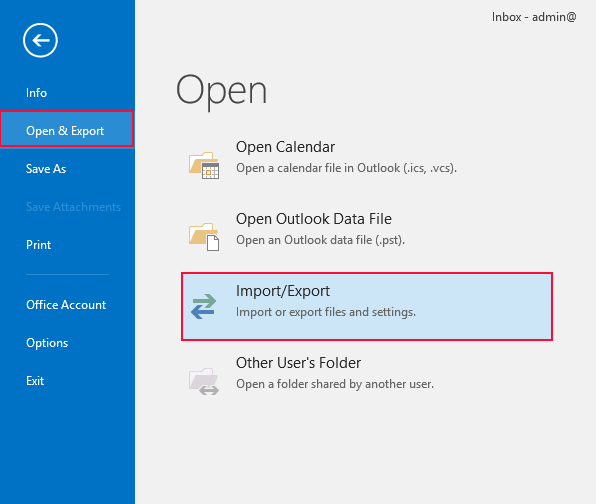
- Then go to the “File” option and then select “Open & Export” and “Import/Export” tab
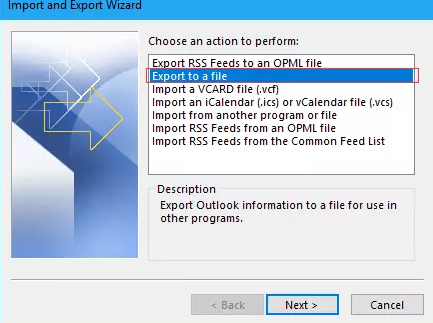
- From the “Import and Export Wizard”, select the “Export to a File” option and press the “Next” tab
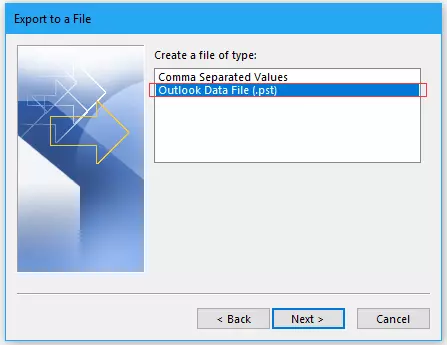
- It will open the “Export to a File” window, select the “Outlook Data File (.PST)” option, and then “Next”
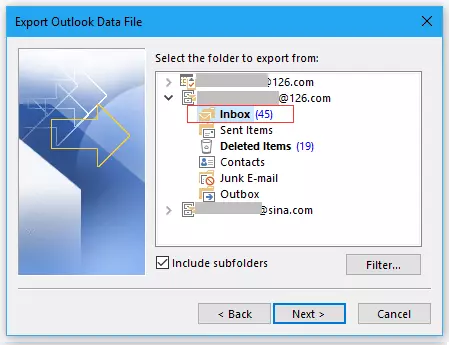
- Choose the connect Google account and check the “Include Subfolder” option
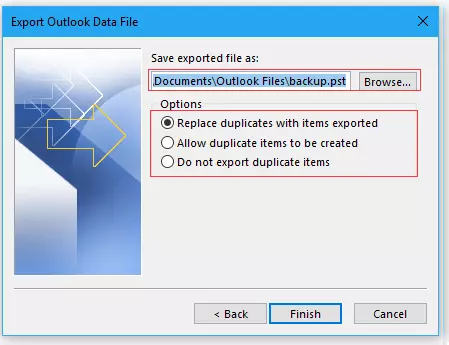
- Click on the “Browse” tab to choose a local location to save the exported data. After that, select any of the given options and press the “Finish” tab
Disadvantages of Manual Solutions
However, while this is a tried-and-tested technique to export Google Workspace emails to PST, it has some disadvantages that one can’t deny.
The above manual processes need technical assistance. They could be time-consuming and risk data loss. Installing MS Outlook is essential to perform the conversion task.
Pro Ways toExport Google Workspace Emails to PST
Manual tricks are challenging and have several downsides. Considering these factors, experts recommend a third-party solution. Softaken is a prominent store for all types of G Suite and MS Outlook third-party tools. Download the Softaken Google Apps Back Pro, a user-friendly tool that makes backing up G Suite data a breeze.
You can download the free version of this application to assess its quality.
Steps to Run the Tool to Export Google Workspace Emails in PST Format
Before you launch this app, go to the Google Apps Settings to enable IMAP. Follow the process as you can see on the screen.
- Now, “Turn on” less secure apps and refresh the page to see if the option is activated.
- Launch this sophisticated application after installing it on your Windows system.
- Now, provide the credentials and press the “Connect to my Gmail account” tab.
- The next window shows the “Folder Name” and “Number of Messages” each folder holds.
- Press the “Next” tab after a preview.
- In this window, select the “Folder” that you want to create a backup and select “PST” to save data.
- Next, press the “Browse” button to direct the tool location of the new PST file, and finally, press the “Process Now” tab to complete the process.
Advantages of Softaken G Suite Export Tool
Advantages of this Application.
Allow Users to Export Entire Folder Data At Once – This advanced application supports converting a specific folder or entire folder in one go, saving users time and effort.
An Independent Backup Application – This application offers independent backup of Gmail to MS Outlook for Windows. In other words, it doesn’t need a prior installation of MS Outlook to export data.
Conversion to Many Other Platforms – This prominent application supports migrating Google Workspace to EML, EMLX, MSG, PST, and MBOX file formats.
Interactive Interface – This application can be operated by a novice without technical guidance. It is a user-friendly app that provides data backup without sacrificing quality.
Recommended for Personal & Professional Users – If you need this app for personal or professional use, we recommend you consider it without further doubt. It is a reliable program.
FAQs
Ques: Can I back up more than one Gmail account data at a time using this software?
Ans: This application allows you to create a backup of one Gmail account at a time.
Ques: Can I export data from the Google Workspace account whose password is unknown?
Ans: No, the correct password for the Google Workspace account must be configured and processed for conversion.
Ques: Does this app export emails with their attachments?
Ans: Yes, it supports the conversion of emails with their attachments. It offers complete migration.
Conclusion
Overall, Google Workspace is an unlimited cloud platform. If you want to export Google Workspace emails to an email client, the recommended third-party tool can help. To convert Gmail to PST, you can choose either a third-party or a manual solution.