Release v5.0: Upgrade Softaken MSG Converter with Multilingual MAPI Support, UI Performance Fixes, and PDF Engine Integration
Softaken MSG Converter to Version 5.0. With this release, we’ve focused on improving day-to-day stability. WE have added full support for international and multilingual MSG files – finally squashing those pesky Japanese character bugs, fixed broken export paths, and completely optimized how large directories are handled so the app never freezes on heavy workloads.
New Features
UI & Workflow Changes
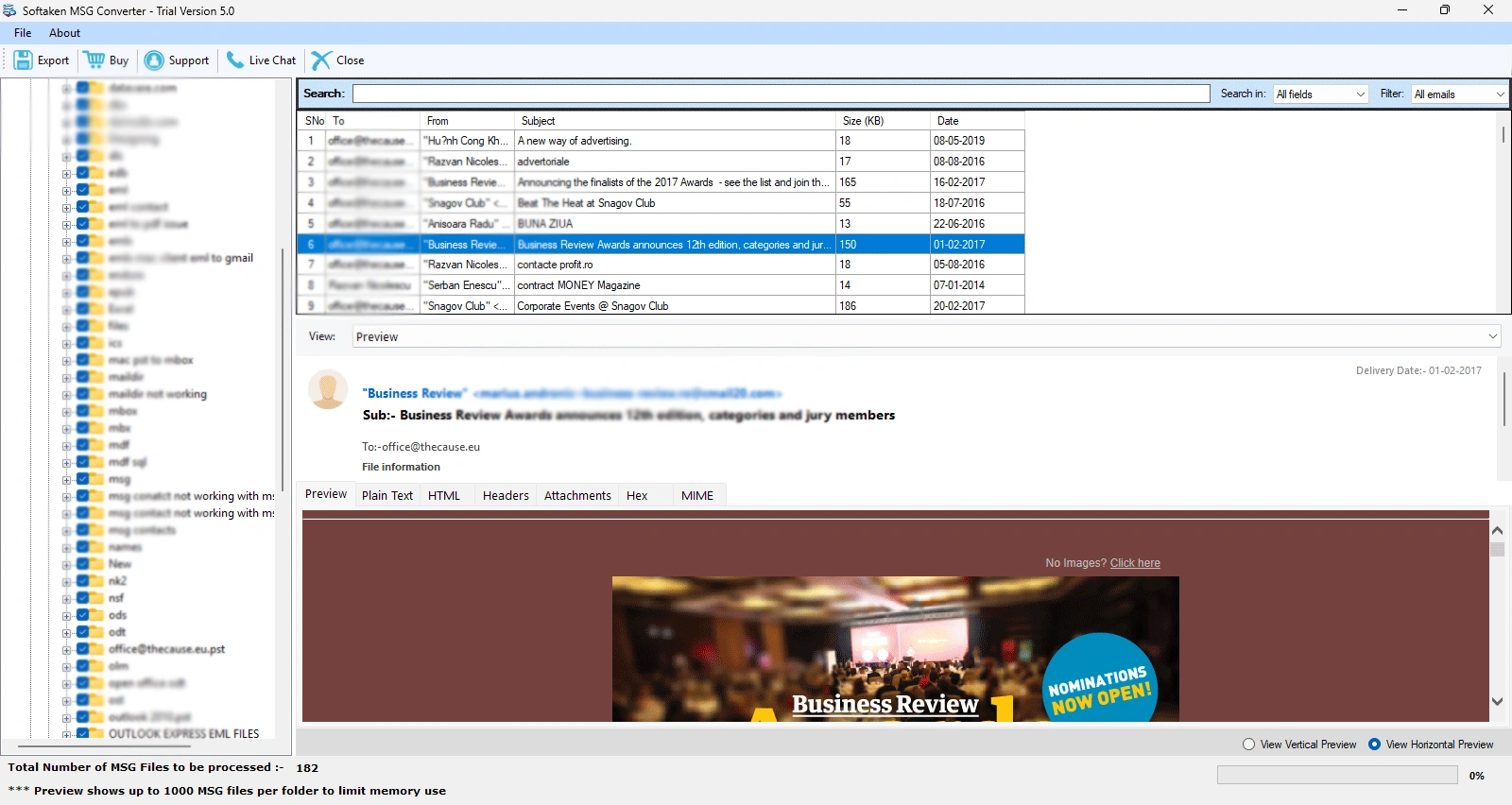
- Export Button: The Export button here stays enabled. Shows clear instructions – “Please select a folder for export…” if clicked without a checked folder.
- Folder Tree: Implemented lazy loading (dummy child nodes). Caps views at 800 subfolders per level – shows “… more folders” hint. Parent checkbox applies to immediate children only (no recursive UI freezing).
- About Grid and Status: This now displays the “Loading MSG files…” It tracks up to fifty thousand files in the background but caps the preview at a thousand files. This keeps memory usage low and helps to stop the app from lagging.
- Crash Fix: Fixed “Collection was modified” crash by using a file list snapshot during grid binding.
Preview & International MSG
- MAPI-First Loading: Used for Unicode subjects, bodies, and headers to natively support Japanese/multilingual files across all preview tabs.
- Fixes: Drastically reduced grid character corruption – mojibake. Added temporary copying for locked MSG files and implemented a MAPI cache.
Export and Validation
- Validation: It can now validate the path and format before starting and also blocks empty file exports for you.
- Folder Structure: You can now save your output files directly into their original subfolder paths.
- Naming: Also worked on fixing the PDF naming convention dropdown. Added safe fallback names – pdf for garbled titles.
PDF Export Engine
- Features: Builds UTF-8 HTML from MAPI text. Added an optional – Include header toggle.
- PDF Validation: The app now checks that each of your PDF exists and has a file size greater than zero before logging success. So like – if an export fails, the exact reason is caught and logged.
Check MSG to PDF Conversion Process
EML / EMLX Export
- Outlook Fix: It sets IsDraft = false, while using real SMTP addresses from MAPI To/Cc/Bcc so Outlook doesn’t open files as drafts with fake recipients@local addresses.
- Fidelity: Uses ToMailMessage and MAPI Unicode helpers for Japanese text.
Check Softaken MSG to EML and EMLX Conversion
Performance & Logging
- Background Scanning: Offloaded folder scanning to a background thread. Switching folders instantly cancels the previous scan via a generation counter.
- Smart Conversion Logs: Now, it automatically drops a detailed txt straight into your output folder. It tracks everything.
Trial or Demo Mode
We have also enhanced the functionality of our trial version, increasing the demo export limit from 15 to 50 messages per run. This bound is now expressed in a single global constant so that any future changes are a one-step process. The application logs and final completion messages have been updated as well to properly reflect this new 50 file ceiling.