Have you ever wondered why hard drive crashes always feel like they came out of nowhere? The reality is, they rarely do. Long before a drive gives up, it drops 10 distinct clues that something is seriously wrong. Before your system stops responding altogether, watch out for these 10 critical warning signs of hard drive failure and learn how to protect your data before it’s too late.
Real-Life Scenario
According to a Reddit user, he lost an important work file. The situation was slowly turning bad as the system sometimes froze and large files were taking a long time to open. After losing an important file, he stopped working on the system until a technician could check it. Fortunately, the hard drive crash was diagnosed before he lost other files.
Top 10 Early Warning Signs of Hard Drive Failure
Do you know there are some early signs of hard drive failure that you must not ignore?
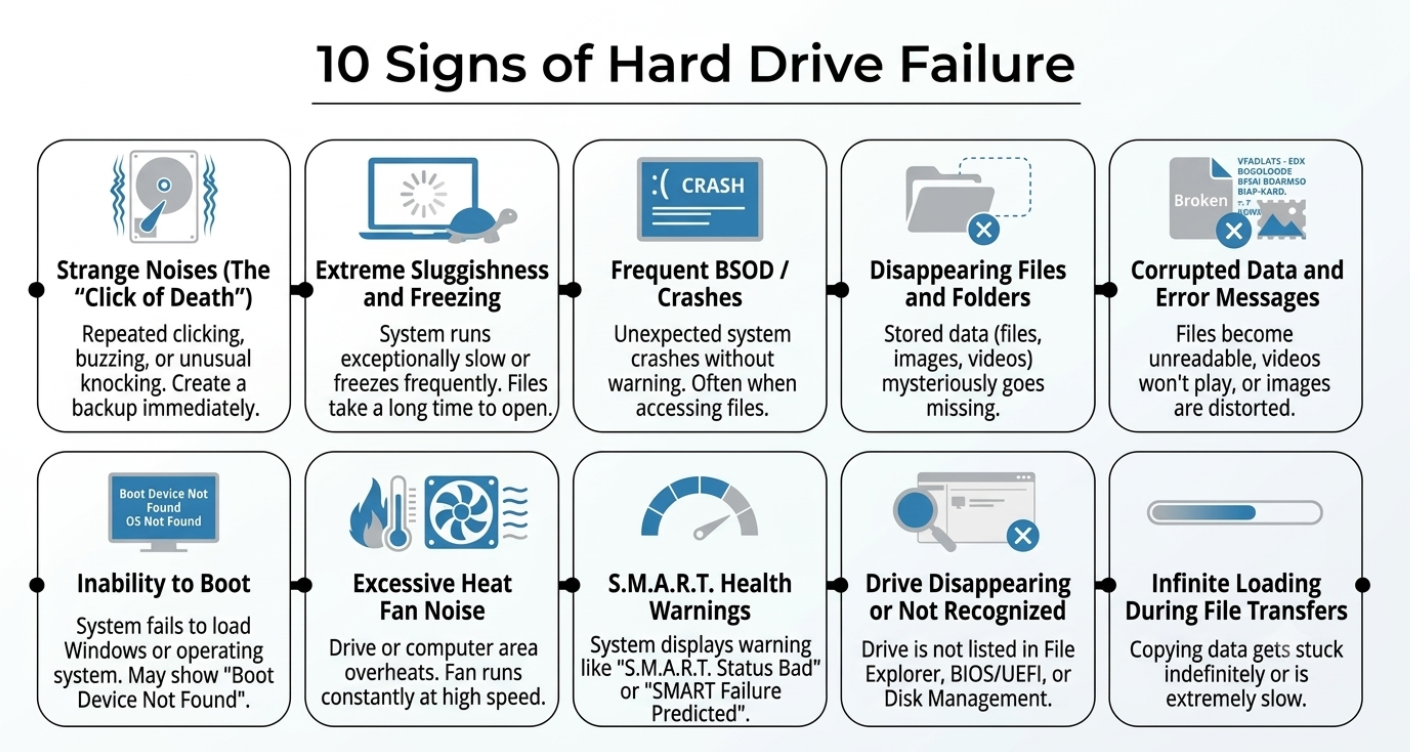
1. Strange Noises (The “Click of Death”)
It is called the click of death, which is usually seen in traditional Hard Disk Drives (HDDs). These sounds include repeated clicking, buzzing or unusual knocking. It means that a problem with the hard drive’s internal components has started to develop. In other words, physical damage has begun. But not every clicking sound is related to this issue, as some HDDs create normal operating noises. If the system is old and the noise has begun, it could be scary. The foremost step is to create a backup of important data. Don’t restart the drive repeatedly or run a heavy diagnostic tool, as these actions can cause more harm.
2. Extreme Sluggishness and Freezing
Noticing sluggish behaviour in the hard drive, such as it running slow or freezing, is also an early sign of damage. It can occur when a hard drive develops bad sectors, taking time to read and write data, causing files to open slowly and delaying the launch of applications.
3. Frequent Blue Screens of Death (BSOD) / Crashes
In simple words, while you are working and the system battery is full, if all of a sudden the system turns off without any sign of shutting down, this could be a sign of an unhealthy hard drive. The sudden crash issue may arise while trying to open large files, installing apps, or transferring data.
4. Disappearing Files and Folders
Missing files or folders on a hard disk is one sign of a storage problem. When bad sector development, reading errors or file system damage occurs, the operating system may be unable to find the stored data. In this circumstance, you may lose your crucial files, images, and videos. A cloud backup is a must. Files can also go missing due to malware, mistaken deletion or sync difficulties.
5. Corrupted Data and Error Messages
Problems like videos that stop playing, unclear or distorted images, and documents that are unable to be accessed can be associated with a hard drive failure. Bad sectors may develop that prevent the operating system from scanning and reading information correctly. In this situation, the system may display a message like “corrupted or unreadable directory.”
6. Inability to Boot Up
If your system fails to boot up, it could be an early sign of a hard drive issue. It means that there could be damage to critical system files, or the drive’s internal components could be preventing Windows from loading properly. The system may display messages such as “Boot Device Not Found” or “Operating System Not Found.” The system may restart more than one time automatically.
7. Excessive Heat or Fan Noise
Overheating may be due to dust buildup, high workload, or poor ventilation. Another reason could be a hard drive failure. Excessive temperature can cause performance issues. You may notice that the fan is continuously running.
8. S.M.A.R.T. Health Warnings
This built-in feature is available in many hard drives. The full name of S.M.A.R.T. is Self-Monitoring, Analysis and Reporting Technology. The primary function of this feature is to track the health of the drive by monitoring read error rates, temperature, and various other potential problems. If a hard drive with this feature starts developing issues, the system may display a warning such as “S.M.A.R.T. Status Bad” or “SMART Failure Predicted.”
9. Drive Disappearing or Not Being Recognised
In this condition, your system may not recognise the drive, or the hard drive may disappear. You can notice that the drive is not displayed in Disk Management or File Explorer. The BIOS or UEFI fails to detect the drive. External drives can disconnect suddenly, while internal drives may become inaccessible during normal use. The issue may be associated with insufficient power, a damaged cable, or a faulty USB port.
10. Infinite Loading During File Transfers
During a file transfer, the process may get stuck. It is a sign that bad sectors have developed and the drive may be failing to read or write data. Copying data can be extremely slow, especially with large files.
Note: While these symptoms point toward a failing HDD, issues like bad RAM, malware, or overheating can sometimes mimic them. Always check secondary causes before panicking.
What Causes Hard Drives to Fail?
1. Mechanical Wear
This is a common issue that causes hard drive failure, especially in traditional Hard Disk Drives (HDDs). The moving parts of hard drives work continuously. With time, they can wear out. Aging of the internal parts can cause unusual noises, a slow drive, or read/write errors. Eventually, the drive may stop working completely.
2. Head Crash
Internal component failure, mechanical problems, or physical shock can cause the read/write head, which floats just above the platter, to touch or scratch the platter. Heads can touch the platter because of these issues and damage the stored data. Clicking noises and data corruption can be associated with a head crash.
3. Heat
Every system generates heat, but excessive heat can impact the lifespan of a hard drive. Regularly check the ventilation. Heavy system workload is another issue that can overheat the drive. Excessive heat can increase the risk of drive failure and data loss.
4. Physical Shock and Vibration
The read/write head can be damaged, and the spinning platter of the hard drive can be damaged due to physical shock and vibration. If you are using an external hard drive, keep it in a stable place to prevent physical damage.
5. Manufacturing Defects
During manufacturing, there is a chance of faulty components. You may bring home a new system, but it can slowly develop defects. The system may develop unusual noises and missing data issues early.
6. Environmental Damage
There are some environmental factors that can impact hard drive performance, such as dust, moisture, liquid spills, or extreme temperatures.
Ways to Detect Early Hard Drive (HDD) Failures
Several tools are available to choose from, but we have selected a handful of tools that can help detect early HDD failures.
1. S.M.A.R.T. Monitoring Tools
S.M.A.R.T. (Self-Monitoring, Analysis, and Reporting Technology), as we discussed earlier, is a built-in monitoring feature. It tracks temperature, read/write errors, and other indicators of drive health, including bad sectors. The tool may display warning messages so that you can take quick action.
2. Manufacturer Utilities
They are best described as diagnostic tools offered by hard drive manufacturers to assess the health of a drive. Like S.M.A.R.T., these tools can also detect read/write errors and bad sectors. In addition, they can provide quick tests, extended diagnostic tests, and drive health reports, such as Seagate SeaTools and Western Digital’s diagnostic utilities.
3. OS-Level Tools
OS-level tools are built-in utilities that can help check the file system and identify certain hard drive problems. If your system has an OS-level tool, it means the operating system provides a built-in tool for checking certain storage-related issues. Early diagnosis may help identify problems before they lead to data loss, but these tools cannot detect every type of hard drive failure.
How to Recover Data from a Hard Drive After Failure
Do you know that if a system’s hard drive fails, there may be limited chances of recovering the data? This means you could lose your precious data. This is one of the primary concerns. We have thoroughly discussed the ways to recover data from a failed hard drive.
Immediate Safety Precautions after HDD Failure
- Stop Using the Hard Drive. If it has been confirmed that the hard drive is losing performance, the foremost step is to stop using the drive. Continuing to use it may lead to further damage and reduce the chances of recovery. Don’t access the drive unnecessarily or install software. Don’t create new files.
- Confirm the Hard Drive Connection. Insufficient power supply is one of the possible reasons why a hard drive may stop working. Therefore, important steps include checking for a loose cable or a damaged USB port. Check the cable and power supply properly before using the system.
- Create a Disk Image. This is one of the best practices when you notice an unstable but readable hard drive. Creating a disk image may preserve the current condition of the drive for recovery. It is a process where a sector-by-sector copy of the drive helps with further recovery attempts.
Recommended Recovery Solution
After completing these important safety precautions, you can use a reputable recovery program to retrieve your files.
Softaken Data Recovery is a reliable solution designed to smoothly recover all types of files, including images, videos, and archives. This Windows application supports a deep scanning mechanism to restore lost data. The interface is interactive and user-friendly, meaning it hardly needs practical guidance to install and run. The app can recover multiple deleted files at once, and a free trial is available to let you experience its usefulness firsthand.
Conclusion
Overall, a hard drive is a fragile part of a system that can fail over time. After noticing some common hard drive failure signs, it is always better to create regular backups and avoid unnecessary heavy workloads. You can replace a hard drive as well.
FAQs (Frequently Asked Questions)
What are the Common Hard Disk Failure Symptoms?
Unusual noises, missing data, unexpected system shutdowns, and system freezes are some common signs of hard disk failure.
Is it Possible to Recover Data from a Failing Hard Drive?
Yes, this is possible in some cases, but you should stop using the drive and take crucial steps, such as using reliable data recovery software or seeking help from professionals.