Softaken Software today launched Cloud Backup, a Windows program for IMAP backup and Office 365 email export. The tool pulls mail from IMAP accounts, from several accounts in one job, and from cloud mailboxes in one or more tenants. It saves everything to folders on the user’s PC. The files use common formats, so other mail apps can open them.
The software works on the computer where it is installed. Email moves from the provider into the folder the user chooses. The tool does not host or store mailbox data. The 64-bit installer is compatible with Windows 10 and 11. It has its own dependencies, so no .NET Desktop Runtime is required.
Main features of Cloud Backup Tool
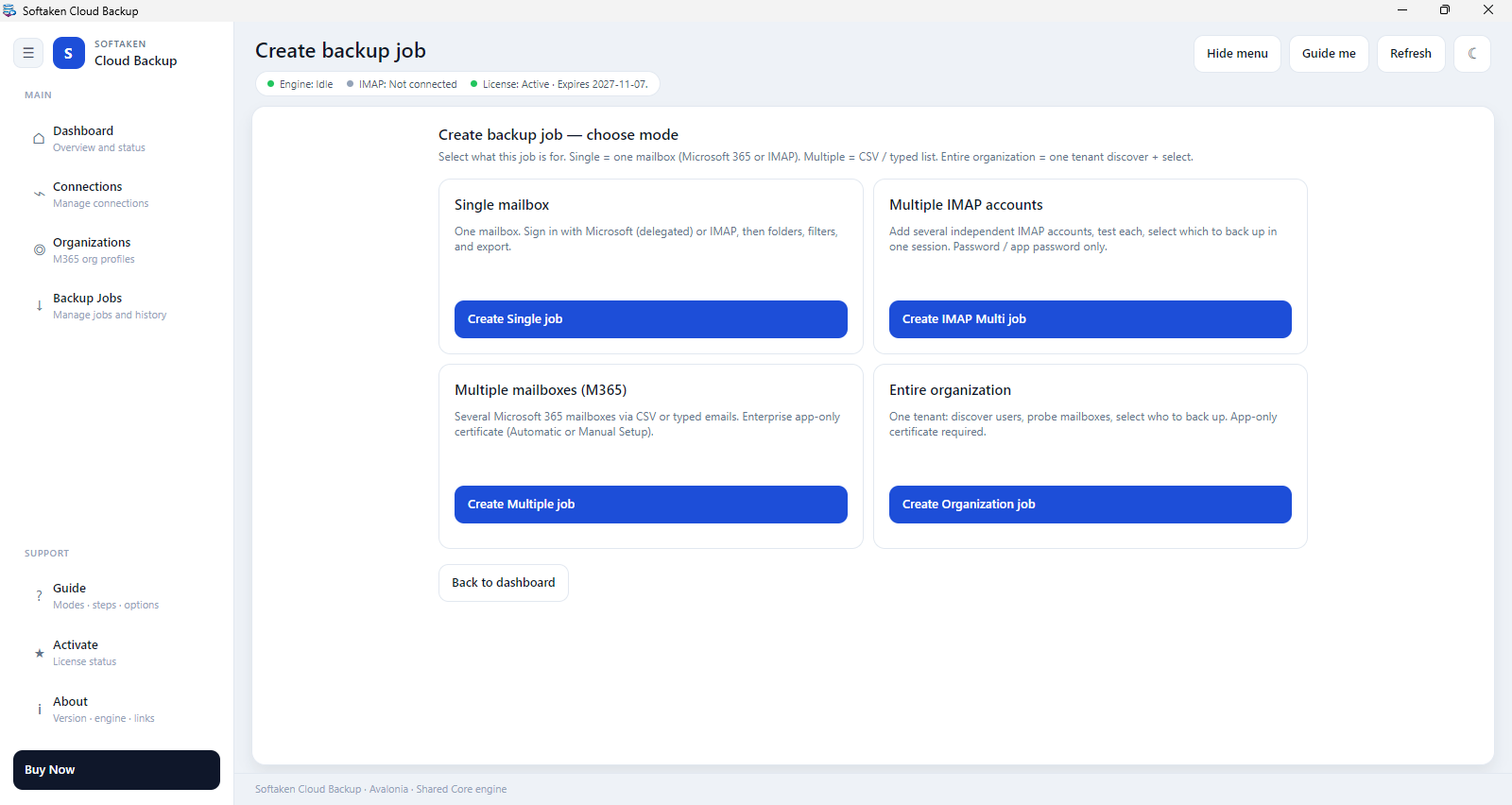
- IMAP backup: Supports Gmail, Yahoo, Zoho, GoDaddy and custom IMAP hosts over SSL/TLS. You can browse the folder tree and preview messages.
- IMAP multi accounts: You can add many IMAP accounts in one job. They run one after another, and each has its own folder.
- Single user: After a normal Microsoft login, one mailbox is backed up.
- Multiple mailboxes: Export a set of mailboxes from a tenant as EML, MSG, PST or MBOX.
- Whole organization and tenants: Setup can be automatic or manual, with certificate import and a Test Connection check. Each tenant has its own organization profile, and adding a tenant is like adding another profile. Mailboxes can be loaded from a CSV file, typed in, or discovered. Two mailboxes run at the same time, and the rest wait in line.
- Supported Formats: Export emails in eight formats, including EML, EMLX, MSG, MBOX, PST, HTML, MHTML and PDF. Users can rename files and split PST files by size. Contacts, Calendar and Tasks can be exported to PST files too, if permissions allow.
- Filters: Users can filter a job by sent date or received date, sender, subject, body text or attachments. The skip duplicates option is useful for repeat runs.
- Job tools: dashboard displays recent jobs, jobs screen keeps history. Use the Back to Process button to continue working on an ongoing job. Light and dark themes. Guide me tour.
How it works
- Install the program, add an IMAP account, or select a mailbox backup mode (single user, multiple mailboxes, or entire organization).
- Select the folders you want to back up, specify where to save them and choose an export format. The full version allows you to set filters.
- Select the folders you want to back up, specify where to save them and choose an export format.
- On the Dashboard or Jobs screen, open the backup location.
It is used to backup a mailbox before changing providers, to keep local copies of selected folders for audit and retention or to export a mailbox when an employee leaves. Agencies and service providers can run IMAP multi-account or tenant jobs for multiple clients from a single workstation. The tool is to backup and export. It is not a live sync client like Outlook Cached Mode and does not host email.
Demo and Full Versions:
A demo version allows users to test the screens and the connection procedure with a single mailbox. It exports about 10 messages per folder and filters are disabled. The full edition doesn’t have that cap. It enables filters and adds multi-account and organization jobs. It is activated using a license from the License screen Both versions can be installed on the same machine.
Licensing and pricing
Office 365 Backup is a one-time license based on the number of mailboxes you back up. Plans start at $29 for 5 mailboxes and include 5, 10, 20, 50 and 100 mailboxes. Request a custom quote for organizations or service providers with 100+ mailboxes (including multi-tenant MSP setups).
“With growing data retention regulations and increasing costs for cloud storage, IT admins need reliable offline copies that don’t depend on live cloud connections,” said the Product Manager at Softaken.