A Smarter Way to Manage Large PST Files
Softaken, A trusted name in the email migration and data management environment, has proudly announced the release of its latest upgraded software, Softaken Split PST Pro Version 7.0. The tool is developed to enhance its capabilities to efficiently break large PST files into smaller PST files. It arranges data into well-organized segments, making email management faster, safer, and more flexible for individual and enterprise users. This upgrade addresses the challenges faced by users handling oversized PST files that slow down the performance and lead to data corruption. Softaken has focused on improving usability, reporting transparency, and precision in mailbox management.
A Smarter Way to Manage Large PST Files
Taking a backup or migrating a large PST file becomes difficult. Software allows users to split data into smaller parts based on multiple conditions efficiently, which ensures better performance, easier accessibility, and improved data safety. This software supports both PST files and allows users to split data without compromising file integrity.
What’s New in Version 7.0
The upgraded version launches several powerful features and enhancements, which make it more advanced and user-friendly.
Path-Based Folder Selection
Instead of selecting the entire mailbox, users can choose a specific folder using the exact mailbox path, such as Inbox\2024\Invoice. The engine process only selects subtrees, complete skip the unrelated folders, which result as faster exports and zero unnecessary data in output PSTs
SplitRepot.json
Every split operation generates a machine-readable file, which is placed directly in the output folder, which captures Item seen vs Item exported, Integrity flags, Sorted bucket breakdown, and Trial metadata.
Full Scan Trial
The demo version provides the complete experience of the application, allowing users to preview actual data insight while limiting export functionality. This provides an honest overview to the user before purchase.
Preflight Validation
Before starting the spitting engine, the tool runs the preflight check that verifies.
Output path exists and is writable]
For the estimated output size, the available disk space is sufficient
Select one folder path at least
Mode-specific risks are flagged
Multiple Splitting Options for Flexibility
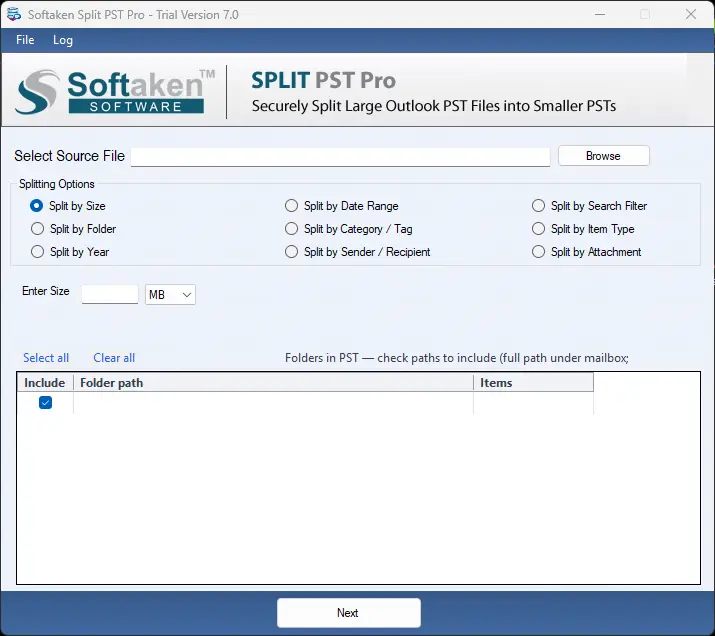
The software offers multiple splitting options to suit different users’ needs.
- Size
- Folder
- Year
- Date Range
- Sender or Recipient
- Category or Tag
- Attachments
- Item Type
- Search Filter
CEO Statement
We always works to provide the best possible solutions to our users. The objective behind this launch is to deliver advanced, user-centric innovations. Managing large amounts of data has always been a challenge for users. With this release, we have focused on delivering a simple and reliable solution to our users
Check How to Split Outlook PST by Size, Year and Folder Here
Ideal for which users
- The latest version is beneficial for:
- IT Administrator
- Personal Users
- Professional Users
- Organization
- Business user