MP4 or MPEG is a video file format used for movies and video clips that are highly supported by all websites & other devices. This file format allows easy compression of videos to reduce their size, and users can also convert MP4 files. Sharing MP4 videos on social media platforms is easy. Also, this MP4 format offers a smart video experience to users.
Still, it has been noted that not all media players support the MP4 format. Because of this, many users ask to convert MP4 files to other video formats.
Through this write-up, we will figure out the methods to convert MP4 videos to other video formats.
Free Methods to Convert MP4 Video Files
Among the crowd of several online video converters, it is not easy to pick one that assures effective results. However, VLC Media Player is the most preferred and recommended way for video file conversion. Let us check the conversion of MP4 videos using VLC Player and free online converters.
Also Read: Convert MKV to MP4 Video Format
Technique 1. With VLC Media Player
VLC Media Player allows converting video files and also deals with playback issues in media files. Given are the instructions to convert MP4 files to other formats with VLC Player:
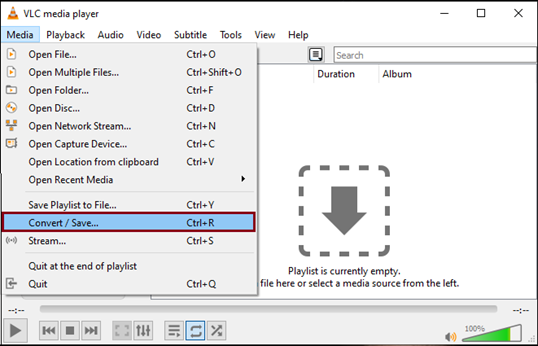
- Open VLC Player, then tap on Media – Convert/Save in the menu bar.
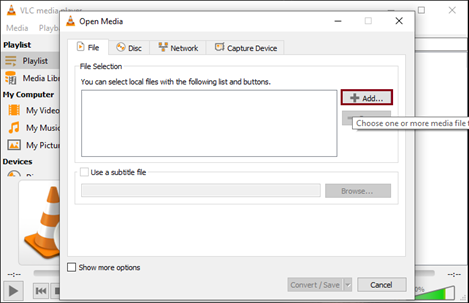
- Tap on the Add button & locate MP4 files that you want to convert
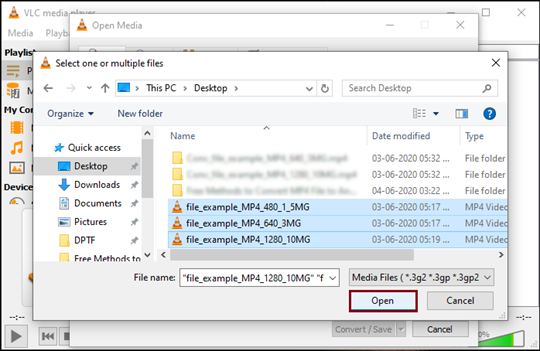
- Pick the videos and hit Open
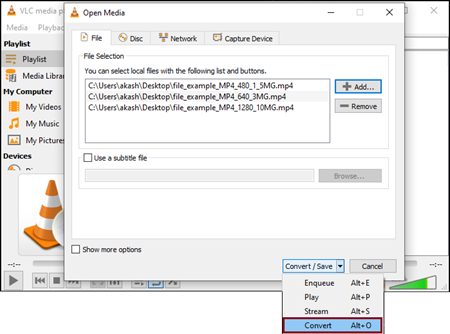
- After adding the file to the list, pick Convert from the drop-down Convert/Save
- From Settings, pick the Output Profile for videos that you need to convert
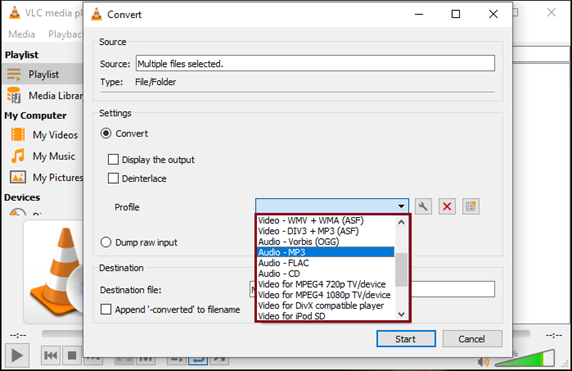
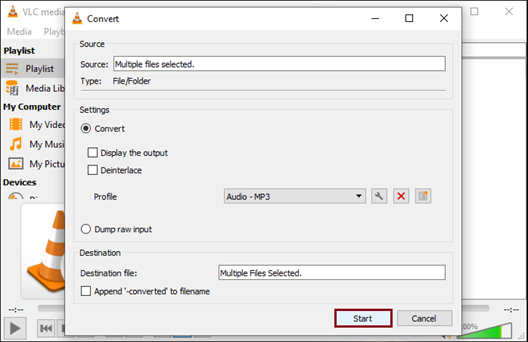
- Press the Start button to begin the conversion.
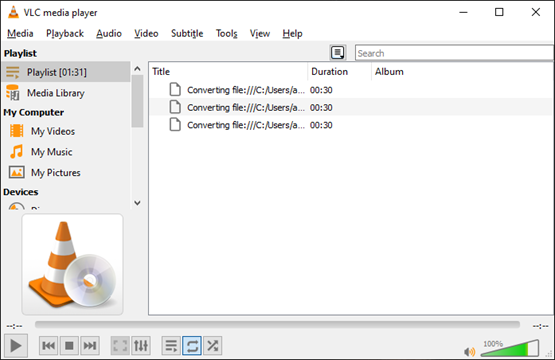
- Wait for VLC to provide you required files.
Technique 2. With Free Online Converters
Apart from this, you can search for free online converters on the internet. You will notice several online video converters, and you can pick the suitable one for you. These online converters will help you convert videos from one format to another. But the problem is, you have to experiment with various online tools to get the perfect one for you, as not all online converters will provide you with exact results.
Therefore, depending on online video converters is not enough, as they may corrupt the video file. So, we strongly recommend picking a reliable third-party software rather than using online converters. Even these third-party applications help you repair corrupted video files.
Software to Convert MP4 Videos
With third-party applications, converting MP4 videos to other formats becomes easy, friendly, and safe for all. Here, we suggest one such tool named Softaken Audio Video Converter. Using this effortless utility, one can convert MP4 to MP3, FLV, AVI, MOV, and many other video & audio formats. This software smoothly works with audio files to export them to any audio/video format. Within a few seconds, the software provides exact results without harm to the video quality.
Steps to use the software to convert MP4 video files to other formats:
- Launch the suggested application on your system.

- Pick ‘video’ in media type and load the MP4 video file(s).
- Select the preferred video format.
- Mention the desired location on your system for the output file.
- Tap on the ‘Convert’ button, and within a few clicks, you will get the output file at the defined location.
Conclusion
This guide addresses the concerns of users seeking the perfect solution to convert MP4 to other formats. To address this, we have introduced various methods, including both free and paid third-party tools. To get exact outcomes, it is highly important to choose the right approach. So, to achieve timely and efficient results, third-party software is highly recommended by experts that offers a lot of formats to convert your video files.