
Softaken NSF to Hotmail Importer

Softaken NSF to Hotmail Importer

Software to upload Lotus Notes files to Hotmail (Outlook.com) account

Direct migration of NSF items to Hotmail via login details — enter Hotmail account login details,select or create a folder,then press Upload Now.
Lotus Notes email client installation is compulsory (not standalone). Internet connection is required as local NSF files move to the Hotmail cloud account. Windows only — not macOS.
  • Batch import NSF files to Hotmail account
  • File limitations are not there to import NSF to Outlook.com
  • Evaluate the software before purchasing through demo version
  • Powerful,safe and fast migration of Lotus Notes emails with attachments
  • Wide support to IBM Notes 11.0,10.0,9.0,8.5,7.0,etc.
  • Download quickly on Windows XP/Vista/7/8/10 &others
  • Generate log report after the migration process
  • Upload NSF file to desired folder in Hotmail account
  • Direct and error-free migration of NSF items to Hotmail via login details
  • Thorough scan and number of files display
NSFHotmailOutlook.com
Batch upload multiple NSF files at once. Retains metadata (subject,date,time,from,to,cc,bcc),images,hyperlinks,font styles,font size,attachments,and folder hierarchy. Internet required.
WindowsLotus Notes RequiredLogin DetailsBatch NSFSelect / Create Folder

Lotus Notes NSF to Hotmail / Outlook.com


NSF (Lotus Notes / IBM Notes)Softaken (Windows + Notes)Hotmail / Outlook.com

Watch NSF to Hotmail ImporterDemo


Load NSF,sign in to Hotmail,and upload

See Softaken Mail Importer (engine for NSF cloud import) load NSF files,enter Hotmail login details,choose a destination folder,and upload — with Lotus Notes installed.

  • Install the software and choose / load NSF file
  • Enter Hotmail account login details
  • Select the folder or create a folder in Hotmail
  • Press the Upload Now button

See the NSF to Hotmail ImporterInterface


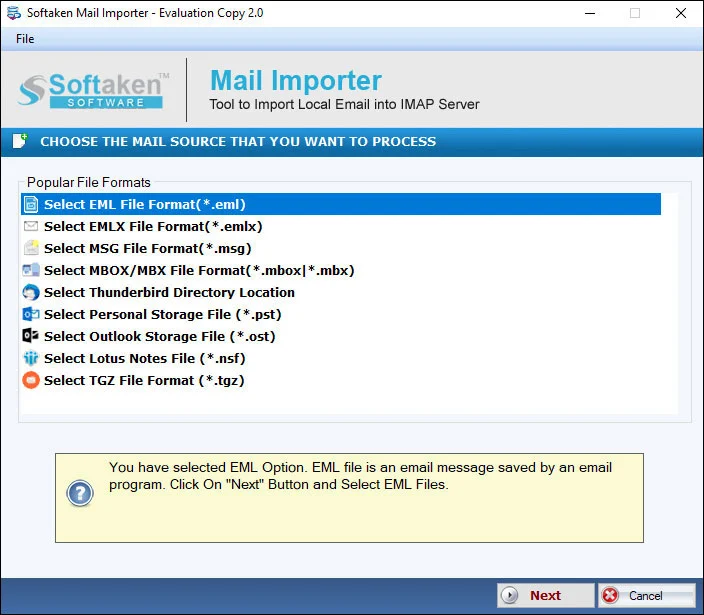
Softaken Mail Importer home for NSF import
1

Launch &Load NSF

Install the software,then choose and load NSF file(s). Batch import multiple NSF files at a time.

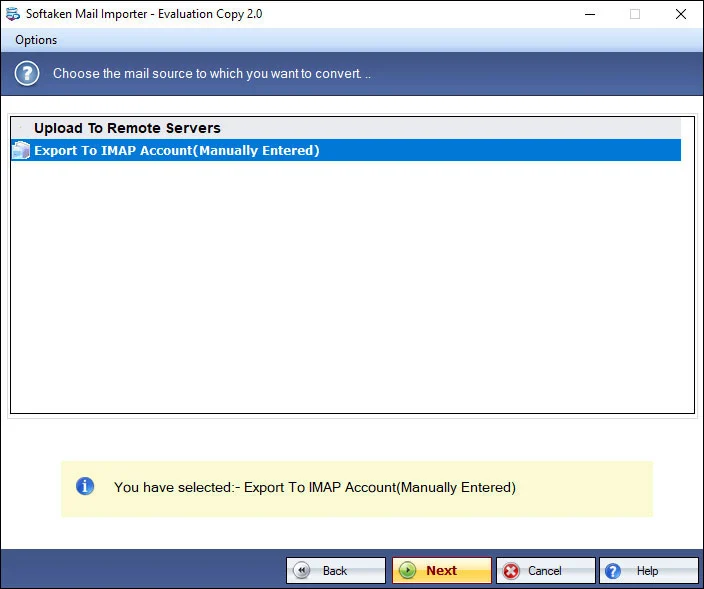
Import options for NSF to Hotmail
2

Import Options

Thorough scan and number of files display before you migrate Lotus Notes emails with attachments.

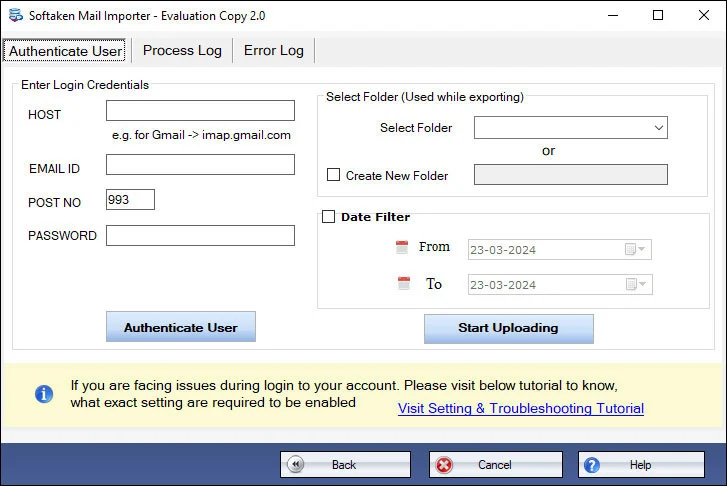
Hotmail account login details screen
3

Login &Upload

Enter Hotmail account login details,select or create a folder,then press Upload Now. A log report is generated after migration.

Free Demo is available for evaluation. Full license unlocks unlimited migration (from $49). Guide:user steps· demo video.

Key Features of NSF to Hotmail Importer


Safely perform NSF to Outlook.com import

The software offers powerful and advanced algorithms to import Lotus Notes files to Outlook.com account. Without losing data integrity and compromise to file quality,all emails from Lotus Notes are imported to Hotmail account.


Batch Import operation

Users can easily upload multiple NSF files at a time to Hotmail account. This will save a lot of time and effort of users and is useful when users have numerous Lotus Notes NSF files. There is no effect on the quality and performance of the software due to the size &number of NSF files.

Interactive Interface

The interface of the software is robust and user-friendly. Users can easily handle the program without any hassles. Its interactive GUI makes this program easy to understand even by novice users. Only 4-5 simple steps are there with this tool to open Lotus Notes files in Hotmail account.

Wide Support
Wide Support

All the NSF file created by IBM Notes all versions are supported by the software. Also,the program is strongly supported to use on all versions of Windows operating systems including the latest Windows 11,Windows 10,Windows 8.1,Windows 8,Windows 7,and others.

Retain Email metadata

NSF to Outlook.com Importer retains the metadata including subject,date,time,from,to,cc,bcc,etc. It also preserves images,hyperlinks,font styles,font size,and attachments while importing Lotus Notes emails to Hotmail account.

Preserve actual folder structure

The program preserves the folder hierarchy of Lotus Notes data. It will not modify the internal structure of Lotus Notes items even after importing them to Hotmail account. You can trust this program as it keeps all details of NSF file safe.

Feature Comparison of NSF to Hotmail Importer – Trial and Licensed Version

A free demo is available so you can evaluate the software before purchasing. Numeric per-folder demo migration limits (for example 10 or 25 items) are not listed on this product page. Full license unlocks unrestricted migration (from $49).

Features
  • Batch import NSF to Hotmail / Outlook.com
  • Migrate emails with attachments safely
  • Lotus Notes client installation compulsory
  • Login details;select or create folder
  • Retain metadata &folder hierarchy
  • Multiple NSF;generate log report
  • Windows only;IBM Notes versions
  • Limitation
  • Price
DEMO Version
  • Free evaluation / demo
  • FREE
FULL Version
  • Unlimited migration
  • $49

Tools Faq's


This product page documents migration via Hotmail account login details— enter login details,select or create a folder,then press Upload Now. Microsoft Modern Auth (OAuth 2.0),App Passwords,two-step verification / 2FA workflows,and zero credential storage are not separately claimed on this page.
Yes. To import NSF emails to Outlook.com / Hotmail,it is compulsory to have Lotus Notes email client installed on the system. Softaken importer is Windows only. Internet connection is also required.
This page documents import to Hotmailand Outlook.comaccounts. Separate support for @live.com and @msn.com domain extensions is not listed beyond Hotmail / Outlook.com naming on this product page.
Orphaned,disconnected,or password-protected NSF handling is not separately claimed. The page documents batch NSF import to Hotmail / Outlook.com via login details,with Lotus Notes compulsory,folder hierarchy preserved,and emails migrated with attachments.
Yes for attachments and folder hierarchy:the program preserves the folder hierarchy of Lotus Notes data and migrates emails with attachments. It retains metadata including subject,date,time,from,to,cc,bcc,etc.,plus images,hyperlinks,font styles,and font size. Domino rich-text tables and doclinks are not itemized separately beyond those claims.
Yes. You can upload NSF to a desired folder in the Hotmail account,or select the folder or create a folder in the Hotmail account for NSF files,then press Upload Now.
Date-range filters are not claimed on this product page. The software supports batch / multiple NSF files import,thorough scan and number of files display,and upload to a desired or newly created Hotmail folder.
A free demo version is available so you can evaluate the software before purchasing. Numeric per-folder migration limits (for example 10 or 25 items) are not listed on this product page. Full license unlocks unrestricted migration from $49. Windows only;Lotus Notes required;internet required.

Software Specifications


Windows onlyLotus Notes compulsoryLogin detailsInternet requiredFrom $49

System Requirement

ProcessorAny Pentium Class

Operating SystemWindows 11,10,8.1,8,7 &Other

Memory512 MB Minimum

Hard Disk100 MB of free space for software installation

Software Delivery

ElectronicVia Email

Minutes15

DemoFree evaluation

Full LicenseFrom $49

Interface Available

Language SupportedEnglish

Support OptionEmails,Chat &Skype

PlatformWindows only

ProductNSF to Hotmail Importer

Migration Notes

TargetHotmail / Outlook.com

AuthHotmail login details

PrerequisiteLotus Notes compulsory

InternetRequired (cloud upload)

Data Integrity

MetadataSubject,date,time,from,to,cc,bcc

Also preservesImages,hyperlinks,fonts,attachments

FoldersHierarchy preserved

BatchMultiple NSF at once

NSF to Hotmail Importer Reviews